In this article
- 1 Why Most Social Media Automation Fails
- 2 The Architecture: How This Actually Works
- 3 What You’ll Need Before Starting
- 4 Step 1: Setting Up Your Content Source
- 5 Step 2: Connecting Claude for Content Generation
- 6 Step 3: Parsing and Formatting the Output
- 7 Step 4: Platform-Specific Posting
- 8 Step 5: Smart Scheduling (Not Just Random Times)
- 9 Step 6: Error Handling (The Part Everyone Skips)
- 10 Step 7: Content Variation (Avoiding the Robot Sound)
- 11 The Complete Workflow (Visual Overview)
- 12 What Actually Changes When You Run This
- 13 Common Mistakes and How to Avoid Them
- 14 Extending the System
- 15 FAQs
- 16 What’s Next
I used to spend Sunday nights batch-scheduling social media posts. Two hours minimum, every week, squinting at a calendar view while my actual work piled up.
Buffer plus Zapier, the whole deal. It worked fine until ChatGPT showed up and I started using it for headlines. Then I started hearing about “AI agents” and felt like I was already behind.
I tried CrewAI. Too technical. I tried n8n a few times and bounced. The nodes looked easy but it didn’t click. I’d sign up, get frustrated, abandon it.
Then I picked one project I actually cared about and gave n8n one more shot. Took longer than it should have. Way more complex than it needed to be. But I finished it, and that’s when the model in my head finally clicked.
Heads up: some links in this post are affiliate links: a small kickback to me at no cost to you. I only recommend tools I’ve actually run.
Social media automation has a catch: the standard SaaS tools (Hootsuite, Sprout Social, Later) are mostly solving a scheduling problem. They don’t draft anything. The leaner answer for solo builders is: own your draft layer with n8n + an LLM, and let a scheduler handle the rest.
This is the workflow I run for my own posts on LinkedIn and X. No coding background required, but you’ll need a couple of hours to set things up.
Why Most Social Media Automation Fails
Before we build anything, let’s talk about why your current approach probably isn’t working.
The Buffer/Hootsuite trap: You’re still writing every post manually. The tool just schedules it. That’s not automation. That’s a fancy calendar.
The AI content mill problem: Tools like Jasper or Copy.ai can generate posts, but they sound like… AI. Generic hooks, no personality, zero connection to your actual expertise.
The “set it and forget it” myth: Most automation breaks within weeks because nobody built in error handling or content variation.
Real automation means the system drafts, formats, and routes. A human still approves anything that ships. That’s the pattern we’re building.
The Architecture: How This Actually Works
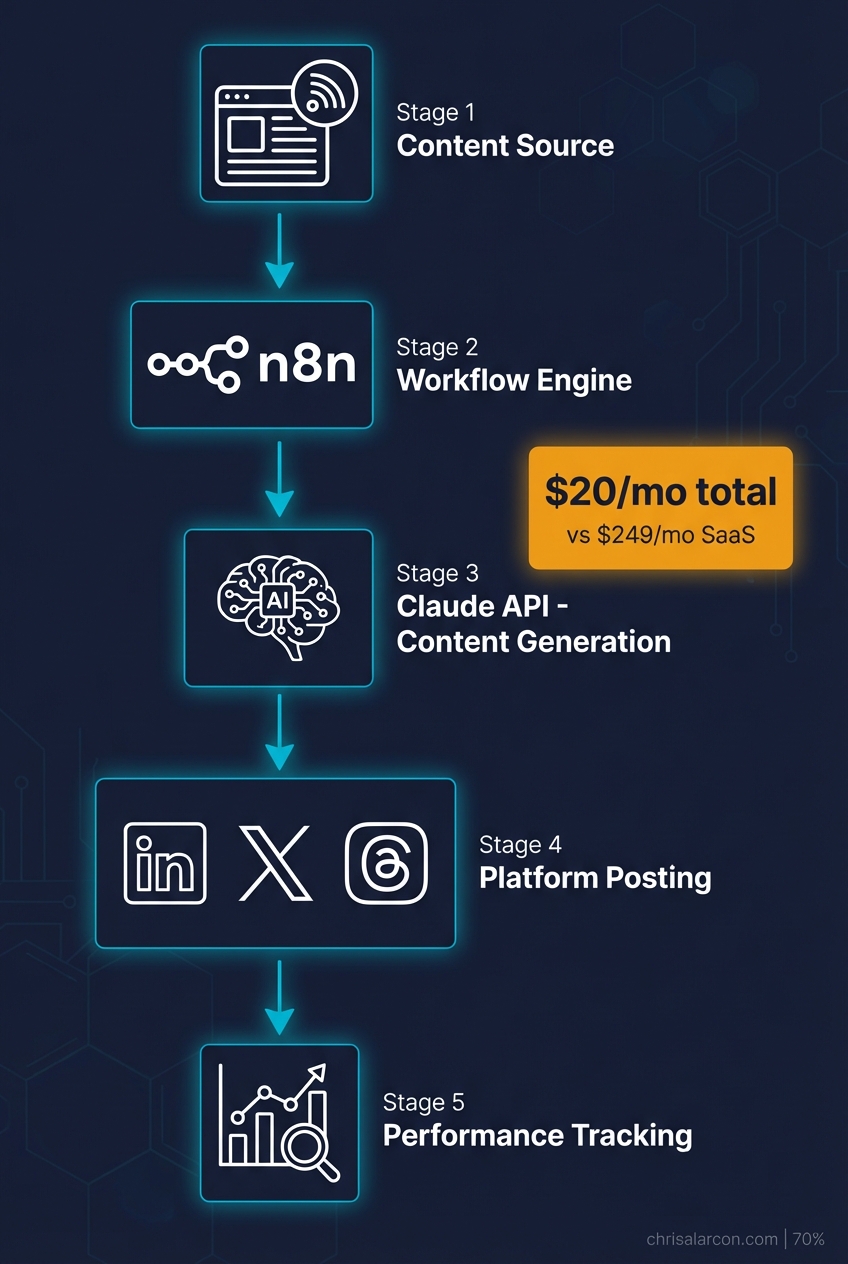
Here’s the 30,000-foot view of what we’re creating:
Content Source (Blog/Newsletter)
        ↓
    n8n Workflow
        ↓
   Claude API (Content Generation)
        ↓
   Platform-Specific Formatting
        ↓
   Scheduling + Posting APIs
        ↓
   Performance Tracking
Rough cost shape (your numbers will vary, check current pricing):
- n8n: free if self-hosted on a small VPS, otherwise paid cloud
- Claude API: a few dollars a month at solo-builder volume
- Platform APIs: usually free for posting from your own accounts
The point isn’t “this is dirt cheap.” The point is the cost scales with usage instead of with seats and feature tiers.
The 60-second version, from my Shorts: I Record One Video and It Automatically Goes to Three Platforms.
What You’ll Need Before Starting
Let’s get the prerequisites out of the way:
Required accounts:
- n8n account (cloud or self-hosted)
- Anthropic API key (for Claude)
- Social platform developer accounts (Twitter/X, LinkedIn, etc.)
Time investment:
- Initial setup: 2-3 hours
- Testing and refinement: 1-2 hours
- Ongoing maintenance: 15 minutes/week
Technical skills:
- Basic understanding of APIs (I’ll explain as we go)
- Comfort with drag-and-drop interfaces
- Patience for initial debugging
If you’ve never touched n8n before, I’d recommend starting with my n8n Tutorial for Beginners to learn the fundamentals. Then check out my n8n workflow examples worth building for inspiration on what to build.
Step 1: Setting Up Your Content Source
Every good automation starts with a trigger. For social media, that trigger is new content.
Option A: Blog Post Webhook
If you’re automating social posts for blog content (my recommendation), set up a webhook that fires when you publish:
- In n8n, create a new workflow
- Add a Webhook node as your trigger
- Copy the webhook URL
- Add it to your CMS’s publish hook (Astro, WordPress, Ghost all support this)
Option B: Manual Content Queue
Prefer more control? Use a Notion database or Google Sheet as your content source:
- Add a Schedule Trigger node (runs every hour)
- Connect to Notion or Google Sheets node
- Filter for items marked “Ready to Post”
Option C: RSS Feed
Already have an RSS feed? Even simpler:
- Add an RSS Feed Trigger node
- Point it at your feed URL
- Set check interval (I use every 30 minutes)
For this tutorial, I’ll use Option A since it’s the most automated approach.
Step 2: Connecting Claude for Content Generation
This is the core of the workflow. We’ll use Claude to turn your blog post into platform-specific drafts.
Note: This tutorial uses the HTTP Request method for Claude API calls. If you want a more powerful approach, check out n8n’s AI Agent node which handles tool attachment and autonomous decision-making - I cover building agentic workflows with it in detail in my AI Agent node guide.
Add the HTTP Request node:
- Create an HTTP Request node after your trigger
- Set method to POST
- URL:
https://api.anthropic.com/v1/messages - Add headers:
x-api-key: Your Anthropic API keyanthropic-version:2023-06-01content-type:application/json
The prompt that actually works:
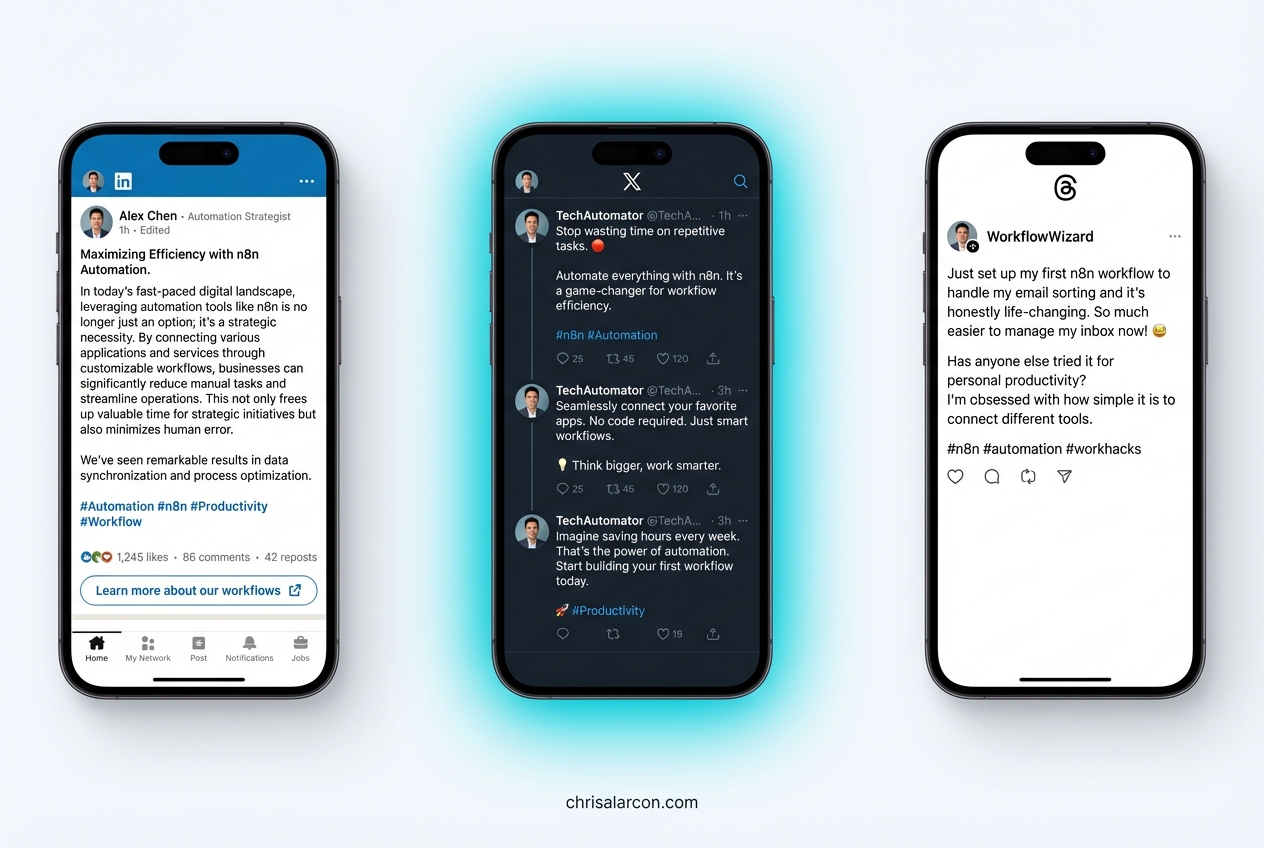
Here’s the prompt structure I use - generic prompts produce generic content. This one is shaped around platform conventions and voice:
{
  "model": "claude-sonnet-4-20250514",
  "max_tokens": 1024,
  "messages": [
    {
      "role": "user",
      "content": "You are a social media editor for a solo builder who teaches automation. Transform this blog post into social media content.\n\nBlog Title: {{$json.title}}\nBlog Summary: {{$json.description}}\nKey Points: {{$json.excerpt}}\n\nCreate:\n1. One LinkedIn post (hook + insight + CTA, 150-200 words)\n2. One Twitter/X thread (5-7 tweets, first tweet is the hook)\n3. One short-form post for Threads (casual, 50-100 words)\n\nRules:\n- Use 'you' and 'I' language\n- Include specific numbers when available\n- No hashtag spam (max 3 per platform)\n- Sound human, not corporate\n- Each piece should stand alone (don't assume reader saw the blog)"
    }
  ]
}
Why this prompt works:
- Role context: Tells Claude who it’s writing for
- Structured output: Three distinct formats in one call (saves API costs)
- Specific constraints: Word counts prevent rambling
- Voice guidelines: Matches my brand’s casual-but-expert tone
Step 3: Parsing and Formatting the Output
Claude returns a single text block. We need to split it into individual posts.
Add a Code node:
const response = $input.first().json.content[0].text;

// Split by platform headers
const linkedinMatch = response.match(/LinkedIn[:\s]*([\s\S]*?)(?=Twitter|$)/i);
const twitterMatch = response.match(/Twitter[:\s]*([\s\S]*?)(?=Threads|$)/i);
const threadsMatch = response.match(/Threads[:\s]*([\s\S]*?)$/i);

return {
  linkedin: linkedinMatch ? linkedinMatch[1].trim() : '',
  twitter: twitterMatch ? twitterMatch[1].trim() : '',
  threads: threadsMatch ? threadsMatch[1].trim() : '',
  originalTitle: $input.first().json.title,
  publishDate: new Date().toISOString()
};
This extracts each platform’s content into separate fields we can route to different posting nodes.
Step 4: Platform-Specific Posting
Now we connect to each platform. I’ll cover the three I use most.
LinkedIn Integration
LinkedIn’s API requires OAuth 2.0, which n8n handles automatically:
- Add a LinkedIn node
- Select “Create Post” operation
- Connect your LinkedIn account (n8n walks you through OAuth)
- Map the
linkedinfield from your Code node to the post content
Pro tip: LinkedIn favors posts with line breaks. Add this to your Code node:
linkedin: linkedinMatch[1].trim().replace(/\n\n/g, '\n\n\n')Twitter/X Integration
Twitter’s API has gotten complicated (thanks, Elon), but it still works:
- Add a Twitter node
- You’ll need Twitter API v2 access (apply at developer.twitter.com)
- For threads, you’ll need multiple tweets linked by
reply_to_tweet_id
Thread posting logic:
// Split twitter content into individual tweets
const tweets = twitterContent.split(/Tweet \d+:/i).filter(t => t.trim());

// First tweet posts normally, subsequent tweets reply to previous
let previousTweetId = null;
for (const tweet of tweets) {
  const response = await postTweet(tweet.trim(), previousTweetId);
  previousTweetId = response.data.id;
}
Threads/Instagram Integration
Meta’s Threads API is newer but straightforward:
- Add an HTTP Request node (Threads doesn’t have a native n8n node yet)
- Use Meta’s Graph API endpoint
- Requires Instagram Business account linked to Facebook Page
Honestly, Threads posting is still finicky. I sometimes fall back to Buffer’s free tier just for Threads while the API matures.
Step 5: Smart Scheduling (Not Just Random Times)
Here’s where most automations get lazy. They post at fixed times regardless of when your audience is actually online.
Add engagement-based scheduling:
- Create a Google Sheets node that logs post performance
- After 2-4 weeks, you’ll have data on best posting times
- Add a Code node that adjusts posting time based on historical engagement
// Simple version: map day of week to best posting hour
const bestTimes = {
  'Monday': 9,
  'Tuesday': 10,
  'Wednesday': 9,
  'Thursday': 11,
  'Friday': 10,
  'Saturday': 11,
  'Sunday': 10
};

const today = new Date().toLocaleDateString('en-US', { weekday: 'long' });
const postHour = bestTimes[today];

// Calculate delay until optimal posting time
const now = new Date();
const postTime = new Date(now);
postTime.setHours(postHour, 0, 0, 0);

if (postTime < now) {
  postTime.setDate(postTime.getDate() + 1);
}

return {
  delayMinutes: Math.round((postTime - now) / 60000),
  scheduledFor: postTime.toISOString()
};- Add a Wait node using the calculated delay
This is the lazy version. Once you have a few weeks of data, the real win is feeding actual engagement back into the pick instead of trusting a static map.
Want more workflows like this?
I send practical automation systems from my own build - real workflows, not recycled theory.
Step 6: Error Handling (The Part Everyone Skips)
Your workflow WILL break. APIs go down, rate limits hit, content gets flagged. Build for failure:
Add an Error Trigger workflow:
- Create a separate workflow with Error Trigger node
- Connect it to a Slack or Email node
- Include the error message, workflow name, and timestamp
Add retry logic:
In your HTTP Request nodes, enable:
- Retry on fail: Yes
- Max retries: 3
- Wait between retries: 1000ms
Add content validation:
Before posting, verify the AI didn’t hallucinate:
// Basic sanity checks
if (content.length < 50) throw new Error('Content too short');
if (content.length > 3000) throw new Error('Content too long');
if (content.includes('undefined')) throw new Error('Template variable failed');
if (content.toLowerCase().includes('as an ai')) throw new Error('AI disclosure leaked');
That last check catches when Claude accidentally reveals it’s an AI. Instant credibility killer.
Step 7: Content Variation (Avoiding the Robot Sound)
Post the same format every time and your audience tunes out. Add variation:
Rotate content templates:
const templates = [
  'hook_insight_cta',      // Standard thought leadership
  'story_lesson',          // Personal narrative
  'contrarian_take',       // Challenge common belief
  'how_to_quick',          // Tactical tip
  'question_engage'        // Start with question
];

const todayTemplate = templates[new Date().getDay() % templates.length];
Adjust tone by platform:
- LinkedIn: Professional but personable
- Twitter: Punchy, opinionated
- Threads: Casual, conversational
Include this in your Claude prompt:
Platform tone:
- LinkedIn: Write as a professional sharing industry insights. Use "we" occasionally.
- Twitter: Be direct and slightly provocative. Hot takes welcome.
- Threads: Super casual. Write like you're texting a smart friend.
I walk through this on camera in How I post to 5 platforms in 20 minutes (full system) (4 min).
The Complete Workflow (Visual Overview)
Here’s what your finished workflow looks like in n8n:
[Webhook Trigger]
       ↓
[HTTP Request - Claude API]
       ↓
[Code - Parse Response]
       ↓
[Code - Calculate Best Time]
       ↓
[Wait - Delay Until Optimal]
       ↓
    ┌──┴──┐
    ↓     ↓     ↓
[LinkedIn] [Twitter] [Threads]
    ↓     ↓     ↓
[Google Sheets - Log Performance]
       ↓
[IF - Check for Errors]
       ↓
[Slack - Notify on Failure]
Total nodes: 10-12 depending on platforms. Execution time and per-run cost depend on your model and volume - keep an eye on it for the first few runs instead of trusting a number from a blog post.
What Actually Changes When You Run This
The honest version of “before and after”:
- Sunday-night scheduling stops being a 2-hour ritual. Drafts arrive in a queue. You edit and approve.
- Posting consistency goes up because the system doesn’t forget Tuesday exists.
- Engagement is a coin flip until you have weeks of data. Some platforms will move, others won’t. Don’t promise yourself a number.
What surprises most people: the AI-drafted posts aren’t magically better. They’re just more consistent and platform-shaped, which beats “skipped this week again.”
Common Mistakes and How to Avoid Them
The pitfalls I keep seeing (and made myself):
Mistake 1: Over-automating
Don’t automate replies or comments. That’s how you get banned and lose authenticity. Automate distribution, keep engagement human.
The bigger trap is the opposite: building workflows so complex you forget how they work two weeks later. I’ve burned plenty of weekends on automations that no longer matched what I was actually posting. Start small.
Mistake 2: Ignoring platform limits
- LinkedIn: Max 3 posts/day before reach tanks
- Twitter: Rate limits are aggressive
- Threads: Still figuring out optimal frequency
Build delays into your workflow to respect these limits.
Mistake 3: No human review option
Add a “review before posting” path for high-stakes content. Use a Wait node with webhook resume, sending yourself a Slack message with approve/reject buttons.
Mistake 4: Generic prompts
“Write a social media post about this article” produces garbage. Be specific about voice, length, format, and platform conventions.
Mistake 5: Not tracking what works
If you’re not logging performance, you can’t improve. The Google Sheets logging step isn’t optional - it’s how you make the system smarter over time.
Extending the System
Once the basic workflow runs reliably, consider these additions:
Content repurposing: Connect to your content repurposing engine for even more automation.
Performance-based scheduling: After collecting enough data, use the social media scheduler with AI optimization approach.
Trending topic integration: Pull from your trending topics monitor to post about what’s hot.
Image generation: Add DALL-E or Midjourney integration for auto-generated visuals - useful, though for solo builders I usually find a clean screenshot or diagram pulls more attention than a generic AI image.
Want a done-for-you content flywheel built around this? If you’d rather record one long-form video a week and have the workflow, prompts, and approval queue handled, take a look at Content Flywheel DFY.
FAQs
Q: Will this get my accounts flagged as spam?
Not if you post reasonable volumes, keep quality up, and don’t auto-reply or auto-DM. Posting drafts you’ve reviewed from your own account is the same risk profile as scheduling them in any other tool.
Q: What about Instagram/Facebook?
Doable, but Meta’s API requirements are stricter. You need a Business account and approved app. Worth it if those platforms matter for your business.
Q: Can I use GPT-4 instead of Claude?
Yes. Just swap the API endpoint and adjust the prompt format. I prefer Claude for this use case because it follows formatting instructions more reliably.
Q: What if I don’t have a blog to repurpose?
Adapt the trigger. You could use a Notion database of content ideas, a Google Doc of weekly topics, or even manual input through n8n’s form trigger.
Q: Is this “cheating” at social media?
Every major brand uses automation. The difference is whether your automated content provides real value or just adds noise. Focus on the former.
What’s Next
You now have the blueprint for a lean social media drafting system that scales with usage instead of seats.
But reading about automation doesn’t automate anything.
Here’s the order I’d actually use:
- First: Set up n8n (cloud trial or self-hosted, your call) and get a Claude API key
- Then: Build the basic webhook → Claude → draft → review flow for one platform
- Then: Add a second platform once the first is boring and reliable
- Then: Add error handling, logging, and any scheduling smarts
Start with one platform. Get it boring. Then expand.
The compounding is real. Every post the system drafts is time you’d otherwise spend staring at a blank composer. Every Sunday you don’t burn on scheduling is one you can spend on the work that actually moves the business.
If you’d rather get the whole flywheel running without sinking weekends into it, Content Flywheel DFY is the done-for-you version. Otherwise, start here and I’ll send you the free prompt pack plus the next useful system I package.
This post is part of the n8n AI agents hub: definitions, tutorials, workflow patterns, and the build-vs-run decision pages in one place.

Written by
Chris AlarconChris Alarcon shows people who don’t code the boring Claude setup that actually works. He runs his one-person operation on these systems and shares every workflow, prompt, and tool combo in public. Start with the 15 prompts he uses every day.
Work With Me
Setting this up for your team?
I do that. The right plan per seat, the boring setup that makes it stick, and the first three chores handed off. A 2-hour workshop or a done-with-you build, for teams of 2-50.
See how it works →The 15 AI prompts I actually use every day
I tested hundreds and kept the 15 that survived. You get them right away, then one short email from me every Tuesday.