In this article
- 1 Where You Put the File Changes the Rules More Than Which Brand You Picked
- 2 The Popular Advice About Big Files Is Backwards on File Size
- 3 The Scanned PDF Trap Is the Most Expensive Surprise in This Comparison
- 4 Why Claude “Forgot” Something That Was Definitely in Your Project File
- 5 Summarize This and Find the Clause Are Two Different Jobs With Two Different Risk Levels
- 6 Where Each One Genuinely Wins
- 7 Frequently Asked Questions
- 8 The Verdict, By What Is Actually on Your Desk
You have a 90-page contract, report, or policy PDF and one question you actually need answered. Every ranking page on this query hands you a context-window spec sheet and calls it a decision.
That doesn’t help you with the actual job.
Three things decide this, and none of them is the size of the context window: where you put the file, whether the PDF is a scan, and whether you are summarizing or judging.
My rule for this one: the bigger window does not read your document, and when being wrong is expensive, run both models against each other before you trust either one.
One note on the window itself, since every other page leads with it. Anthropic’s context window doc states that Claude Sonnet 5 supports a 1M token context window on all paid plans.
Opus 4.8, Opus 4.7, Opus 4.6, and Sonnet 4.6 support 500K. Outside of these models the window is 200K, and there’s no free-tier number published anywhere.
OpenAI does not clearly publish context window sizes for its consumer tiers at all.
So the “bigger window” argument compares a published number to an unpublished one. That just means one vendor is more open than the other. Useful to know, but it’s not what those pages think they’re proving.
What will actually break your afternoon is file size caps, image handling, and retrieval behavior. All three are documented. None of them show up in those search results.
Where You Put the File Changes the Rules More Than Which Brand You Picked
So the table that actually helps here compares chat to project knowledge, on both platforms.
| Claude chat | Claude project files | ChatGPT chat | ChatGPT project knowledge | |
|---|---|---|---|---|
| File size cap | 500MB per file | 30MB per file | 512MB per file, 2M tokens | 512MB per file, 2M tokens |
| File count | Up to 20 per chat | Unlimited, must fit context window | 80 files per 3 hours (Free: 3/day) | 10 uploaded at a time |
| What gets read from a PDF | Text and visuals under 100 pages | Text extraction only, except multimodal PDFs | Text and visuals (Enterprise: visual retrieval) | Text only, images discarded |
| When it flips to search | Automatically at context limit (RAG) | Automatically at context limit (RAG) | Not documented for consumer tiers | Not documented for consumer tiers |
| Storage | Not published per-user | Not published per-user | 25GB per user, 100GB per org | 25GB per user, 100GB per org |
Sources: Anthropic’s upload documentation, OpenAI’s file uploads FAQ, and OpenAI’s Projects documentation.
Look at the first row. That’s the one this whole post is about.
The Popular Advice About Big Files Is Backwards on File Size
The standard advice, including the top-voted Reddit answers on this, is that large files belong in the knowledge base rather than in chat. If you mean lots of files, that’s right. For one big file, Anthropic’s own numbers say it’s backwards.
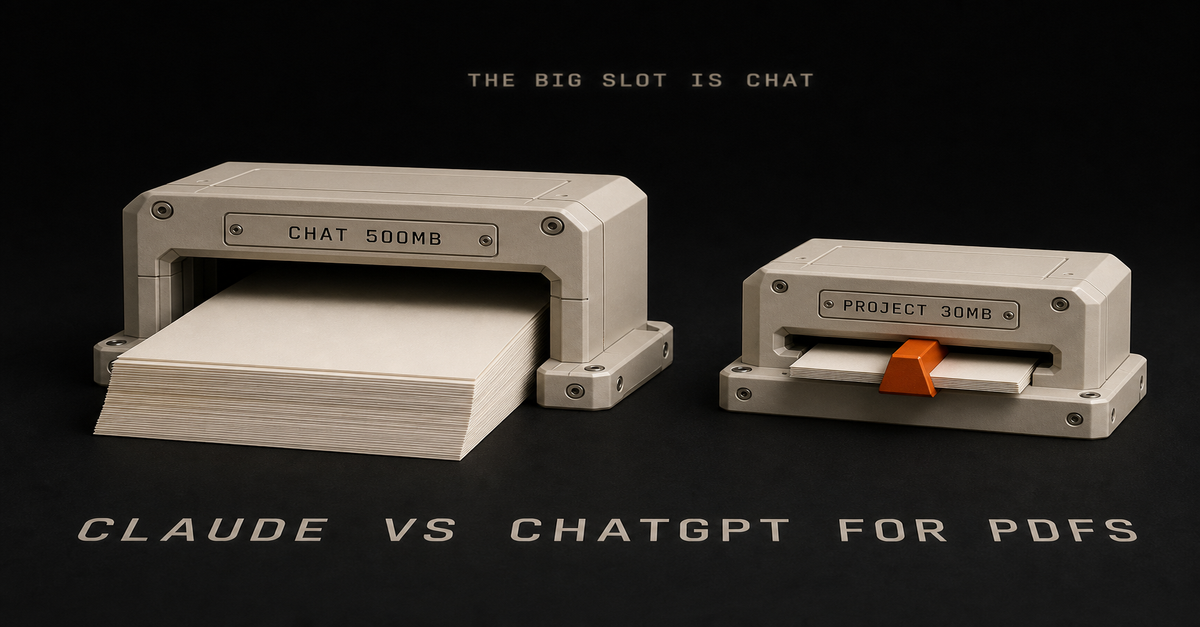
Anthropic’s upload doc puts chat uploads at 500MB per file, up to 20 files per chat. The same page documents project files at 30MB per file.
That is a 16x gap running the opposite direction from the advice.
- One enormous PDF, used once: drop it straight into a chat. The project will reject it long before the chat does.
- Forty documents you will query for months: project knowledge. Unlimited file count there, and the chat’s 20-file ceiling is what would stop you.
“Knowledge base for big stuff” sounds obviously right. It only holds up when you have lots of files, not one huge one.
There’s a second catch too. Anthropic specifies project files as “Text extraction only (except for multimodal PDFs).” File your chart-heavy quarterly report in the project, the spot you’d assume is more thorough, and it can lose its charts.
The Scanned PDF Trap Is the Most Expensive Surprise in This Comparison
If your PDF is a scan or a photo of a document, this section decides your answer by itself.
OpenAI’s file uploads FAQ states it directly: “ChatGPT Enterprise supports Visual Retrieval for PDF files… All other plans and document files only support text-based retrieval. This means that ChatGPT will extract digital text from the file and discard any images.”
Their dedicated visual retrieval page repeats it: “This capability is available only to ChatGPT Enterprise customers. It is not supported for ChatGPT Free, Pro, Team, or Edu accounts.”
A scanned document has no digital text. So if ChatGPT pulls the text and throws out the images, there’s nothing left.
Claude’s documented behavior on the same input: “Claude models can analyze both text and visual elements (like images, charts, and graphics) in PDFs that are under 100 pages.” And that applies on every tier.
Neither vendor uses the word OCR in their consumer docs, so I’m not going to guess whether either one does it. What they do document is what gets read and what gets thrown out. That’s enough to make the call.
But there’s a gap in Claude’s docs. PDFs over 1000 pages get text only, and for anything between 100 and 1000 pages the docs say nothing.
That range covers most real contracts, annual reports, and policy manuals. In other words, the exact document that brought you here. Any page that tells you what happens in that range is making it up.
So test your own file: ask Claude to describe a specific chart or signature block on a specific page. If it can, visuals are being read. If it can’t, you’re only getting the text, so plan around that.
The nested version of this trap that will genuinely catch you
Same PDF, same ChatGPT account, two different behaviors depending on how it got there.
OpenAI documents it: “PDFs uploaded as GPT Knowledge or Project Files are processed using text-only retrieval. PDFs uploaded by users during interactions with a published GPT or within a Project conversation are processed using visual retrieval.”
So filing a PDF into your project’s knowledge strips its images. Dragging the identical file into that project’s chat window does not. The tidy habit is the one that costs you the images. Know that before you build a workflow around it. Same argument as Claude Projects vs Custom GPTs.
Claude has the same problem, in the project-files line quoted above. On both platforms, the knowledge base is the worse place for anything visual.
Why Claude “Forgot” Something That Was Definitely in Your Project File
This is the most common complaint with long documents, and there’s a documented reason for it.
Anthropic explains that when retrieval augmented generation is enabled, “Claude uses a project knowledge search tool to retrieve relevant information… Instead of loading all project content into memory at once, Claude intelligently searches and retrieves only the most relevant information needed to answer your questions.”
The trigger is the part that matters:
RAG automatically activates when your project approaches or exceeds the context window limits. You’ll see a visual indicator.
It reverses if the project drops back below the threshold, and Anthropic says it can expand capacity by up to 10x.
In practice: below the threshold, everything you filed gets loaded. Above it, Claude searches instead of reading, and it only finds what its search thinks matches how you worded the question.
So it’s the same project with two behaviors, and it switches on its own.
That’s why the clause you know is in there comes back as “I don’t see that in the documents.” Claude isn’t making things up there. Its search just missed the clause. Ask again using the exact wording from the document, not your paraphrase.
One caveat. Anthropic’s RAG page says “RAG for projects is available for all Claude plans (free, Pro, Max, Team, and Enterprise),” while their Projects article describes enhanced project knowledge with RAG as paid-plans-only.
So two Anthropic pages from the same period say opposite things. Check your own account for the indicator rather than trusting either page.
Summarize This and Find the Clause Are Two Different Jobs With Two Different Risk Levels
Every page on this query treats “work with a PDF” as one task. It is two, and only one can hurt you.
Summarize and orient is low stakes. What is this report about, what are the main findings, what do I need before the meeting. If the model flattens a detail, you find out in the meeting and correct it. Both tools are fine here.
Find the clause and judge it is not. What is the termination notice period, does this indemnity cap cover third-party claims, does this policy apply to me. Being wrong has a dollar figure attached.
That second job is where my trust-but-verify rule from the Claude vs ChatGPT for Excel breakdown applies without exception: the fully autonomous agent does not exist yet. Run the AI in parallel with your manual process until its answers match yours, and keep QA-ing after they do.
My cross-check is what I’d do with documents: if you are using ChatGPT, paste the output into Claude and ask it to QA it. Then reverse it. AI is already smarter than us at plenty of things and it can still be wrong.
For a contract, that means a concrete loop:
- Ask model A for the clause, requiring it to quote the exact passage and give the page number.
- Open the PDF and read that page yourself. Everyone skips this and it takes ninety seconds.
- Paste model A’s answer into model B and ask it to QA the interpretation against the same document.
- Where the two disagree, that is your list for a human who is paid to be right.
Step one does most of the work. A model forced to quote and cite cannot hand you a smooth paraphrase of a clause that is not there.
Two setup habits from that same breakdown make either job go better:
- One job per session. Do not dump 20 files covering 20 topics and fire off 10 questions. The exception that works is grouping files that belong together. Four contracts from one vendor relationship is one job. Four unrelated policies from four departments is four jobs, and merging them is how you get answers that mix up documents without telling you.
- Decide the output format before you upload. That choice is the real skill. It’s the difference between “summarize this contract,” which gives you prose you have to re-read, and “give me a table with clause, page number, plain-English meaning, and risk to me.”
Capture and processing are separate problems here, same as they are in meeting notes. Whether this work belongs in a chat, a project, or something scheduled is the routing question covered in the Claude Guides pillar.
Where Each One Genuinely Wins
Neither is the universal answer, and pages that pick a winner outright are not being straight with you.
ChatGPT wins on volume and throughput. 80 files every 3 hours is a generous documented allowance, and the 2M token per-file cap does not apply to spreadsheets at all.
If you work with CSVs alongside your PDFs, that matters. Storage is published too, at 25GB per user and 100GB per org, which is more than Anthropic tells you.
ChatGPT’s free tier is honest about being a trial. 3 file uploads per day tells you immediately whether it fits your week.
Claude wins on scanned and image-heavy documents on any tier. Anthropic documents visual analysis of PDFs under 100 pages with no tier condition, while OpenAI restricts visual retrieval to Enterprise. That’s the biggest documented difference between the two for this job.
Claude wins on published transparency. Context windows by model and plan, page thresholds, per-destination file caps. You can plan against numbers instead of guessing.
Both share one weak spot: non-PDF documents. Anthropic states that for DOCX, TXT, and the rest, “Claude extracts text only from these files. If they contain embedded images, Claude won’t be able to read or interpret them.”
Same for Google Drive: “Claude extracts text content only from Google Drive files. Images embedded in documents are not processed.” A Word doc full of screenshots is a bad input on either platform.
Frequently Asked Questions
Is Claude or ChatGPT better for PDFs in 2026?
For one large PDF, especially a scanned or image-heavy one, Claude. Anthropic documents that Claude analyzes both text and visual elements in PDFs under 100 pages on any tier, while OpenAI documents that visual retrieval for PDFs is Enterprise-only and all other plans extract digital text and discard images.
For a large library of documents you query repeatedly, both handle it, and the deciding factor is where you put the files rather than which brand you picked.
What is the maximum PDF size Claude can handle?
Anthropic documents 500MB per file for chat uploads, up to 20 files per chat. Project files are capped much lower at 30MB per file, with unlimited file count as long as total content fits the context window.
Separately, Claude analyzes text and visuals in PDFs under 100 pages and processes text only for PDFs over 1000 pages.
Can ChatGPT read a scanned PDF?
Not on consumer plans. OpenAI documents that visual retrieval for PDFs is available only to ChatGPT Enterprise customers and is not supported for Free, Pro, Team, or Edu accounts.
On those plans ChatGPT extracts digital text from the file and discards any images, so a scanned or photographed document has no extractable text and yields nothing usable.
Why did Claude miss something that was in my project file?
Anthropic documents that retrieval augmented generation activates automatically when a project approaches or exceeds context window limits. Below that threshold everything is loaded at once.
Above it, Claude switches to searching and retrieving only what it judges relevant, which means the same project can behave two different ways depending on how full it is. A visual indicator appears when the switch happens.
How many PDFs can I upload to ChatGPT?
OpenAI documents up to 80 files every 3 hours, with free users limited to 3 file uploads per day. Individual files are capped at 512MB and 2M tokens, spreadsheets at roughly 50MB.
Inside Projects, only 10 files can be uploaded at the same time, and the project count per plan runs from 5 on Free to 40 on Edu, Pro, Business, and Enterprise.
The Verdict, By What Is Actually on Your Desk
There’s no single winner. It depends on the document, not the brand.
- One huge PDF you need answers from today: either tool, dropped into a chat window, not filed into a project. Chat takes 500MB on Claude and 512MB on ChatGPT. The project route caps at 30MB on Claude and strips images on both.
- A scan, a photo, or anything image-heavy: Claude, unless you are on ChatGPT Enterprise. Consumer ChatGPT discards the images, and images are the entire document.
- A library you will query for months: project knowledge on either platform, with the images caveat understood, and know that Claude switches to search once the project outgrows the window.
- A contract you are going to sign: neither one alone. Make the model quote and cite the page, read that page yourself, then cross-check with the other model per the Excel breakdown’s verify rule.
- You are only paying for one: ask whether your documents are born digital or scanned. That question decides it faster than any context window number.
Put the file in the right place and check whether the visuals are being read. After that, sure, argue about which one writes prettier summaries.
Published and last reviewed July 18, 2026. Limits verified that day against vendor documentation linked inline: Anthropic’s upload page (itself dated April 22, 2026), Anthropic’s context window and RAG for projects pages, OpenAI’s file uploads FAQ, visual retrieval FAQ, and Projects documentation. No first-party head-to-head test was run for this page. These numbers drift, and both vendors ship changes constantly, so check the official pages before relying on any figure here.

Written by
Chris AlarconChris Alarcon shows people who don’t code the boring Claude setup that actually works. He runs his one-person operation on these systems and shares every workflow, prompt, and tool combo in public. Start with the 15 prompts he uses every day.
The boring setup
It still won't know you tomorrow.
The Setup is one folder. Drop it into a Project, answer three questions, and Claude or ChatGPT writes your memory file and your voice file itself. It stops forgetting you, stops sounding like AI, and runs three real jobs by name. Twenty minutes tonight. No code. $39, 30-day refund.
See The Setup →The 15 AI prompts I actually use every day
I tested hundreds and kept the 15 that survived. You get them right away, then one short email from me every Tuesday.