In this article
- 1 Get the transcript out, and there are three places it lives
- 2 Do not clean the transcript first
- 3 Name the output instead of asking for a summary
- 4 Use Sonnet, which means this works on the $0 plan
- 5 For a meeting that repeats, save it as a Project
- 6 The part you will still write yourself
- 7 So where should you start
- 8 Common questions
Quick answer: export the transcript, paste it in raw, and stop asking for a summary. Instead, name the sections you want back: overview, decisions with who made each, action items as a table with owner and due date, and open questions nobody answered. Run it on Sonnet, which means it runs on the $0 plan. Then write the one paragraph at the top yourself.
The Ship Lean rule on meeting notes: name the output, do not ask for a summary.
Claude will not join your call and no bot appears in Zoom, Meet or Teams, which I cover properly on Claude vs ChatGPT for meeting notes. Everything below assumes the transcript already exists and the write-up is the chore.
Get the transcript out, and there are three places it lives
You probably do not need a new tool for this. Each of the big three can produce a transcript, though all three gate it: you generally need an eligible paid account, the feature switched on, and on a work account an administrator who has not switched it off for you. Check before you buy a recorder.
| Tool | Where the transcript comes from | Vendor’s own instructions |
|---|---|---|
| Zoom | Cloud recording with audio transcript enabled; download the .vtt or .txt afterwards | Zoom’s transcript article |
| Google Meet | Turn on transcripts during the call; a Doc lands in Drive when it ends | Google’s Meet transcript help |
| Microsoft Teams | Start transcription in the meeting; it saves to the meeting chat and recap | Microsoft’s Teams transcription help |
My own version is simpler than any of these, and worth stealing if your meetings are phone calls. I transcribe on my phone, then drop the transcription straight into Claude. I keep the Cowork tab open, which is Anthropic’s file-handling surface and is now folded into Claude itself, and that is the whole capture step.
I have deliberately not recommended a meeting recorder here. Most of the pages ranking for this question are content marketing for one, which is why they spend the first third on capture and the last third on a signup button.
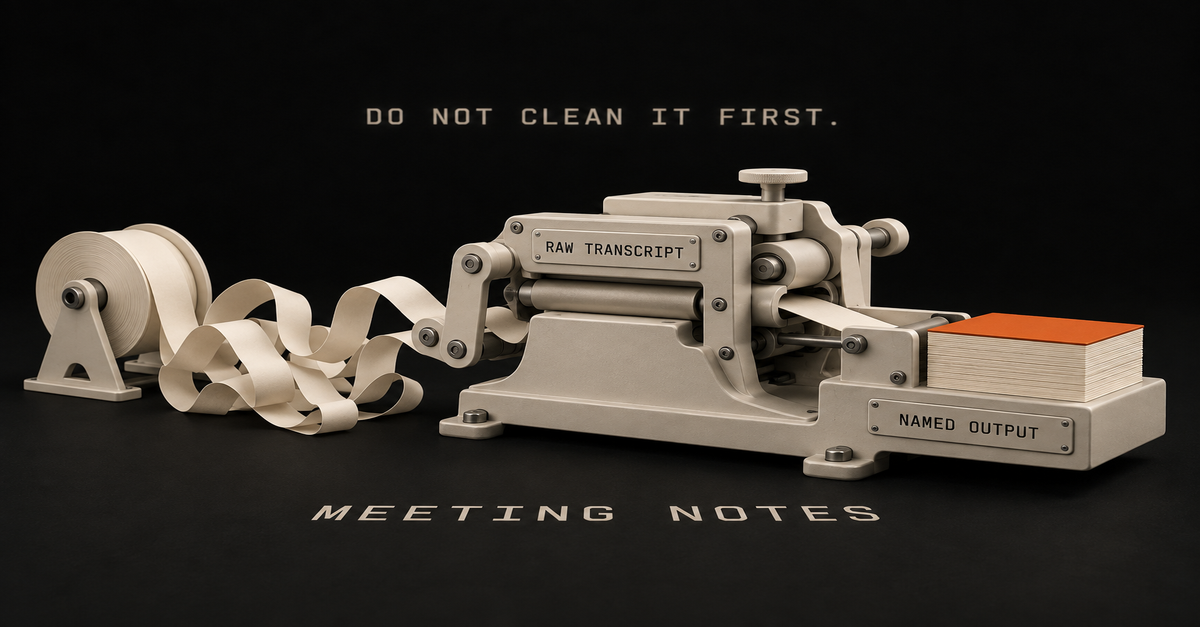
Do not clean the transcript first
This is the step that quietly kills the habit, and almost nobody tells you to skip it.
Your instinct is to tidy up before pasting. Strip the speaker tags, delete the ums, fix the false starts.
Do not. Raw is fine, and I think raw is better.
The reasoning, and you should judge it rather than take my word: the filler is signal. “Yeah I guess we could” and “let’s do it, book it” look similar once a transcript has been tidied, and read very differently when it has not.
That hedging is the clearest evidence available of who was agreeing and who was thinking out loud. CLSkills Hub, one of the few pages ranking here that is not selling a recorder, makes the same point from the other direction in its prompt guidance: “Distinguish between someone suggesting something and the group agreeing to it.”
You are also just doing unpaid work. If tidying takes eight minutes and you do it after every call, you have rebuilt the chore you were trying to delete.
Paste it ugly.
One thing to sort out before you paste anything real
A meeting transcript is not a blog draft. It has your colleagues, your clients and whatever somebody said before they realised they were being recorded.
So, before this becomes a habit: check whether your employer has a policy about putting work material into an AI tool, and check whether the people on the call know they were recorded.
On consumer Claude plans, Anthropic’s own privacy documentation explains when conversations may be used to improve their models and where the setting lives. Turn it off, or use an account that is covered by your company’s agreement.
None of that is a reason to skip the workflow. It is a reason to spend five minutes on it once, rather than finding out afterwards.
Name the output instead of asking for a summary
Here is the actual technique, and it is the whole page.
“Summarize this meeting” gets you a paragraph. Nobody needs a paragraph. You need to know what was decided, who owes what, and what got dodged.
So name the sections. This is the four-section prompt I built for this page and ran on September 18, 2026, and you can paste it as-is:
Here is the raw transcript from our weekly sync. Do not give me a summary.
Write it up with these exact sections:

1. Overview - one paragraph
2. Decisions - each one with who made it
3. Action items - a table with owner, task, and due date
4. Open questions - anything raised that nobody answered

Do not clean up the transcript first. Work from it as it is.

--- TRANSCRIPT ---
[paste here]
Four named sections and one instruction not to tidy. I ran it against an invented transcript for an invented company, in Claude’s desktop app, on Sonnet at medium effort. This is what came back.
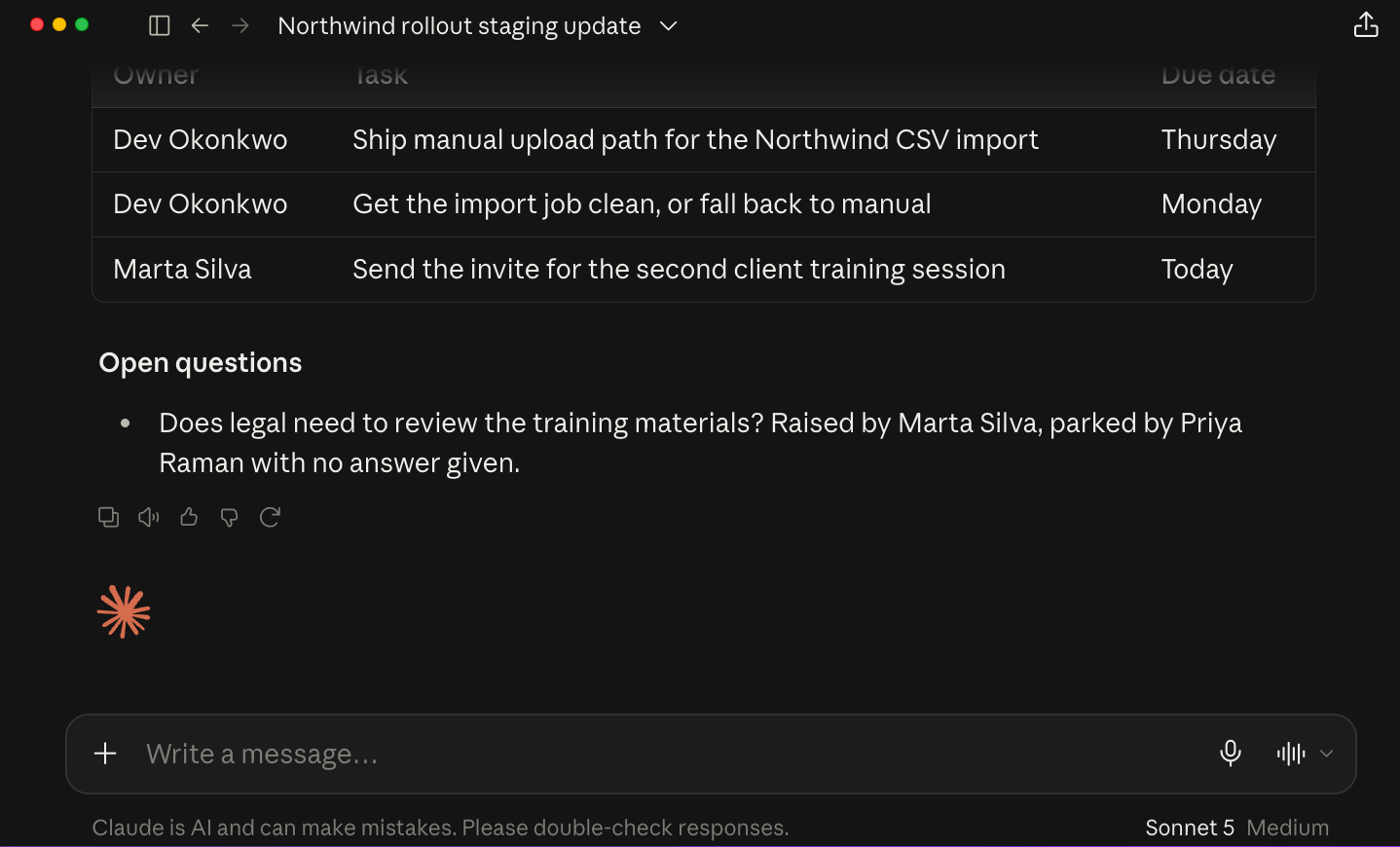
Look at what naming the sections bought.
The action items came back as a real table with an owner and a due date on every row, pulled out of conversational mush like “I can have that Thursday” and “Yeah I’ll send the invite today”. Nobody in that transcript said the words “due date”.
And the open questions section caught the thing that matters most in real meetings: “Does legal need to review the training materials? Raised by Marta Silva, parked by Priya Raman with no answer given.”
That is the kind of line a summary throws away. Somebody asked something, it got parked, and three weeks later it is a problem.
I asked for that section by name and it came back; I have not run the controlled version where I ask the same model for a plain summary and compare, so treat that as one run and not a study.
Two rules sit under the technique:
- Ask for structure, not compression. A summary discards the parts that had no conclusion. Those are the expensive parts.
- Attribute everything. “Decisions with who made each one” is three extra words that turn a document nobody trusts into one people act on.
If what you actually owe someone is meeting minutes rather than notes, it is the same job with a stricter section list: attendees, decisions with who made each, action items with owner and due date, and matters carried forward. Minutes fail because nothing has an owner, not because the prose was weak.
Use Sonnet, which means this works on the $0 plan
Every post about this quietly pushes you toward the biggest model. Anthropic’s model guide says the opposite, and it puts a number on the cost in the only currency that matters on a subscription.
| Model | Rate limit use | Anthropic’s “best for” | On the $0 Free plan |
|---|---|---|---|
| Haiku | Lightest | Quick answers, summaries, simple extraction | Yes |
| Sonnet | Moderate | Coding, writing, analysis, multi-step workflows | Yes |
| Opus | Heavy | Deep research and complex reasoning | No |
| Fable | Heaviest | Largest, most critical, long-running projects | No |
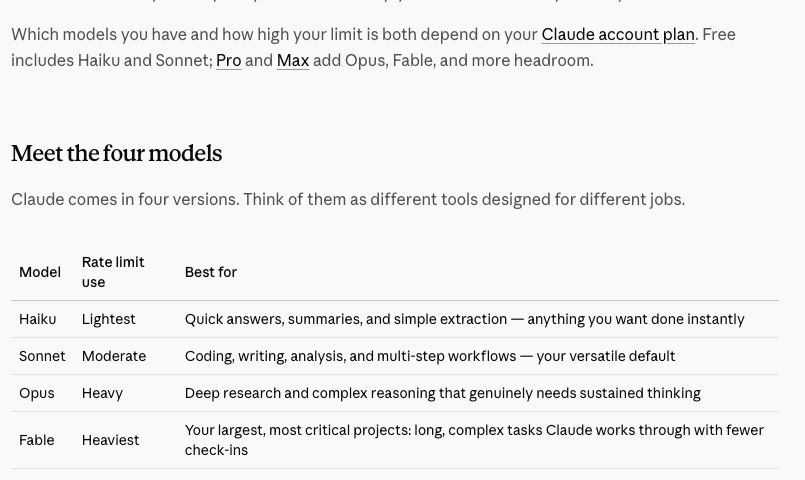
Sonnet is moderate. Opus is heavy. Fable is heaviest. For a write-up you could have done yourself with more coffee, moderate is the correct amount of machine.
A meeting write-up is not a reasoning problem. It is a structuring problem. You already know what happened, you were there.
And the line directly above that table is the useful one: “Free includes Haiku and Sonnet; Pro and Max add Opus, Fable, and more headroom.” Anthropic’s pricing comparison table says the same thing in its Models row.
So the entire workflow on this page runs on a $0 Claude account.
| What you need | Free ($0) | Pro ($20) / Max ($100) |
|---|---|---|
| Sonnet | Yes | Yes |
| Pasting a long transcript | Yes | Yes |
| Projects, for recurring meetings | Yes, up to 5 | Yes |
| Opus or Fable | No | Yes, and this job needs neither |
If you want the model question in full, Fable vs Opus covers what the heavier models actually cost you, and is Claude Pro worth it covers the upgrade.
For a meeting that repeats, save it as a Project
Everyone writes the one-off version of this. The real saving is in the meeting you have every week.
Make a Claude Project per recurring meeting. In the project instructions, put the things you would otherwise retype every time:
- who is usually on the call and what each person does
- the account, client or workstream it belongs to
- your role, so it knows whose actions to surface first
- the four-section list from the prompt above
Then your weekly ritual is: paste transcript, send. No prompt at all.
Anthropic’s pricing comparison table shows Projects on the Free plan capped at 5, and uncapped on Pro and Max. Five covers most people’s genuinely recurring meetings, so spend them on the ones that repeat rather than the ones that felt important once. Claude Projects vs custom GPTs covers the comparison with the other side.
The part you will still write yourself
Here is the honest limit, and it is not the one you expect. It is not accuracy. It is voice.
I do not write, I talk. And even with a good system behind me, I will read the output back and think: this does not sound like me. Not wrong. Not missing anything. Just not mine.
That gap narrows and it does not close. My own setup got noticeably better once I added a dedicated take-and-point-of-view file on top of the simple brand guidelines I had before, an approach I put together after watching how Greg Isenberg and Dan Koe run their content systems. Better, and still not a hundred percent.
Nailing your voice a hundred percent and your thoughts is never going to be a hundred percent. This is why you still have to give your effort.
It is never going to just write things for you, ever. You still have to invest energy giving your POV, your direction, your taste, and then overseeing the final output. That does not go away.
For a meeting write-up specifically, that cashes out as two things staying yours.
| Claude does this well | You still do this |
|---|---|
| Pulling decisions, owners and dates out of mush | The one-line “here is what this actually means” at the top |
| Catching the questions that got parked | Deciding which parked question is a real problem |
| Structure, tables, attribution, consistency | Tone, judgment, and what to leave out |
The top line is the bit people actually read. Write that yourself and let the machine do the structure.
The two-minute version of this whole page, from my Shorts:
The 60-second version, from my Shorts: Never Write Up a Meeting Again: The 2-Minute AI Workflow After Every Call.
So where should you start
- If you have a transcript sitting there right now: paste it raw into Claude on Sonnet with the four-section prompt. That is a five-minute test and it costs nothing.
- If you are on the $0 plan: everything on this page works. Do not upgrade for this.
- If you have the same meeting every week: make it a Project once, and never write the prompt again.
- If you owe formal minutes: same technique, stricter section list, and put the action items in a table.
- If you do not have transcripts yet: turn them on in Zoom, Meet or Teams before you buy anything. You probably already have the feature.
- If your write-ups get ignored: it is almost never the summary quality. It is that nothing had an owner and a date. Name those sections.
- If it does not sound like you: it will not. Write the top paragraph yourself and stop fighting the rest.
For the wider map of this kind of work, the Claude at Work hub is the place to start, and Claude use cases has twenty more chores in this shape.
Common questions
How do I use Claude for meeting notes?
Export the transcript from your meeting tool, paste it in exactly as it comes out, and name the sections you want instead of asking for a summary: overview, decisions with who made each, action items as a table with owner and due date, and open questions.
Do I have to clean up the transcript first?
No. Speaker tags, filler and false starts are fine and actually help, because they are how the model tells a suggestion apart from an agreement. Tidying first is unpaid work.
Which Claude model is best for meeting notes?
Sonnet. Anthropic rates its rate limit use as moderate, against heavy for Opus and heaviest for Fable, and calls it the versatile default for writing and analysis. The heavier models spend more of your week on reasoning this job does not obviously need. Start on Sonnet and move up only if it visibly falls short.
Does this work on the free Claude plan?
Yes. Sonnet is on the $0 plan, and so are Projects, capped at 5. Opus and Fable are not, and this job needs neither.
How do I get meeting minutes instead of notes?
Same technique with a stricter section list: attendees, decisions with who made each, action items with owner and due date, and matters carried forward. Ask for the action items as a table.
Where this comes from: the four-section prompt was written for this page and run in Claude on September 18, 2026, on an invented transcript. The screenshot is that real result on Sonnet. Model and plan facts are Anthropic’s model guide and pricing table, read the same day. I claim no time saving, because I have not measured one. Last reviewed September 2026.

Written by
Chris AlarconChris Alarcon builds Ship Lean: the boring Claude and AI setups that actually work, handed to people who don’t code. He runs his one-person operation on these systems, around a full-time job, and shares every workflow, prompt, and tool combo in public. Start with the 15 prompts he uses every day.
Work With Me
Setting this up for your team?
I do that. The right plan per seat, the boring setup that makes it stick, and the first three chores handed off. A 2-hour workshop or a done-with-you build, for teams of 2-50.
See how it works →The 15 AI prompts I actually use every day
I tested hundreds and kept the 15 that survived at my desk. You get them right away, then one short Ship Lean note every Tuesday.