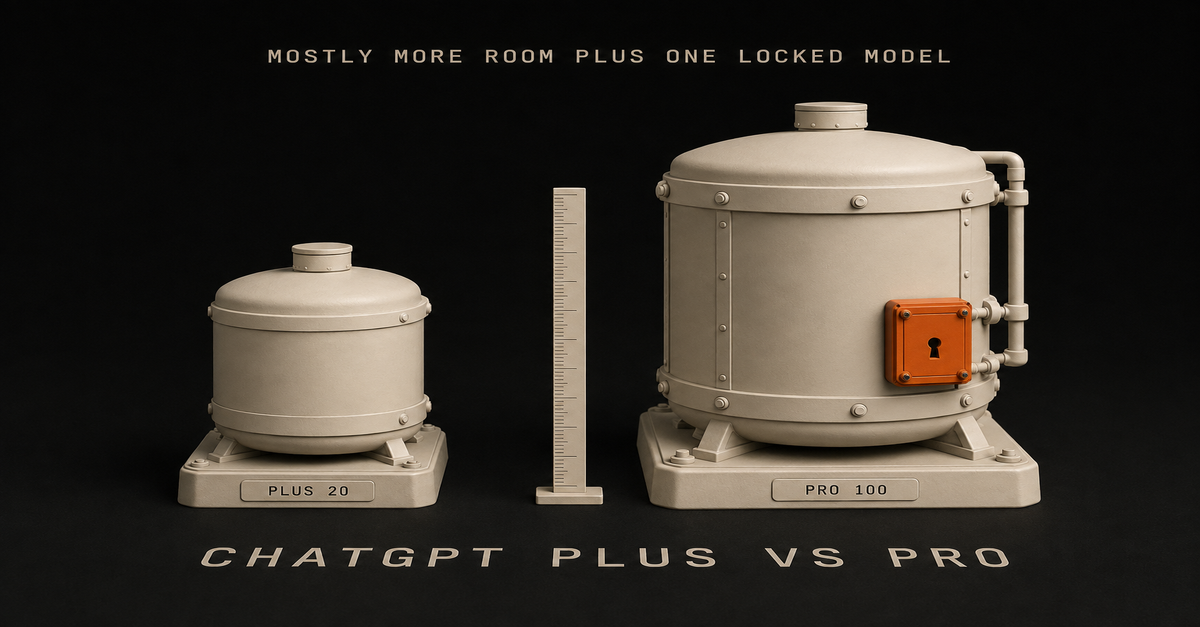
You’re buying room, not a smarter ChatGPT. Plus already has the GPT-6 models in Work and Codex. Stay on $20 until the limit stops real work.
I climbed that ladder myself, $20 to $100 to $200, and $200 is what I pay today. People hear that and figure the $20 plan broke. I didn’t say it broke, I just said I hit the usage.
ChatGPT Pro vs Plus: pick by what stops you, not the price tag
Pro is three plans now, and every step costs the same $20 per Plus
OpenAI split Pro into three monthly plans at DevDay on September 29, 2026. Its Pro tiers help article lists them and says only that “Pro 200 includes more usage than Pro 100. Pro 500 offers the highest included usage of the three plans.”
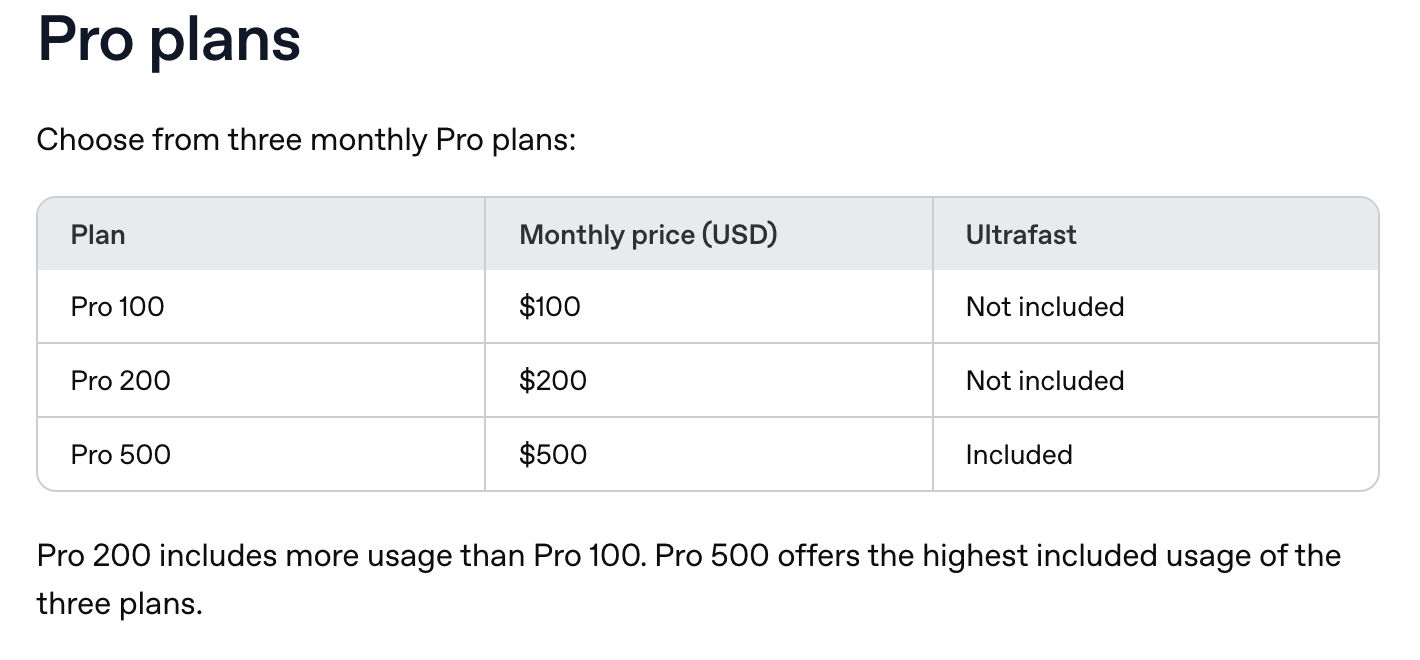 OpenAI’s Pro tiers help article, captured October 2, 2026.
The multiples come from two OpenAI sources, not that page. The DevDay recap puts Pro 500 at “25 times the ChatGPT Plus allowance.” OpenAI’s Thibault Sottiaux posted the rest, relayed on OpenAI’s community forum: Plus 1x, Pro 100 5x, Pro 200 10x.
| Plan | Price | Usage vs Plus | Price per Plus of usage |
|---|---|---|---|
| Plus | $20 | 1x | $20 |
| Pro 100 | $100 | 5x | $20 |
| Pro 200 | $200 | 10x | $20 |
| Pro 500 | $500 | 25x, plus Ultrafast | $20 |
The math went flat. The old $200 plan was 20x, so it was the one bulk deal on the ladder, and that’s the part that got cut. A bigger plan now buys a bigger bucket, not a better rate.
If you already had Pro 200 between September 22 and 10 a.m. Pacific on September 29, OpenAI says you keep the old allowance through October 29, 2026. New Pro 200 subscriptions are open again at the lower allowance, still $200.
Plus already has the new models. Pro adds room, the Pro models and a bigger window
From OpenAI’s pricing comparison, read October 2, 2026:
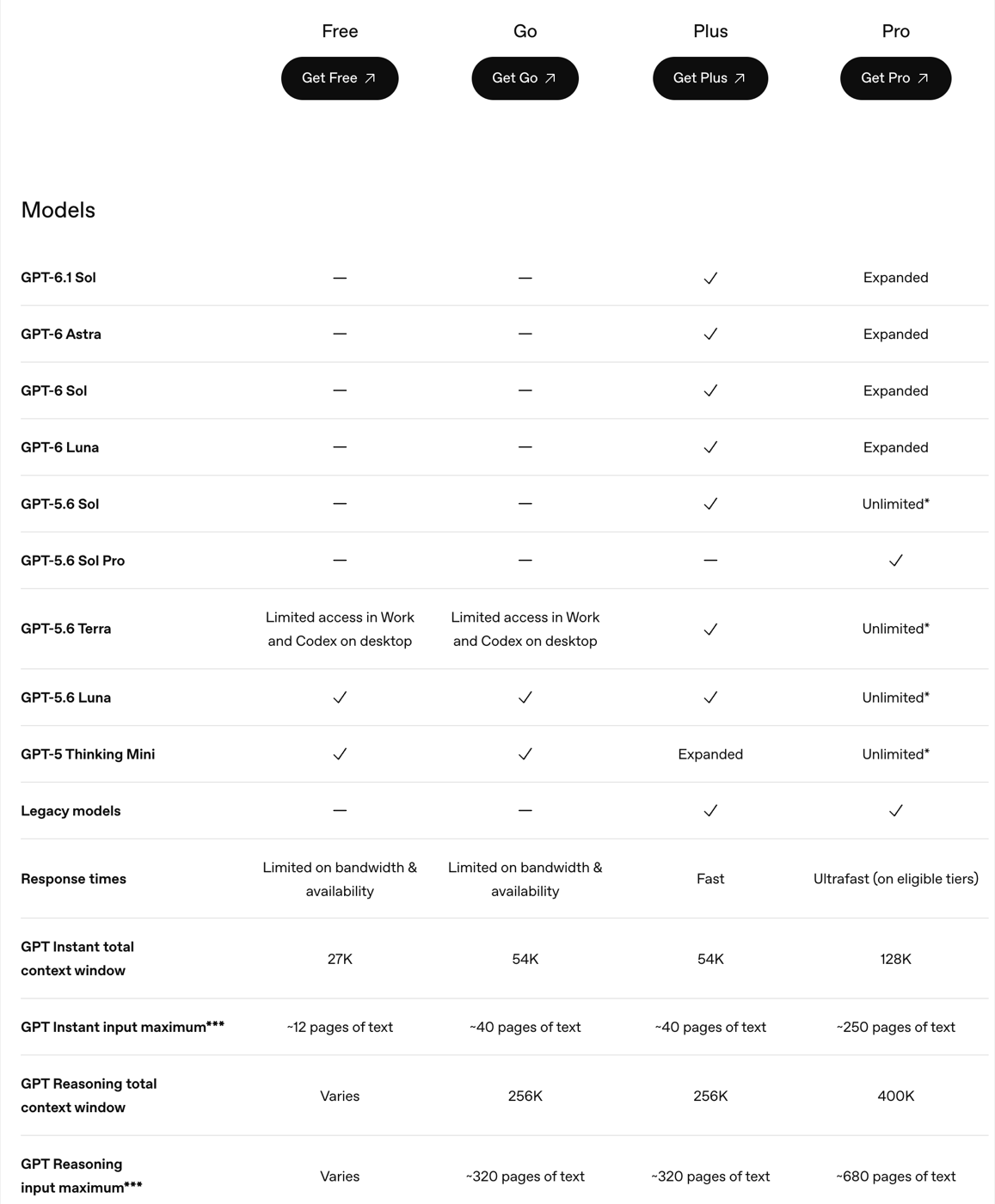 ChatGPT’s pricing comparison, captured October 2, 2026.
| Plus, $20/mo | Pro, from $100/mo | |
|---|---|---|
| GPT-6.1 Sol, GPT-6 Astra, GPT-6 Sol, GPT-6 Luna | Included | Expanded |
| GPT-5.6 Sol thinking levels in Chat | Medium and High | Medium, High and Extra High |
| Pro models in Chat (GPT-6 Pro, GPT-5.6 Sol Pro) | Not included | Included, with their own allowance |
| Instant context window | 54K (~40 pages) | 128K (~250 pages) |
| Reasoning context window | 256K (~320 pages) | 400K (~680 pages) |
| Dots, OpenAI’s always-on agents | Not included | Included |
| Ultrafast in Work and Codex | Not included | Pro 500 only |
| Annual billing | None | None |
The thinking-level and Pro-model rows come from OpenAI’s GPT-5.6 and GPT-6 Pro article. Dots come from the DevDay recap: “Available on Pro and Business Premium in eligible markets.”
Plus isn’t locked out of GPT-6. The help article says “Plus plans include GPT‑6 Astra in ChatGPT Work and Codex.” What Plus misses is Astra in the chat box, where it shows up as GPT-6 Pro. The full plan-by-surface map is on which ChatGPT plans get Astra.
The Pro models are metered too. “A Pro subscription does not include unlimited use of the GPT-6 Pro model,” OpenAI says, and on Pro $100 GPT-6 Pro and Sol Pro share one weekly allowance.
Plus limits are real, and OpenAI only puts numbers on Work and Codex
For Chat, OpenAI gives Plus no fixed number. Its Plus article says Plus “may include usage limits such as message caps, especially during high demand.”
For ChatGPT Work and Codex, which share one allowance, OpenAI’s pricing docs publish estimates per five hours on Plus:
| Model | Plus, messages per 5 hours |
|---|---|
| GPT-6 Astra | 5-45 |
| GPT-6.1 Sol | 15-160 |
| GPT-6 Sol | 15-150 |
| GPT-6 Luna | 350-3,000 |
“Weekly limits may also apply,” the same page says, and “Pro plans currently have no five-hour limit.” So if you keep running out on Plus in Work, check which model you picked first. Five Astra messages can be a whole window.
When you hit the wall in Work or Codex, on either plan, you wait, switch models, or buy credits. OpenAI says Plus and Pro users who reach the limit “can purchase additional credits to continue working without needing to upgrade.”
I didn’t move up because something broke. I hit the usage.
This is how it went for me, months ago. I was already on the $20 plan, and I heard people talking about Codex, OpenAI’s tool for building things, which comes with Plus.
My first read was that it’s just like Claude Code but not as good, but then people were talking about it. Claude Code is Anthropic’s version, and I was used to it.
So I figured, I’m already paying for it, so I’m gonna try it. I used it on a video editing skill I was building.
And then: holy shit, this is really good. It was pleasant to talk to. Before that ChatGPT was just not as good as Opus, man. I got so used to Opus.
Then the usage ran out. I hit the limit because I got busy building shit, so I tried a hundred, then I started really testing it and then ventured to 200.
By early September I’d dropped back to $100 to pay for Grok Bot.
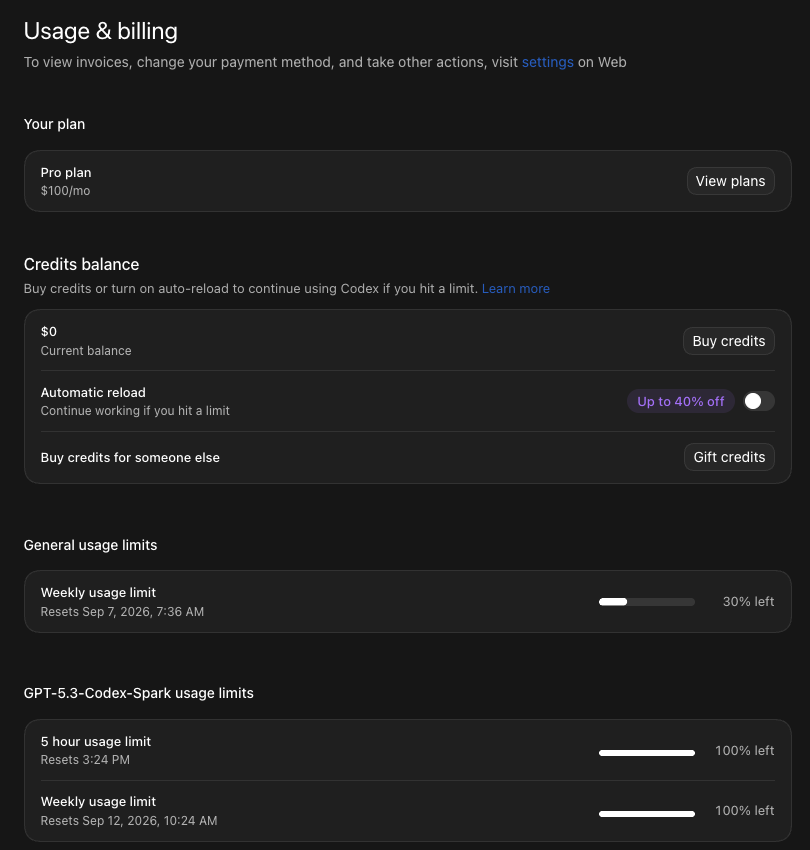 My ChatGPT app on September 5, 2026, back on $100.
Now I’m back on $200 because of the dots release, and I’m switching over from Grok Bot.
That’s my job, though. I test new stuff all day, so I outgrow tiers faster than a normal person would. The longer version of that story is on is ChatGPT Pro worth it.
What that looks like in a normal week is the useful part. You’re not gonna hit the limit just by asking chat stuff. Should I eat this with my steak, what’s the weather, help me rewrite this email. The $20 plan handles that all day.
Where it burns is when you ask it to make something: build a website, edit a video, run a long research job. That’s when the limit shows up.

The 60-second version, from my Shorts: One Workday of AI Chat Ate 31% of a Monthly Quota.
Upgrading buys more room, not an end to the limit
Here is my read on what Pro does: you’re gonna still hit the limit, you’re just gonna get more usage.
Even on $200, my meter was at 2% on October 2 with a reset coming. I don’t buy credits. I’ll wait it out.
Other people find the same thing. One r/ChatGPTPro poster in September, on paying for two 5x plans:
“I decided to upgrade to 5x. Few days into that and I saw how fast I was using up my limit.”
Two more things the upgrade won’t do.
Support can’t rescue you. OpenAI’s Pro tiers article: “Support cannot reset ChatGPT or Codex limits.” You wait for the reset shown in your account, or you switch models.
There’s no annual discount. OpenAI says Pro is billed monthly and annual billing isn’t available, and the Plus article says the same. The upside: no lock-in. You change plans in Settings, then My Plan, so one month of Pro 100 costs you $80 to find out.
Plus wins for most people reading this
Not just on price. Plus has GPT-5.6 Sol in Chat, deep research, projects, scheduled tasks and legacy models. It’s the same product with a lower ceiling and a few locked doors.
On r/ChatGPTPro, u/alexoff put it plainly:
“For everything else - ChatGPT Plus is usually enough. Also, try better prompting and you will see much better results in my opinion that would be enough even on a Plus plan.”
A lot of people who think they need more compute need a better prompt.
The counterweight, from the same thread, is u/peraltz94 on why Pro paid off for them:
“Having access to better models, more context, more juice, legacy models, and deep research and agent mode limits, were my factors. If I can get improved responses and save me time, and I can quantify to hours then it has enough value.”
That’s the right test. Not “is it better,” but can you count the hours it saves.
If you’re stuck between two AI companies instead of two plans, Claude Max vs ChatGPT Pro is the $100-and-up version, and Claude Pro vs ChatGPT Plus is the $20 one. Not paying for anything yet? Start at ChatGPT Free vs Plus. Every current price I track lives on the AI plan tracker.
Let the wall pick your plan, not the price list
Three Pro plans make this look like a bigger decision than it is. It isn’t.
My rule: let the pain be the reason you move up, not the spec sheet. If the $20 plan stops you on real work every week, try Pro 100 for one month. If it doesn’t, stay put and keep the $80.
I’m on $200 and I still wait out resets. So don’t buy the biggest plan to stop worrying about the limit. Buy one month of the next step when the limit is costing you work, and see if you feel it.
FAQ
What is the difference between ChatGPT Plus and Pro?
Plus is $20 a month. Pro is three monthly plans at $100, $200 and $500. The gap is mostly usage: OpenAI puts Pro 500 at 25 times Plus, and OpenAI’s Thibault Sottiaux put Pro 100 at 5x and Pro 200 at 10x. Pro also adds the Pro models in Chat, a bigger context window and dots.
Is ChatGPT Pro $100, $200 or $500?
All three. Since DevDay on September 29, 2026, OpenAI’s help center lists three monthly Pro plans: Pro 100 at $100, Pro 200 at $200 and Pro 500 at $500. Only Pro 500 includes Ultrafast. New Pro 200 subscriptions are open again, with a lower allowance than the old $200 plan.
What are the ChatGPT Plus limits?
OpenAI publishes no fixed number for Plus in Chat; its Plus article says limits such as message caps may apply and vary. For ChatGPT Work and Codex it publishes estimates per five hours on Plus: 5 to 45 messages on GPT-6 Astra, 15 to 160 on GPT-6.1 Sol and 350 to 3,000 on GPT-6 Luna, with weekly limits on top.
Does ChatGPT Plus get GPT-6 Astra?
Yes, but not in the chat box. OpenAI’s help center says Plus plans include GPT-6 Astra in ChatGPT Work and Codex. In Chat, Astra shows up as GPT-6 Pro, which OpenAI lists for Pro $100, Pro $200, Business and Enterprise.
Can OpenAI support reset my usage limit if I hit it?
No. OpenAI’s Pro tiers article says Support cannot reset ChatGPT or Codex limits. You wait for the reset time shown in your account, switch to another available model, or buy credits for the features that accept them.
Is there an annual discount on ChatGPT Plus or Pro?
No. OpenAI says Pro is billed monthly and that annual billing and paying for multiple months in advance are not available. Its Plus article says the same for Plus. That also means trying a higher tier for one month carries no lock-in.
Where this comes from
The plan facts come off OpenAI’s help center, pricing page, pricing docs and DevDay recap, read October 2, 2026. The 5x and 10x figures are an OpenAI staffer’s post, because the help page only gives the order.
What’s mine is the story, the rule and my September billing pane. I’ve paid $20, $100 and $200. Never $500, never Ultrafast.
This post is part of Claude Guides, the hub for using AI without code.
Published September 5, 2026. Updated October 2, 2026 for the three Pro plans, checked against OpenAI’s pages linked inline.
Frequently asked questions
What is the difference between ChatGPT Plus and Pro?
Plus is $20 a month. Pro is three monthly plans at $100, $200 and $500. The gap is mostly usage: OpenAI puts Pro 500 at 25 times Plus, and OpenAI's Thibault Sottiaux put Pro 100 at 5x and Pro 200 at 10x. Pro also adds the Pro models in Chat, a bigger context window and dots.
Is ChatGPT Pro $100, $200 or $500?
All three. Since DevDay on September 29, 2026, OpenAI's help center lists three monthly Pro plans: Pro 100 at $100, Pro 200 at $200 and Pro 500 at $500. Only Pro 500 includes Ultrafast. New Pro 200 subscriptions are open again, with a lower allowance than the old $200 plan.
What are the ChatGPT Plus limits?
OpenAI publishes no fixed number for Plus in Chat; its Plus article says limits such as message caps may apply and vary. For ChatGPT Work and Codex it publishes estimates per five hours on Plus: 5 to 45 messages on GPT-6 Astra, 15 to 160 on GPT-6.1 Sol and 350 to 3,000 on GPT-6 Luna, with weekly limits on top.
Does ChatGPT Plus get GPT-6 Astra?
Yes, but not in the chat box. OpenAI's help center says Plus plans include GPT-6 Astra in ChatGPT Work and Codex. In Chat, Astra shows up as GPT-6 Pro, which OpenAI lists for Pro $100, Pro $200, Business and Enterprise.
Can OpenAI support reset my usage limit if I hit it?
No. OpenAI's Pro tiers article says Support cannot reset ChatGPT or Codex limits. You wait for the reset time shown in your account, switch to another available model, or buy credits for the features that accept them.
Is there an annual discount on ChatGPT Plus or Pro?
No. OpenAI says Pro is billed monthly and that annual billing and paying for multiple months in advance are not available. Its Plus article says the same for Plus. That also means trying a higher tier for one month carries no lock-in.
Prices change quietly. I'll email you when ChatGPT changes.
One email per change, plus my Tuesday note. Unsubscribe anytime.