In this article
- 1 Yes, they run with your laptop closed (with one exception)
- 2 How to set one up (about 60 seconds)
- 3 The first thing I scheduled: my inbox
- 4 What to actually schedule (the recurring stuff that compounds)
- 5 The best scheduled task: a weekly review that does the research first
- 6 The gotchas nobody warns you about
- 7 What I refuse to schedule: content
- 8 Cowork or Claude Code for scheduling?
- 9 What I would schedule first
- 10 How this was checked
Quick answer: yes, Claude Cowork scheduled tasks now run remotely, which means they fire on their schedule even when your laptop is asleep and the app is closed. The one exception is a task that needs your local files or apps, which still has to run on your awake machine.
That one fact is what makes recurring Cowork tasks dependable. It’s also the thing half the articles on this page still get wrong.
If you searched “claude cowork scheduled tasks,” “do cowork tasks run when my computer is closed,” or “how to schedule a task in claude cowork,” this page settles it: the closed-laptop question first, then the 60-second setup, then what to schedule so the feature earns its keep.
I walk through this on camera in 8 Claude Routines That Run My Business While I Sleep (20 min).
Yes, they run with your laptop closed (with one exception)
This is the big one, so it goes first.
A lot of pages you will find on this exact search still say scheduled tasks “only run while your computer is awake.” That was true at launch. It is not true now.
Anthropic’s current help center is explicit. From the scheduled tasks help article: “Scheduled tasks run remotely, so they run on their cadence even when your computer is asleep or the Claude Desktop app is closed.”
Their cross-device help page says the same thing a second way: scheduled tasks “no longer need your computer to be awake.”
So the morning brief lands whether or not you opened your laptop. That is the difference between a nice demo and a system you can rely on.
The exception is in the same help article: “If a scheduled task requires local files or apps, it will only run locally.” A remote run happens on Anthropic’s servers, so it can reach your connectors (email, calendar, Slack, Drive) and files saved to your Claude account, but it cannot reach a folder sitting on your hard drive.
Point a task at your Downloads folder and it becomes a local task again, which means your machine has to be awake for it.
The clean rule: connectors and cloud files run in the cloud, your local folders run on your desk. My shorthand for it is “cloud in, cloud out; local files, local machine.”
Design your recurring tasks around connectors and you get the closed-laptop magic. Design them around a local folder and you are back to leaving the lid open.
How to set one up (about 60 seconds)
You do not write any code. Two paths, both in the app.
Open the Scheduled section in the left sidebar, then click New task in the upper right. From there:
- Set up manually. Enter a task name, the prompt (what you want it to do), an approval mode, a frequency, and optionally a model and a folder. Click Save.
- Create with Claude. Claude asks you a few multiple-choice questions, then proposes a task name, a schedule, and what it will do. You click Schedule to confirm.
Frequency options, straight from the help article: hourly, daily, weekly, on weekdays, or manually. That covers almost every real recurring chore.
One detail that trips people up: each scheduled run is its own fresh Cowork session. It does not remember your last chat.
So everything the task needs to know goes in the prompt, in a connected tool, or in a file it can open. Write the instruction as if the task has never met you, because on every run, it hasn’t.
You manage the whole thing from that same Scheduled screen: review upcoming and past runs, edit the instructions or schedule, pause a task, resume it, delete it, or run it on demand when you do not want to wait for the next cycle.
The first thing I scheduled: my inbox
Hands down, inbox. It organizes, archives the junk, unsubscribes, and pings me about the stuff that matters: this person reached out, this bill needs to be paid.
But the part worth copying is how I got there: I ran it manually first. I described what I wanted without fully understanding what I actually needed, let it run, and iterated. Okay, I need this part.
I do not need that. I like this format better. Once it did the job right repeatedly, and only then, I put it on a schedule and stopped babysitting it. It eventually graduated off Cowork entirely onto my always-on machine, but Cowork is where I tested it.
Run it manually until the output stops surprising you. Then schedule it. That’s it.
What to actually schedule (the recurring stuff that compounds)
Don’t schedule something clever. Schedule something boring that you do every week anyway. That’s what turns Cowork from a tool into staff, and it’s the part most articles skip.
Anthropic’s own launch note put it well: “You set it up once, a morning brief, weekly spreadsheet updates, Friday team recaps, and Claude handles it automatically.” Real users landed on the same handful of jobs.
| The recurring job | How often | Runs closed? |
|---|---|---|
| Morning email + calendar brief | Daily / weekdays | Yes (connectors) |
| Weekly metrics or content review | Weekly | Yes (connectors/cloud files) |
| Monday expense report from forwarded receipts | Weekly | Yes (connectors) |
| 7am digest of your industry sources | Daily | Yes (web + connectors) |
| Sort/rename a local Downloads folder | Weekly | No (local files, needs awake machine) |
| Monthly LinkedIn profile health check | Weekly / monthly | Yes (web) |
Notice the split maps exactly to the exception above. The jobs that run with the lid closed all pull from connectors or the web. The one that needs an awake machine is the one pointed at a local folder.
For the full list of what people run, 20 real Claude Cowork use cases has the receipts, and every recurring one there is a scheduled-task candidate.
The 60-second version, from my Shorts: 3 FREE Claude Tasks That Run Your Business On Autopilot.
The best scheduled task: a weekly review that does the research first
The recurring task I’d copy is the one I run myself, documented in the Cowork use cases breakdown: a weekly content and metrics review. Mine answers three questions: how did the content perform, are we trending the right direction, and why or why not.
This is that weekly audit, straight from my system. Verdict first, graded against my own playbooks:
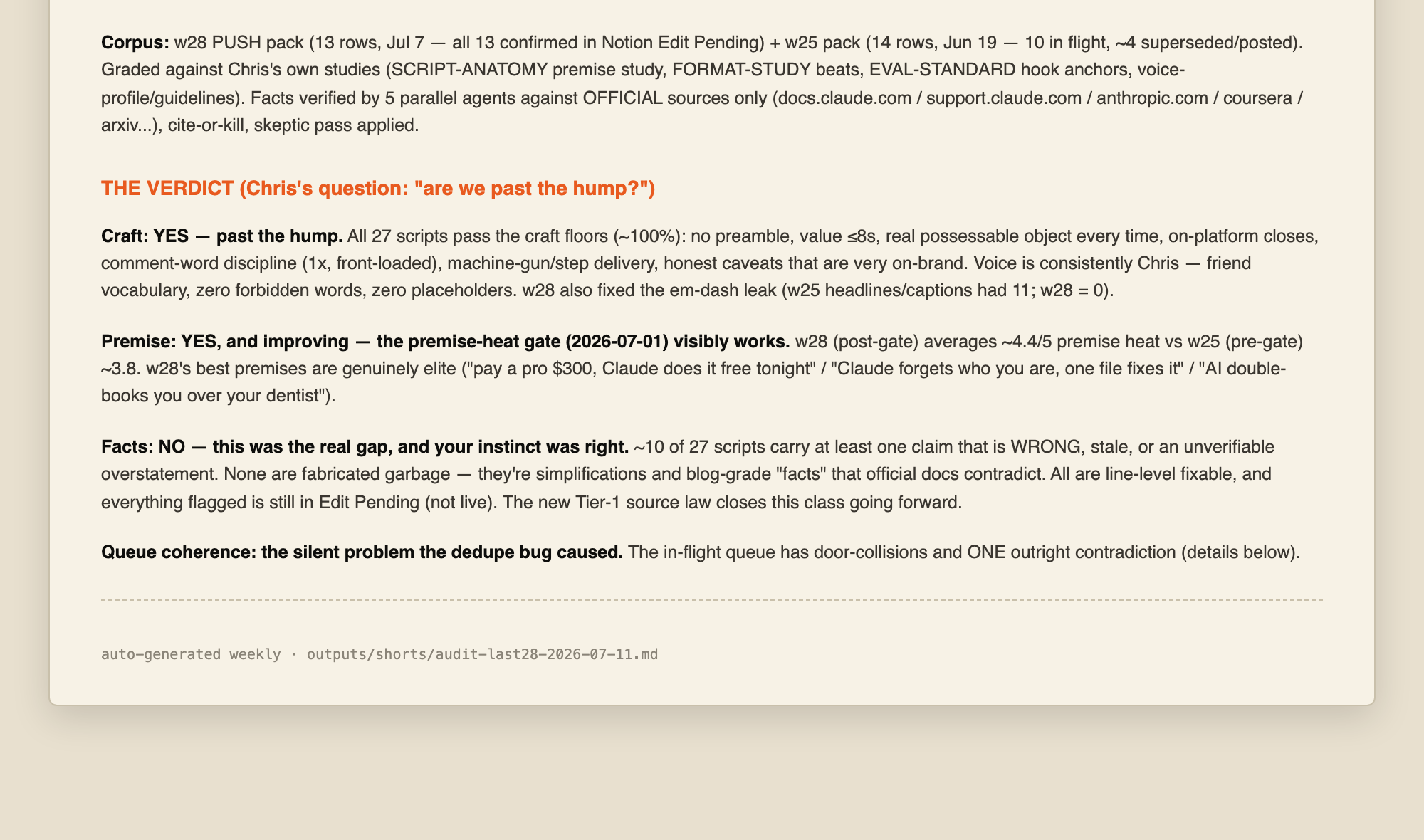
The part that makes it good, the rule I gave in that post: have it do the research BEFORE proposing changes, because sometimes the right answer is “nothing is broken, keep going, put in the volume.” A scheduled review that jumps straight to “here are 5 changes” every week trains you to keep changing things for no reason.
One that checks the data first and is allowed to say “no change needed” is the one you keep.
The gotchas nobody warns you about
Scheduled tasks are good. But three real snags show up in the community threads, and you should know them before you trust one overnight.
Fresh session means re-auth on some tasks. One user set up a daily task that scrapes an authenticated site in the browser and hit a wall: “because scheduled sessions start in a new chat window it prompts for browser access every time, which defeats the purpose of scheduled/automated runs.”
Anything that needs a live browser login is a weak fit for unattended scheduling right now.
Silent overnight failures. Another user chaining tasks flagged the honest hard part: “what happens when a scheduled agent fails silently at 3am.
Still figuring out reliable error propagation.” Anthropic’s help article does not document retry behavior, so treat a critical task as “check the result,” not “trust it blind.” Read the past-runs list on the Scheduled screen for anything you actually depend on.
It burns your plan faster than chat. Anthropic says this directly in its consumption guide: “A single Cowork task or Claude Code debug session can consume many more tokens than chat.”
A task running every morning is doing multi-step work every morning. On the $20 Pro plan, a few heavy daily tasks will meet the weekly cap. That is plan sizing, not a bug, and it is the exact signal covered in Claude Max vs ChatGPT Pro.
What I refuse to schedule: content
The place scheduling has burned me every single time is content. I used to fantasize about a fully automated content pipeline: I put everything in, it generates, and my only job is to review at the end. It does not work that way. And honestly, it is not as fun. It is mindless.
I tried scripting entire 20 to 30 minute videos. You sound robotic reading it, and you lose track of what you are even talking about. What actually works is the opposite: the system generates the outline and the research, and I riff the substance.
I wing it in a controlled way. I enjoy it more and I know what I am talking about. My newsletter gets repurposed from that long-form, so it is already in my voice. Same pattern on Substack: I pick the topic, I riff, I approve the outline and the research.
The rule that came out of all that burn: creating content has to be more me; the system’s job is to help me create it faster. That is the difference between AI slop and having a ghostwriter partner who understands your vision.
Schedule the deterministic stuff (pull the analytics, scrape the competitors, prep the research) and keep the substance human.
Cowork or Claude Code for scheduling?
If you write code, you might wonder whether to rig this up in a terminal instead. For recurring office chores, you almost never should.
My take, from Claude Cowork vs Claude Code: scheduled tasks are cleaner in Cowork than anything I have rigged up in the terminal, and I live in Claude Code all day. You define the cadence once and it just runs, no cron file, no script, no install.
The simple rule: Cowork does your office work, Claude Code builds software. A weekly report is office work. Keep it in Cowork.
What I would schedule first
If you have never made one, do not overthink the first task.
- Easiest win: a daily or weekday morning brief that reads your email and calendar and hands you the day. It runs on connectors, so it fires with your laptop closed.
- The compounding win: a weekly review that checks your real numbers and is explicitly allowed to say “nothing is broken.” Research first, changes second.
- The reminder that works for me: my content day is Friday, so a Friday task kicks off the first steps on its own. It pulls candidate topics and starts the research without waiting for me. I cannot forget content day, because the work is already sitting there when I show up. If you batch anything weekly, give the batch day a task that runs the boring first hour for you.
- Skip for now: anything pointed at a local folder or needing a live browser login, until you are okay leaving your machine awake for it.
Build one, watch its first two runs on the Scheduled screen, then add a second.
If you want ready-made prompts that make good first scheduled tasks, grab the 15 workday AI prompts at /start. Most of them run fine on the $20 tier and turn into recurring tasks in one click.
How this was checked
Product facts here are from Anthropic’s official help center, linked inline at each claim: the scheduled tasks article, the cross-device article, and the consumption guide. User reports are public Reddit threads, linked where quoted.
A few things Anthropic does not document, so this page does not claim them: exact timezone/DST handling, retry behavior on a failed run, and whether scheduled-task completion pushes a notification. Where users report a gotcha, it is labeled as a community observation, not official behavior.
Published and last reviewed July 17, 2026. Product facts checked against Anthropic’s support center on that date. Cowork’s scheduled tasks are available on all paid plans and, per the current help center, run remotely even when your computer is asleep, with local-file tasks as the documented exception. These products change often; the linked official pages are the source of truth.
This post is part of Claude Guides, the hub with every plan decision, task comparison, and setup guide for using Claude without code.

Written by
Chris AlarconChris Alarcon shows people who don’t code the boring Claude setup that actually works. He runs his one-person operation on these systems and shares every workflow, prompt, and tool combo in public. Start with the 15 prompts he uses every day.
The boring setup
It still won't know you tomorrow.
The Setup is one folder. Drop it into a Project, answer three questions, and Claude or ChatGPT writes your memory file and your voice file itself. It stops forgetting you, stops sounding like AI, and runs three real jobs by name. Twenty minutes tonight. No code. $39, 30-day refund.
See The Setup →The 15 AI prompts I actually use every day
I tested hundreds and kept the 15 that survived. You get them right away, then one short email from me every Tuesday.