In this article
- 1 What you need (as of October 2, 2026)
- 2 Open Settings > Memory and read every entry like a stranger wrote it
- 3 Check the three switches, and leave sensitive topics off
- 4 Claude has three kinds of memory, and only one is the list you just read
- 5 Tell Claude the few things that matter, on purpose
- 6 Turn memory off for one chat before you send the first message
- 7 When Claude forgets or remembers the wrong thing, check these first
- 8 Keep what you can’t afford to lose in files you own, and keep them lean
- 9 Write it in the right place once, and stop repeating yourself
- 10 Common questions
- 11 Where this comes from
I’ve made the mistake of making it grow over time. So you just learn from the mistakes and mistakes and mistakes.
“It” is the main file my Claude reads before every job. It kept growing because I kept adding to it. On June 9 I cut it from 173 lines to 155. Today it’s 128.
Maybe you’re on the other side of that. You tell Claude your job, your tone and the format you like, and next week it acts like it never met you. So you wonder if you’re the problem.
You’re not. The last thing you want to do is waste time and effort and tokens explaining everything all over again, starting from scratch.
Claude does have a memory, it’s on by default, and you can read every line of it. This is mine:
 My Claude memory page, September 21, 2026. Descriptions blurred.
Four entries, all saved from my chats. Here’s where to find yours, what to fix, and what I keep in files instead.
What you need (as of October 2, 2026)
- Any Claude plan. Anthropic’s memory help page says memory is on by default for Free, Pro and Max, on the web, the desktop app and your phone.
- On a work account: Team and Enterprise owners control memory, and it’s off for each member until they turn it on. Ask IT what Claude may keep about client work before you tell it anything.
- Five minutes.
- Skip for now: importing your ChatGPT memory. Read your own list first.
Open Settings > Memory and read every entry like a stranger wrote it
Settings > Memory. On top sits You (Preferences and Profile on mine). Below it, everything else Claude saved sits under Topics.
Click an entry to read it. Use the edit icon to fix it or Delete to drop it. Anthropic says changes apply to every chat after that.
When I opened mine in September, my reaction was: “Interesting. Interesting. But it has it in there, so yes, it’s on.”
It knew people I’d talked about in old chats. And literally has my wife’s name in there.
That’s fine, as long as you know. The point of this page is not to memorize anything. In my words from that week: “Not to try to memorize things, but just to see things.”
If an old guide sends you to Settings > Capabilities, that’s the legacy layout. Anthropic redesigned memory on July 10, 2026, gave it its own Memory page on August 25, and closed the export window for the old version on September 9.
Check the three switches, and leave sensitive topics off
Scroll down the same page:
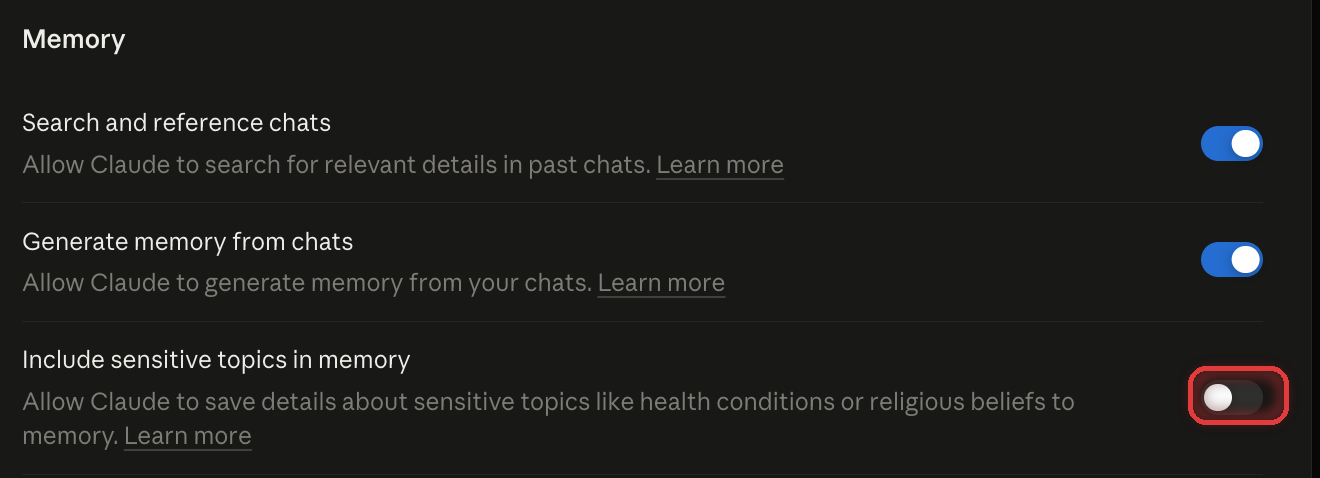 My three memory switches, September 21, 2026. Sensitive topics off.
- Search and reference chats: lets Claude look through your past chats when it needs to.
- Generate memory from chats: lets Claude keep adding entries as you talk.
- Include sensitive topics in memory: health conditions, religious beliefs and similar. It’s off by default, and mine is off.
Two bigger buttons live on this page too. Pause keeps what Claude already saved but stops it from using or adding memories. Reset “permanently deletes all memories including project memories,” and there’s no undo.
Claude has three kinds of memory, and only one is the list you just read
People mix these up, and that’s most of the “it forgot me” confusion.
| What it is | Who has it | Where you control it | |
|---|---|---|---|
| Memory | Topics Claude saves as you chat | Free, Pro, Max (Team and Enterprise if turned on) | Settings > Memory |
| Chat search | Claude looks up old chats when it needs to, shown as a tool call | Pro, Max, Team, Enterprise | The "Search and reference chats" switch |
| Project memory | A separate memory space and summary for each project | Every plan with Projects | Inside the project |
| Incognito | No memory at all: not saved, not searchable | All plans | Ghost icon on a new chat |
Source: Anthropic’s memory and incognito help pages, read October 2, 2026.
The one that trips people: something Claude knew inside a project may not show up in a normal chat, because each project keeps its own memory. How projects work is its own page: how to use Claude Projects.
Tell Claude the few things that matter, on purpose
You don’t have to wait for Claude to pick things up. Three ways to say it straight:
- In any chat, say “remember this.” Anthropic’s wording: tell Claude what you’d like it to remember, change or forget.
- Put who you are and how you want answers in the Instructions for Claude box in Settings. It applies to every chat. Mine opens with one line:
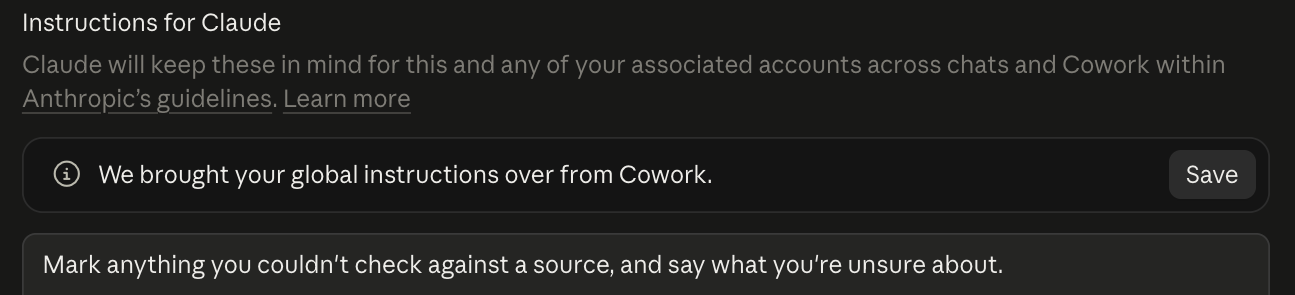 My Instructions for Claude box, September 21, 2026.
- Give each project its own line. For every project you can have that little line that says display my information this way.
Steal this for a project’s instructions box, then change the words to fit your job:
Answer first, in 3 short bullets. Put any numbers in a table.
No long paragraphs. If you're not sure about something, say so.
Applicable for: ops leads, HR, project managers, teachers, anyone who keeps retyping the same setup.
Turn memory off for one chat before you send the first message
Sometimes you don’t want a chat to teach Claude anything. Click + in the message box and switch Memory off before your first message. Anthropic says the setting locks once you send.
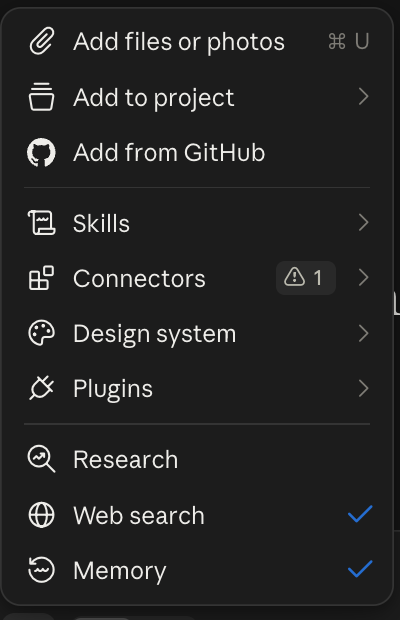 The Memory switch in my Claude message box, September 18, 2026.
That chat still lands in your history and still shows up in chat search. If you want neither, start an incognito chat with the ghost icon instead.
Incognito chats aren’t saved to history or memory, and Claude can’t find them later. Anthropic keeps them for 30 days by default. They open in the older chat layout, so Claude can’t create files or run code in them.
When Claude forgets or remembers the wrong thing, check these first
Has Claude remembered the wrong thing about me? Of course. Of course. But I think it happens less because I use Claude Code and I have the CLAUDE.md.
More on that file below.
You’re not the only one who’s felt this. A ChatGPT user on r/ChatGPT described the same fear about a different app: “it says ‘memory saved’ and then it works for a few weeks and then boom it forgets about it… Is it normal.”
On Claude, it usually has a plain reason:
| What you see | Why | Fix |
|---|---|---|
| It knew something in a project, not in a normal chat | Each project has its own memory | Say "remember this" in a normal chat, or put it in Instructions for Claude |
| It remembers something wrong | An entry in Topics is off | Settings > Memory, edit or delete that entry |
| You deleted the chat and it still knows | Deleting a chat doesn't remove the memory it created | Delete the entry itself |
| It forgot an incognito chat | Incognito never saves | Working as designed |
| Nothing gets saved on your work account | Team and Enterprise start with memory off per member | Turn it on, or ask your admin |
| A Cowork task on your computer ignored memory | Local Cowork sessions don't use memory, cloud ones do | Run it in the cloud, or put the facts in the project |
Keep what you can’t afford to lose in files you own, and keep them lean
Claude’s memory lives inside Claude. No memory feature moves on its own. You’re the one who has to carry it.
So the stuff that matters goes in files. I use Claude Code, the version of Claude that works with files on my computer. It reads one plain text file, called CLAUDE.md, at the start of every session.
That’s the file that grew. Now it has a rule.
I only add stuff that matters there, like model routing, behavior that is global and that I repeat over and over again. So my thing is lean. It’s not just something that keeps growing over time.
Boris Cherny, who created Claude Code, goes further. At YC’s Startup School in August, he told people to delete their CLAUDE.md, skills and hooks every six months and see what the model does, per one write-up of the talk. I don’t do that, to be honest. I just keep it lean.
One of the biggest things I use it for is how it gives me information.
Today we added a rule to that file after Andrej Karpathy’s post about better formats for explaining things: plainer writing, diagrams, interactive pages, custom videos. Quick questions stay short. Plans and decisions come back as a page that opens with a picture.

@karpathy · Oct 1, 2026
We'll be spending a lot more time trying to understand the outputs of language models. A few thoughts, tips & tricks:
…Diagrams / images. Instead of writing, ask your LLM to create a diagram. These can be a lot easier to process, parse, and understand. But even better:
Web pages. Ask for output "in HTML" to get a beautiful, interactive webpage…
And I get video, which is something new to me. Instead of getting a block of text, you get a video sometimes showing you what you’re about to approve or what changes just got made.
In the app, the same idea is that one line in a project. You don’t need Claude Code for it.
Before you trust any of this to Claude alone, take a copy. Anthropic’s export prompt, pasted into a new chat:
Write out your memories of me verbatim, exactly as they appear in your memory.Save the answer in a doc you own. If you want those files written for you, that’s what The Setup does: one folder in a Project, three questions, $39.
Write it in the right place once, and stop repeating yourself
My file grew because I kept adding. It works now because it only gets the things I’d otherwise say every day.
Yours can start smaller than mine. I don’t have to remind it. I just tell it in the CLAUDE.md, I write it in the right place. In the app, the right place is the Memory page, the Instructions box and one line per project.
So open Settings > Memory today. Delete one entry that’s wrong, then write one line in Instructions for Claude. That’s it. For the rest of the Claude setup around it, start at Claude Guides.
Common questions
Does Claude have memory on the free plan?
Yes. Memory is on by default for Free, Pro and Max on the web, desktop and phone, per Anthropic’s help center as of October 2, 2026. Searching old chats is paid only. For what else the $0 plan covers, see Claude’s free plan.
Does deleting a chat delete what Claude remembers?
No. Anthropic says the memory entries a deleted chat created stay put. Delete the entry itself in Settings > Memory. Reset wipes everything, project memories included, with no undo.
Can I move my ChatGPT memory to Claude?
Yes, on Free, Pro, Max and Team, on the web and desktop. Ask ChatGPT to “List every memory you have stored about me,” then go to Settings > Memory > Start import, paste and click Add to memory. Anthropic’s import page calls it experimental and says Claude focuses on work details, so personal ones may not stick.
Is Claude Code memory the same as memory in the Claude app?
No. Claude Code reads plain text files on your computer, mainly CLAUDE.md, at the start of every session. The app keeps its memory as a list in your account, and one doesn’t feed the other. If Claude Code is next for you, start with how to use Claude Code.
Does Claude memory use up my usage limit?
Anthropic doesn’t publish a usage cost for memory. My take: more context costs a little more, but it’s minimal on a model like Sonnet. On the $20 Pro plan, Opus 5.5 runs inside your limits, and Anthropic says it performs at the level of Fable 5.1 on most work. How the meters work is in Claude usage limits explained.
Where this comes from
The settings, plans and dates come from Anthropic’s help center and release notes, checked October 2, 2026. The memory screens are my own account from September, and the line counts come from my file’s history.
I haven’t tested the ChatGPT import. Most of what I need Claude to know lives in files, not the memory page.
Published October 2, 2026. Last reviewed October 2, 2026 against Anthropic’s help center.
This post is part of Claude Guides, the hub with every plan decision, task comparison, and setup guide for using Claude without code.

Written by
Chris AlarconChris Alarcon shows people who don’t code the boring Claude setup that actually works. He runs his one-person operation on these systems and shares every workflow, prompt, and tool combo in public. Start with the 15 prompts he uses every day.
The boring setup
It still won't know you tomorrow.
The Setup is one folder. Drop it into a Project, answer three questions, and Claude or ChatGPT writes your memory file and your voice file itself. It stops forgetting you, stops sounding like AI, and runs three real jobs by name. Twenty minutes tonight. No code. $39, 30-day refund.
See The Setup →The 15 AI prompts I actually use every day
I tested hundreds and kept the 15 that survived. You get them right away, then one short email from me every Tuesday.