In this article
- 1 What you need (as of September 25, 2026)
- 2 Step 1: Click Code, one tab over from chat
- 3 Step 2: Point it at one new folder, not your whole drive
- 4 Step 3: Leave it on Manual so you approve every change
- 5 Step 4: Give it your first job, which is you
- 6 Step 5: Check the folder, not the chat, to know it worked
- 7 Step 6: When it breaks, paste the error into a fresh chat
- 8 Step 7: Give it a to-do list so the ideas don’t pile up
- 9 You don’t have to be an expert to build real things
- 10 Stay in chat if you’re not building anything
- 11 Should you learn the terminal? Not on day one
- 12 Where this comes from
I used to believe that Claude Code was just for the top [engineers], but trust me it’s not. I don’t have a development background, and I’ve built three live websites with it. The one you’re reading right now is built with it too.
If “just use Claude Code” makes you picture a black terminal window full of text you can’t read, that picture is out of date. In the Claude desktop app, Claude Code is a tab. My take: all you gotta do is switch the tab and it looks almost the same.
You need a paid plan, one folder, and about 15 minutes.
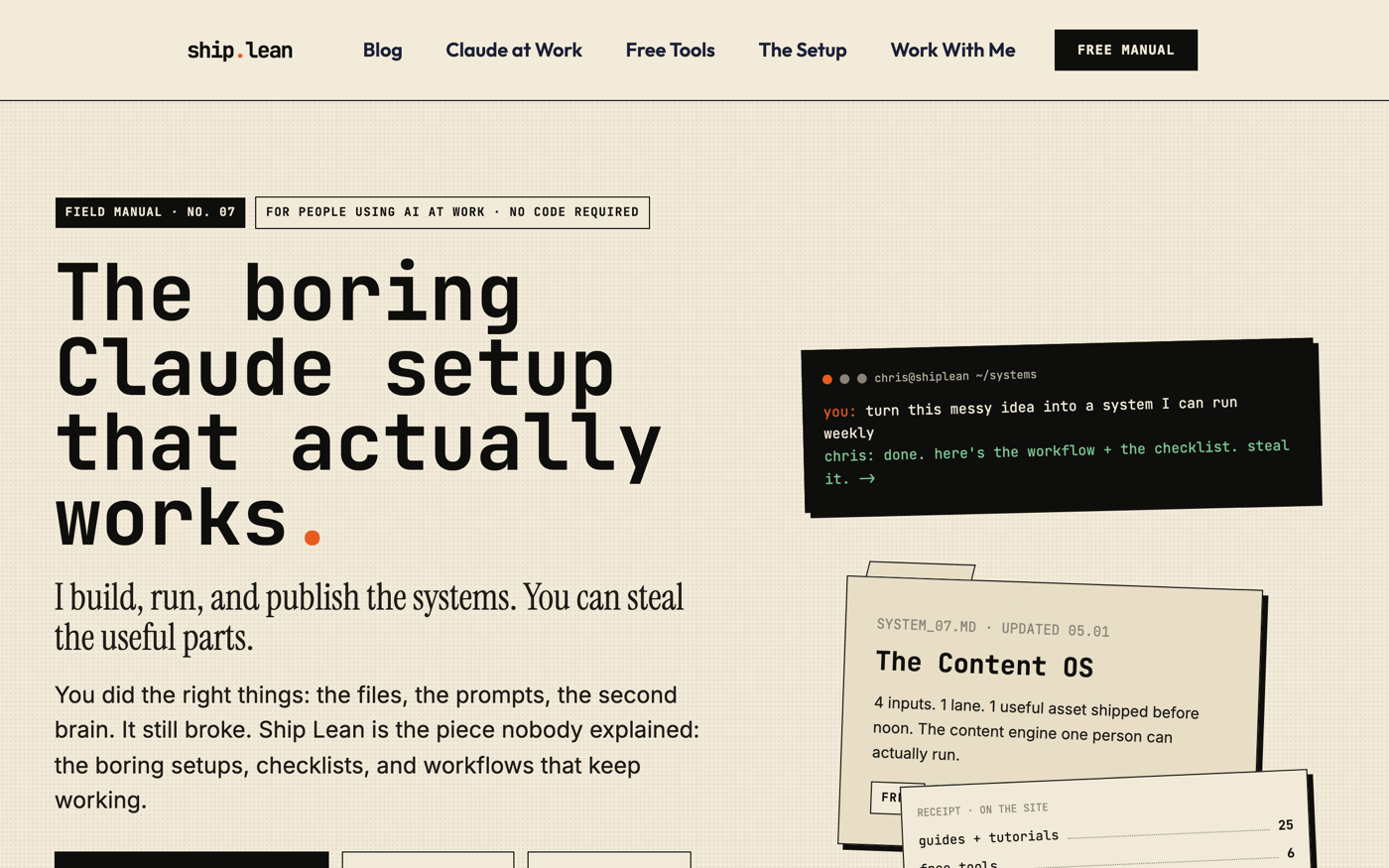 The site you’re reading, built with Claude Code by a non-coder. Live on September 25, 2026.
One honest note before you start: I work in the terminal, because that’s how I learned it. You don’t have to, and the last section says why.
What you need (as of September 25, 2026)
- A paid plan. Claude Code is on Pro and up, not Free. Pro is $20 a month, or $17 a month billed annually, per Claude’s pricing page.
- The Claude desktop app on a Mac or Windows PC (Linux is in beta), per Anthropic’s desktop quickstart. Nothing else to install.
- One folder you don’t mind it touching. A new empty one is perfect.
- Work laptop? Ask IT before you point it at company folders. On Team and Enterprise plans, your admin controls what it can do.
- Skip for now: the terminal, VS Code, and every “20 settings you need” list.
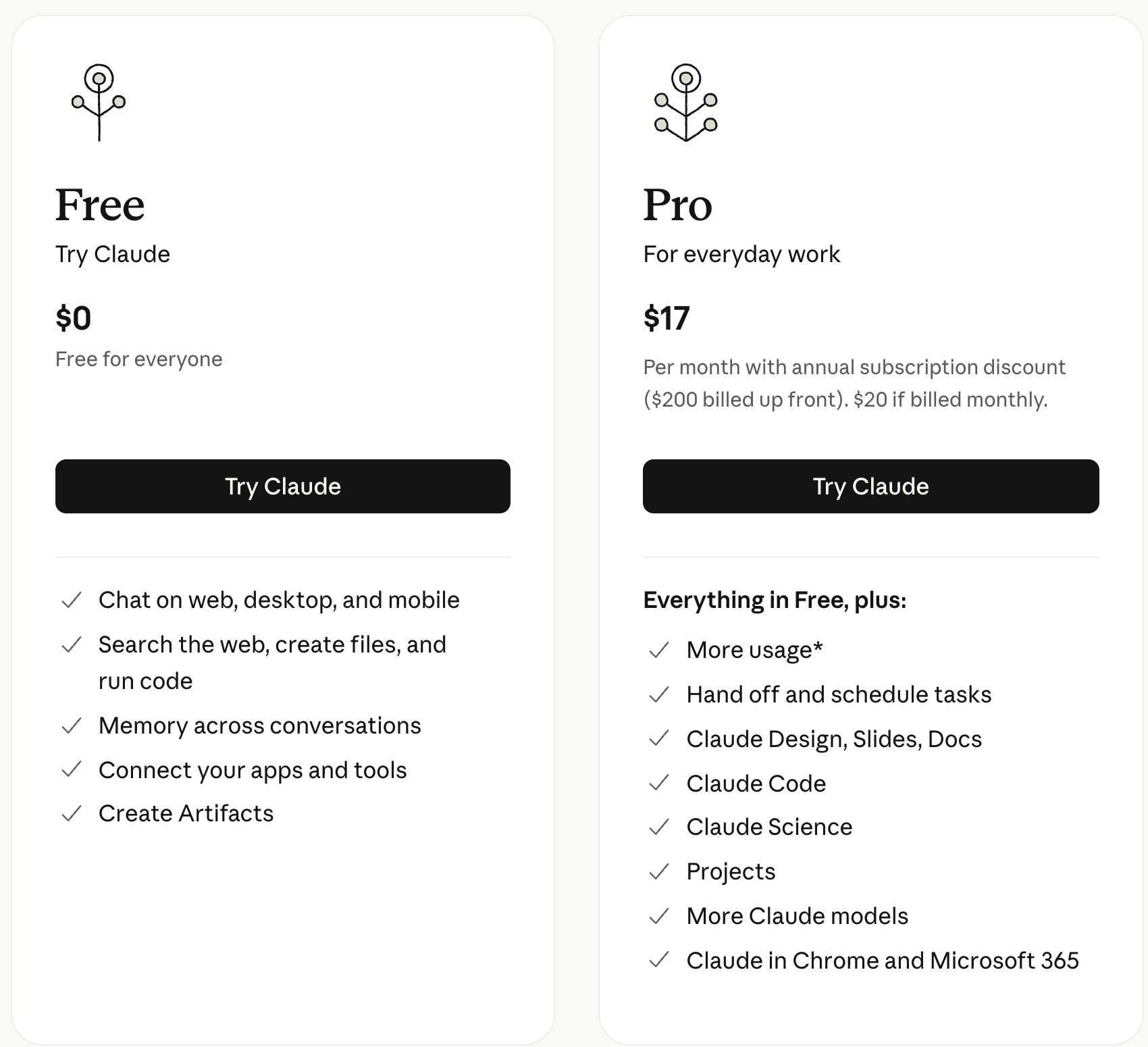 Claude’s pricing page, September 18, 2026.
If you’re still on Free, what Claude’s free plan actually includes shows what you’d be upgrading from.
Step 1: Click Code, one tab over from chat
Claude desktop app → sign in → Code (at the top of the window). If Code asks you to upgrade, you’re on Free.
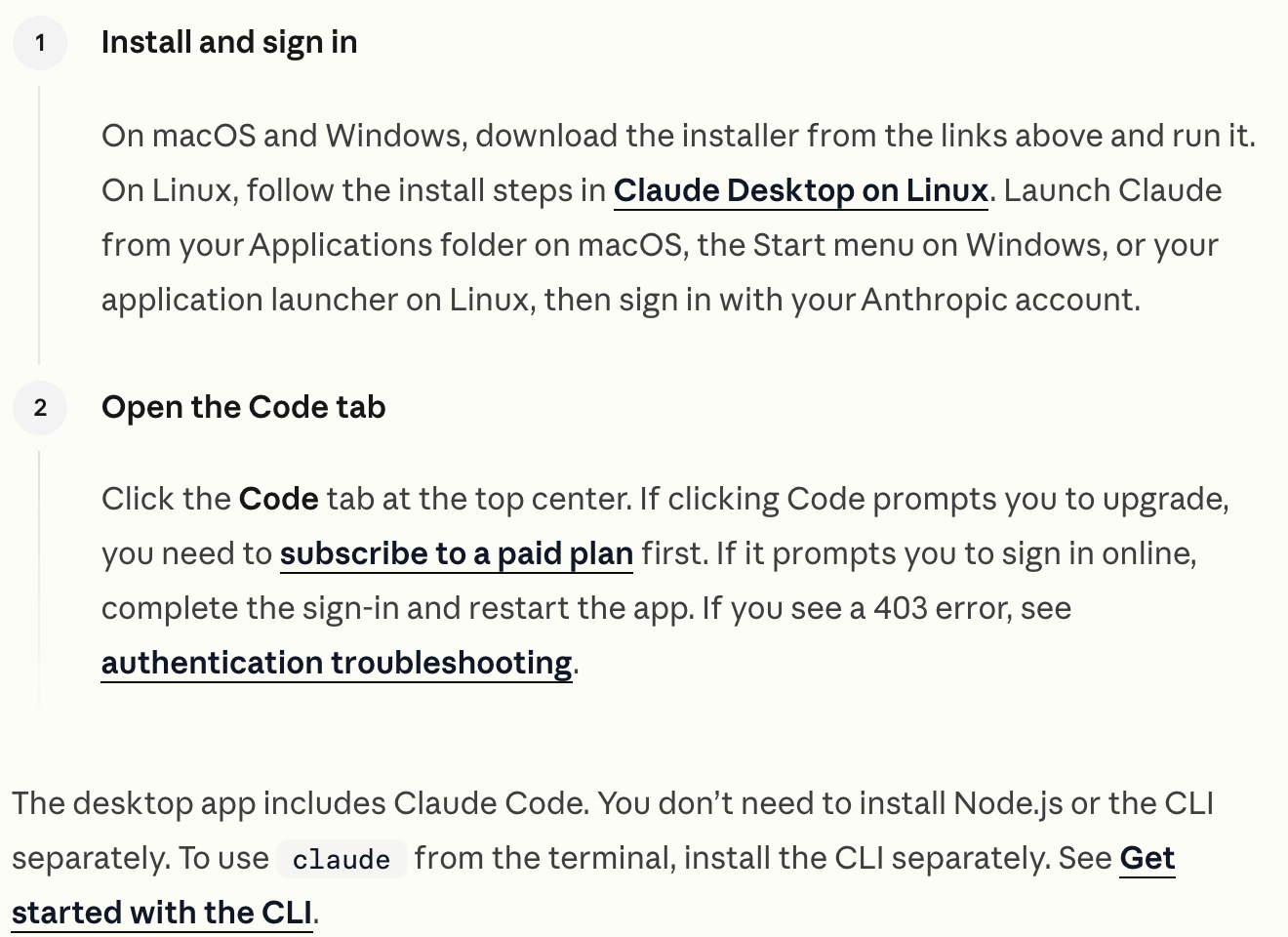 Anthropic’s desktop quickstart, captured September 25, 2026.
Cowork and chat merged on September 16, 2026, and people worried the tab went with it. It didn’t. Anthropic’s merge note says “The model picker and the ‘Code’ tab are where they were.” If you don’t see it, open the sidebar, and Code shows up in the top bar.
Step 2: Point it at one new folder, not your whole drive
Code tab → Local → Select folder. Make a new folder first (I’d call it claude-first-run) and pick that.
This is the one real difference from chat. In my words: the only thing is you can pick your repo or your folder and that’s it. “Repo” is just the coder word for a project folder.
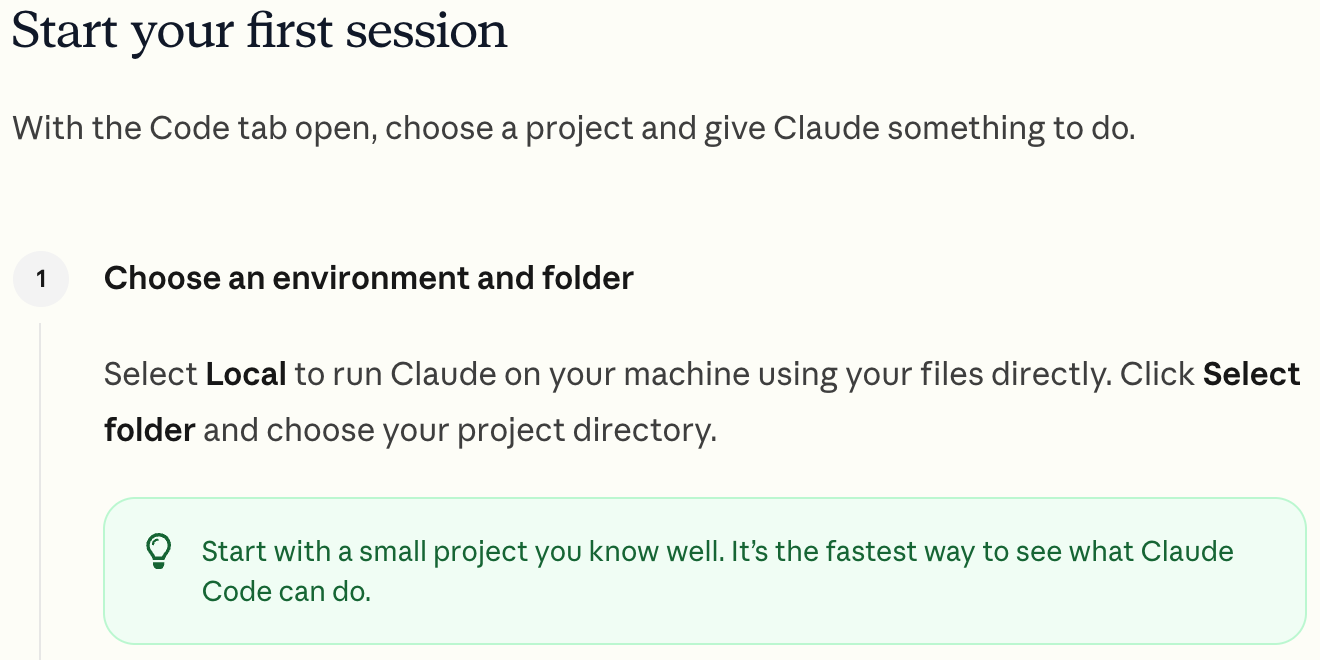 Anthropic’s desktop quickstart, captured September 25, 2026.
Why a new folder: Claude Code can create, edit and move files inside whatever you give it. Anthropic says its checkpoints are “not a replacement for version control.” A fresh folder, or a copy of one, is your undo button.
Step 3: Leave it on Manual so you approve every change
Prompt box → the mode button next to Send → Manual. Manual is the default, so on a first run you usually just leave it alone.
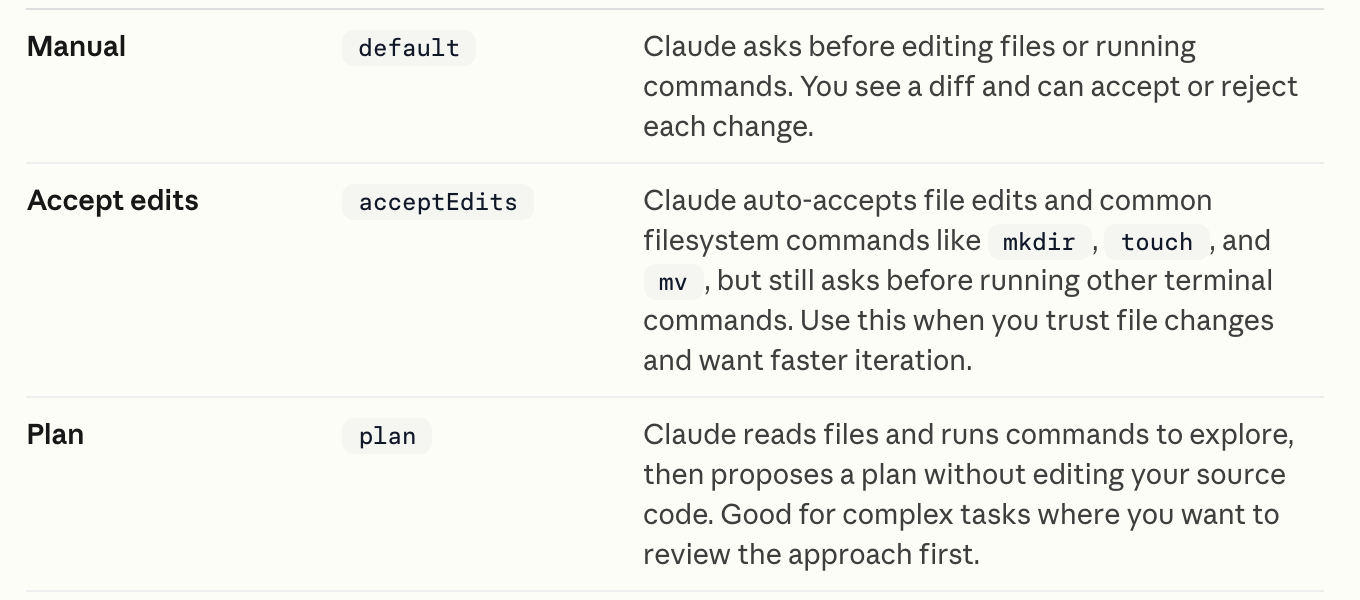 Anthropic’s Claude Code desktop docs, captured September 25, 2026.
On Manual, Claude asks before it edits a file or runs a command, and shows you the change to accept or reject, per Anthropic’s desktop docs. Ignore Accept edits, Auto and Bypass permissions on day one, and on a work laptop, ignore anyone who tells you to skip permissions.
Step 4: Give it your first job, which is you
The first thing I’d do is the thing I say all the time. Spend time riffing: I am a non-coder, I run a one-person operation, I manage a bot team. Tell it everything about you.
Then have it save that to a file, so every future session starts knowing who you are. Paste this and fill in the brackets (talk as long as you want):
I don't code. I work full time as [your job]. I [manage a team of 4 / work solo].
Outside work I [side project, goals, what eats my week].
Here's a normal week for me: [ramble for two minutes].

Save what you learned about me into a file called about-me.md in this folder.
Then read it back and give me the 3 biggest opportunities where you could
save me time this month, smallest first.
Time box: 15 minutes. Applicable for: anyone with a job and a to-do list (ops leads, HR, teachers, managers, people with a side business).
Step 5: Check the folder, not the chat, to know it worked
Chat can tell you it did something. Code actually does it, so the proof is a file.
- You saw a change to approve. On Manual, Claude shows you
about-me.mdbefore it writes it. Accept it. - The file is in your folder. Open the folder in Finder or File Explorer. If
about-me.mdisn’t there, it only talked, and nothing happened. - The opportunities sound like your week, not a generic productivity list. If they’re generic, tell it more and ask again.
If something reads wrong, ask it why in plain English. That’s the whole fix-it skill on day one.
Step 6: When it breaks, paste the error into a fresh chat
Something will break eventually, usually a long red error message. My fix is boring. Open a new chat window, paste it on another Claude Code chat window, ask it to fix it. That’s the worst thing that can happen.
Then ask what went wrong in layman’s terms. Most of the time the answer is “this thing was missing, I already fixed it.”
The bigger risk is scope creep. Before you build something real, write down what “done” looks like, or you’ll keep building forever.
I’m guilty of it right now. I’ve been editing an emulator game, a Pokemon game, for days, well past 24 hours of my own input, and I’m still adding customizations. Ironically, scope creep.
Step 7: Give it a to-do list so the ideas don’t pile up
Once it knows you, the ideas start coming, and they get messy fast. I used to leave notes files scattered everywhere. Now I keep the ideas in a free Linear account, which is like a Trello board for your AI, and knock them down like a checklist.
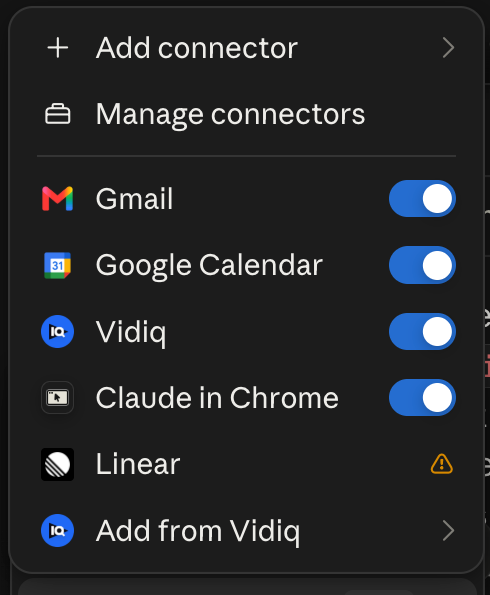 My Claude connectors menu, September 2026. Linear is already in there.
Claude has a Linear connector, and Anthropic’s desktop docs list Linear among the tools the Code tab can connect to. Treat this as week two, not day one.
You don’t have to be an expert to build real things
This is what Code gives you that chat doesn’t: it builds actual stuff in a real folder. This site is built with Claude Code too, on Astro, Tailwind and Vercel. Those names sound scary, and it’s a lot at first, but once you learn it, it becomes second nature.
My three Claude Code sites, on camera (6 min). The "free" is the hosting; Claude Code still needs Pro.
Before you build something big, know the basics of what you’re making: what the app needs to do, at a high level. You don’t need a course, just a plan on one page.
Other people coming from Cowork land in the same place. After moving projects over from Cowork, u/Jefferheffer wrote on r/ClaudeAI: “It’s not that much harder than cowork and dang it did a much better job at finding missing pieces of context.”
Nolen Jonker, a non-coder testing it for XDA, put it this way: “Turns out I didn’t need to use or even understand half of the coverage on Claude Code to actually benefit from it.”
Stay in chat if you’re not building anything
Be honest with yourself first. Are you gonna build an app? Are you gonna build anything serious? If you can do your work in chat, Cowork tools included, you don’t need Claude Code.
That’s a change from what I used to say. In July I told people to start with Cowork because Claude Code was the big brother. My view now: you don’t need it, but there’s no reason not to try it, because it’s a tab.
It’s not all or nothing. You can toggle between the tabs.
If you’re still deciding, Claude Cowork vs Claude Code draws the line between the two doors, and Claude guides maps the rest of what Claude does on a normal workday.
Should you learn the terminal? Not on day one
Would I tell a regular person to use the terminal? No.
That’s gonna slow you down. It’s gonna take you months. You’re gonna have to learn the shortcuts, the tricks, the interface, and if you’ve never used a terminal, trust me, it’s terrible.
I only use it because I started when Claude Code was terminal-only, and it took me weeks to get comfortable. I work in the terminal and VS Code because I like seeing the folders. That’s just me being used to it.
You don’t need to see them. Ask it to be your eyes: “Can you tell me the list of the folders in this directory? Let’s do some spring cleaning.” Most days, the app I actually open is Codex, not a terminal, because it looks simpler.
You lose nothing by starting in the app. Anthropic says the desktop app and the terminal run the “same underlying engine” and can work on the same project. A few power features (like agent teams) are terminal-only. If you want the Codex side, Codex vs Claude Code covers which one to open first.
My rule: you don’t have to be an expert, you just gotta get over the fear.
Where this comes from
The plan, tab and permission facts come from Anthropic’s pricing page, its Claude Code docs and the September 16 merge note, all checked September 25, 2026. The app and connector screenshots are mine.
What I haven’t done: run this exact first job in the desktop Code tab, since I work in the terminal, or test it on Windows.
Published September 25, 2026. Last reviewed September 25, 2026 against Anthropic’s docs and pricing page.

Written by
Chris AlarconChris Alarcon shows people who don’t code the boring Claude setup that actually works. He runs his one-person operation on these systems and shares every workflow, prompt, and tool combo in public. Start with the 15 prompts he uses every day.
The boring setup
It still won't know you tomorrow.
The Setup is one folder. Drop it into a Project, answer three questions, and Claude or ChatGPT writes your memory file and your voice file itself. It stops forgetting you, stops sounding like AI, and runs three real jobs by name. Twenty minutes tonight. No code. $39, 30-day refund.
See The Setup →The 15 AI prompts I actually use every day
I tested hundreds and kept the 15 that survived. You get them right away, then one short email from me every Tuesday.