
In this article
- 1 The Split in One Table (updated September 2026)
- 2 Claude Can Send Now (It Could Not Until August 2026)
- 3 ChatGPT Can Send, But It Has to Ask First
- 4 The Privacy Question Is Not “Which Tool,” It Is “How Did the Email Get There”
- 5 The Verdict Spine: Email Is Generalist Work, Not Creative Work
- 6 Run the Cross-Check Before Anything Important Leaves Your Outbox
- 7 Save Your Email Voice Once Instead of Re-Explaining It Every Week
- 8 Where Claude Genuinely Wins on Email
- 9 How This Comparison Was Built
- 10 Frequently Asked Questions
- 11 Pick By What You Need the Tool to Actually Do
Until late August 2026 this page opened with “Claude cannot send your email.” That is no longer true. Anthropic’s Gmail connector now sends, replies and forwards, and asks for your approval before each one by default.
ChatGPT has worked that way for a while. So both can hit send and both ask first.
Every page ranking for this query is arguing about tone. That is the wrong argument.
My rule for this one: tone is the cheapest thing to fix and the loudest thing in search results. What matters is which tool can touch your inbox, and how it treats the words you put in it.
Whether you searched “claude vs chatgpt for email,” “chatgpt vs claude for gmail,” or “can claude send emails,” the answer starts with what each tool can do and what happens to your data. Tone comes after. Below is the split, with the official docs behind each line.
The Split in One Table (updated September 2026)
| Claude | ChatGPT | |
|---|---|---|
| Reads your inbox | Yes, via Google Workspace connector | Yes, via connectors |
| Creates a draft | Yes, in Gmail | Yes |
| Sends the email | Yes, since August 2026. Asks for approval first by default | Yes, gated as an “important action” |
| Reads attachments | Metadata only, not content | See OpenAI’s connector docs per app |
| Trains on connector-retrieved email | No, stated explicitly | Not by default on Business, Enterprise, Edu |
| Trains on email you paste in | Possible on Free, Pro, Max if chat training is on | Possible on Free, Plus, Go, Pro if the setting is on |
| Available on the free tier | Yes, connectors are on all tiers | Connector behavior varies by tier |
| In-browser help | Claude in Chrome, beta, paid plans, labeled risky | Not covered here |
| Saved email voice | Projects with project instructions | Projects and custom GPTs |
The third row is the one most pages still get wrong.
Claude Can Send Now (It Could Not Until August 2026)
Until late August 2026 the Google Workspace connectors documentation said “Claude creates drafts in your Gmail account, but cannot send emails on your behalf,” with an FAQ line that read “Can Claude send emails on my behalf?
No.” That is the version most comparison pages still quote. It changed in late August 2026. The same FAQ line now reads:
Yes. Claude can send, reply to, and forward emails from Gmail, and asks for your approval by default before each of these actions.
The approval step is the important part. Ask Claude to reply to a thread and it drafts the reply, shows it to you, and waits. On Team and Enterprise plans an owner decides whether members can let those actions run without asking each time. I covered the switch the week it landed:
The 60-second version, from my Shorts: Claude just got a send button for your Gmail.
The setup screen makes more sense now too. Google’s OAuth screen mentions email sending permissions, and Claude actually uses them. The setting to leave on is the approval prompt.
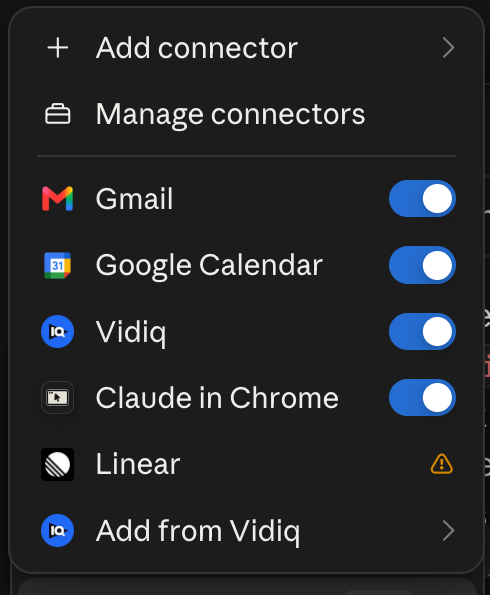
My own connector list in Cowork. Gmail is on, which is all the setup the send path needs; the approval prompt does the rest.
One more limit before you build a habit on this. Claude can’t open attachments through Gmail. It only sees the metadata. So “read the contract Sarah sent and reply” does not work end to end. You get the filename, not the file.
Connectors are available on all Claude tiers including free. On Team and Enterprise, an Owner has to enable them for the organization first.
ChatGPT Can Send, But It Has to Ask First
ChatGPT has sent email for a while, and its gate works the same way Claude’s does now. Sending isn’t silent. The useful detail is what OpenAI calls it. From the connectors documentation:
An important action is an app action that could have a meaningful effect outside ChatGPT… Examples may include: Sending or editing an email, message, comment, post…
The default behavior is spelled out on the same page: ChatGPT “uses Important actions, which allows reading from apps automatically but asks before actions that may have a meaningful effect outside ChatGPT.”
So it runs at two speeds. Reading your inbox is automatic. Sending stops and waits for you.
One catch the other pages on this skip. OpenAI’s Outlook email and calendar app documentation lists mail sending scopes while describing retrieval as read-only. So OpenAI’s own doc contradicts itself. On Outlook, test it on a low-stakes message before you trust it with a client thread.
The Privacy Question Is Not “Which Tool,” It Is “How Did the Email Get There”
This should change what you do tomorrow morning. On both platforms, copy-pasting an email into the chat is the worst option for your data.
Anthropic’s connector page states the protection clearly: “We do not train our models on your Gmail, Drive, or Calendar connector data.” Then it draws the line that matters.
If you are using our consumer products (e.g. Claude Free, Pro, and Max)… and you have chosen to allow us to use your chats… then any content you copy/paste from your Gmail, Drive, Calendar… may be used to improve our models.
Anthropic’s model training policy page says the same thing. Email Claude pulls through the connector is never trained on. The same email, pasted into a chat box on a consumer plan with training allowed, can be.
OpenAI draws its line by plan instead of by how the email got there. From the connectors doc: for ChatGPT Free, Plus, Go, and Pro users, OpenAI may use information accessed from apps to train models if your “Improve the model for everyone” setting is on.
For Business, Enterprise, and Edu customers, OpenAI does not use information accessed from connectors to train models by default.
So here’s the rule for both:
- Connector, on a work plan: the safest setup on either platform.
- Connector, on a consumer plan: protected on Claude for retrieved data; on ChatGPT, check your training setting.
- Copy-paste into a chat window on a consumer plan with training on: the riskiest setup, and it’s the one most people are using right now.
If your inbox contains client names, salary figures, legal threads, or anything under an NDA, that last bullet is why this section exists. Turn the setting off, or connect the account instead of pasting.
The Verdict Spine: Email Is Generalist Work, Not Creative Work
This is where you actually decide. It’s the same question the Claude Guides pillar is there to answer: which tool owns which job in your week.
My split across my own week, published in Claude Cowork vs ChatGPT Work, runs like this. ChatGPT is the well-rounded everyday generalist, and it doubles as the QA layer for Claude’s output. Claude is where the real work happens: creative work, scripts, content, building and refining.
Email is correspondence. Most of it is generalist work.
One more thing from my own week. Almost every comparison out there assumes “AI for email” means writing emails. My biggest AI email win isn’t drafting at all.
It’s management: my inbox system organizes, archives the junk, unsubscribes, and pings me on the stuff that matters, like a person reaching out or a bill that needs to be paid.
Drafting responses is the smaller half. If your inbox is cluttered, the most useful email automation you can build has nothing to do with writing (the full setup is in Cowork scheduled tasks).
Confirming a meeting, chasing an invoice, answering a vendor, summarizing a thread for your manager: that is ChatGPT’s lane by that split, and either tool can now carry it through to send.
The exception is real, though. Some email is writing. The resignation note, the pitch to a decision maker, the apology to a client who is already annoyed, the message where the wrong word costs you something.
Those are Claude tasks by the same split. And the approval prompt helps you there. Nothing you can’t take back goes out until you’ve read it.
Run the Cross-Check Before Anything Important Leaves Your Outbox
The rule I landed on in the Excel breakdown works here too: run the output past the other model before it goes out. If you are using ChatGPT, paste it into Claude and ask it to QA it.
For email, the trigger is easy to state.
Anything going to a client, your boss, or anyone who can fire you gets a second-model read before send.
It takes about thirty seconds, and it catches where AI email really goes wrong. That’s usually not grammar. It’s a confident tone that drifts, or a draft that agrees to a deadline you never agreed to.
Ask the second model one question: does this commit me to anything I did not intend to, and does the tone match a message to this person.
One catch. Pasting the draft into the second tool is exactly the copy-paste path from the privacy section, so on a consumer plan check your training setting first, or run the cross-check on a work account.
Save Your Email Voice Once Instead of Re-Explaining It Every Week
Both tools have the same fix for “it does not sound like me,” and it is a container you set up once.
Claude has Projects, where you can define project instructions for each project, including instructing Claude to use a more formal tone. The free tier is capped at 5 projects, so an “Email” project is a reasonable use of one of them.
ChatGPT has Projects too, with one rule to know, per OpenAI’s Projects doc: project instructions only apply inside the respective project and will override your global custom instructions. Your email project can be more formal than your default without you editing your global settings back and forth.
Custom GPTs go one step further, and OpenAI’s guide to creating a GPT spells out the split better than most people use it.
Use knowledge for reference material, not rules or behavior. Put rules, tone, and workflow guidance in instructions.
So here’s what you build. Your voice rules go in instructions: sentence length, greeting and sign-off, whether you use exclamation points, what you never say. Then 5 to 10 of your actual sent emails go in knowledge as reference material.
Building GPTs is paid-only and web-only, so plan around that.
If you want the longer comparison of those two containers, it is in Claude Projects vs custom GPTs.
One timing warning before you spend an evening on this. My manual-reps rule, also from the Excel breakdown, says don’t lock in a workflow before you have run it manually enough times to stop changing your mind.
So do not write your email voice instructions on day one. Draft emails the slow way for two or three weeks, keep the corrections you make by hand, and then turn those corrections into the instruction block.
Where Claude Genuinely Wins on Email
Now that both tools send and both ask first, the capability table is close to a tie. So the difference comes down to the writing.
Claude reads a hard email better. It holds your tone across a long reply, it doesn’t slide into the hedge-everything tone that gives AI email away, and when you tell it “shorter, and drop the apology” it actually does that instead of rephrasing the apology.
Leave the approval prompt on. That is your pause: nothing leaves your account until you have read it, no confirmation dialog you clicked past at 4:50 on a Friday. For anyone whose email carries legal, financial, or relationship weight, that prompt is worth more than the two seconds it costs.
Add the editing and refining edge from my split above, and it’s pretty clear: if your hard emails are the ones that matter, Claude is the better email tool for you.
How This Comparison Was Built
I didn’t run a side-by-side test for this page, and there are no screenshots of private inboxes on it.
What it is built on instead:
- Official vendor documentation, linked at every capability claim: Anthropic’s Google Workspace connectors page, model training policy page, Projects page, and Claude in Chrome page; OpenAI’s connectors page, Outlook app page, Projects page, and GPT creation guide.
- Verbatim quotes rather than paraphrase wherever the exact wording is the point, especially on sending and on training data.
- My published verdicts on adjacent questions, linked at each claim: the daily-driver split from the Cowork vs Work comparison, the cross-check rule and the manual-reps rule from the Excel breakdown.
One flagged inconsistency: OpenAI’s Outlook app documentation lists mail sending scopes while describing retrieval as read-only. Outlook users should verify behavior on a test message. Both companies change things often, so if their pages disagree with this one, trust theirs.
Updated September 5, 2026: Anthropic’s connector page flipped its FAQ from “Can Claude send emails on my behalf? No.” to “Yes,” with approval required by default. The title, table, and the two sections on sending were rewritten to match. I covered the change in a Short on August 25.
Frequently Asked Questions
Can Claude send emails from Gmail?
Yes, since late August 2026. Anthropic’s Google Workspace connector documentation now answers it directly: “Yes. Claude can send, reply to, and forward emails from Gmail, and asks for your approval by default before each of these actions.” Before that it was draft-only, and most pages on this topic still say so.
Can ChatGPT send an email without asking me?
Not by default. OpenAI classes sending an email as an “important action,” which it defines as an app action that could have a meaningful effect outside ChatGPT. The default configuration reads from connected apps automatically but asks before actions like sending, so the message is shown to you first.
Is it safer to paste an email or connect my account?
Connecting is safer on both platforms. Anthropic states it does not train on Gmail, Drive, or Calendar connector data, but says pasted content from those sources on Free, Pro, or Max may be used to improve models if you allowed chat training.
OpenAI may use information accessed from apps for training on Free, Plus, Go, and Pro when “Improve the model for everyone” is on, and does not by default on Business, Enterprise, and Edu.
Can Claude read my email attachments?
No. Anthropic’s connector documentation states that attachment content is not directly accessible through Gmail, metadata only. Claude can see that a file was attached and what it is called, but it cannot open the contents, so “read the attached contract and draft a reply” does not work end to end.
Do I need a paid plan to connect Claude to Gmail?
No. Google Workspace connectors are available on all Claude tiers including free. On Team and Enterprise plans, an Owner has to enable connectors for the organization before individual users can set them up.
Why does the Google consent screen mention email sending permissions?
Because Claude now uses them. Anthropic’s documentation says the OAuth screen mentions sending permissions and that Claude can send, reply to, and forward emails, but only with your explicit approval by default. On Team and Enterprise plans, owners decide whether members can let those actions run without asking each time.
Can Claude write directly inside my Gmail compose window?
Claude in Chrome, in beta on paid plans (Pro, Max, Team, and Enterprise), has built-in knowledge of how to navigate Gmail and other popular platforms, and Anthropic still labels it risky even with safety classifiers enabled.
Treat in-browser assistance as an experiment rather than the reliable path. The dependable Claude email surface is the Google Workspace connector, which drafts, and with your approval, sends.
Pick By What You Need the Tool to Actually Do
There’s no one winner here. It depends on your inbox.
- You want the whole loop handled, drafting through to send: either one now. Both send, both ask first by default, so pick by the rest of this list.
- Most of your email is routine correspondence: ChatGPT, per the generalist half of the daily-driver split.
- Your hard emails are the ones that matter: Claude. Better at voice and refining, and the approval prompt is your pause before anything irreversible.
- You handle confidential threads: connect the account instead of pasting, and check your training setting.
- You are on a free plan: Claude connectors work on free tiers, which is the cheapest real path into an AI-assisted inbox.
- You want it to sound like you every time: a project with instructions on either tool, built after two or three weeks of manual reps, per the Excel breakdown.
So decide how the email gets into the tool and who reads it before it goes out. Tone comes after that.
Published July 18, 2026. Updated September 5, 2026, when Anthropic’s Gmail connector gained send, reply and forward with approval required by default. Capabilities, permissions, and training-data policies checked against Anthropic’s and OpenAI’s official support documentation, all linked inline. No first-party head-to-head test was run for this page. These products change often; the official pages are the source of truth.

Written by
Chris AlarconChris Alarcon shows people who don’t code the boring Claude setup that actually works. He runs his one-person operation on these systems and shares every workflow, prompt, and tool combo in public. Start with the 15 prompts he uses every day.
The boring setup
It still won't know you tomorrow.
The Setup is one folder. Drop it into a Project, answer three questions, and Claude or ChatGPT writes your memory file and your voice file itself. It stops forgetting you, stops sounding like AI, and runs three real jobs by name. Twenty minutes tonight. No code. $39, 30-day refund.
See The Setup →The 15 AI prompts I actually use every day
I tested hundreds and kept the 15 that survived. You get them right away, then one short email from me every Tuesday.