In this article
- 1 The short answer, by who you are
- 2 The fork nobody writes about: bundle versus deliberate buy
- 3 What $30 of Grok actually gets you
- 4 What Grok actually does in my week
- 5 What Gemini gets you, at every price
- 6 I ran one real session, and it was not bad
- 7 What would actually make me switch
- 8 Where Gemini genuinely wins
- 9 How I checked this
- 10 So which one should you buy?
Which plan should you buy? Tap 3, get the verdict
Quick answer: These are not rivals, they are two different purchases. Gemini is a bundle you probably already own through a Google account, Workspace or a phone plan.
Grok is a $30 agent you deliberately buy, and what you are buying is Grok Bot running jobs while you are not there. So the real question is not “which is better.” It is “do I need to add Grok.”
Full disclosure before you read another line: I pay for Grok and I do not use Gemini.
I am not going to pretend that is neutral. What I will do is judge Gemini on its published facts and on the one real session I ran, show you both receipts, and tell you exactly what would make me switch.
The short answer, by who you are
| You are | Pick | Why |
|---|---|---|
| Already inside Google all day, Gmail and Docs | Gemini, and check what you already have | You may be paying for it and not know |
| Want better answers to questions you ask | Either, honestly | Both are good at this now. Not worth $30 |
| Want research reports without babysitting | Gemini free tier first | Deep Research is on the free plan |
| Want jobs that run on a schedule without you | Grok, $30 SuperGrok | This is the actual product difference |
| Chasing the top of the benchmarks | Neither, on principle | It changes every six weeks. Pick on workflow |
The two ladders, side by side
Both price lists in one place, read September 5, 2026.
| Grok (xAI) | Gemini (Google) | |
|---|---|---|
| Free | $0, web and X search, voice | $0, Gemini 3.6 Flash, Deep Research, Canvas, Live |
| Entry paid | SuperGrok $30, unlocks Grok Bot | AI Plus $4.99, Gemini in Gmail and Vids |
| Mid | SuperGrok Plus $100 | AI Pro $19.99, Docs, Flow, 5 TB |
| Top | Lite and Heavy, no published price | AI Ultra $99.99 (5x) / $199.99 (20x) |
| The thing you are really buying | Agents that run jobs on a cloud computer of their own | A model already wired into your documents |
| Already included with | nothing | Google One, Workspace, some carrier plans |
That table is the whole point. Google’s ladder starts lower and is often already paid for. Grok’s starts at $30 because the $30 is the agent.
The fork nobody writes about: bundle versus deliberate buy
Every other page on this search runs a benchmark table. That is the wrong axis.
Gemini arrives. It is in your Gmail, in Docs, in your Google account, and it is bundled into Workspace plans and some carrier deals.
I have it in a browser tab right now because it comes with my Verizon subscription. I did not choose it. It showed up.
Grok does not arrive. You go to x.ai and you pay $30.
That one difference decides more than any benchmark. One of these you are already carrying, and the other has to justify a new line on your card every month.
What $30 of Grok actually gets you
From x.ai’s pricing page, read September 5, 2026.
| Plan | Price | What it adds |
|---|---|---|
| Free | $0 | Real-time web and X search, voice mode, connectors |
| SuperGrok | $30/mo | Grok 4.6, Grok Bot access, connectors, higher rate limits, Expert, image and video generation |
| SuperGrok Plus | $100/mo | Everything above, plus 1080p video, significantly higher usage across Chat, Imagine, Voice and Build, priority access |
| SuperGrok Lite | not published | Appears in the comparison table with no price anywhere |
| SuperGrok Heavy | not published | Same |
Two things worth flagging.
The Lite and Heavy tiers have no published price. They sit in xAI’s own comparison table with buttons that take you to a checkout. That is genuinely under-reported and you should know it before you assume $30 and $100 are the whole ladder.
Grok Bot runs on a cloud computer of its own, not your laptop, and its usage is listed as its own included allowance. xAI’s Grok Bot page lists “Grok Bot’s own computer” and “Weekly Grok Bot usage included” as line items, and says Bots keep working “24/7, even when your laptop is closed.” Note the singular: per xAI’s docs all of your Bots share that one computer rather than getting one each. I have seen the separate-pool claim repeated a lot; what xAI actually publishes is the line above, so that is what I will stand behind.
Two smaller things that confuse people searching “Gemini vs Grok” in either order.
The $8 X Premium thing is not this. X Premium raises your Grok usage limits inside X. It is not a SuperGrok plan and it does not include Grok Bot. The direct plans are the $30 and $100 ones above.
Grok Build is separate from Grok Bot. Build is xAI’s app-building surface; Bot is the agent that runs jobs. My SuperGrok covers both, and Build is the one I have not properly played with yet.
Also worth knowing: x.ai now trades as SpaceXAI LLC. Same Grok, same pricing page.
What Grok actually does in my week
This is the part I can speak to first-hand, and it is why the $30 stays on my card.
I do not use Grok as a chat window. Just having another chat AI is not useful to me anymore. It is fine on the go, but for that I use ChatGPT, and sometimes Claude. For actual workflows I use Grok Bot, and that is a different product wearing the same brand.
I run three folders: growth, publishing, and intelligence.
Growth holds the scrapers. There are agents I named Shorts Hawk, Substack Hawk and Plan Watch, and their whole job is to scrape my own analytics three to four times a day. Shortly after a post goes out, then again through the day. They watch whether anything is popping, whether something is over-indexing, and they track it across the week.
Then they drop it in a ledger.
That ledger is the actual point. It is not “here are your numbers,” it is “Chris, this is working, do more of this next week.” I stopped posting into the wind and started running experiments I can read back.
Publishing does something I could never automate before: it uploads my long-form YouTube videos for me. Same for my Substack notes.
Intelligence runs a news scout that scrapes X, plus an agent that watches YouTube videos from people I follow and summarizes what is worth applying.
I authenticated once and they have been running since. I had assumed each sub-agent got its own machine; per xAI’s Grok Bot docs that is not how it works. “All of your Bots use the same persistent cloud computer. They share files, browser sessions, and app logins,” and the computer is scoped to your account rather than to a single Bot.
Which is exactly why authenticating once was enough. Worth knowing before you assume the Bots are walled off from each other, because they are not.
It feels like a little mini swarm. A small team doing its thing.
I would not hand that to Gemini, because Gemini does not do it. That is not a knock on the model. It is a different shape of product.
For what it is worth, this is roughly where the people who have tested both land too. VKTR’s editorial team, who ran all three of ChatGPT, Gemini and Grok head to head, framed the choice the same way I do: as a question of which one fits the work rather than which scores highest.
What Gemini gets you, at every price
From Google’s subscription page, verified September 5, 2026.
| Plan | Price | What you get |
|---|---|---|
| Free | $0 | Gemini 3.6 Flash, varying access to 3.1 Pro, image generation, Deep Research, Gemini Live, Canvas |
| Google AI Plus | $4.99/mo | 200 Flow credits, Gemini in Gmail and Vids, custom tool creation, 400 GB storage |
| Google AI Pro | $19.99/mo | Gemini in Gmail, Docs and Vids, Flow with 1,000 credits, 5 TB, YouTube Premium Lite |
| Google AI Ultra | $99.99/mo | 5x higher limits than Pro, first access to Deep Think and Gemini Spark, Project Genie |
| Google AI Ultra 20x | $199.99/mo | 20x higher limits than Pro |
The correction that saves people money: Deep Research is on the free tier. Google lists it right there in the free plan’s feature set. If research reports are what you wanted Gemini for, you may not need to pay anything at all.
The correction that costs people money: Deep Think and Gemini Spark are Ultra features. They are listed under the $99.99 plan as “first access,” not under the $19.99 one. A lot of people upgrade to AI Pro expecting Deep Think and do not get it.
I ran one real session, and it was not bad
I do not use Gemini, so I am not going to review it. But I did sit down and actually use it for a few minutes rather than write about it from a spec sheet.
I gave it a setup prompt: structure the visual hierarchy and site architecture for a cookie showcase website, outline the pages, navigation flow and content blocks needed for launch.
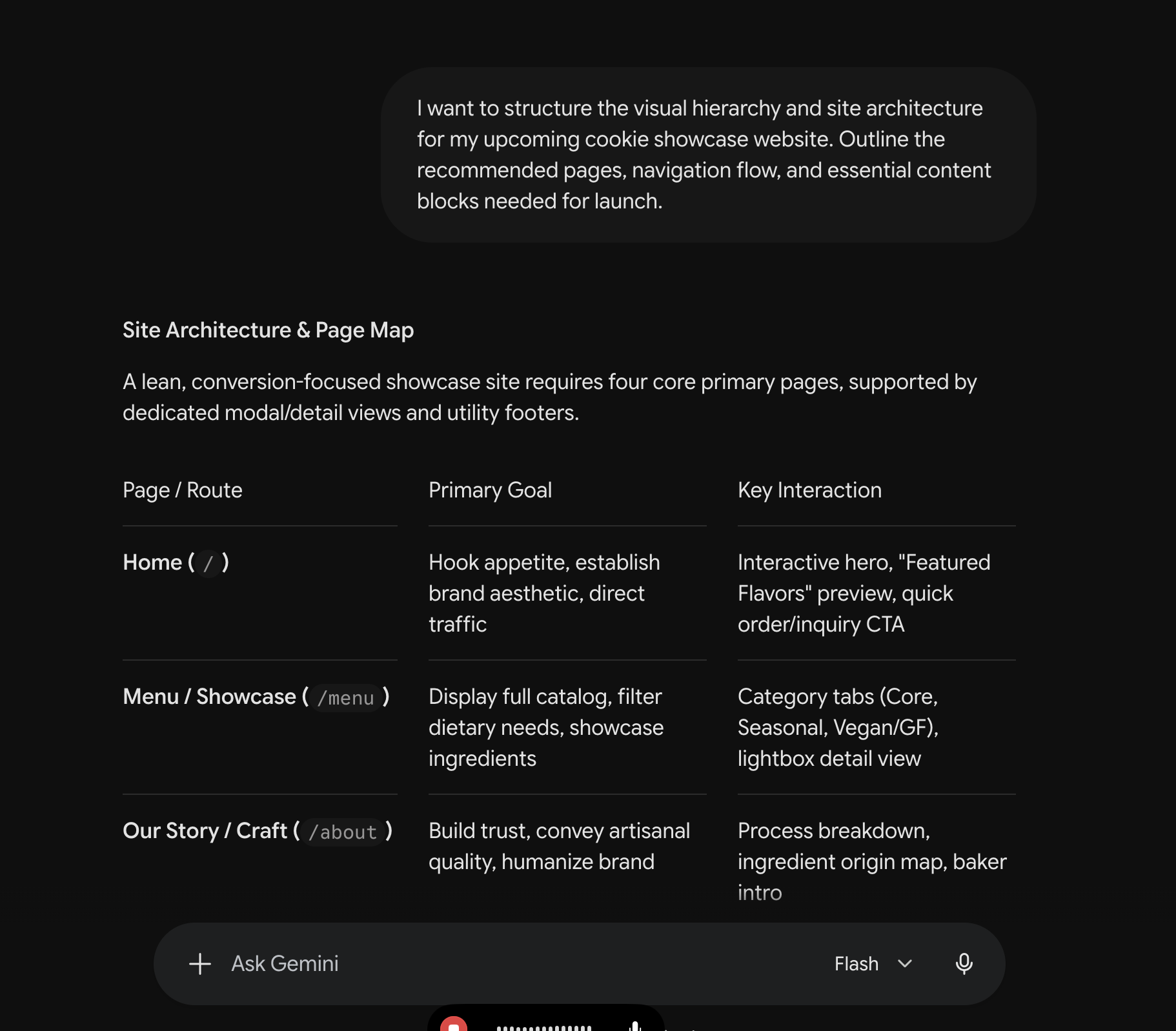 My actual prompt and the answer that came back, running on Flash. It answered fast.
Honestly? A little verbose. It gave me a page map table when I would have taken three lines.
Then I asked it to draw it.
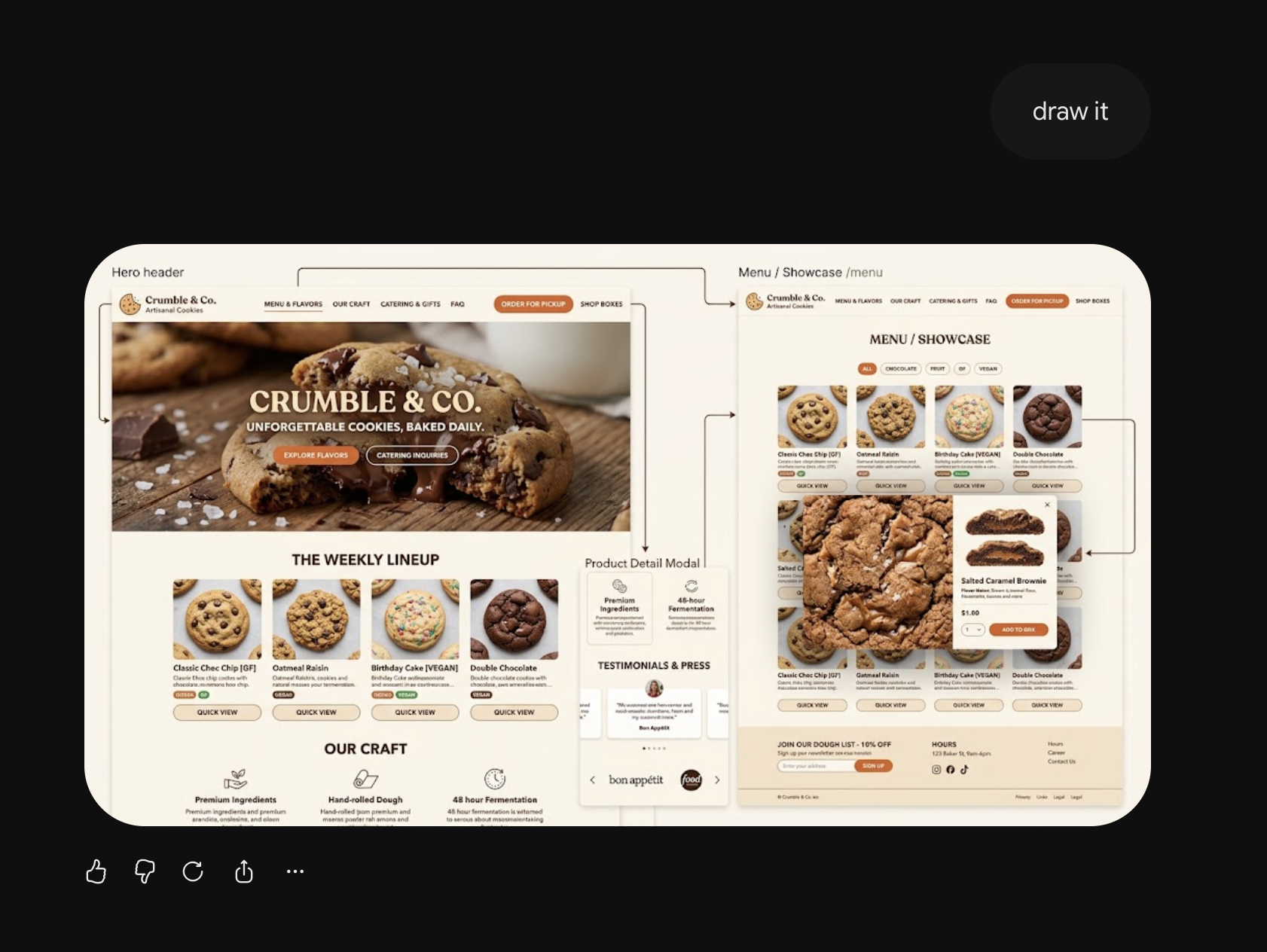 Same session, one follow-up. It generated an actual site mockup with the page flow drawn between screens.
That is pretty impressive. And it was fast.
So no, it is not a bad model. I want to be clear about that, because “I do not use it” and “it is not good” are different statements and the internet keeps confusing them.
I do not use it because I do not have a specific use case for it. I already have Codex, Claude and Grok. That is genuinely too many options for one person to run well, and adding a fourth without a job for it is how you end up paying for four things and getting good at none.
My wife uses Gemini. It is fine.
What would actually make me switch
I want to answer this properly rather than leave it as a shrug, because it is the only honest version of a verdict I can give you.
I would switch if it became more powerful than Fable, or just as powerful for less money. That is the whole condition. Not vibes, not a benchmark chart, not a launch video.
And I would not bet against it. I watched Grok go from a thing I did not use and thought was laughable to one of my main drivers. Google has the ability to come back the same way, and the benchmarks are trending in the right direction.
I also genuinely like some of their other products. Notebook LM is good. I just do not reach for it often.
So am I opposed to Gemini? No. I have too many options right now, and that is a real constraint, not a verdict on the model.
Where Gemini genuinely wins
Let me make the case I am not naturally inclined to make.
It is already paid for. If your employer has Workspace, or you have Google One, or it came with your phone plan the way it came with mine, the marginal cost of using Gemini today is zero. Nothing on this page beats free.
It is where your documents already are. Grok is not in your Gmail and it is not in your Docs. For a lot of office work, being one click from the file beats being a slightly different model.
Deep Research is on the free tier. Grok has nothing at $0 that competes with that.
Notebook LM is a genuinely good product and it has no real equivalent on the Grok side.
If you already have Gemini and your work is documents, email and research, the correct answer to “should I add Grok” is probably no.
How I checked this
Grok prices, tiers and the Grok Bot inclusion come from x.ai’s pricing page, read September 5, 2026. Gemini prices and the tier placement of Deep Research, Deep Think and Gemini Spark come from Google’s subscriptions page, read the same day.
The Grok Bot workflow is my own setup, running since late August 2026. The two Gemini screenshots are one session I ran on September 5, 2026, with the picker set to Flash. The account comes bundled with my Verizon plan, so I have not checked which tier it resolves to. That session is the only Gemini use behind this page. I have not tested Gemini’s paid tiers, I have not benchmarked either product, and I have not compared answer quality across them at any scale. Where I have an opinion, it is labeled as mine.
The 60-second version, from my Shorts: Grok builds the app from one sentence and hands you the link.
So which one should you buy?
- You already have Gemini through Google or a carrier: use it, and do not add anything until it fails you at a specific job.
- You want research reports for free: Gemini’s free tier. Deep Research is included.
- You were about to buy AI Pro for Deep Think: stop. That is a $99.99 feature.
- You want jobs that run without you: Grok, $30. That is what Grok Bot is and nothing on Google’s ladder is the same shape.
- You have three AI subscriptions already: do not add a fourth until one of them stops doing a job you need.
If Grok is the side you are leaning toward, what is Grok Bot covers the agent properly and is Grok Pro worth it covers the money. For the cross-vendor version of this decision, try Grok vs Claude or Claude vs Gemini.
Every plan and price I track sits on the AI plan tracker.
This post is part of Claude at Work, the hub for using AI at your job without code.
Published September 5, 2026. All prices and tier contents checked that day against x.ai and Google’s own subscription pages, linked inline. Both companies change these often, and two Grok tiers still have no published price, so open the live pages before you buy.
Plan-change alerts
I read the AI pricing pages so you don't have to.
Get one short email the day any plan on the tracker changes price or limits — Claude, ChatGPT, Gemini, Copilot, Grok, Perplexity. The kind of change I catch: Fable 5 quietly leaving Claude Pro's plan limits, Copilot Pro's consumer plan disappearing — both documented and dated on this tracker's changelog. No schedule, no filler: a change happens, you hear about it.

Written by
Chris AlarconChris Alarcon builds Ship Lean: the boring Claude and AI setups that actually work, handed to people who don’t code. He runs his one-person operation on these systems, around a full-time job, and shares every workflow, prompt, and tool combo in public. Start with the 15 prompts he uses every day.
Work With Me
Setting this up for your team?
I do that. The right plan per seat, the boring setup that makes it stick, and the first three chores handed off. A 2-hour workshop or a done-with-you build, for teams of 2-50.
See how it works →