How to Use Claude With Obsidian: The 3-Folder Setup I'd Use If I Started Over
Chris Alarcon ·
$ you'll have
An Obsidian vault Claude can read and file into, with three folders and a short rules note.
ok your job, with the steps below
- Cost
- Obsidian is free. Folder access needs a paid Claude plan.
- Tools
- Obsidian · Claude desktop app
Why this setup, and what you need
I heard people hyping up Claude for notes, tried it a bunch of times, and it didn’t work. Then I saw the actual problem.
We do mad research, we do mad things and then we never really learn from our mistakes. We never really learned anything, because we’re just always starting from scratch.
That’s when the idea of the vault came into mind. A thumbnail study, a book, something I read on X. None of it was captured anywhere Claude could find again.
Now it is. My vault is called iris-vault, it lives in Obsidian, and Claude Code and Codex read it and file into it every week. The copy my agents write to has 402 pages today, and 462 git commits touched it in the last 30 days.
It also got buried in junk once. That mess is why the rules in step 5 exist.
If I was starting from scratch, I’ll just keep it simple. You can keep it manual. That’s what I would do.
So this is that version: one vault, three folders, Claude doing the filing, and a short rules note. No plugin.
What you need (as of October 18, 2026)
- Obsidian, free. Obsidian’s pricing page says the app is free, commercial use included. Sync to your phone is optional, $4 a month billed yearly.
- A paid Claude plan for folder access. Anthropic’s Cowork guide lists Pro, Max, Team and Enterprise. On Free, paste a note into a chat or a project instead (how to use Claude Projects).
- The Claude desktop app, open while it works. Since October 6, Cowork tasks on Pro and Max run in the cloud, and Claude reaches your connected folders through the desktop app, per Anthropic’s surfaces article.
- One folder for business notes. Supplier calls, client notes, what you read. Not your diary.
- A work laptop? Files Claude uses in a cloud task are processed on Anthropic’s servers. Ask IT before a company folder goes in.
- Skip for now: community plugins, MCP servers and the Obsidian CLI. My vault runs zero community plugins.
The fear is real. One r/ObsidianMD user put it this way: “I cannot bear the idea of giving an AI company access to my personal notes just for the minimal organizational improvement.” That’s why the folder you connect holds business notes only.
Step 1: Make one vault for what you read, think and learn
Obsidian > create a new vault > pick where the folder lives
All you’re doing is creating a vault, a folder, where you organize your information as you go: stuff you read, ideas, stuff you learn. That’s pretty much it.
Obsidian’s own data storage page says why Claude can work in it: “A vault is a folder on your local file system, including any subfolders.” The notes are plain text files. Anything that can read a folder can read your vault.
Put the vault somewhere you’ll find it, like Documents. You’ll point Claude at that exact folder in step 4.
Applicable for: an Etsy shop, a herb farm, a design business, anyone who reads a book and forgets it by Friday.
Step 2: Split it into three folders: knowledge, operations, raw
Obsidian’s file list > the New folder button at the top (three times)
I think we stole it from Karpathy. You have just three folders: knowledge, an operating system, and the processing one, the raw folder.
my-vault/
├── knowledge/    what you learned: book notes, research, decisions
├── operations/   how your business runs: your checklists and SOPs
└── raw/          the inbox: screenshots, links, half-thoughts
Andrej Karpathy’s LLM wiki gist actually describes three layers, not three folders. Raw sources, the wiki, and a schema file (CLAUDE.md or AGENTS.md) holding the rules. My knowledge folder is his wiki, raw is his raw sources, and the rules note in step 5 is his schema.
Operations is my own addition, because a business needs a place for how it runs.
His line sums up the split: “Obsidian is the IDE; the LLM is the programmer; the wiki is the codebase.”

I build mine with his method on camera in AI Second Brains Clearly Explained (15 min).
Step 3: Drop anything that sparks an idea into raw
Drag the file, or paste the note, into raw/
Let’s say you take a screenshot on X and you’re like, this inspired me, it made me think about this. You drop it in raw. That’s the whole step.
In my case it’s automated. I tell Dots, my ChatGPT inbox bot. Dots adds it to the raw folder, and a Codex automation on a schedule picks it up and adds it to the wiki. That’s a lot of steps though.
It can become a complex system. All you gotta do is make it simple. Start by dropping things in raw by hand.
Step 4: Point Claude at the vault and let it do the filing
Claude desktop app > new conversation > Project or folder > Add folder (pick the vault, per my Claude Cowork walkthrough)
And then have AI do it for you. That’s the hack. ‘Cause if you do it yourself you’re not gonna be consistent. Even if you document consistently, following the rules consistently? AI is better at that.
Claude asks before it touches the folder. Read the box once:
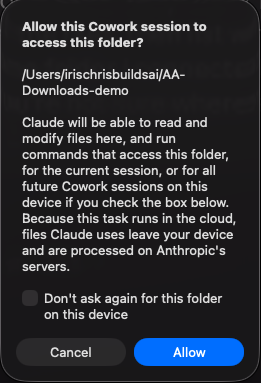 Cowork’s folder permission box on my Mac mini, September 25, 2026.
Then copy this into the chat:
Read everything in raw/. For each item, find the note in knowledge/
it belongs in and add it there. Only make a new note if nothing fits.
Don't touch operations/. When you're done, list every note you changed,
then delete what you filed from raw/.
Cowork asks your permission before it permanently deletes anything, so you’ll see that last part coming.
There are three ways to hook Claude up to the vault. Here’s how they compare:
| Way to connect | Can it file notes? | Setup | Who it fits |
|---|---|---|---|
| Cowork with the vault folder added | Yes | A few clicks, paid plan | Most people. Start here |
| Claude Code on the vault folder | Yes | Desktop app or terminal | You want everything to stay on your computer |
| Copy a note into a chat or project | No, read only | None, works on Free | You just want answers about one note |
Plugins and MCP servers are a fourth door. I’ve used none of them, and you don’t need one for a folder of notes.
I run the second row. Claude Code can edit my folder, and as I said back in September, “I need to see the folders, otherwise I feel like I’m gonna get a lot of trash in there.” Anthropic’s own answer for tasks that stay on your machine is the same tool: use Claude Code in the desktop app.
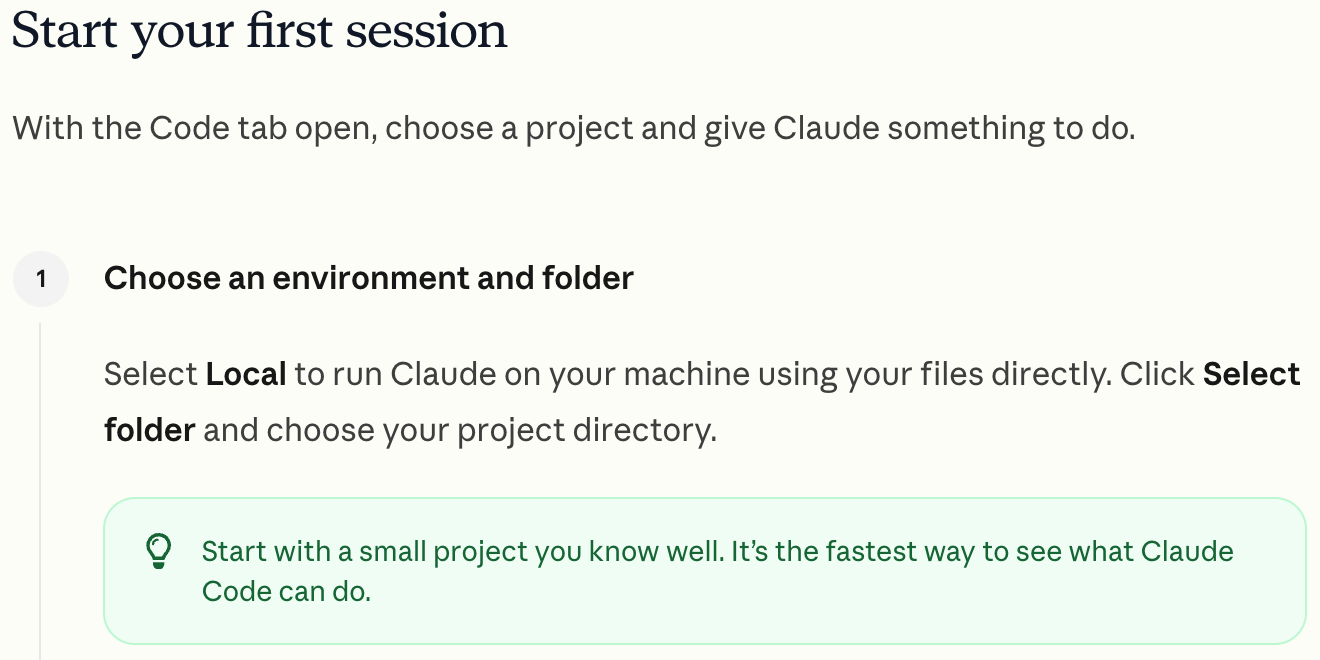 Anthropic’s Claude Code desktop quickstart, read September 25, 2026.
More Claude setups for your business, in order, live on Claude guides.
Step 5: Write your rules after the first mess
A note called CLAUDE.md in the vault’s top folder, or Cowork’s folder instructions
I didn’t start with rules. I started with a mess.
One of the worst mess is when we used Hermes to collect data from Reddit and all these other pain points, and it just became a mess. Hermes is an AI agent we had collecting research.
We just started collecting mad data for no reason and then it just kept climbing up, and to make matters even worse, it wasn’t even processing consistently, so we just had this folder climb up with a lot of junk.
My vault log has the receipt. On June 3 we deleted the graveyard of already-processed raw files: 2,247 files, 78MB, 94% of the whole vault. The vault went from 83MB to 4.7MB.
So this is why we have to create rules on how to use the wiki. It’s a lot of iteration. My rules note now opens with a routing table: knowledge for research and decisions, operations for SOPs only, raw gets drained and then deleted, and run reports never go in the vault.
Your first version can be five lines. Copy this into a note called CLAUDE.md at the top of your vault:
New notes go in knowledge/. Never create a folder at the top level.
Before you make a new note, check if one already exists. Add to it instead.
Never delete or rewrite anything in operations/.
After you file something from raw/, delete it from raw/.
End every session with a list of the notes you changed.
Claude Code reads a CLAUDE.md in the folder you start it in when the session launches. In Cowork, put the same lines in the folder instructions, which Anthropic says add context “when you select a local folder on desktop.”
Where it breaks: Claude can still ignore it. Anthropic’s memory docs say Claude treats CLAUDE.md “as context, not enforced configuration.” A rule Claude only reads is a suggestion.
So keep an undo. Obsidian’s File recovery core plugin keeps snapshots of your notes, and a copy of the folder before a big cleanup costs nothing. Mine sits in git, plus a lint script every page has to pass.
Check it worked: ask a question only your notes can answer
New conversation with the vault folder added > ask about something you filed
It’s not just asking. It’s something that happens in the background. On a normal day it’ll reference it itself if I ask a question.
When you start developing something, you’re like, have you done this before? You can point it there.
You read a book and you’re like, damn, can you look at this framework and see how we can apply it to this problem? You can do it now.
Try one of those:
Check knowledge/ first. Have I already looked into [the thing you're
about to do]? Tell me which notes you used.
It worked if:
- The answer names the notes it read.
- It uses your words, numbers or names, not a generic answer.
- raw/ is emptier than before, and nothing new showed up at the top level.
If it answers like a fresh chat, it didn’t read the folder. Check that the vault is the folder you added.
Keep it a little manual until the habit sticks
The problem was starting from scratch every time. Three folders and Claude doing the filing fixes that, and you can build the automation later. I did, and it took a lot of steps to get right.
You just gotta make sure you keep it simple and keep it a little manual at first.
So make the three folders tonight, drop one thing you read this week into raw, and ask Claude to file it.
FAQ
Do I need a plugin to use Claude with Obsidian?
No. Obsidian stores notes as plain Markdown files in a vault, and a vault is just a folder on your computer, so Claude can read and edit it through folder access in Cowork or Claude Code. Plugins and MCP servers are optional extras, and my own vault runs zero community plugins.
Does Obsidian need to be open while Claude edits my vault?
No. Claude works on the files in the folder, and Obsidian automatically refreshes your vault when files change outside the app. The Claude desktop app is the one that has to stay open, because Cowork reaches your local folders through it.
Can I use Claude with Obsidian on the free plan?
Not with folder access. Anthropic lists Cowork on paid plans only (Pro, Max, Team and Enterprise). On Free, copy a note into a chat or a Claude project and ask about it there; Claude just can’t file anything back into your vault.
Is an Obsidian MCP server safe to use with Claude?
Only if you trust who built it. Anthropic’s MCP docs say to verify you trust each server before connecting it, and warn that servers that fetch external content can expose you to prompt injection. For a notes folder, plain folder access does the job without one.
Will Claude mess up my Obsidian notes?
It can, mostly by piling up junk and duplicate notes rather than deleting things. Give it one folder, a short rules note about where new notes go, and an undo. Cowork asks before it permanently deletes files, and Obsidian’s File recovery core plugin (on in my vault) keeps snapshots of your notes.
Where this comes from
The Obsidian, Cowork and CLAUDE.md facts come from Obsidian’s and Anthropic’s own pages, read October 18, 2026. The vault, its log and the June 3 cleanup are mine, and the page count is the copy my agents write to.
I haven’t used an Obsidian plugin or MCP server, and I haven’t timed the starter setup.
Published October 18, 2026. Checked that day against Obsidian’s and Anthropic’s own pages, linked inline.

Written by
Chris AlarconChris Alarcon shows people who don’t code the boring Claude setup that actually works. He runs his one-person operation on these systems and shares every workflow, prompt, and tool combo in public. Start with the free 1-page setup.
The boring setup
It still won't know you tomorrow.
The Setup is one folder. Drop it into a Project, answer three questions, and Claude or ChatGPT writes your memory file and your voice file itself. It stops forgetting you, stops sounding like AI, and runs three real jobs by name. Twenty minutes tonight. No code. $39, 30-day refund.
See The Setup →Get the free 1-page setup
The boring 1-page setup. No code, no jargon. Get it now, then one short email from me each Tuesday.
