How to Turn Voice Memos Into Organized Notes With AI: 4 Steps, Then Ask Them Before You Write (2026)
Chris Alarcon ·
$ you'll have
Every voice memo lands as a lightly cleaned note in one place you can ask: what have I said about this?
ok your job, with the steps below
- Cost
- Free with iPhone Voice Memos and a Claude or ChatGPT Project; Grok Bot from $30 a month if you want an agent to file memos for you
- Tools
- iPhone Voice Memos · ChatGPT or Claude · Grok Bot (optional)
Why this setup, and what you need
What have you already said about the thing you’re working on today?
You don’t remember. You said it into your phone three weeks ago, felt smart for a minute, and it went into a list you’ll never play back.
That list is the reason I keep memos at all. You can pick your brain on topics that you’ve talked about before, you just forget exactly.
My memo library had 124 recorded memos in it on October 29. Before I make something, I ask it what I’ve already said. Here’s that question, asked about Dots, OpenAI’s agent inside ChatGPT:
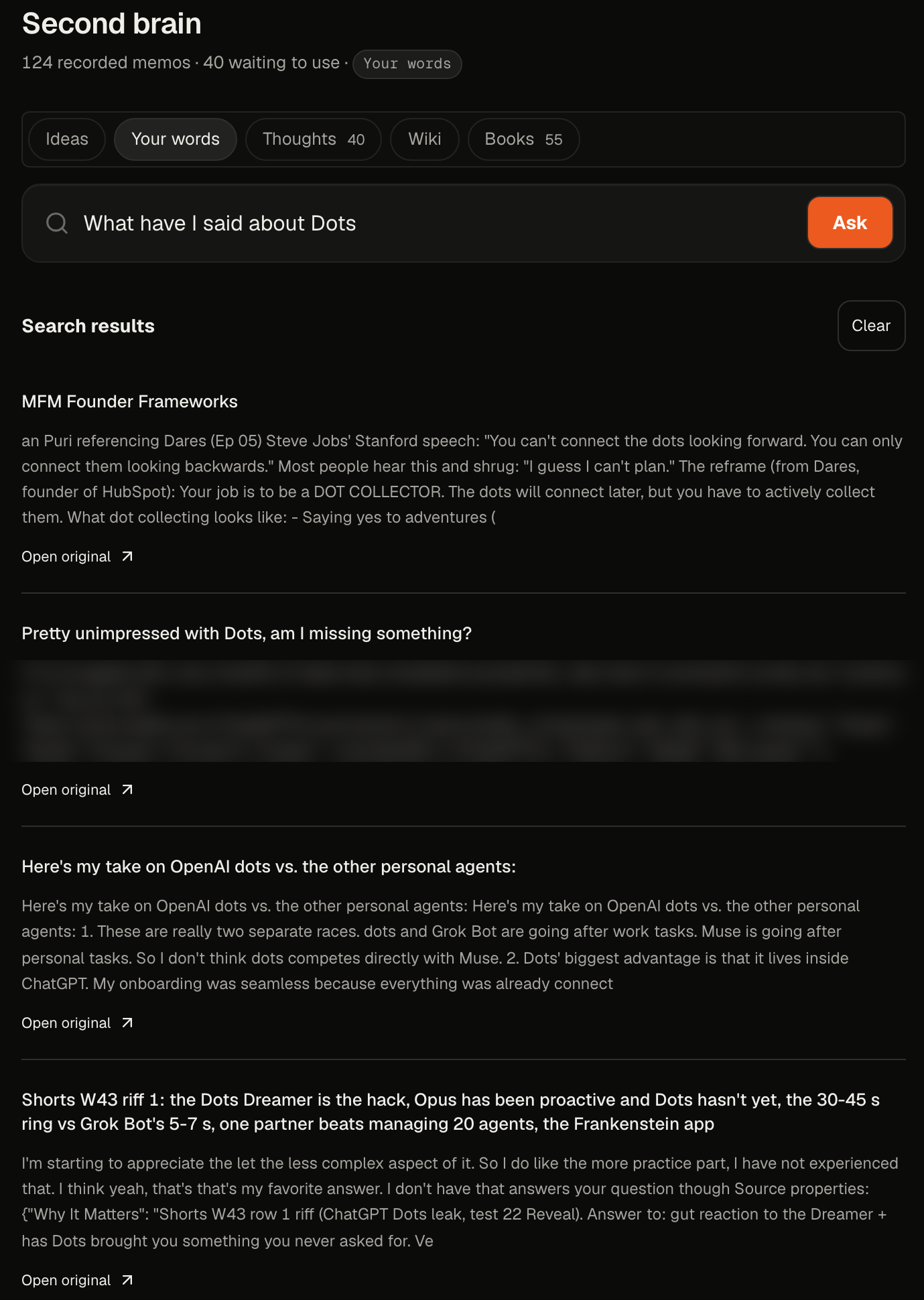 My Studio app, October 29, 2026. One question, asked of my memos and saved notes.
You don’t need my app to get this. You need four steps:
- Talk to something that writes it down.
- Clean it lightly. Keep your words.
- Keep every memo in one pile.
- Ask the pile before you make something.
What you need (as of October 29, 2026)
- A phone that transcribes. iPhone Voice Memos transcribes speech on iPhone 12 or later, in English and nine other languages, not in every region, per Apple’s Voice Memos guide.
- One place that can hold files and answer questions. A Claude Project works on the free plan (up to five projects), per Anthropic’s Projects page. ChatGPT Projects work too.
- Optional: an agent that files memos for you. Grok Bot comes with The X Subscription’s Premium plan, $30 a month, per xAI’s pricing docs.
- A work phone or work account? Memos about clients or coworkers end up in that AI’s cloud. Check with IT before you point it at company stuff.
- Skip for now: paid memo apps. Your phone already transcribes, and the first two steps cost nothing.
Step 1: Talk to something that writes it down for you
Two ways in. Pick one.
The free way: record in Voice Memos, open the recording, then tap the recording > Copy Transcript. That’s the whole transcript, ready to paste.
The way I’d tell a friend to start: get an agent you can just talk to, and let it file the memo. For a beginner with an iPhone, my pick is Grok Bot. Sign up with that, the best 15 dollars you could spend.
A correction on that $15, because I called it a trial. It’s a discount, not a free trial.
My words were “first month of 50% off if you’re lucky.” The “if you’re lucky” is mine, because offers move. On October 29, grok.com/plans showed Premium at $15 for the first month, “50% off for 1 month, then $30 monthly.” Check the page the day you sign up.
xAI’s Grok Bot FAQ also says some accounts see a Start Trial button. That one is a usage credit with a 7-day window, and it never turns into a paid plan. One catch for iPhone people: a trial started through the App Store in the iOS app turns into a paid Apple subscription unless you cancel first.
Then give it a place to drop things. I’d said “give it access to your computer, a folder.” Close, with one fix: Grok Bot works from its own cloud computer, and it only runs commands on your Mac when you turn that on and approve them, per xAI’s apps page. Point it at your Notion instead, one of the apps it connects.
Here’s what each option does with a memo today:
| Where you talk | What it does with a memo | Cost, checked October 29, 2026 |
|---|---|---|
| iPhone Voice Memos | Transcribes on the phone. Copy Transcript, and search finds words inside transcripts | Free, iPhone 12 or later |
| ChatGPT | Takes the audio file (M4A, MP3, WAV and more, up to 512 MB), transcribes it, talks about it | Paid plans only. Not on Free |
| Claude | Takes the text, not the audio. Paste the transcript | Free plan works for text |
| Grok Bot | You dictate or voice chat to it, and tell it to drop each memo in your Notion | Premium, $30 a month. $15 first month on grok.com on Oct 29 |
ChatGPT’s audio rules are on OpenAI’s file uploads article. Claude’s no-audio list is on Anthropic’s upload page. If your real question is meetings, not memos, Claude vs ChatGPT for meeting notes covers recording calls.
Grok Bot did my capture in September. Today my Dot in ChatGPT does the same job: I talk, it files.
Applicable for: anyone who thinks out loud in the car, on a walk, or between calls.
Step 2: Clean it lightly and keep your own words
Fix the sentences. Keep the voice.
My memos get a little bit polished: sentences, grammar, the ums deleted. That’s it. Not raw, and not rewritten. My September 16 morning memo is filed under exactly that label: “lightly cleaned for readability. Repeated filler is removed.”
Why not let the AI summarize? Because what you want back later is your line, not its recap. A summary of a riff reads like everyone else.
Paste this into the agent’s instructions, or into your Project’s instructions:
You're my memo clerk. When I send a voice memo or transcript:
1. Clean it lightly: fix sentences and grammar, remove ums,
   repeats and false starts. Keep my words. Do not summarize,
   do not add ideas, do not make it sound smarter.
2. Give it a short title that says what I said, plus the date.
3. Save it as one new entry in my "Memos" page or folder.
4. Reply with the title only.
One exception in my own setup: riffs I record for a video are stored word for word, on purpose.
Applicable for: anyone who’ll reuse their own words in a post, a pitch, a proposal or a video.
Step 3: Keep every memo in one pile you can search
One pile. Not five apps.
Mine lands in one Notion database first. My Mac mini reads it every few minutes and keeps a private search copy, the vector database I keep talking about. That just means a search that matches meaning, not only exact words. No outside service touches that copy.
You don’t need any of that. The no-Mac-mini version:
- Keep one running doc per month, like “Memos, October 2026.” Paste each cleaned memo at the bottom with its date.
- Drop that doc into one Claude or ChatGPT Project at the end of the month. Then every chat in that Project can read your memos.
- Watch the file cap. ChatGPT Projects cap how many files they hold, and the cap depends on your plan; check OpenAI’s file uploads article. One doc per month keeps you under it for years.
On paid Claude plans, Projects switch into a search mode automatically as files pile up, with “up to 10x” the room, per Anthropic. That’s most of what my setup does, without the hardware. The step-by-step for the Project itself is in how to use Claude Projects.
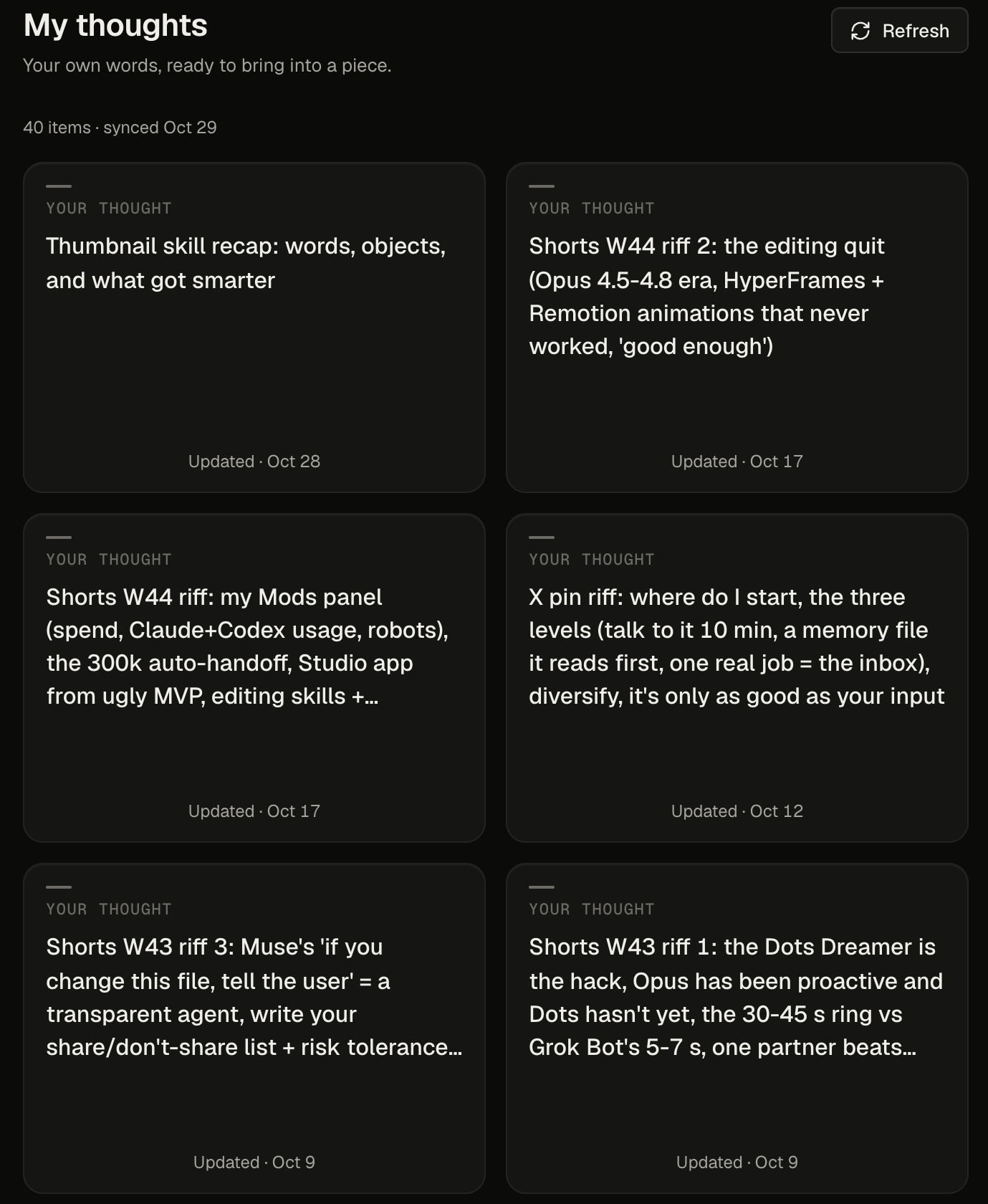 My memo shelf in Studio, October 29, 2026. Forty memos not used yet.
Step 4: Ask your memos before you make something
The memo pays off here, or never.
Say I’m about to talk about Dots. Before I write a word, we check the pile: what specific thing are we talking about, and what have we said about this? And then we use them as supporting points.
Then I riff.
On October 29 that question pulled back four hits, the ones in my screenshot up top. Two are mine, like my take on Dots vs the other personal agents. Two older Dots riffs, from October 4, became my video OpenAI Dots Tutorial for Beginners.
Steal the question:
I'm about to make something about [topic].
Search my memos. What have I said about [topic]?
Quote my exact lines, with the date of each memo.
Then tell me where I changed my mind.
Don't add anything I didn't say.
The other two hits weren’t mine: a podcast note and a Reddit thread I’d saved. My search mixes my memos with things I saved from other people, so read the result before you quote it as yours.
If you write with AI, this is the step that keeps it sounding like you. I go deeper on that in how I write blog posts with AI without slop.
Check it worked: ask about something you know you said
Ask it a question you already know the answer to.
Pick a topic you remember memoing about. Ask the pile what you said.
- Working: it quotes you, in your words, with dates.
- Not working: it answers in general terms with no dates. That usually means the file isn’t in the Project, or you asked in a chat outside it.
Then try one you forgot. That’s the moment the habit sticks.
My memos back up the work now. They don’t start it
Memos aren’t a daily ritual for me. It just happens sporadically, not all the time.
And they changed jobs. We collect so much now that a memo is icing on top. They’re never really content ideas anymore. They just support my content.
One I’ll count, barely: item three on my September 16 morning memo was building my own app. Sure, call that a memo.
People who think out loud hit the same wall. On Hacker News, jxcl put it this way: “The problem of course is later going back and listening to the voice memo and getting organized information out of what essentially turns into me rambling to myself.”
Another commenter, generalizations, said it shorter on Hacker News: “I like thinking out loud, but don’t like having to listen to voice memos.” With a pile you can ask, you never have to listen back.
Your old thoughts are only worth something if you can ask them
So, what have you already said about the thing you’re working on? With one pile and one question, you get your own lines back with dates, instead of a shrug.
That’s the whole setup. Now you have a process where you capture riffs and it drops it in your own database and it organizes it for you.
Start small:
- On an iPhone and nothing else: Voice Memos, Copy Transcript, one doc per month.
- On Claude or ChatGPT: add one Project and paste the clerk instructions from step 2.
- Want it hands-free: an agent like Grok Bot, filing into Notion.
Tonight, record one memo about something you’re working on. Next week, ask it back. More setups like this live on my Claude at work hub, and the machine my memo search runs on is in what runs on my Mac mini.
FAQ
Can Claude listen to voice memos?
No. Claude’s upload page lists documents and images, and no audio formats. Transcribe the memo first, for example with iPhone Voice Memos and Copy Transcript, then paste the text into Claude or save it in a Claude Project.
Can ChatGPT transcribe voice memos?
Yes, on paid plans. ChatGPT takes M4A, MP3, WAV and other audio files up to 512 MB and can transcribe and discuss them. Audio uploads are not available on the Free plan, and OpenAI warns that transcripts may contain errors.
Does the iPhone transcribe voice memos for free?
Yes. Voice Memos transcribes speech on iPhone 12 or later, in English and nine other languages, though not in every country or region. Open the recording, then choose Copy Transcript to grab all of it. Search in Voice Memos also finds words inside transcriptions.
Should AI rewrite or summarize my voice memos?
My take is no. Have it clean lightly: fix sentences and grammar, drop the ums and repeats, and keep your words. A summary throws away the exact lines you’ll want back later when you write or record.
Do I need a vector database to search my voice memos?
No. A Claude or ChatGPT Project holding your memos in a few files answers “what have I said about X?” fine for most people. Paid Claude plans switch Projects into a search mode automatically when files get big. I run a private index on a Mac mini only because my library also holds books and saved posts.
Where this comes from
The tool facts come from Apple, OpenAI, Anthropic and xAI help pages, plus grok.com’s plans page, all read October 29, 2026. The memo count, the Dots search and both Studio screens are my own library, captured that day.
Grok Bot did my memo capture in September and my ChatGPT agent does it now, so I haven’t rerun the $15 Grok Bot setup this month. I haven’t timed how much any of this saves.
Published October 30, 2026. Tool facts and the Grok offer checked October 29 against each vendor’s own pages.

Written by
Chris AlarconChris Alarcon shows people who don’t code the boring Claude setup that actually works. He runs his one-person operation on these systems and shares every workflow, prompt, and tool combo in public. Start with the free 1-page setup.
The boring setup
It still won't know you tomorrow.
The Setup is one folder. Drop it into a Project, answer three questions, and Claude or ChatGPT writes your memory file and your voice file itself. It stops forgetting you, stops sounding like AI, and runs three real jobs by name. Twenty minutes tonight. No code. $39 until Nov 8 · 30-day refund.
See The Setup →Get the free 1-page setup
The boring 1-page setup. No code, no jargon. Get it now, then one short email from me each Tuesday.
