How to Use Codex (2026): 6 Steps From Download to a Job That Runs Every Friday
Chris Alarcon ·
$ you'll have
Codex open in the ChatGPT desktop app, a safe permission picked, and one boring job running on a schedule.
ok your job, with the steps below
- Time
- About 30 minutes for steps 1 to 5
- Cost
- Free (Codex is on every ChatGPT plan)
- Tools
- ChatGPT desktop app (Codex mode)
Codex change alerts
I'll tell you the next time Codex changes.
One email per change, plus my Tuesday note.
The first time I opened Codex, I was building a video editing skill on the $20 plan. I just started asking questions. Can you replace this? Can you build a skill? And it did.
I was like, oh okay, it’s pretty cool. Then I just kept testing it like a chat.
It was this new interface, it didn’t intimidate me because I was already using Claude Code and ChatGPT and all that, but it was still new.
If you don’t code, the name Codex sounds like a room you’re not allowed in. It isn’t.
Now a Codex scheduled task on my MacBook reads the AI pricing pages every Friday at 7 a.m. and fixes my AI plan tracker, on its own most weeks. Here is every run it has shipped, straight from my site’s history:
| Run | What it changed on the tracker | Commit |
|---|---|---|
| Tue Sep 1 | First run. Added Microsoft 365 Family, split Gemini Ultra, fact-patched 8 posts. Claude finished it. | 9090820 |
| Fri Sep 4, 7:06 a.m. | Added Claude Enterprise, stamped Gemini | 4bd3ae2 |
| Fri Sep 11, 7:10 a.m. | Added Microsoft 365 Pro, updated limits | cf4b596 |
| Fri Sep 25, 7:07 a.m. | Corrected Claude and Gemini features, added Copilot chat | 9cf843c |
| Fri Oct 2, 7:09 a.m. | Added Sonnet 5.5 context, verified plan rows | f160c2e |
| Fri Oct 9 | ChatGPT Pro now three tiers. The 7:06 a.m. run needed a same-day retry, shipped 8:13 p.m. | 2910b02 |
| Fri Oct 16, 7:03 a.m. | Updated Grok tiers, Gemini models, Claude credits | e78bbf1 |
Seven runs, one retry, and no commit on September 18. Six steps get you from download to your own version of that. One setting in step 3 I would never give you on day one.
What you need (as of October 18, 2026)
- Any ChatGPT plan, Free included. OpenAI’s Codex plan article says “Codex is included across ChatGPT plans, including Free and Go.” Codex Cloud is not on Free or Go, and image generation is not on Free, per OpenAI’s Codex pricing page.
- The ChatGPT desktop app for Mac, Windows or Linux. Codex lives inside it now.
- 30 minutes and one question you’d normally google at work.
- A work laptop? Codex can read and edit files in the folder you point it at. Ask IT before that folder holds company files, and expect managed accounts to have some settings locked by an admin.
- Skip for now: the terminal version, the editor extension and Codex Cloud. You don’t need any of them for one scheduled job.
Step 1: Download the ChatGPT desktop app and switch it to Codex
chatgpt.com/download > install > sign in > choose Codex > New chat
The standalone Codex app is gone. On July 9, 2026, OpenAI merged it into the ChatGPT desktop app, with Chat, Work and Codex “available on every plan, including Free.” If you had the old Codex app, update it and it becomes the new one.
OpenAI’s desktop app guide gives the order: install, sign in with your ChatGPT account, then “Choose ChatGPT or Codex… In Codex, start with New chat.”
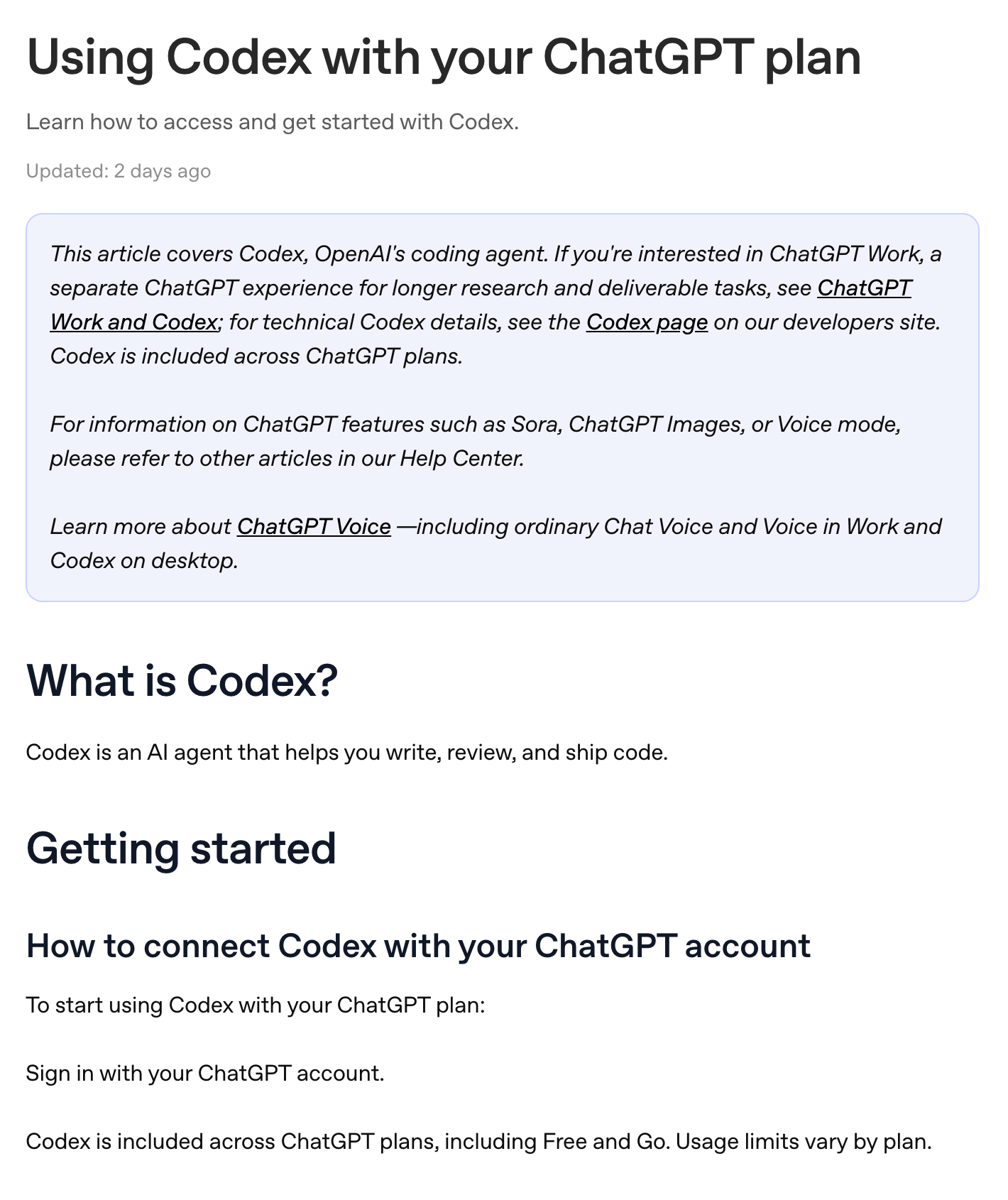 OpenAI’s help center, captured September 18, 2026. Same wording on October 18.
You’ll see Work in the same app. Work and Codex share one usage pool, and the difference between them is in what ChatGPT Work is.
Applicable for: anyone on a ChatGPT account, at work or at home.
Step 2: Start a New chat and just ask it questions
Codex > New chat > type a question like you would in ChatGPT
Don’t open a folder yet. Do what I did: I just started asking questions. That’s it.
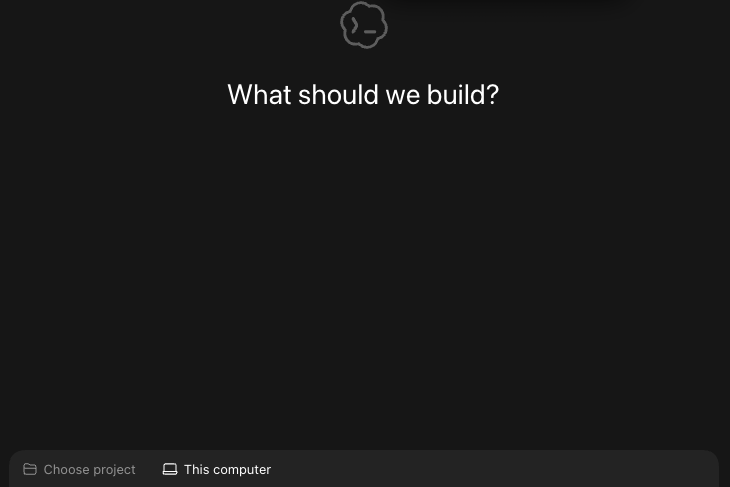 A projectless New chat in Codex on my Mac mini, October 18, 2026.
OpenAI’s projects guide backs that up. Start a chat without a project “when the work is self-contained.” Make a project when the work “will continue over time” and keeps using the same files.
One thing to know: a chat without a project still saves what it makes somewhere. On my Mac mini, those land in dated folders under Documents/Codex. I have 16 of them since August 24.
Then give it one real job. My advice from September still stands: tell it everything about you, have it write a file about you and your goals, then ask for the biggest opportunities. Copy this and fill in the brackets:
I'm not a coder. I [your job, e.g. "run a small herb farm" or
"manage onboarding for a 40-person company"].
Here's a normal week for me: [3-5 things you do every week].
Write a short about-me.md with who I am and my goals, then list
the 3 jobs you could take off my plate, smallest first.
Where it breaks: those files pile up. Back in September I said it plainly: “I would leave MD files scattered and it would just become messy quick.” Once a job repeats, give it its own project folder.
Applicable for: the herb farm owner who drops last month’s sales CSV in a folder and asks for the three slowest products, or the ops lead with a weekly report.
Step 3: Pick a permission before it touches real files
The permissions control beneath the composer > Ask for approval / Approve for me / Full access
That menu decides what Codex can do without asking you.
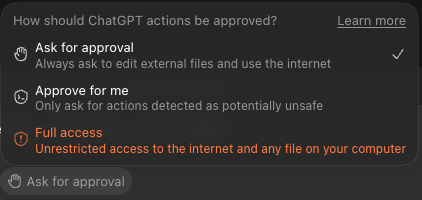 My Codex permissions menu on my Mac mini, set to Ask for approval, October 18, 2026.
Here is what each one means, from OpenAI’s sandboxing guide:
| Permission | What it can do alone | Who it’s for |
|---|---|---|
| Ask for approval | Read and edit inside your folder, run routine steps there. Stops and asks before going further. | Day one, and any folder you care about |
| Approve for me | Same box, but a separate reviewer checks eligible requests instead of you. Free on a ChatGPT sign-in. | After a few weeks, once the asks get boring |
| Full access | No box. Changes files, runs commands and uses the network without asking. | A spare machine with nothing personal on it |
For a first timer I wouldn’t give access to everything. It takes comfort.
Ask yourself one question first: what happens if somebody steals this data?
For me it’s always been this. If someone hacks into my Mac mini, it’s not the end of the world. I don’t store any personal information.
Then make it safe. Don’t put anything public, and make sure nobody on your Wi-Fi can just log in and open its files. I wouldn’t put social security numbers anywhere near it.
Here’s what full access looks like when it goes wrong. pixelbro on Hacker News had Codex run out of disk space mid-task. It “found 25GB of untracked files in the project, in a folder called Recordings.” It cleaned them up. “There goes all the raw Unity Recorder footage I’d ever recorded.”
His lesson: “if you give it a box and tell it to go ham, it’s on you to make sure you didn’t leave precious unrecoverable assets in that box.”
So start on Ask for approval. If the asks start to feel like babysitting, turn on Approve for me under Settings > Permissions > Auto-review, per OpenAI’s help article.
Step 4: Run the job by hand once before you schedule it
New chat (or your project) > paste the job prompt > read what comes back
OpenAI’s scheduled tasks guide says it straight: “Before you schedule a task, test the prompt manually in a regular chat first.” Check that the prompt is clear, the output is something you can review, and the model behaves.
Write the prompt so it tells you when it couldn’t do something. Here’s one shaped like my plan watch:
Open these pages: [link 1], [link 2], [link 3].
For each one, pull the price and the usage limits.
Compare them with my sheet [file name] and list only what changed.
If a page won't load, say so. Never guess a number.
How to tell it worked: it names what it couldn’t read. My October 16 run logged this on the tracker: “ChatGPT pricing and Perplexity were unreadable; their dates remain unchanged.”
That’s the line you want. If a run never reports a problem, open one of the pages yourself and compare.
Step 5: Schedule only the boring job that needs no judgment
Scheduled (left sidebar), or tell the chat “run this every Friday at 7 a.m.”
You can set a task up right from a chat. OpenAI’s guide says to describe the work, when it should run, and whether each run starts a new chat. Then it shows up under Scheduled.
Two catches before you pick the job:
- Keep the computer on and the app running. A task that needs files on your computer won’t run on a closed laptop.
- It runs alone, with your default permission. In OpenAI’s words, “Scheduled tasks run unattended with your default sandbox settings.” On Full access, “background scheduled tasks carry elevated risk.” That’s why step 3 comes first.
If the folder is tracked with Git, you can run the task in a separate copy called a worktree, so it never touches files you’re still working on. My plan watch runs in its own copy of my site folder for that reason. It lives on my MacBook because it needs Codex’s built-in browser to read the pricing pages.
Now my rule for what goes on a schedule. Something you do repeatedly and dumb and deterministic, pull data to feed my dashboard, that can run on its own.
Something that needs my input and judgment, like building content, you can’t automate that. That’s a rookie mistake I would have done in the past.
The rookie version: have it generate the scripts and have them ready, so you just wake up and they’re done. But think about it. You do no input, you’re reading on topics you don’t even know if you care about.
So keep the human in the loop wherever judgment lives. I think it’s important.
Step 6: Check the Scheduled inbox and your usage every week
Scheduled > open the latest run · chatgpt.com/codex/settings/usage
OpenAI calls the Scheduled view “your inbox.” Runs with findings show up there with an unread marker. Read the first few runs closely and fix the prompt or the timing, per the same guide.
Then watch your meter at OpenAI’s usage dashboard. On Plus, OpenAI’s Codex pricing page estimates 15 to 160 local messages per five hours on GPT-6.1 Sol. Pro plans currently have no five-hour limit.
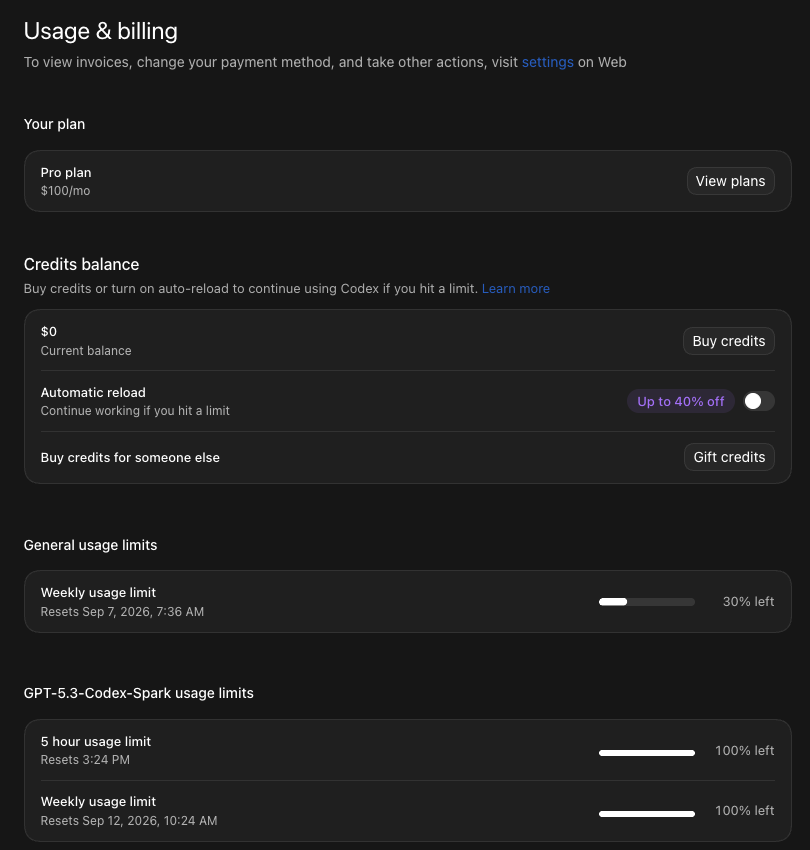 My ChatGPT usage pane, Pro $100, September 5, 2026.
I started on $20, hit the limit while building, went to $100, and I’m on the $200 plan now. What each plan costs is in Codex pricing.
One more check: GPT-5.5 left Codex on October 14, 2026. OpenAI’s guide says to move any scheduled task still on it to GPT-6.1 Sol if your plan has it.
Where it breaks: two of the seven runs in my table up top needed me. A scheduled job still needs you to look at it once a week.
Hand the judgment work to Claude, keep Codex on the repeat work
My split hasn’t changed since September: “Codex, I tend to use it for research, automations, QA’s.” And Claude is my main engine for content.
- Want to compare the two before you commit? That’s Codex vs Claude Code.
- Want Codex to act in Gmail, Sheets or Notion? Start with how to use Zapier with Codex.
Every Claude and ChatGPT guide for office work, in order, lives on Claude guides.
Earn the full access, one boring job at a time
I started by asking questions, and that’s still the right first move. Can you build this? And it does.
The app felt new to me too, and I had a head start. The part that takes nerve is what you let it touch while you sleep. I wouldn’t recommend people to just give access right away. It takes time, man.
So tonight, open Codex, start a New chat and ask it one question about your week. Schedule the boring job next month.
FAQ
Is Codex free?
Yes, Codex is included on every ChatGPT plan, Free and Go included, per OpenAI’s help center as of October 18, 2026. Usage limits vary by plan. Free and Go get GPT-6 Luna in the desktop app, subject to rollout, while Codex Cloud and image generation are not part of the Free plan.
Is the Codex app gone?
It merged. On July 9, 2026, OpenAI folded the Codex app into the new ChatGPT desktop app, and updating the old Codex app turns it into that app. Codex is now a mode inside it: choose Codex, then New chat.
Does my computer need to stay on for Codex scheduled tasks?
Yes, when the task uses files on your computer. OpenAI’s scheduled tasks guide says to keep the machine powered on and the ChatGPT desktop app running, and the project folder has to still be on disk when the task runs. A laptop that is closed at 7 a.m. Friday misses a 7 a.m. Friday job.
Can Codex delete my files?
It can change files inside the folder you give it, and on Full access it can change files, run commands and use the network without asking. The default sandbox keeps edits inside your workspace. Scheduled tasks run unattended with your default sandbox settings, so pick the permission before you schedule anything.
Do I need the terminal to use Codex?
No. The ChatGPT desktop app runs Codex without a terminal on Mac, Windows and Linux. OpenAI’s pricing page lists a terminal version, an editor extension, the web and iOS as Plus extras, but none of those are needed for a first job or a scheduled task.
Where this comes from
The click paths, permissions, scheduled task rules and limits come from OpenAI’s docs, read October 18, 2026. The run table is my site’s history and the usage pane is my account.
The scheduling rule and the permission advice are mine. I haven’t built anything serious in Codex, and I haven’t timed what the Friday job saves me.
Published October 18, 2026. Checked that day against OpenAI’s docs, linked inline.

Written by
Chris AlarconChris Alarcon shows people who don’t code the boring Claude setup that actually works. He runs his one-person operation on these systems and shares every workflow, prompt, and tool combo in public. Start with the 15 prompts he uses every day.
The boring setup
It still won't know you tomorrow.
The Setup is one folder. Drop it into a Project, answer three questions, and Claude or ChatGPT writes your memory file and your voice file itself. It stops forgetting you, stops sounding like AI, and runs three real jobs by name. Twenty minutes tonight. No code. $39, 30-day refund.
See The Setup →The 15 AI prompts I actually use every day
I tested hundreds and kept the 15 that survived. You get them right away, then one short email from me every Tuesday.
