In this article
- 1 Chat asks, Work delivers, and Codex is a third thing
- 2 OpenAI’s own two pages disagree about whether Work is free
- 3 Where Astra sits, and why your usage vanishes
- 4 Here is what I actually hand to Work
- 5 The expensive lesson: I tried to build a Pokemon game
- 6 When to stay in chat
- 7 Work vs Codex vs Claude’s version, in one table
- 8 So should you open Work
- 9 Common questions
Quick answer: ChatGPT Work is the mode that hands you a finished file instead of a reply. It is for longer, multi-step jobs that end in a document, spreadsheet, deck, report or Site.
It is still rolling out, and it draws on the same usage pool as Codex. Open it when the output is a deliverable. Stay in chat when the output is an answer.
Chat asks, Work delivers. That’s my read on Work, and the part nobody leads with is what the delivery costs you.
Chat asks, Work delivers, and Codex is a third thing
OpenAI splits the three by job, and their own wording is the cleanest definition on the internet right now.
| Experience | What OpenAI says it is for | What you get back |
|---|---|---|
| Chat | Ask questions, search, brainstorm, or get quick conversational help | An answer |
| Work | Research a topic, analyze information, or create a document, spreadsheet, presentation, report, or Site | A finished file |
| Codex | Write or debug code, run tests and commands, review changes, or work with a repository | Changed code |
| Voice | Talk naturally with Work or Codex in the desktop app and ask it to start or coordinate tasks | A running task |
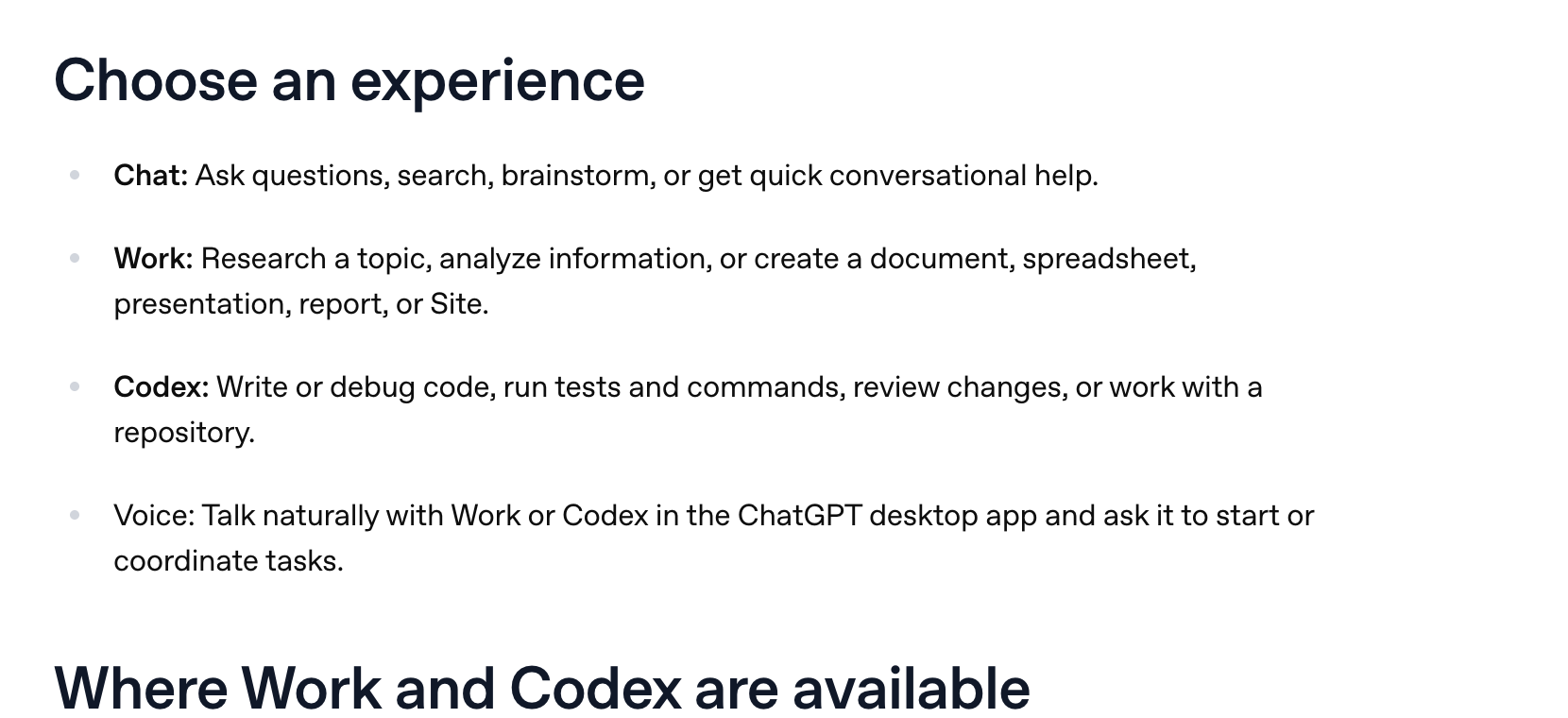
The plainest way I can put it: Work is a chat with hands. It can actually edit your files, open things, delete things. If you have used Claude’s file-handling mode, it is the same shape of tool.
lifeandwork.blog, one of the small sites ranking on this exact framing, says it the same way: “In chat mode, it behaves like a conversational partner for ideas, questions, and quick explanations. In work mode, it becomes a structured assistant for drafting, planning, reviewing, and managing tasks.”
OpenAI’s own two pages disagree about whether Work is free
I went looking for a clean answer to “which plan has it” and did not find one. I found two OpenAI properties saying different things on the same day.
OpenAI’s developer docs, read September 18, 2026, open with this: “ChatGPT Work and Codex are included in your ChatGPT Free, Go, Plus, Pro, Business, Edu, or Enterprise plan.”

OpenAI’s help centre, read the same day, says Work is available on ChatGPT web and mobile for eligible paid plans, and in the desktop app when it is included for your plan and workspace.
Free is in one list and absent from the other. I’m not going to pick a winner and call it settled. I can’t tell which page is stale, and every other article on this confidently picks one of the two.
What both agree on is the part that actually explains your experience: Work is still rolling out. The help centre says it is gradually rolling out to eligible accounts, and that if you do not see it yet, your account may not have access yet.
So if Work is missing from your ChatGPT, you have not done anything wrong and there is no setting to find. Check your own account, not a pricing table. That goes for this page too. Trust what’s in front of you.
One practical note before you go upgrading: new sign-ups and upgrades to the ChatGPT Pro $200 plan are currently paused. Our AI plan tracker follows that sort of change.
Where Astra sits, and why your usage vanishes
Every capability tour skips this section. It’s the most useful one on the page.
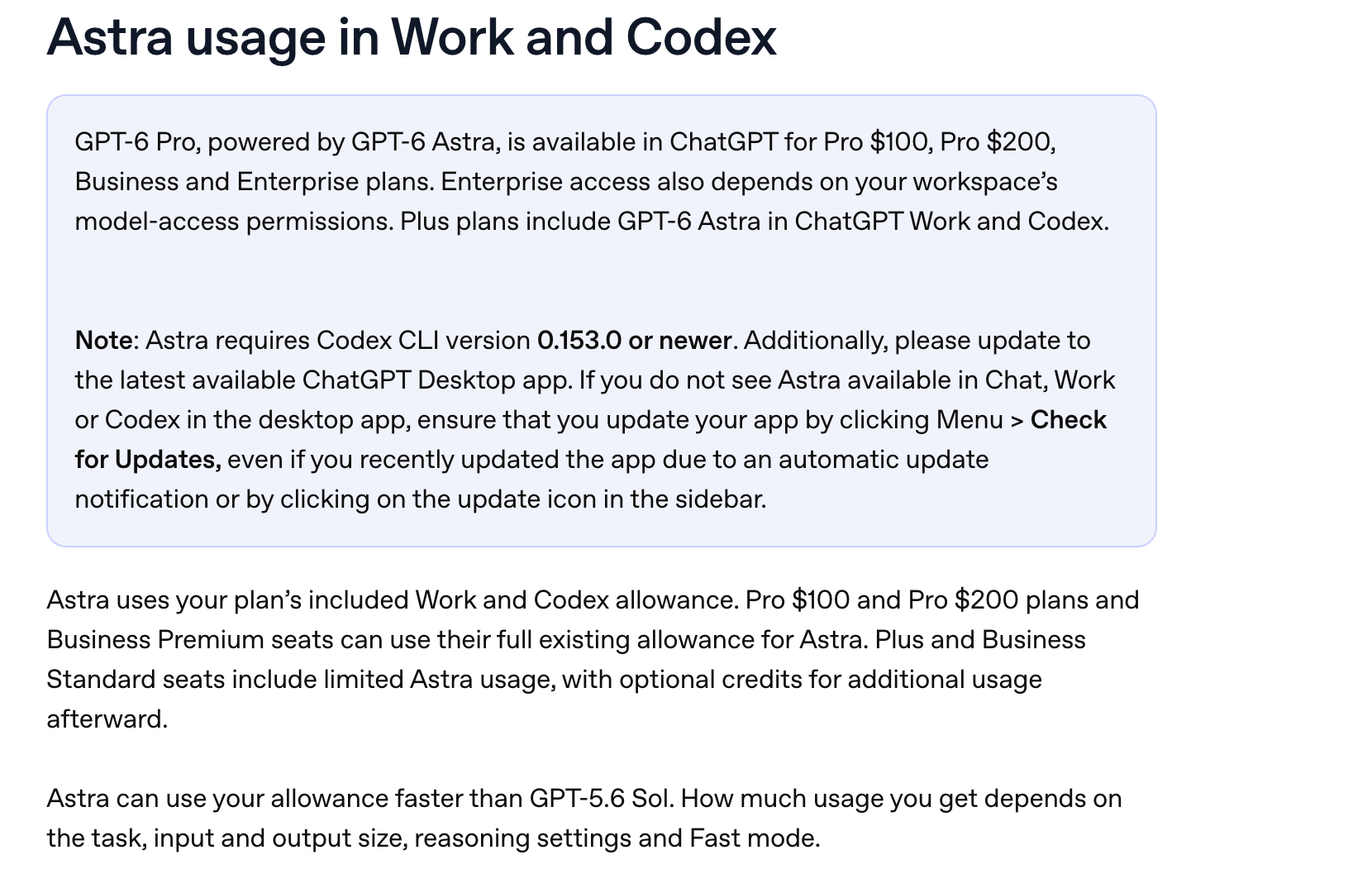
One sentence from OpenAI’s own page does most of the work: “Plus plans include GPT-6 Astra in ChatGPT Work and Codex.”
If you’re on Plus, that changes how you should look at Work. It’s more than a different way to ask.
On the $20 plan, Work and Codex are the two surfaces where the heavy model reaches you, and ordinary Chat is not one of them. Which plan gets Astra where is Astra by ChatGPT plan, so I won’t redo it here.
The line that matters for this page comes next: “Astra can use your allowance faster than GPT-5.6 Sol. How much usage you get depends on the task, input and output size, reasoning settings and Fast mode.”
That is OpenAI saying, in their own words, that the model you pick moves the meter. They do not publish a multiplier, and neither will I. Any “Astra burns 5x faster” number you find online is someone’s estimate. The detail lives on Astra usage limits.
What I can add is what it’s like to use. Astra burns fast enough that I changed my habits. I use it every day, I have run out of usage more than once, and I will not put a firm percentage on it because it swings with the task.

That is my own usage and billing pane from September 5, 2026. The meter is a real number, and it goes down while you watch.
Here is what I actually hand to Work
The rule I use is embarrassingly simple: if it is a question, it is chat. If it is a job, it is Work.
Quick question, one answer, done? Chat. “There’s a deal on this TV, which one should I get?” That is a chat question and it would be a waste of an agent.
Building something, reviewing my own system, going through my analytics, pulling my YouTube live data apart? That is Work. In my case a lot of that runs through Codex specifically, because my work ends in files and scripts, but the shape is the same.
The test is the output. If what you want back is a file, open Work. If what you want back is a sentence, stay in chat.

That is the Work composer on my own account on September 10, 2026, with the model chip showing what is loaded. It is the thing you will actually be looking at, and no competitor page shows it to you.
The first job I would hand it, on camera:
The 60-second version, from my Shorts: What to hand ChatGPT Work first (OpenAI's own advice).
The expensive lesson: I tried to build a Pokemon game
Here’s the honest part, because a capability tour won’t give you one.
I pointed Astra at building a Pokemon-style game. It got somewhere. It did not get close to finished. And it ate a serious chunk of my usage doing it.

That screen is real and it is as far as it got.
Could I have done it better? Yes, and you can learn from my mistake. I was inefficient. I got too creative, I went all over the place, and I never gave it tight direction.
If I had said “clone the basic thing and keep it simple” I would have spent a fraction of the usage and got further.
This doesn’t mean “Work is bad at games”. It means Work spends real money-equivalent on vague instructions. Chat doesn’t, because chat is not out there doing forty steps on your behalf while you watch.
Give Work a scoped job with a named output. Save the exploring for chat.
TechRadar ran the opposite experiment, handing Work a pile of life-admin chores, and their headline verdict was that it handled them like a pro. That matches what I’ve seen. Give it a boring job with clear limits and it does well.
When to stay in chat
Every page about Work lists what it can do. This is the other list.
Stay in chat when:
- You want an answer, not a file.
- You are still figuring out what you want. Doing that thinking in Work gets expensive.
- The task is one step. An agent that plans, checks and revises is extra work you pay for.
- You are on Plus and the job does not need Astra-grade reasoning. OpenAI’s own guidance is that Astra moves the meter faster.
- You just want speed. OpenAI’s framing for Chat is “fast, conversational assistance and everyday questions”, and that is still the right tool for most of the day.
And no, regular ChatGPT is not going away. OpenAI’s FAQ answer is one line: “The fast, familiar Chat experience is still available.” On desktop you switch with the toggle at the top of the page. On mobile it is the dropdown at the top of the screen.

That is the chat-side picker on my account, and it is a different set of choices from the Work composer further up this page. It’s the same subscription with two different menus.
Work vs Codex vs Claude’s version, in one table
| What it is for | Where it runs | Go deeper | |
|---|---|---|---|
| ChatGPT Work | Documents, spreadsheets, decks, reports, Sites | Web, mobile, desktop; local files in the desktop app only | This page |
| Codex | Code, tests, commands, repositories | CLI, IDE, web, desktop, iOS | Codex vs Claude Code |
| Claude’s file mode | The same shape of job on Anthropic’s side | Desktop and web | Cowork vs ChatGPT Work |
One note on that last row: Anthropic has folded Cowork back into Claude itself, with their own docs now carrying the line “Claude Cowork is now just Claude.” The feature is still there. Only the product name went away.
So should you open Work
- If you are on Plus and have never opened it: do, once, on a job with a clear deliverable. Work and Codex are also where Astra reaches you on that plan.
- If you cannot find it: you are not missing a setting. It is still rolling out.
- If you are on Free: check before you assume. OpenAI’s docs list Work as included on Free and OpenAI’s help centre does not, so your own account is the only reliable answer. Either way you have Codex, which is on every ChatGPT plan, covered on Codex vs Claude Code.
- If your usage keeps vanishing: it is probably the model, not the mode. Read Astra usage limits and get deliberate about when you reach for the big one.
- If you mostly ask questions: stay in chat and stop feeling behind. Work is for a different kind of job.
The Claude at Work hub has the equivalent map on the Anthropic side if you run both like I do.
Common questions
What is ChatGPT Work mode?
Work is an agent mode inside ChatGPT for longer, multi-step tasks that end in a finished deliverable. OpenAI describes it as researching a topic, analyzing information, or creating a document, spreadsheet, presentation, report or Site. Chat, by contrast, is for quick conversational help.
Is ChatGPT Work free?
OpenAI’s own two pages disagree, as of September 18, 2026. The developer docs list Work as included on Free, Go, Plus and up. The help centre says eligible paid plans. It is also still rolling out, so check your own account rather than either page.
Why can I not find Work in my ChatGPT?
Because it is still being rolled out. OpenAI’s own wording is that Work is gradually rolling out to eligible accounts and that availability will continue to expand. If it is missing, your account may simply not have access yet.
Does Work use more usage than chat?
Work follows the same usage structure as Codex, so it draws on the same agentic allowance. The larger variable is the model: OpenAI says Astra can use your allowance faster than GPT-5.6 Sol, without publishing a rate.
Can Work open files on my computer?
Yes, in the desktop app, where you open a local folder or project and grant access only to the files a task needs. Work on web and mobile cannot directly access files on your computer.
Where this comes from: OpenAI’s own ChatGPT Work and Codex help article, read and screenshotted September 18, 2026, two days after OpenAI updated it. I pay for ChatGPT and use Work and Codex daily. The Pokemon game and the usage screens are mine, taken September 10. No usage multiplier, because OpenAI publishes none. Last reviewed September 2026.

Written by
Chris AlarconChris Alarcon builds Ship Lean: the boring Claude and AI setups that actually work, handed to people who don’t code. He runs his one-person operation on these systems, around a full-time job, and shares every workflow, prompt, and tool combo in public. Start with the 15 prompts he uses every day.
The boring setup
It still won't know you tomorrow.
The Setup is one folder. Drop it into a Project, answer three questions, and Claude or ChatGPT writes your memory file and your voice file itself. It stops forgetting you, stops sounding like AI, and runs three real jobs by name. Twenty minutes tonight. No code. $39, 30-day refund.
See The Setup →The 15 AI prompts I actually use every day
I tested hundreds and kept the 15 that survived at my desk. You get them right away, then one short email from me every Tuesday.