How to Use Codex and Claude Code Together: Opus Plans, Codex Builds, Opus Reviews (2026)
Chris Alarcon ·
$ you'll have
Codex working inside Claude Code, with Opus writing the plan, Codex building most of it, and Opus checking the result.
ok your job, with the steps below
- Time
- About 20 minutes to set up, then one small job
- Cost
- Claude Pro ($20 a month) plus any ChatGPT plan, Free included
- Tools
- Claude Code · Codex · OpenAI's Codex plugin for Claude Code
Why this setup, and what you need
Opus wins. Hands down, there’s no debate.
That’s my answer when someone asks what happens when Codex and Claude disagree. I’m not choosing both and saying figure out the solution and both of you tell me which is best; that’s a waste of time.
If you pay for ChatGPT and Claude, you’ve probably wondered if you’re paying twice for the same thing. You’re not, as long as each one gets its own job.
Here’s mine. Opus, in Claude Code, solves the problem and writes the plan. Codex executes the bulk of the code. Then Opus reviews it at the end.
Think of it like a sandwich. It’s spending like half the usage, or even less, than if it had done the planning and then everything itself.
That number is my estimate, not a meter reading. My own rule file (CLAUDE.md, the instructions Claude Code reads every session) still calls the saving “a guess” until I measure it.
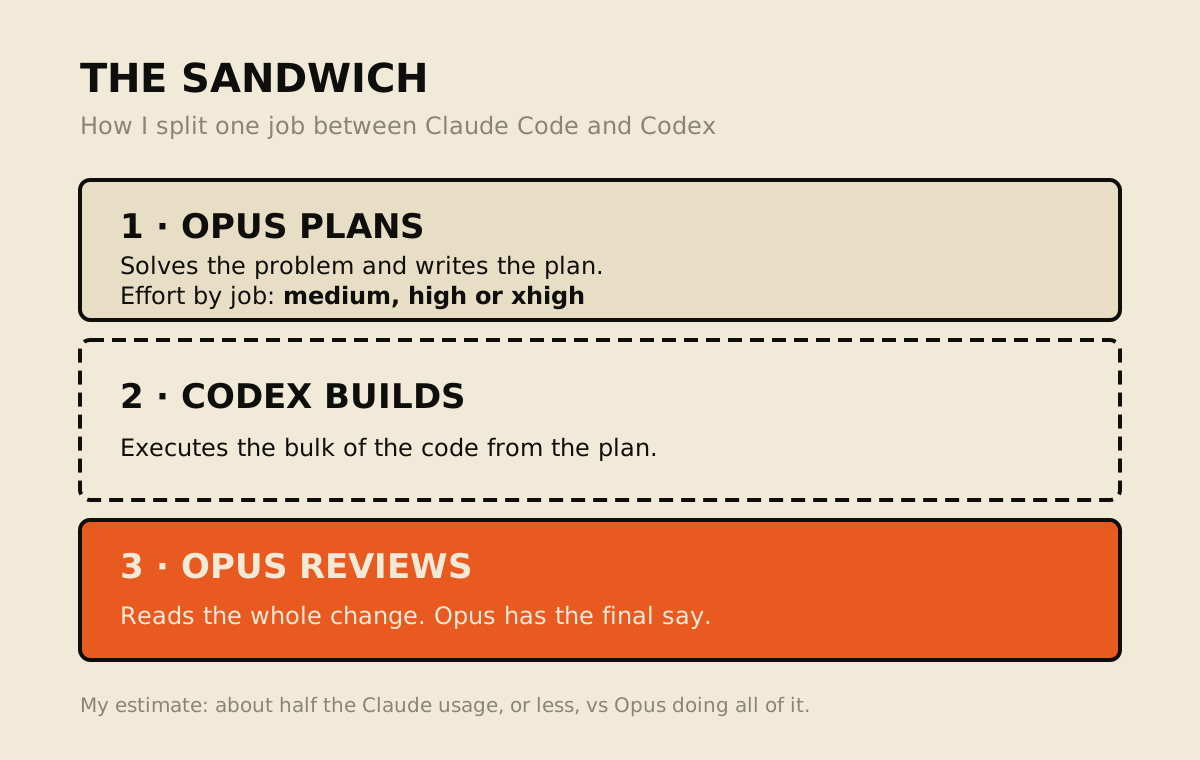 The split I run, October 2026.
Here’s the Codex side of it today. My bridge (a small script that hands jobs from Claude Code to Codex) logged more than 700 code jobs handed to Codex in the last 14 days, and Codex’s weekly usage meter, a day after its reset, sits at 8%.
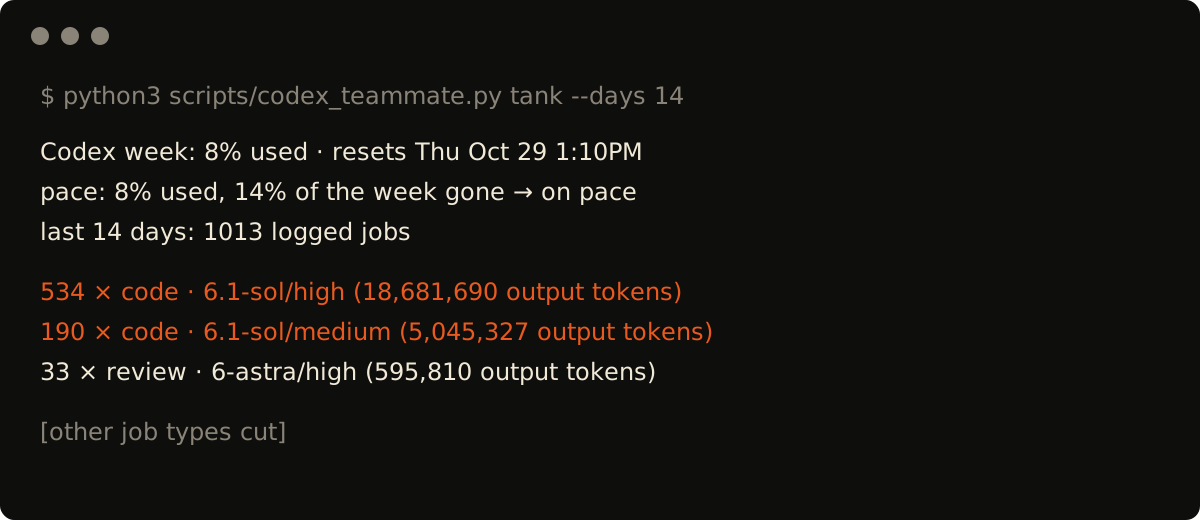 My Codex bridge’s usage report with Sol (the Codex model I use), October 23, 2026.
I made a Short about running the two together:

From my Shorts: Claude Code and Codex are the strongest AI models out there. Together you 10x your output.
Four steps get you the same sandwich. I run mine through a homemade bridge; the steps use OpenAI’s own plugin, which I haven’t tried.
What you need (as of October 23, 2026)
- Claude Pro or higher. Claude Code isn’t on the Free plan. Pro is $20 a month billed monthly ($17 a month billed yearly), and it adds more Claude models than Free, per Anthropic’s pricing page.
- Any ChatGPT plan, Free included. Codex comes with all of them, from Free at $0 to Plus at $20 and Pro from $100, per OpenAI’s Codex pricing. New to it? Start with how to use Codex.
- Codex installed and signed in on the same computer. The plugin runs on your local Codex install and login.
- Node.js 18.18 or later, which OpenAI lists as a plugin requirement.
- A work laptop? Both tools read and change files in the folder you open. Ask IT before that folder holds company files.
- Skip for now: the plugin’s review gate and any homemade bridge. Both come up below.
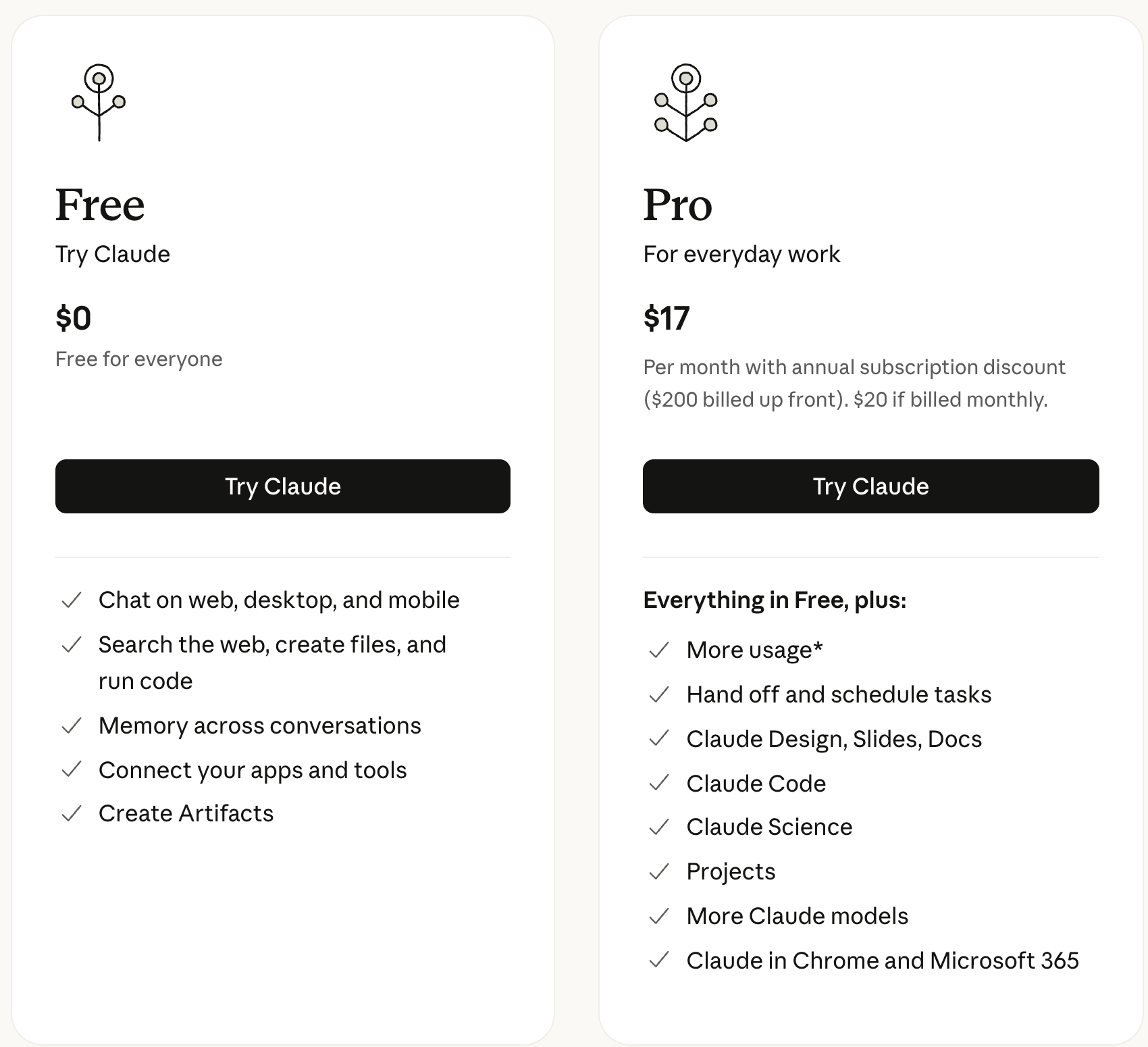 Anthropic’s pricing page, September 18, 2026. Claude Code was still not on Free on October 23.
Step 1: Install OpenAI’s Codex plugin inside Claude Code, not an MCP
Claude Code > type the four commands below, one at a time
My first answer for beginners was: “I’d tell a beginner to just install the official OpenAI MCP.” OpenAI’s docs say that piece is gone.
Its docs page on the Codex MCP server removal says “The codex mcp-server command and the standalone codex-mcp-server binary have been removed.” So guides that tell you to add Codex as an MCP server are out of date.
My point stands, with the right name: use the piece OpenAI ships, not a homemade bridge. Today that’s the Codex plugin for Claude Code.
/plugin marketplace add openai/codex-plugin-cc
/plugin install codex@openai-codex
/reload-plugins
/codex:setup
/codex:setup checks that Codex is installed and logged in, and can offer to install it for you. Then you get /codex:review and /codex:adversarial-review, which are read-only, and /codex:rescue, which hands a task to Codex.
Full disclosure: I haven’t tried the plugin.
I did install an OpenAI MCP on my Mac mini, the Computer Use server from the ChatGPT desktop app. That one lets Claude see and click apps on my screen. It doesn’t hand code to Codex, so it’s not what you want here.
How to tell it worked: OpenAI’s README says you should see the /codex: commands, plus a codex:codex-rescue agent when you type /agents.
Applicable for: anyone paying for both who opens Claude Code in a project folder.
Step 2: Have Opus solve the problem and write the plan first
Claude Code > /model > Opus > /effort > medium, high or xhigh
I run Opus at high, or even extra high, or medium depending on the use case. In Claude Code those are high, xhigh and medium. Opus 5.5 starts at medium, per Anthropic’s model config docs. The Claude app shows the same ladder:
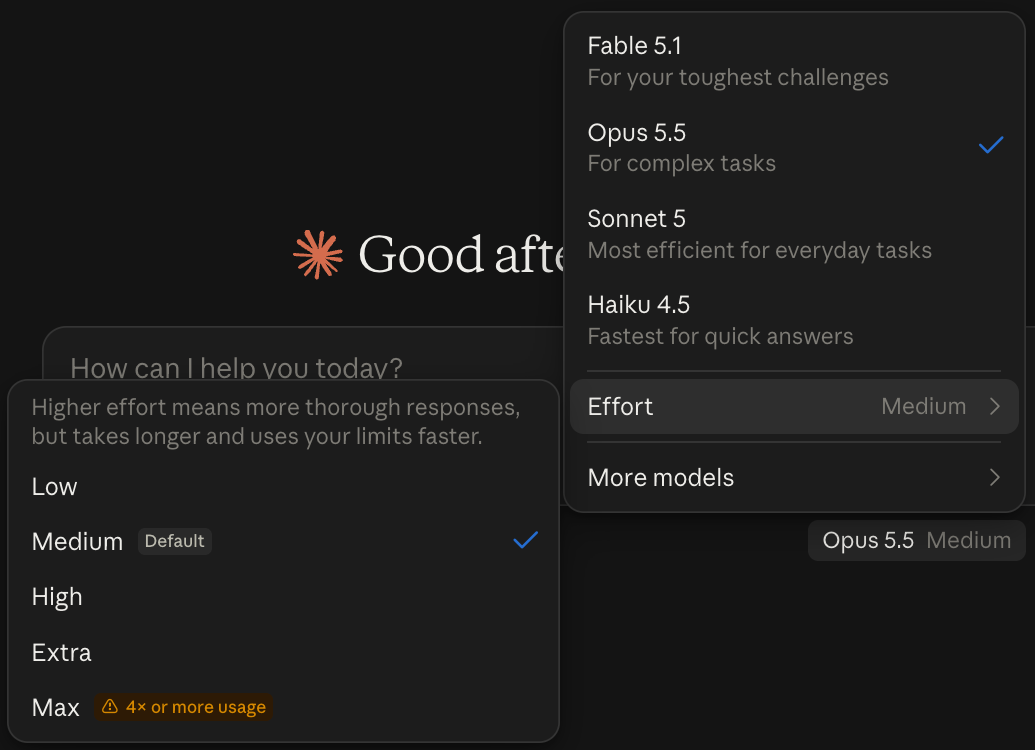 My Claude model picker, Effort menu open, September 22, 2026.
Have it write the plan to a file, not just a chat reply, so Codex can read the same thing. Copy this:
Plan this before anyone writes code: [the job, in one sentence].
Write the plan to plan.md: the files to change, what changes in each,
what must not change, and the one check that proves it worked.
Don't write any code yet.
My rule file says it the same way: “Opus researches and writes the exact brief: files, change, contracts, tests, and the proving command.”
Where it breaks: the two tools read different rule files. Codex reads AGENTS.md. By default, Claude Code reads AGENTS.md only when there’s no CLAUDE.md, per Anthropic’s memory docs.
| What’s in your folder | Codex follows | Claude Code follows |
|---|---|---|
| AGENTS.md only | AGENTS.md | AGENTS.md |
| AGENTS.md and CLAUDE.md | AGENTS.md | CLAUDE.md only |
CLAUDE.md with @AGENTS.md inside it | AGENTS.md | Both |
The last row is the fix. Put your rules in AGENTS.md and add @AGENTS.md to CLAUDE.md, so both agents work from one rulebook.
Step 3: Hand the bulk of the code to Codex
Claude Code > /codex:rescue + the plan > /codex:status > /codex:result
With the plugin, /codex:rescue hands the job to Codex. OpenAI’s README says these tasks can take a while and recommends running them in the background:
/codex:rescue --background Build everything in plan.md. Only touch the files the plan names. If the check fails, stop and tell me why.Check on it with /codex:status, then read what it did with /codex:result.
Mine runs through my own bridge script instead. It wraps Codex on my ChatGPT subscription, stays read-only unless I pass --write, and needs no API key. The build relay below is from my rule file, written October 14.
Here’s mine, for reference; yours will be simpler.
1. Plan: Opus researches and writes the exact brief: files, change,
   contracts, tests, and the proving command.
2. Build: [...] codex_teammate.py ask --prompt-file <brief> --write
   --job code --model sol --effort medium [...]
3. QA: Opus runs the check and reads the whole diff.
Where it breaks: every Codex run comes out of your Codex usage limits, per the plugin README. That’s the point of the sandwich, as long as you watch both meters.
Step 4: Let Opus review the whole change and give it the final say
Claude Code (Opus) > paste the review prompt > read its list before you keep anything
Codex’s own /codex:review is read-only and fine for a second look. In my sandwich, Opus does the last pass, and Opus wins.
Codex finished plan.md. Read every changed file against the plan.
Run the check from the plan. List what the plan asked for that's
missing, and anything that changed that the plan didn't name.
Fix small gaps. Ask me before anything big.
Why I don’t skip this: my rule file has the scar. In October, a Codex brief that said “commit + push” shipped a trim of one of my skill files claiming “0 missing.” It had dropped 4 rules.
Since then the rule reads: “Codex never commits or pushes before this QA.”
On this website it runs the same way. The written split says “Claude: final voice, taste, strategy application, and skill execution,” and Codex does read-only review and regression hunting. If Codex can’t run, the rule is plain: “do not claim the gate passed.”
Skip the plugin’s review gate on day one. OpenAI warns it “can create a long-running Claude/Codex loop and may drain usage limits quickly.”
Still deciding which one to pay for first? That’s a different question, and it’s answered in Codex vs Claude Code.
Pick your first job from the apps you already pay for
It depends, man. If you’re a business owner, start with simple use cases. What apps do you pay for? Which ones cost the most? Then see if you can replace one.
Don’t be overwhelmed by apps like Notion. I’m not gonna replace Notion; their UI, everything honestly just works as is. I switched it to free because I only needed a simple database feature, and now I don’t need it for that either, so I canceled it.
My first plan was never to rebuild Notion. It was a simple task tracker, which is way easier than recreating an app with that many features.
Same with editing. Maybe your editing app only does simple cuts. You may not need an app at all, because AI can do it in the back end. An app is a bonus if you’re visual.
Before I made a video editor app, I did it for close to a year just on the back end: Claude would edit it for me and I’d review the video. The full workflow is in how I cut my Shorts with Claude Code.
It was clunky, and eventually Opus got really good, so I started entertaining the idea of building an app or an interface, and it worked.
So your first sandwich is small. Copy this into Claude Code on Opus:
I pay for [app] at [price] a month. I only use it for [the 1-2 things
you actually do]. Plan the smallest version that does just that, as a
simple local tool. Write the plan to plan.md and stop.
Then run steps 3 and 4 on it.
Every Claude and ChatGPT guide for office work lives in Claude guides.
Let Opus have the last word, and start small
My rule: Opus wins, and nobody argues it out. Think of it like a sandwich.
Tonight, install the plugin and pick the cheapest app you pay for. Have Opus write the plan for the tiny version, and let Codex build it.
FAQ
Can I use Codex inside Claude Code?
Yes. OpenAI publishes a Codex plugin for Claude Code that adds /codex:review, /codex:adversarial-review and /codex:rescue. Install it with /plugin marketplace add openai/codex-plugin-cc, then /plugin install codex@openai-codex, /reload-plugins and /codex:setup. It needs a ChatGPT account (Free works) or an OpenAI API key, plus Node.js 18.18 or later.
Is there a Codex MCP server for Claude Code?
Not anymore. OpenAI’s docs say the codex mcp-server command and the standalone codex-mcp-server binary have been removed, so older guides that add Codex as an MCP server are out of date. The official route today is OpenAI’s Codex plugin for Claude Code, which runs on your local Codex install.
Does using Codex from Claude Code cost extra?
Not a separate fee on a ChatGPT sign-in. OpenAI’s plugin README says its usage counts toward your Codex usage limits, so it draws from the plan you already pay for. It also warns that the optional review gate may drain usage limits quickly. Sign in with an API key and that usage is billed apart from your plan.
Should Codex or Claude review the code?
In my setup, Opus does the final review and wins any disagreement. I don’t ask both to argue it out. Codex’s /codex:review is read-only and fine for a second look, but the plan, the last check and the final call stay with Opus.
Do Codex and Claude Code read the same instructions file?
Not by default. Codex reads AGENTS.md. Claude Code reads AGENTS.md only when the folder has no CLAUDE.md, per Anthropic’s memory docs. If you keep both files, import AGENTS.md from your CLAUDE.md so both agents follow one set of rules.
Where this comes from
The plugin commands, the MCP removal, the plan prices and the rule-file behavior come from OpenAI’s and Anthropic’s docs, read October 23, 2026. The sandwich, the build relay and the usage report are mine, from my own rule files and my Codex bridge log.
I haven’t tried OpenAI’s plugin, and I haven’t measured the usage saving yet, so the “half or less” is my estimate.
Published October 23, 2026. Checked that day against OpenAI’s and Anthropic’s docs, linked inline.

Written by
Chris AlarconChris Alarcon shows people who don’t code the boring Claude setup that actually works. He runs his one-person operation on these systems and shares every workflow, prompt, and tool combo in public. Start with the free 1-page setup.
The boring setup
It still won't know you tomorrow.
The Setup is one folder. Drop it into a Project, answer three questions, and Claude or ChatGPT writes your memory file and your voice file itself. It stops forgetting you, stops sounding like AI, and runs three real jobs by name. Twenty minutes tonight. No code. $39, 30-day refund.
See The Setup →Get the free 1-page setup
The boring 1-page setup. No code, no jargon. Get it now, then one short email from me each Tuesday.
