What Effort Level Should You Use in Claude Code? I Run Opus on Medium


Opus medium just every day.
Medium is like the sweet spot for most things. I think like eighty percent of the stuff. I use high for really complex stuff and extra high for like video editing.
If you found the effort setting and got nervous that the wrong pick will eat your week, that’s a fair worry. Anthropic’s own settings menu puts a warning on the top level.
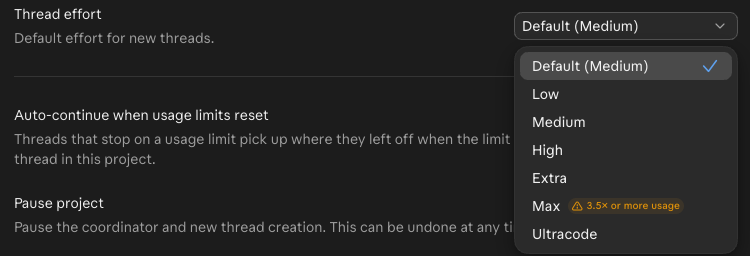 The effort menu in my Claude Code project, November 8, 2026.
Effort decides how much work Claude does, not just how long it thinks
It’s easy to read “effort” as thinking time. It’s bigger than that.
Anthropic’s effort guide says it also controls how many files Claude reads, how much it verifies, and how far it pushes through a job before checking in with you.
So going higher gets you a Claude that does more before it comes back. The model is what sets how capable it is.
That guide gives a clean test for which one to change:
- Claude skipped a file or didn’t check its work: raise the effort.
- Claude had everything it needed and still got it wrong: pick a bigger model.
The default depends on the model, and on Opus 5.5 it’s medium
As of November 8, 2026, Anthropic’s model docs list five levels: low, medium, high, xhigh and max. The app calls xhigh “Extra.” Ultracode in that menu is a separate setting, not an effort level.
| Model | Default effort |
|---|---|
| Opus 5.5 | Medium |
| Sonnet 5.5 | Medium |
| Haiku 5.5 | Medium |
| Opus 4.7 | Xhigh |
| Other models that support effort | High |
If you read a guide that says the default is high, check which Opus it was written for. Lydia Hallie of the Claude Code team wrote Anthropic’s effort guide, and the advice is short: “for most tasks you should use the model’s default effort level.”
Really complex stuff and video editing get more than medium
Here’s how the levels look on my own work.
| Level | When I use it |
|---|---|
| Low | Maybe simple things, I don’t know |
| Medium | Every day, planning, brainstorming, most problems |
| High | Really complex stuff |
| Extra | Video editing |
| Max | Not my default |
On video I get better motion graphics, better taste. That taste is worth the extra effort but it’s not something that I run daily.
Choosing something higher may get you better results, but it’s gonna burn your usage faster.
Hallie also says to treat this “more as a general preference than a task-by-task decision.” That matches how I work. Medium’s a sweet spot so I just leave that as the default, and I let Claude do the routing, with model and effort level.
After 5.5, I think medium is arguably better than five at high
I was actually running on high because this was like Opus 5 era and 5 gave me way better results than medium, so I just kept it on high.
But after 5.5 I think medium is still impressive. Arguably better than five at high, obviously.
That’s my experience on my own work, not a benchmark.
Check Projects first, because the docs and my screen disagree
If your plan is draining fast, look here before anything else.
Anthropic’s Projects docs say “A new project runs every thread on Opus at high effort, which draws on your plan fastest.” The menu at the top of this page, from my own project, says Default (Medium).
I can’t tell you which one you’ll see. So open it:
- Right-click your project in the sidebar and choose Settings.
- Go to General.
- Read Thread effort. Change it there if you want a different default.
For a thread that’s already running, use that thread’s model picker. I walk through the rest of the setup in how to use Claude Code Projects.
Outside Projects, the desktop app’s model picker, in the row under the prompt box, has a level under Effort. In the terminal, type /effort. Enter saves the level as your default, s keeps it to this session, and max lasts for this session only.
Watch your usage, because higher effort burns it faster
I keep a usage status pinned so I can see it, and I keep a tab on it.
 The usage status I keep pinned, November 8, 2026.
I’m on Ultra, so that 38% won’t tell you what 38% means on a $20 plan. If you want the actual numbers on what each plan gets, I broke them down in Claude’s usage limits explained and Claude Pro vs Max.
I’m not smarter than them, so medium stays
Anthropic built this thing, its guide says to use the default for most tasks, and on Opus 5.5 the default is medium.
I’m not smarter than them so I just use it.
You’ll hear people say to leave the setting alone and never think about it. I disagree with that part. I got to medium by running high through the Opus 5 era and then seeing medium hold up on 5.5.
If you’re still building your setup, Claude guides maps the rest, and my Claude Code tips cover what to fix before you worry about this.
My rule: Opus medium just every day. I go higher for really complex stuff and video editing.
So if that menu made you nervous, start on Opus medium, which is not bad. If you’re on an older Opus, your answer might still be high.
Where this comes from
The levels, defaults and quotes come from Anthropic’s docs and its July 7 effort guide, checked November 8, 2026. The menu and usage strip are my own screens from that day, and the jobs are what I actually run.
I haven’t run a controlled test of medium against high.
Published November 8, 2026. Last reviewed November 8, 2026 against Anthropic’s docs.

Written by
Chris AlarconChris Alarcon shows people who don’t code the boring Claude setup that actually works. He runs his one-person operation on these systems and shares every workflow, prompt, and tool combo in public. Start with the free 1-page setup.
The boring setup
It still won't know you tomorrow.
The Setup is one folder. Drop it into a Project, answer three questions, and Claude or ChatGPT writes your memory file and your voice file itself. It stops forgetting you, stops sounding like AI, and runs three real jobs by name. Twenty minutes tonight. No code. $49 · 30-day refund.
See The Setup →Get the free 1-page setup
The boring 1-page setup. No code, no jargon. Get it now, then one short email from me each Tuesday.
