Claude Code Remote Control: How I Keep Claude Running at Home and Steer It From My Phone
Chris Alarcon ·
$ you'll have
A Claude Code session on your computer that you can check and steer from the Claude app on your phone.
ok your job, with the steps below
- Time
- About 15 minutes
- Cost
- Claude Pro or higher
- Tools
- Claude Code · Claude app on your phone
Why this setup, and what you need
Video editing was still running when I went to bed last night. That’s my Shorts pipeline, and it runs long. So I grabbed my phone and looked.
“I just went to bed and got a quick snapshot. I just opened it and I was like, oh, it’s still working. And basically my whole production just ran.”
That’s Claude Code Remote Control. The Claude app on your phone turns into a window on a Claude Code session that keeps running on your own computer. You read what it did, answer its questions and approve the next step from wherever you are.
The catch is the computer. If it sleeps, the work stops.
Back in August my only hack was keeping the laptop plugged in. Since October 5, a Mac mini at home runs Remote Control around the clock, so my phone always has a session to open.
So this page has two parts. First the 3-step version you can run on your laptop tonight, then the always-on setup I actually use.
What you need (as of October 18, 2026)
- A paid Claude plan. Anthropic’s Remote Control docs list Pro, Max, Team and Enterprise. API keys don’t work. Pro is $20 a month billed monthly on Claude’s pricing page.
- Claude Code on your computer, signed in with your claude.ai account. Never opened it? Start with how to use Claude Code.
- The Claude app on your phone, iPhone or Android, same account.
- A computer that stays on while the job runs.
- A work laptop? On Team and Enterprise, an Owner has to turn Remote Control on first. While you’re connected, the conversation is stored on Anthropic’s servers, so ask IT before you point it at company files.
- Skip for now: Channels (the Telegram and Discord feature) and the worktree option. You don’t need either to steer one job from your phone.
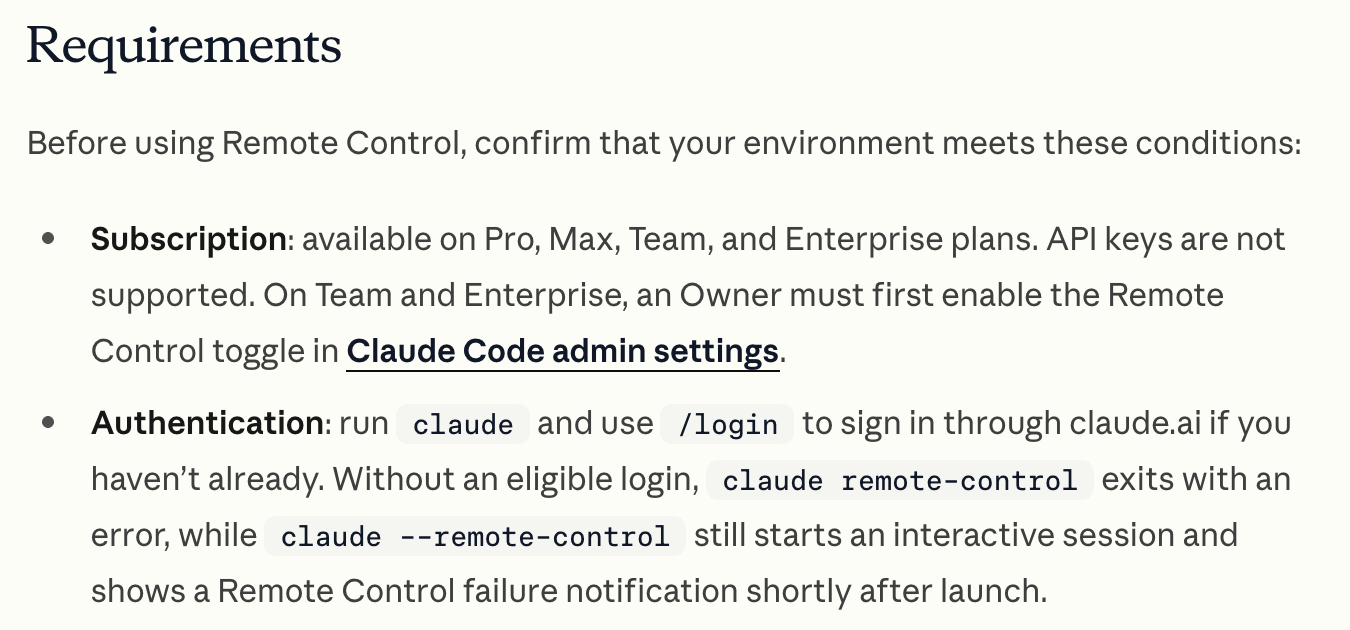 Anthropic’s Remote Control requirements, read October 18, 2026.
Step 1: Sign in with your Claude account, not an API key
Terminal > claude > /login
Remote Control only works with a claude.ai subscription login. If an API key is set on your computer for something else, it wins, and the docs say Remote Control refuses with “Remote Control requires claude.ai subscription auth.”
Fix: remove the key, then run claude auth login and pick the claude.ai option.
Applicable for: anyone already on Pro or Max who has used Claude Code once.
Step 2: Start the session in the folder Claude should work in
Terminal > your work folder > claude remote-control --name "Shop photos"
cd ~/Documents/shop-photos
claude remote-control --name "Shop photos"
The first time, it asks “Enable Remote Control? (y/n)”. Type y. Then it sits there waiting for your phone.
The name is what shows up in the app’s session list, so pick one you’ll recognize from the school pickup line. Say you run an Etsy shop: you kick off “rename and resize these 200 product photos” before you leave, then check on it from the car.
Already inside a Claude Code session? Type /remote-control and the conversation you’re in carries over. The same command works in the Code tab of the Claude desktop app.
Step 3: Open the Claude app, tap Code, pick the session with the green dot
Claude app > Code > your session name
Press the spacebar in the terminal to show a QR code and scan it, or open the app and find the session by name. Per Anthropic, Remote Control sessions show “a computer icon with a green status dot when online.”
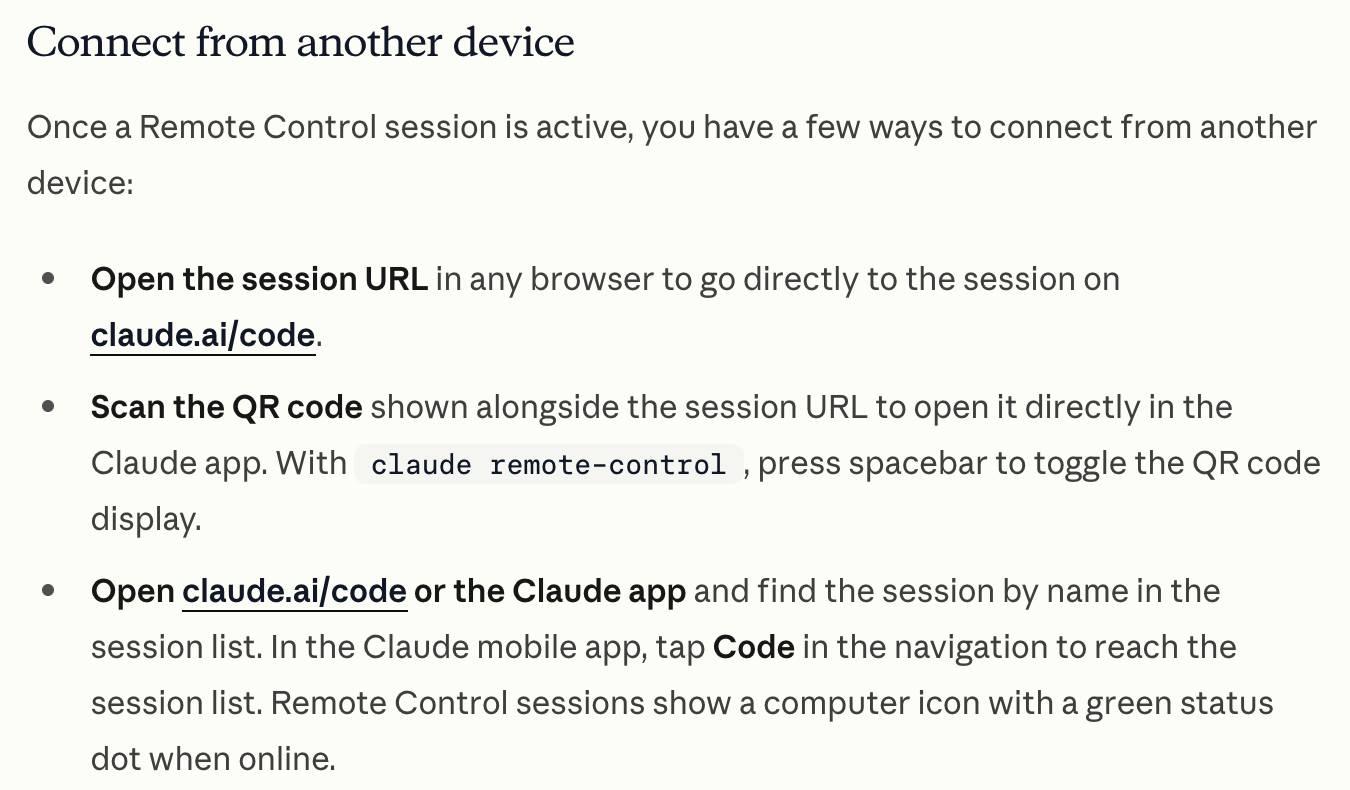 Anthropic’s three ways to connect from your phone, October 18, 2026.
Turn on pings while you’re there. In the terminal, run /config and switch on Push when actions required. Now Claude buzzes your phone when it needs a yes or no, instead of sitting stalled until you walk back. You can also just tell it “notify me when the tests finish.”
Where it breaks: picking Cloud in the app instead of your computer. A cloud session runs on Anthropic’s machines and has none of your files. My own setup notes say it plainly: pick the computer, never Cloud.
Check it worked: ask it something only your computer knows
Phone > your session > type one line
Send “what files are in this folder?” from your phone.
- It lists your real file names. You’re driving the session at home.
- It can’t find them, or it starts setting up a fresh copy of something. You’re in a cloud session. Go back and pick your computer.
My setup: a Mac mini that never sleeps, so my phone always has a session
The laptop version has one weak spot. Close the lid, and the session goes offline until the machine wakes up.
So my server lives on a Mac mini at home that’s set to never sleep and to restart after a power cut. A launchd job (the Mac’s built-in way to keep a program running) starts claude remote-control and brings it back if it ever quits. These are the lines that matter from the real file:
<key>KeepAlive</key>
<true/>
<key>ProgramArguments</key>
<array>
  <string>/bin/sh</string>
  <string>-c</string>
  <string>exec /usr/bin/tail -f /dev/null | /usr/bin/script -q /dev/null /opt/homebrew/bin/claude remote-control --name MacMini --spawn same-dir --permission-mode auto</string>
</array>
<key>StandardOutPath</key>
<string>/dev/null</string>
<key>ThrottleInterval</key>
<integer>60</integer>
<key>WorkingDirectory</key>
<string>~/Productivity</string>
My launchd file, created October 5, 2026. Paths shortened, session name swapped.
What the pieces do, per the docs. --spawn same-dir puts every phone session in the same folder, which means two sessions editing one file can step on each other. --permission-mode auto starts each session in auto mode. KeepAlive with a 60-second throttle tells the Mac to restart it, waiting at least a minute between tries.
Two traps are baked into that one long line:
- It quits the instant it starts with no terminal. A background job has no screen, so the folder-trust question can’t be asked, and Anthropic says the command exits with “Workspace not trusted.” Feeding
tail -f /dev/nullintoscriptfakes a terminal so it stays up. - The output goes nowhere on purpose. The screen redraws were piling up about 50 MB of log a day, per my setup notes, so both logs point at /dev/null.
The restart matters for one more reason. The docs say server mode gives up after roughly 10 minutes without internet and exits. launchd starting it again is what keeps “always on” true.
That buys me one thing. If my laptop dies in the middle of a job, I don’t get up. “I can just ask it to pick up where it left off.” I open the Mac mini session, have it look at the logs and keep going.
It can’t reach the MacBook while that’s off. It doesn’t need to: the Mac mini keeps its own synced copy of my files. How much I actually lean on Claude Code day to day is in my real Claude Code usage.
Where I draw the permission line in auto mode
Every session on the Mac mini starts in auto mode. Honestly, I don’t have an issue with that, because of how I hand it work.
“I’m never just saying build me this and just come back when you’re done.” It’s always: I’m thinking about building this, here are examples, give me the plan. I review the plan. It gives me an artifact with diagrams, so I’m looking at it instead of reading a wall of text.
If I understand it and like it, I approve. If I have questions, I ask. Once my questions are answered, I approve it and it runs.
“I don’t want to be there approving it and babysitting every little thing. I already approved the plan.”
The only time I want my phone to buzz: “Unless something is serious, like, yo, you’re gonna have to open your computer to the internet and give away your money.”
Auto mode isn’t a free pass, and Anthropic doesn’t sell it as one. A second model, the classifier, checks each action before it runs. The permission modes page lists what it blocks by default:
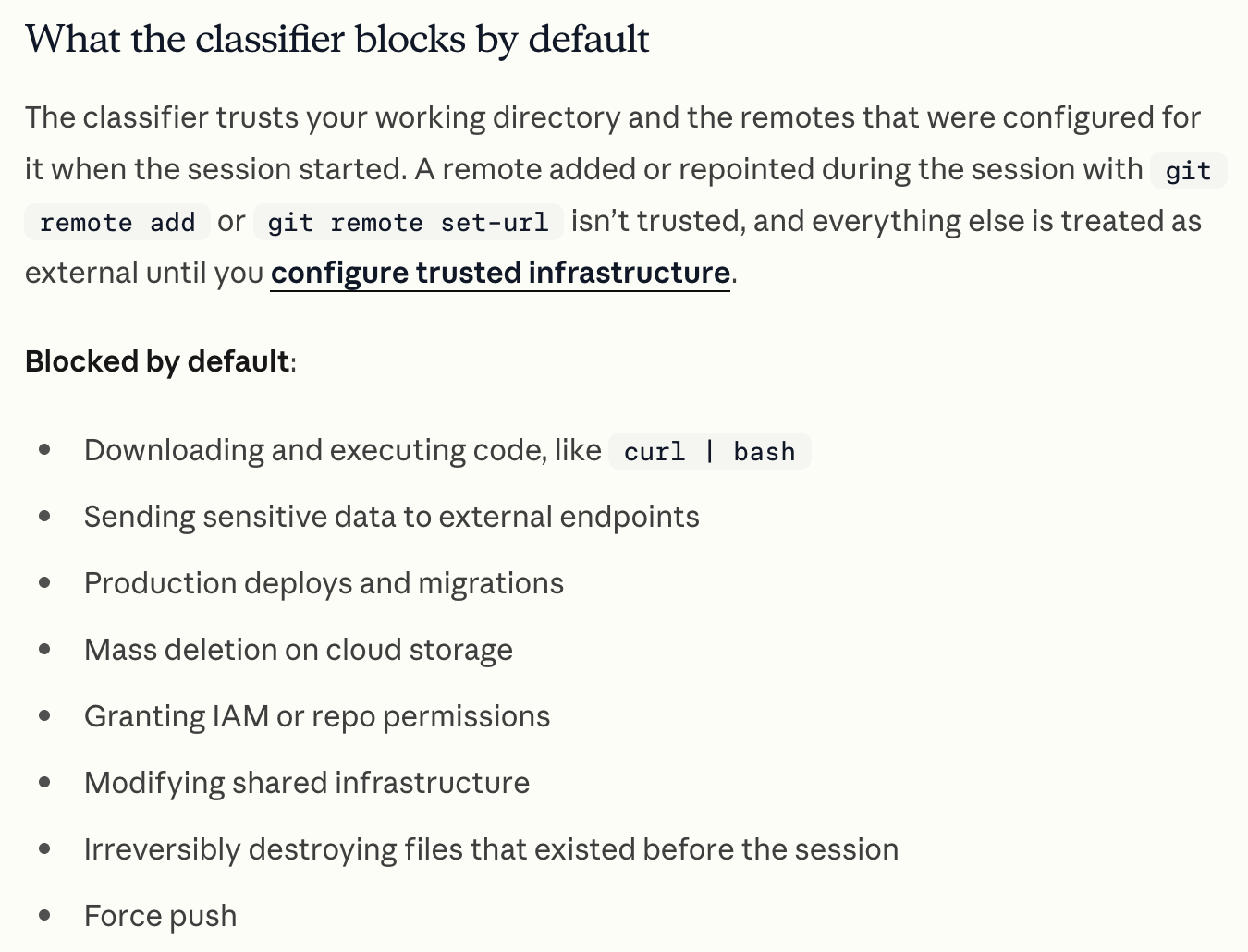 What auto mode blocks by default, Anthropic’s docs, October 18, 2026.
If it blocks something 3 times in a row or 20 times total, auto mode pauses and you’re back to answering prompts. From the phone, your session > + > Permission offers Manual, Accept edits, Plan and Auto. You can’t pick Bypass permissions from the app at all.

The 60-second version, from my Shorts: Claude Code's Secret Auto Mode Just Dropped.
What bit me: a bloated machine, not a broken connection
Nothing has broken since the Mac mini went full time. The connection just stays up.
What bites me is the machine itself. I do video editing on it remotely, plus a bunch of other stuff, and the tabs and windows pile up. “Sometimes it runs out of usage and you build shit and then the computer gets bloated.”
Both halves are real. Claude’s pricing page says Claude Code and the Claude app draw from the same usage pool, so a long job you steer from your phone can hit the limit like any other. How those meters reset is in Claude usage limits explained.
The bloat is on you. “Something to maintain is removing junk and keeping the thing tidy.” An always-on computer is a desk nobody clears unless you do.
Pick Remote Control when the work has to happen on your own computer
Anthropic’s docs list several ways to keep Claude working while you’re away. These four are the ones you’ll actually pick between, and they differ in where Claude runs:
| Option | How you start it | Where Claude runs | Best for |
|---|---|---|---|
| Remote Control | claude remote-control or /remote-control, then the Claude app | Your computer | Steering a job that’s already running |
| Dispatch | Message a task from the Claude mobile app | Your computer, through the Claude desktop app | Handing off a task with almost no setup |
| Channels | A plugin pushes in Telegram, Discord or your own events | Your computer | Reacting to outside messages and alerts |
| Cloud session | Claude app or claude.ai/code, environment Cloud | Anthropic’s machines | Work that needs none of your files |
Dispatch is the one people mix up with Remote Control. If you live in Cowork instead of Claude Code, Claude Cowork on your phone covers it, lid-shut rules included. Not sure which of the two you need? Claude Cowork vs Claude Code splits them.
I already approved the plan, so let it run
The whole reason I set this up was to stop being the bottleneck. I used to stay near the laptop in case Claude had a question. Now I go to bed, open my phone, and the production is still running.
My rule: approve the plan, then get out of the way. “I already approved the plan.”
So tonight, pick one long job, start it with claude remote-control, and check on it from your phone before you sleep. Every other Claude guide for work, in order, lives on Claude guides.
FAQ
Does Claude Code Remote Control work if my laptop sleeps?
No work happens while it sleeps. Anthropic’s docs say the session reconnects automatically when your machine comes back online, but your computer has to stay on and the claude process has to keep running. In server mode, if the machine is awake but offline for roughly 10 minutes, the process exits and you have to start it again.
Which plans include Claude Code Remote Control?
Pro, Max, Team and Enterprise, per Anthropic’s Remote Control docs. API keys are not supported, so you sign in with your claude.ai account. On Team and Enterprise, an Owner has to turn on the Remote Control toggle in the Claude Code admin settings first.
Is Claude Code Remote Control the same as Dispatch?
No. Remote Control lets you drive a Claude Code session that is already running on your computer. Dispatch lets you message a task from the Claude mobile app to the Claude desktop app, which handles it for you. Both run on your own machine.
Can I start a new Claude Code session from my phone?
Yes, if your computer is running claude remote-control in server mode. The server takes new sessions you start from the Claude app or claude.ai/code, up to 32 at once by default. The /remote-control command only shares the session you are already in.
Is Claude Code Remote Control safe?
Anthropic’s docs say your computer only makes outbound HTTPS requests and never opens inbound ports, and traffic goes through the Anthropic API over TLS. Your files and commands stay on your machine, but the conversation is stored on Anthropic’s servers while you’re connected. Pro and Max users can also turn on Require trusted devices.
Where this comes from
The steps, plans and auto mode rules come from Anthropic’s docs and Claude’s pricing page, read October 18, 2026. The Mac mini setup is mine: the launchd file dates from October 5, and the bedtime check, permission line and bloat come from my own use.
No phone screenshot yet, and I haven’t tried Channels or the worktree mode.
Published October 18, 2026. Checked that day against Anthropic’s docs, linked inline.

Written by
Chris AlarconChris Alarcon shows people who don’t code the boring Claude setup that actually works. He runs his one-person operation on these systems and shares every workflow, prompt, and tool combo in public. Start with the free 1-page setup.
The boring setup
It still won't know you tomorrow.
The Setup is one folder. Drop it into a Project, answer three questions, and Claude or ChatGPT writes your memory file and your voice file itself. It stops forgetting you, stops sounding like AI, and runs three real jobs by name. Twenty minutes tonight. No code. $39, 30-day refund.
See The Setup →Get the free 1-page setup
The boring 1-page setup. No code, no jargon. Get it now, then one short email from me each Tuesday.

