Quick answer: Claude, by a mile, if the question is which tool is better. But that is rarely the real question.
The real question is what to do when your job hands you Copilot for free, and the answer to that one is: use Copilot for work data at work, and pay for your own AI for everything that is actually yours.
My line: Copilot is the tool your job gives you. Claude is the tool you would choose.
So I’m not guessing here. I use Copilot at my day job, daily. I pay for Claude Max at $200/month on my own dime and run my whole operation on it.
Quick decision
| Your situation | Pick |
|---|---|
| Company documents, emails, meetings | Copilot. It is the approved tool. |
| Your own writing, thinking, projects, career | Claude |
| You want an agent that does real work (files, code, chores) | Claude (Cowork / Claude Code) |
| Your company enabled almost nothing in Copilot | Claude, and stop blaming yourself |
| Budget is zero | Copilot at work + Claude’s free tier at home |
What Copilot is actually like, from inside a job that uses it
I use it every day, so I can tell you: it’s rough. The best thing about our Copilot is that it can run GPT-5.6-class models under the hood, so the model itself is smart. It’s still clunky in ways you feel every single day.
It feels like a plain chat window. Sometimes the web features are just not there, because your IT team decides what is switched on.
It’s built as enterprise software first, and it’s good at that part: compliance, tenant data, admin control. Nobody has ever told a friend “you have to download Copilot.” You use it because your job has it.
That’s pretty much my whole review.
To be fair to Microsoft, there are two different products called Copilot. One is the free chat most employees get. The other is the paid add-on that can actually see your email and files. I broke that split down in Copilot vs ChatGPT.
If your company never bought the add-on, half of what the ads promised does not exist for you, and no amount of prompting will fix it.
(Copilot vs Claude, if you searched it the other way. Same page, same verdict.)
The 60-second version, from my Shorts: The AI you already pay for is hidden inside Docs, Word, and Notion.
Claude wins on model, surface, and ownership
The model. Fable 5 is the strongest model I have used. Even Opus 5 on high effort is phenomenal. When output has to be right and has to follow instructions exactly, this is the tool. Copilot’s models are good too. Claude’s are just ahead, and you feel it on hard tasks.
The working surface, and it is a landslide. Claude Cowork points the model at your regular office chores. Claude Code builds actual systems. Projects hold context across real work.
Copilot, as most employees experience it, is a chat box. The gap between “chat box” and “agent that does the chore” is the biggest difference in this whole comparison.
It is yours. Your goals, your finances, your side project, your job search. None of that belongs in your employer’s tenant or your employer’s logs.
Your own life belongs in a tool you pay for yourself. That’s the reason I care about most, and it has nothing to do with benchmarks.
Copilot genuinely wins inside the tenant
Copilot does have real wins, though:
- It is the allowed tool. For company data, it’s often the only place you’re allowed to paste anything. A lot of the time, that’s the whole decision.
- It is inside the apps your company lives in (Word, Excel, Outlook, Teams) if your company bought the paid add-on.
- It costs you nothing personally, and for meeting summaries and email cleanup on work data, the free tier is plenty for a lot of people.
- It is better than nothing, by a lot. If Copilot is your only option, use it hard. A clunky frontier model still beats no model.
The prices, verified
Read off the official pages August 21, 2026, tracked on my AI plan tracker:
- Claude: Pro at $20/month ($17 annual), Max at $100 and $200, per Anthropic’s pricing page.
- Copilot, consumer side: here is the August 2026 surprise: the standalone Copilot Pro plan is gone. Microsoft folded consumer Copilot into Microsoft 365: Personal at $9.99/month, Family at $12.99, Premium at $19.99 with the “highest” AI usage tier, per Microsoft’s pricing page. The work version is a separate per-seat license your employer buys.
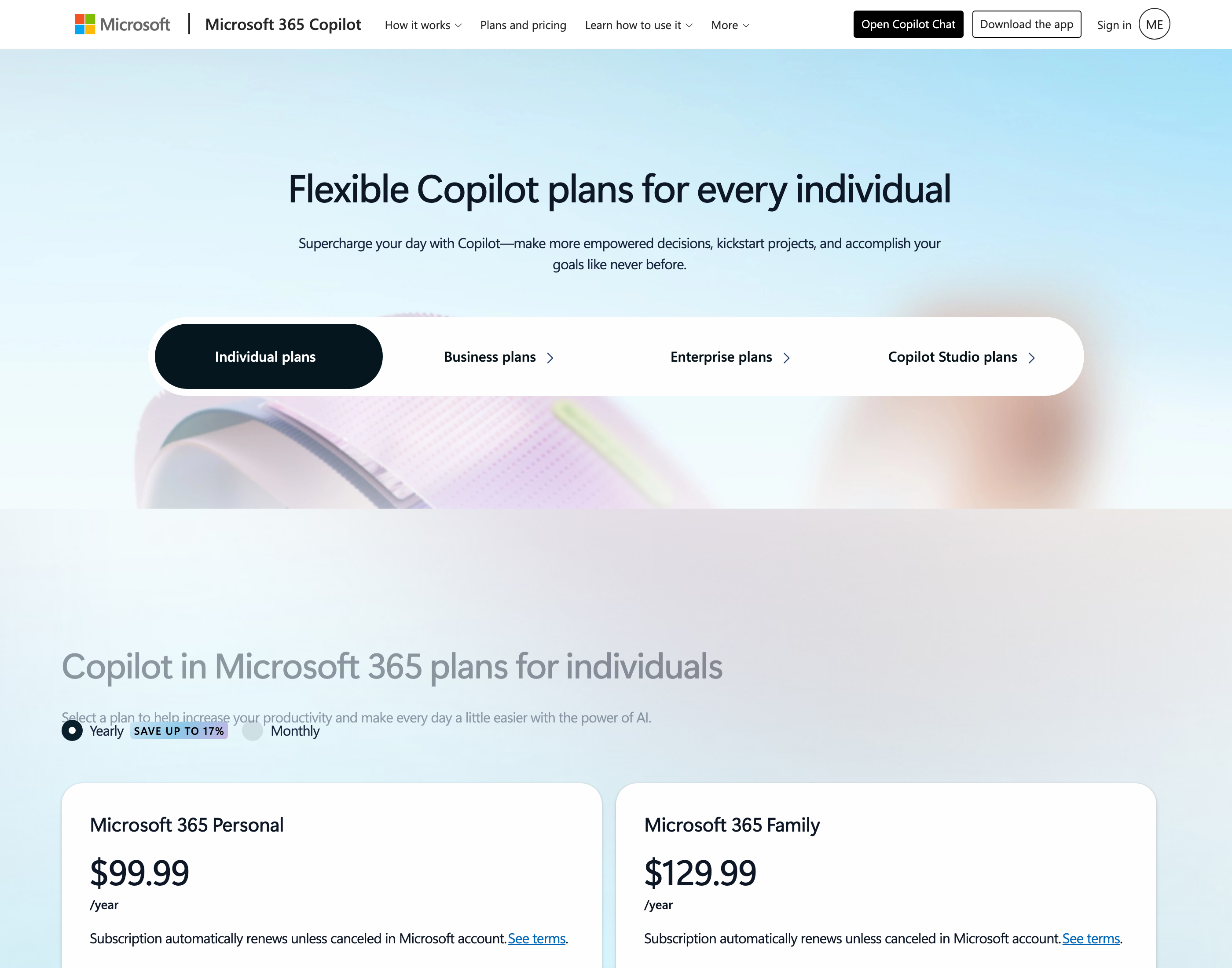 Microsoft’s own individual-plans page, captured August 21, 2026. Copilot now lives inside Microsoft 365 tiers - the standalone Copilot Pro consumer plan is gone.
How I compared these
Copilot: daily use at my actual day job, on a real corporate deployment. So part of what I’m reviewing is how my employer set it up, and you should know that. Claude: daily paid use at the $200 tier for my own business. Prices: official pages, dated, on the tracker.
Four seats, four moves
- Employee with free Copilot, AI-curious: use Copilot for work things, then get Claude’s free tier tonight and give it one real personal task. The gap will make the decision for you.
- Deciding whether your own $20 is worth it: Is Claude Pro worth it is my full answer. If ChatGPT is also in the running, start with Claude vs ChatGPT.
- Employer bought the full Copilot add-on: use it for the work data, because reading your email and files is the one thing only it can do. Then keep your own tool for your own life.
- Manager picking a direction: when Copilot is locked down, people just work around it. Ask what’s actually turned on before you decide anything about AI.
More on using a serious AI tool inside a normal job: Claude Guides.
Last reviewed August 2026. Prices verified against the official pages on August 21, 2026.

Written by
Chris AlarconChris Alarcon shows people who don’t code the boring Claude setup that actually works. He runs his one-person operation on these systems and shares every workflow, prompt, and tool combo in public. Start with the 15 prompts he uses every day.
The boring setup
It still won't know you tomorrow.
The Setup is one folder. Drop it into a Project, answer three questions, and Claude or ChatGPT writes your memory file and your voice file itself. It stops forgetting you, stops sounding like AI, and runs three real jobs by name. Twenty minutes tonight. No code. $39, 30-day refund.
See The Setup →The 15 AI prompts I actually use every day
I tested hundreds and kept the 15 that survived. You get them right away, then one short email from me every Tuesday.