How to Use AI to Find Jobs That Fit You: 4 Steps, Starting With Your No-List (2026)
Chris Alarcon ·
$ you'll have
A short list of job posts that already passed your own no-list, so you only read the ones worth applying to.
ok your job, with the steps below
- Cost
- Job board alerts (Upwork's need Freelancer Plus) plus a paid Claude or ChatGPT plan for the sorting
- Tools
- LinkedIn, Indeed or Upwork alerts · Gmail · Claude or ChatGPT
Why this setup, and what you need
Before you ask AI to find you a single job, write down what makes you say no.
Mine fits in one breath: “Big companies, low pay, stuff like that. Spammy. Not a real company, or a fake job ad, or those job ads that make you set up an account.”
That list does more work than any prompt. It’s what lets a machine read the pile so you don’t have to.
Because the pile is the problem. I used to go on LinkedIn and scroll manually.
“That sucked time and it was depressing. And sometimes you miss stuff, and you just feel like a zombie.”
Now a script on my Mac mini reads it first. On October 29 it pulled 8,595 raw listings from the job boards, and 23 were new once it dropped duplicates and repeats. A cheap decision model cut 5 of those for $0.0019.
Codex reviewed 9 of the 18 left, and 2 made my apply list.
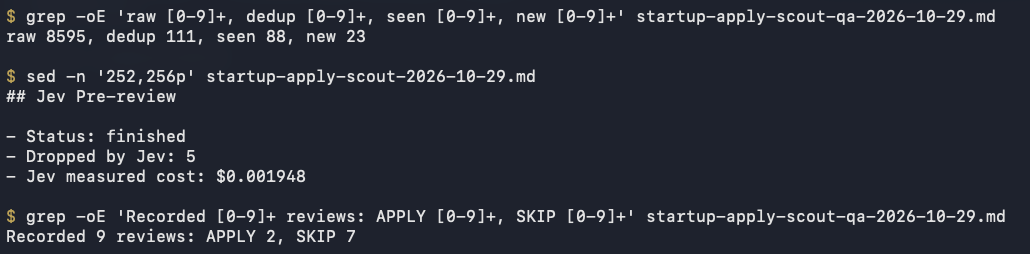 My job scout’s October 29 run, read from its logs on my Mac mini.
You don’t need the Mac mini. The job boards already send alerts, and the AI you pay for can read them.
How to use AI to find jobs that fit you, in four steps and a check:
- Write your instant-no list before anything else.
- Let the job boards watch, and file their alerts in one Gmail label.
- Have Claude or ChatGPT score that label on a schedule.
- Test it, read what it threw out, then loosen it.
What you need (as of October 29, 2026)
- Alerts on the boards you already use. LinkedIn puts a job alerts toggle under any job search. Pick daily or weekly, by email, app notification or both, per its job alerts help page.
- A personal Gmail. Every alert lands in one label. Keep your job search off your work account.
- A paid Claude or ChatGPT plan for the sorting.
- Ten minutes for the list. Step 1 is the part that decides everything after it.
- Skip for now: tools that apply for you. My setup never applies, emails or messages anyone. I do that by hand.
Step 1: Write your instant-no list before anything else
Notes app or a doc > two lists: instant no, and must have.
The instant-no list is the things that make you skip a post without reading the rest. Mine is at the top of this page. Yours might be commute time, travel, a title you’ve outgrown or a pay floor.
Then turn each one into a yes-or-no question. A machine can’t do much with “not spammy.” It can answer “Is this a staffing firm or job board relaying someone else’s job?”
That’s how my scout asks it. Its decision model gets literal questions: is the hiring company the real employer or a relay, is it a big established enterprise, and is the job fully remote and open to US candidates.
Paste this into Claude or ChatGPT to build yours:
I'm looking for a new job. Here's what makes me skip a post
without reading it: [your instant-no list].
Here's what a good fit must have: [3-5 must-haves, like
remote, a pay floor, the kind of work].
Turn both lists into short yes-or-no questions an AI could
answer from a job post alone. Then ask me 5 questions about
anything I left out.
Applicable for: anyone hunting while employed, freelancers on Upwork, career switchers.
Step 2: Let the job boards watch, and file their alerts in one label
Gmail search bar > Show search options > From: the job board’s alert address > Create filter > Apply the label “Job-Alerts” + Skip the Inbox.
Don’t make a chatbot hunt the web for jobs every morning. The boards already know what’s new, and they’ll email you.
What each board gives you today:
- LinkedIn: an alert on any job search, daily or weekly, up to 20 alerts at once.
- Indeed: Career Scout, which Indeed calls its “newest Artificial Intelligence (AI) job search product.” It suggests job matches from a chat. The page lists no price and doesn’t say it applies for you.
- Upwork: instant job alerts “sent immediately after a similar job is posted.” You need the Freelancer Plus plan and at least one proposal to an active job. You can set “the lowest rate you’re willing to consider.”
Upwork also ended RSS. Its RSS deprecation page says support stopped after August 20, 2024.
chistev on Hacker News wanted exactly what this setup builds: “a tool that sends me an email when a certain job matching certain job/client filter criteria is made.” Then: “The inbuilt Upwork alert system sucks.”
Alerts alone aren’t the fix either. eterm, also on Hacker News, stopped opening LinkedIn’s because “every week they email me the same list of the same jobs that have been listed since the first week I signed up.”
That’s why the alerts go into a label and something else reads them. Mine already land in a Job-Alerts label; sorting your inbox with AI shows how that filing works.
Step 3: Have AI score the pile on a schedule
Claude: Gmail connector on > new scheduled task. ChatGPT: Settings > Apps > Gmail, then Work > describe the event.
Here’s what each option does as of October 29, 2026:
| Option | Plan | How it runs | Best for |
|---|---|---|---|
| ChatGPT event-triggered task | Plus, Pro, Business, Enterprise, Edu | Fires on a new Gmail message, filtered by sender or subject | Scoring each alert as it arrives |
| ChatGPT scheduled task | Free once a day; paid up to hourly | Runs on a clock. 3 active tasks on Free and Go, 5 on Plus, 15 on Pro | One morning digest |
| Claude scheduled task | Pro, Max, Team, Enterprise | Hourly, daily, weekly or weekdays. Runs with your computer asleep | A digest from your Job-Alerts label |
The ChatGPT rows come from OpenAI’s scheduled tasks article; Free and Go accounts can’t create event-triggered tasks. The Claude row is Anthropic’s scheduled tasks article. If the laptop question is what’s stopping you, Claude scheduled tasks with the laptop closed covers it.
The standing job I’d paste in:
Read new emails in my Job-Alerts label since your last run.
For each job post, answer my questions: [paste your yes-or-no
list from step 1].
- Any instant-no answer: skip it, and list it at the bottom
  with the one rule it failed.
- Everything else: give me the title, the link, and one line
  on why it fits.
- Never apply, reply or message anyone. Never delete email.
- If nothing passed, say "nothing passed" and show me the
  3 closest skips.
That last line matters more than it looks. You’ll see why in step 4.

I walk through the Claude Cowork version on camera in Job Searching in 10 Minutes a Morning (Claude Cowork Does the Rest) (12 min).
My own version has one extra layer. “It’s a script that we have, Codex is doing that. It’s in the Mac mini.”
“We have it with Jev, which pre-qualifies, and then Claude or even Codex is the one that’s running it, hand combs the picks.”
The logs settle the “Claude or even Codex” part: it’s Codex, twice a day, at 7:35 a.m. and 1:35 p.m.
Jev is a decision model from TypeSafe AI. It answers yes-or-no and pick-one questions and never writes text. Its models page lists $0.042 per million input tokens, and output is free.
So the cheap model cuts the obvious misses, the smarter one reads what’s left, and I decide. You can copy the same split with one scheduled task: the questions do Jev’s job, and you do the deciding.
Step 4: Test it, read what it threw out, then loosen
After the first run: open the skips list > read 10 > fix the one rule that killed something good.
This is the loop I run. “We give it criteria and we test it.” Then “we have AI manually check it,” and you check it too.
“If you see anything that I missed, that’s when you refine and tune the filters. And then eventually you get to the spot you like and then you’re good.”
Here’s what an untuned filter looks like. My Upwork scanner ran 14 hard rules before any AI saw a job: posted in the last 30 minutes, 15 proposals or fewer, payment verified, no Loom video asks, no full-time or VA gigs, and more.
From October 28 at 6:16 p.m. to October 29 at 9:01 a.m. ET, it looked at 104 jobs.
 My Upwork scanner’s backup, October 29, 2026. 104 jobs in, 104 rejected.
It rejected all 104. The AI judge behind those rules never got called once.
A filter that never says yes doesn’t look broken. It looks like a quiet market. That’s why the prompt in step 3 asks for “the 3 closest skips” when nothing passes.
That scanner had a second problem: it drove a logged-in Chrome on my real Upwork account and kept getting logged out. “I can’t keep saying it logs out and it just didn’t run all day.” I shut it down on October 29 and handed Upwork to Grok Bot, one of the jobs in my Grok Bot use cases.
Check it worked: count what gets through, then read the rejects
Look at two numbers after the first week:
- How many passed. A few a day means the list is about right. Zero for three days means it’s too tight, so loosen one rule. Thirty a day means it’s too loose.
- What it skipped. Read 10 rejects once a week. If one was a job you’d have applied to, find the rule that killed it and rewrite that question.
Then apply by hand.
The machine scrolls, you decide
I don’t scroll LinkedIn like a zombie anymore. I read a short list that already passed my own no.
It misses some. I’m fine with that: “I’m okay with it missing some stuff, but I don’t want to check it anymore.”
My rule: “Is it gonna be 100% perfect? Nothing ever is, but it’s good enough that it saves you time.”
Tonight, write your instant-no list. Tomorrow, set one alert and one filter. More setups like this live on my Claude at work hub, and everything else my Mac mini runs is in what runs on my Mac mini.
FAQ
Can ChatGPT find jobs for me every morning?
Yes, if you feed it real job alerts instead of asking it to search cold. On Plus and up, ChatGPT can run an event-triggered task on new Gmail messages filtered by sender, or a scheduled task up to once an hour. Free and Go can schedule a task at most once a day and can’t use event triggers.
Will AI apply to jobs for me?
Some tools try, but I don’t let mine. My job scout never applies, emails or messages anyone. It reads, filters and hands me a short list, and I apply by hand. Keep that line: the sorting is cheap to get wrong, an application isn’t.
Do I need to code or keep a computer on to use AI for a job search?
No. Job alerts come from the boards themselves, and Claude scheduled tasks run on Anthropic’s side, even when your computer is asleep, as long as they only use connectors like Gmail. My version runs on a Mac mini, but you don’t need one.
How do I get Upwork job alerts now that RSS is gone?
Upwork ended RSS feeds after August 20, 2024. Its instant job alerts need the Freelancer Plus plan and at least one proposal to an active job, and you can filter by hourly or fixed price and set the lowest rate you’ll take. Send them to email, then let AI sort them like any other alert.
What should I tell the AI so it doesn’t send me junk?
Your instant-no list, written as yes-or-no questions. Is this a staffing firm relaying someone else’s job? Is the pay under my floor? Does it make me create an account to apply? Questions like these give the AI something to check, where a vague job description gives it nothing.
Where this comes from
The plan and alert facts come from LinkedIn, Indeed, Upwork, OpenAI, Anthropic and TypeSafe pages, read October 29, 2026. The numbers are my job scout’s October 29 logs and my retired Upwork scanner’s backup.
The no-list, the test-and-loosen loop and the hand-applying are how I run it. I haven’t run the ChatGPT event-triggered version on my own alerts, and nothing here claims an interview or a hire.
Published October 30, 2026. Tool facts checked October 29 against each vendor’s help pages.

Written by
Chris AlarconChris Alarcon isn’t a developer. He shows people who aren’t developers how to build real things with Claude Code: a site, an app, an agent. He runs his one-person operation on these systems and shares every workflow, prompt, and tool combo in public. Start with the free 1-page setup.
The boring setup
It still won't know you tomorrow.
The Setup is one folder. Drop it into a Project, answer three questions, and Claude or ChatGPT writes your memory file and your voice file itself. It stops forgetting you, stops sounding like AI, and runs three real jobs by name. Twenty minutes tonight. No code. $49 · 30-day refund.
See The Setup →Get the free 1-page setup
The boring 1-page setup. No code, no jargon. Get it now, then one short email from me each Tuesday.
