What Runs on My Mac Mini: 114 Robots, One AI Bill, and Almost No Apps


So yeah, AI literally has all my subscriptions. We built our own finance app, meditation app, food app. We have our own video app.
We don’t pay for any apps, y’all. I don’t have a reason to pay now.
If you keep seeing “buy a Mac mini for AI agents” posts while your card piles up $20 apps, that probably sounds backwards. More gadgets, more tools, more bills. That’s the pitch everywhere.
My Mac mini is a 2020 M1 with 8 GB of memory. On October 29, 2026, it ran 114 scheduled robots. I pay about $430 a month for AI plans, by my own count, and almost nothing for apps.
Here’s what those robots do, which apps they replaced, what broke quietly last week, and which robots I’m cutting first.
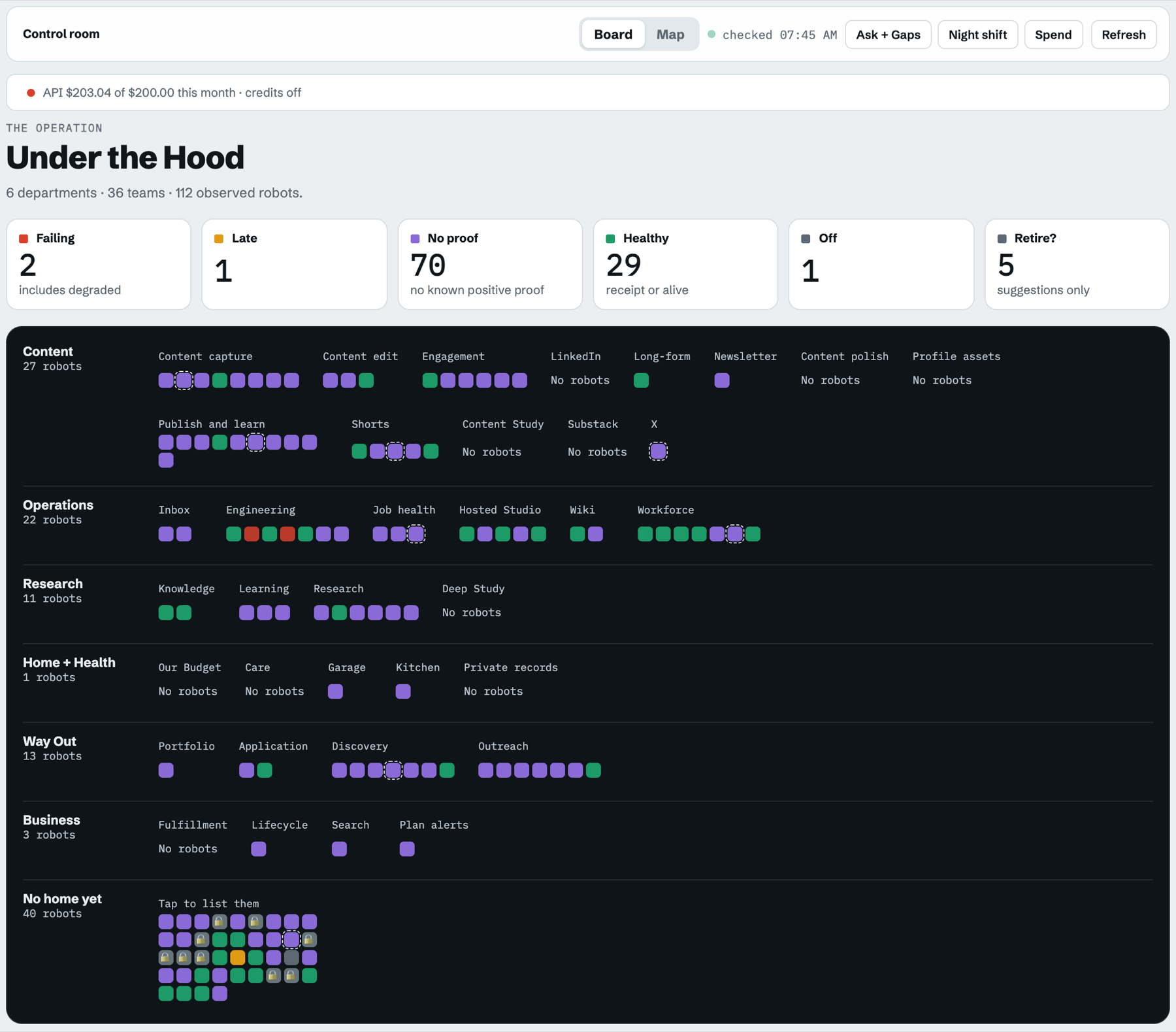 My Under the Hood dashboard, October 29, 2026.
Most of my 114 robots are plain scripts, not AI
A robot here is just a job the Mac mini starts on its own clock. Most of them don’t think. They fetch, sort, copy, check and restart.
My dashboard maps every robot to a step in a workflow. Across 36 workflows there are 300 steps: 134 use AI, 94 are plain code, and 72 are me. So when someone says they run “100 AI agents,” ask how many are scripts with a nice name.
Here’s what mine do, grouped by job:
| Group | What its robots do | When they run |
|---|---|---|
| Content | Pull my recordings into my video app, find posts worth studying on X and YouTube, line up replies and posts for my approval | Through the day |
| Operations | Restart the Mac mini, sweep stuck memory, check every robot’s health, update my wiki | 1 a.m. restart, 2:30 a.m. sweep, health checks at 7:45 a.m., 12:15 p.m. and 8:15 p.m., wiki Thursdays at 9 a.m. |
| Inbox | Sort my email and tell me what needs me | 9 a.m., 2 p.m. and 7 p.m. |
| Way Out (my job hunt) | Find roles that fit and draft outreach I approve | Through the day |
| Home | Refresh our budget, our food-week app and my meditation app’s backups | Through the day |
| Business | Watch AI plan prices and run this site’s weekly search work | Daily and weekly |
AI took over the apps I used to pay for
The robots only matter because of what they let me stop paying for.
On October 28 I moved my email list off Kit and onto Resend. Kit was $39 a month.
Resend’s free marketing plan covers up to 1,000 contacts, and my list fits under that. Kit stays on its free plan for one job: the checkout for The Setup.
Why would you want to pay 30 bucks when you don’t need to, or 40 bucks?
I don’t pay for Notion. And vidIQ, we nuked it. The only reason I’d kept it was a five-dollar-a-month deal.
The moment it goes up, I just nuke it. The moment I don’t need it anymore, I nuke it.
The bigger swap is the apps themselves: our own finance, meditation, food and video apps, each built with the AI plans I already pay for.
The video app is Cutroom. We downloaded Cap, an open source screen recorder, and a robot on the Mac mini now pulls my Cap recordings straight into Cutroom.
I also copied the iPhone recording app I pay for, QCam, into Cutroom’s record page on October 15. QCam is about $70 a year, and it’s next to go.
| What I pay for now | Cost | Note |
|---|---|---|
| AI plans | About $430 a month | My count, plans only |
| vidIQ | $0, nuked | Kept only while it was $5 a month |
| Virtual mailbox | About $10 a month | My estimate |
| QCam | About $70 a year | Cancelling next |
| Notion, Kit | $0 | Notion on its free plan; Kit list moved October 28 |
| Power for the Mac mini | About $0.90 to $5.20 a month | An estimate, not my bill |
The mailbox is the one I can’t automate away. The FTC’s CAN-SPAM guide says every marketing email needs a valid physical postal address, and a registered private mailbox counts. Kit’s address only covers mail sent through Kit.
The power line is my own math. Apple’s Mac mini power page lists my M1 at 6.8 watts idle and 39 watts max. At the August 2026 US average of 18.16 cents per kWh from the EIA, a month of that is pennies to a few dollars.
The one AI bill outside that $430 is the API meter, and it got away from me. The top of my dashboard says it: API, $203.04 of a $200 cap for October, credits off.
So now it stays off, with a one-line rule: subscription first, API only for a case a subscription can’t do.
The restart skipped four nights in a row, and only a log noticed
Every night at 1 a.m., a job restarts the Mac mini. If a heavy job is still running at 1:20, it skips the restart and tries again the next night.
From October 23 to 26, it skipped four nights in a row.
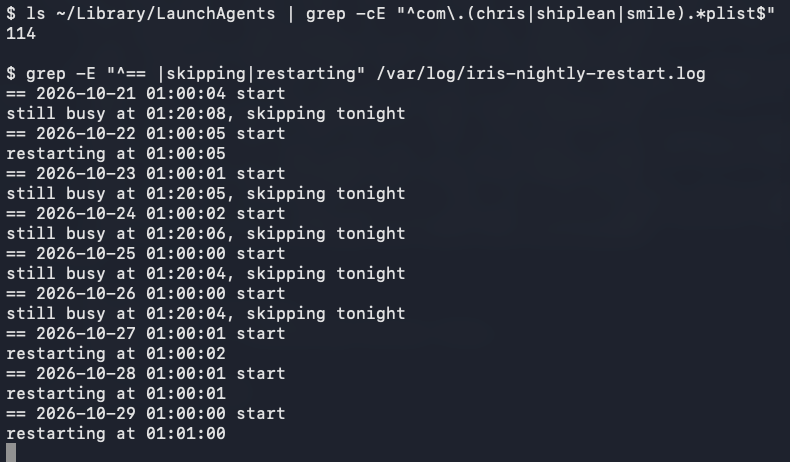 My Mac mini’s restart log, read October 29, 2026.
That morning I’d said the restart was one of the robots I’d miss most: “keeping the Mac mini healthy, like restarting it every morning or something like that, because it gets clogged up and slow.” It runs at 1 a.m., not in the morning, but the clogged part is right.
While it skipped, the memory spillover climbed. My 2:30 a.m. memory sweep logged 2,303 MB of swap on October 25 and 3,765 MB on October 26. After the restarts on October 27, 28 and 29, it read zero.
Then the inbox robot went quiet. Its last pass ran at 9 a.m. on October 24, and the next one didn’t come until about 8:50 p.m. on October 26. When it came back, the catch-up pass filed 32 emails.
I can’t tell you the restart caused that gap. They just happened the same week.
My health check did log it. Between October 10 and 29, it recorded 54 times a robot went from OK to failing, late or half done, across 37 different robots.
joozio on Hacker News, who also runs an agent around the clock on a Mac mini, put it plainly: “Agents fail silently way more than you’d expect.”
Sam Hartley on DEV spends 3 to 5 hours a month on upkeep, “mostly chasing one silent failure or a model update that changed a tag.”
So what did the two and a half quiet days cost me?
It didn’t cost me anything because I think my agents are now handling the inbox. The script was the old process. It doesn’t need to do that job anymore.
That makes it one of the robots I might pause.
The first robots I cut are the ones nobody touches
The audit is coming, and the dashboard already did half of it. Out of 112 robots it watches, 29 show a healthy receipt and 70 have no known proof they did anything useful. Five are flagged “Retire?” and 40 don’t belong to any workflow yet.
The ones I haven’t used or touched, or that keep failing, those are the first ones to go.
Two are failing right now. My Linear check-in and Linear answers robots both ended in an error on the October 29 morning check.
The folder also holds 55 old job files I already retired or backed up, so cutting isn’t new. It just has to happen on purpose.
If you’re setting one of these up yourself, here’s how I run Claude Code 24/7 on a Mac mini, janitor jobs included. And if you only want the inbox piece, start with how to use AI to sort your inbox.
Fewer apps beat more robots
I opened with no apps, and that’s still the point. The Mac mini isn’t the win. The win is that the AI plans I already pay for build the small tools I used to rent, and a box in my house runs them while I sleep.
My rule: more is not necessarily better. Every robot needs a use case, and every app needs a reason to keep charging me.
Before you buy anything, open your card statement. Circle every app over $10 a month and ask whether the AI you already pay for could do that job. Start with the computer you have.
If you’re new to Claude, my Claude guides for non-developers are the place to begin, and the AI morning brief is a good first robot.
Where this comes from
Job counts, logs and the dashboard were read on my own Mac mini on October 29, 2026. Both screenshots are mine from that morning. Resend, Apple, EIA and FTC pages were checked the same day.
The $430, the mailbox and QCam prices are my numbers, not a statement. I haven’t run the robot audit yet or cancelled QCam.
Published October 30, 2026. Logs read and prices checked on October 29, 2026.

Written by
Chris AlarconChris Alarcon shows people who don’t code the boring Claude setup that actually works. He runs his one-person operation on these systems and shares every workflow, prompt, and tool combo in public. Start with the free 1-page setup.
The boring setup
It still won't know you tomorrow.
The Setup is one folder. Drop it into a Project, answer three questions, and Claude or ChatGPT writes your memory file and your voice file itself. It stops forgetting you, stops sounding like AI, and runs three real jobs by name. Twenty minutes tonight. No code. $39 until Nov 8 · 30-day refund.
See The Setup →Get the free 1-page setup
The boring 1-page setup. No code, no jargon. Get it now, then one short email from me each Tuesday.
