How to Use AI to Check Your Business Numbers Every Week (4 Steps, and You Make the Call)
Chris Alarcon ·
$ you'll have
A weekly read of your numbers that ends in one change you chose, judged by a rate instead of raw views.
ok your job, with the steps below
- Cost
- Free to start: Claude's file analysis is on its Free plan
- Tools
- Your analytics export (GA4, Umami, YouTube Studio or your email tool) · ChatGPT or Claude
Why this setup, and what you need
I had AI go through my YouTube Shorts numbers with me. Not a report it wrote while I was gone. Me in the chat, asking why.
I think the biggest read was, yo, your hooks are not good. That to me was revolutionary.
What? I thought they were good. That’s when I started realizing, oh, I shouldn’t delegate the analytics completely. I need to dive into it, understand it.
Because before that, I didn’t check my numbers. That’s the problem. And I had AI do it for me.
AI would look at the numbers and give me a final verdict, and it was just so much that I went manual.
If you’ve been pasting an export into ChatGPT and asking “how did we do?”, this is the other way. The robots count. AI digs with you. You make the call.
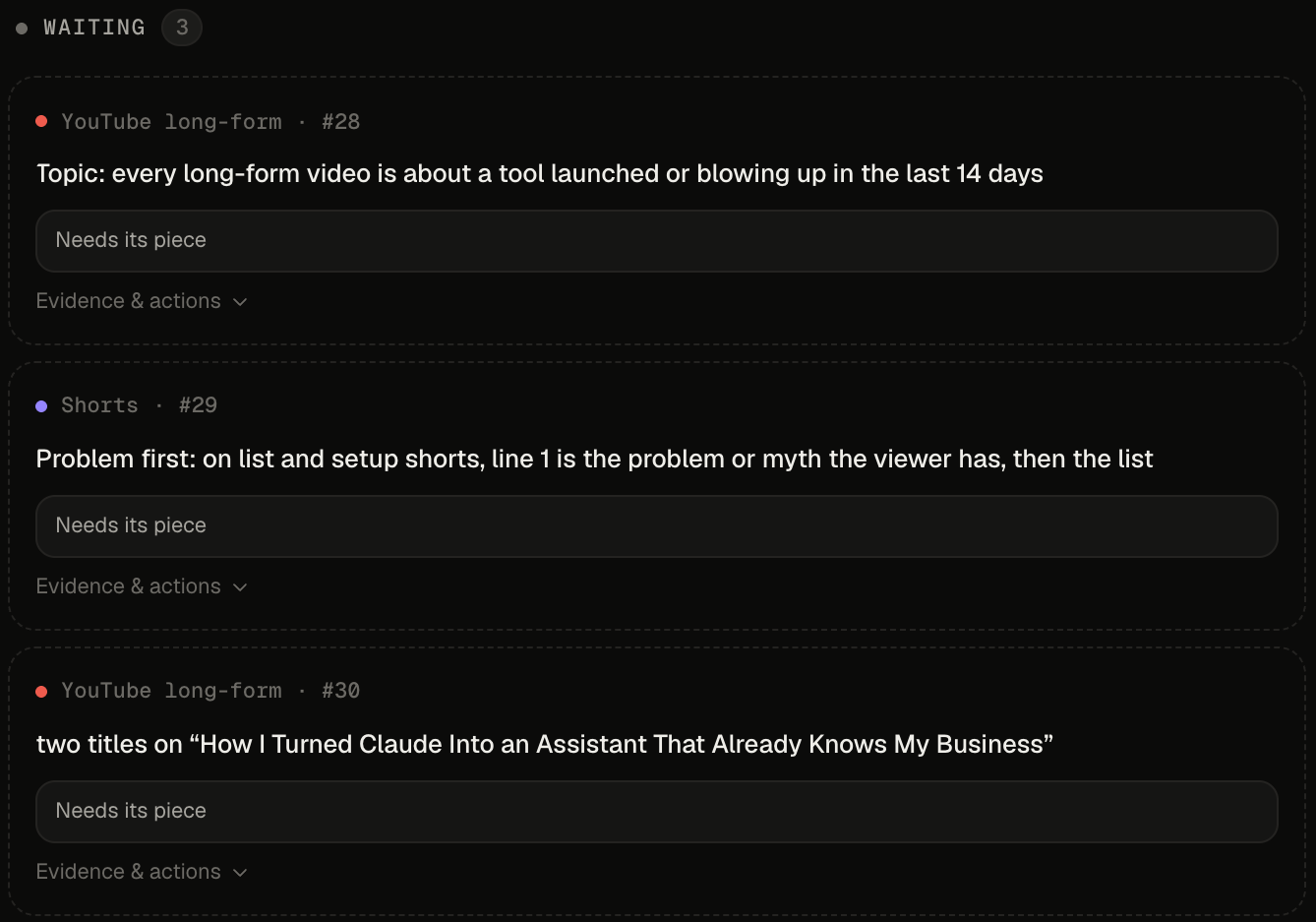 My Studio test board, October 29, 2026. Test #29 is the hooks read.
How to use AI to check your business numbers every week, in four steps:
- Pick one conversion and judge your views against it.
- Put the numbers where you and the AI can both read them.
- Ask why it’s low, why it’s high, and why it worked.
- Fix the top of the funnel first, then make the call yourself.
What you need (as of October 29, 2026)
- An export of your numbers. A CSV from Google Analytics, YouTube Studio, your email tool or your shop. Four weeks is enough.
- ChatGPT or Claude. Both read spreadsheets and run Python on them, per OpenAI’s data analysis help page and Anthropic’s file creation article. Plans for each are in step 2.
- About 30 minutes once a week. My Friday session is built for that.
- Work numbers? Check what your company allows before you upload a customer export to a chat app.
- Skip for now: an automatic weekly report with a verdict on top. I ran one. The next section is why I stopped.
Why I stopped letting AI hand me the weekly verdict
In July my system wrote a weekly content audit with the verdict at the top. I showed it off as use case #12 in my Claude Cowork use cases. Then I let a robot I called the Coach pick my YouTube tests, too.
From October 1 to 21, the Coach opened 15 tests on its own and got 0 answers. Eight got swapped before they ran. Seven got closed by resets. On October 23 I paused it and the other recommendation bots.
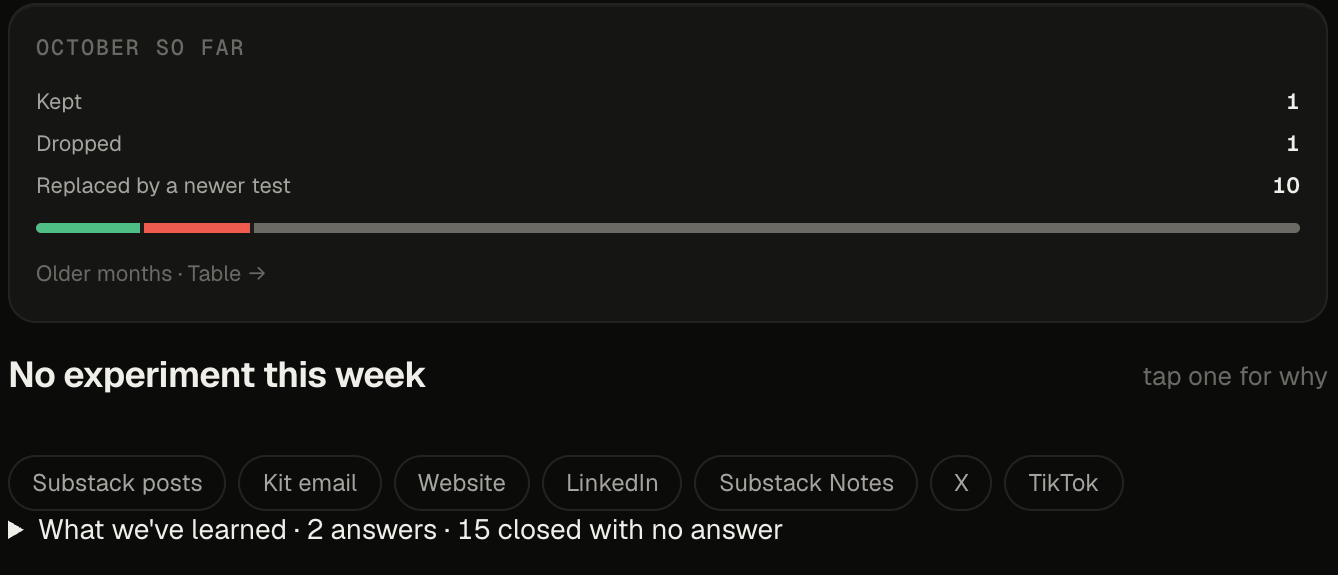 My Studio Experiments page, October 29, 2026: 2 answers, 15 tests closed with none.
The math was never the weak spot. When ChatGPT or Claude runs code on your file, the arithmetic holds up. The weak spot is everything outside the file.
Google says it plainly about its own assistant: Ask Advisor’s answers “rely only on information from within that specific Google Analytics property,” and it “may have some capability limitations and make mistakes” (Google’s Ask Advisor page). Your AI doesn’t know which week you skipped posting, or which page you care about.
There’s a second trap. Twirrim on Hacker News described a coworker pasting a raw spreadsheet into ChatGPT for a styled report: “the LLM is doing its job, predicting the tokens to emit, and not actually doing mathematical analysis of the underlying data.” The fix is to ask for the calculation, not the summary.
Step 1: Pick one conversion and judge your views against it
Write down the one action that pays you: an email signup, a booked call, a sale. Then divide.
Which number do I stop judging on its own? Views. Views matter, but it’s not the end all be all. What we look at now is how many views per conversion.
Here’s why. My Shorts got more views in October and fewer subscribers per view:
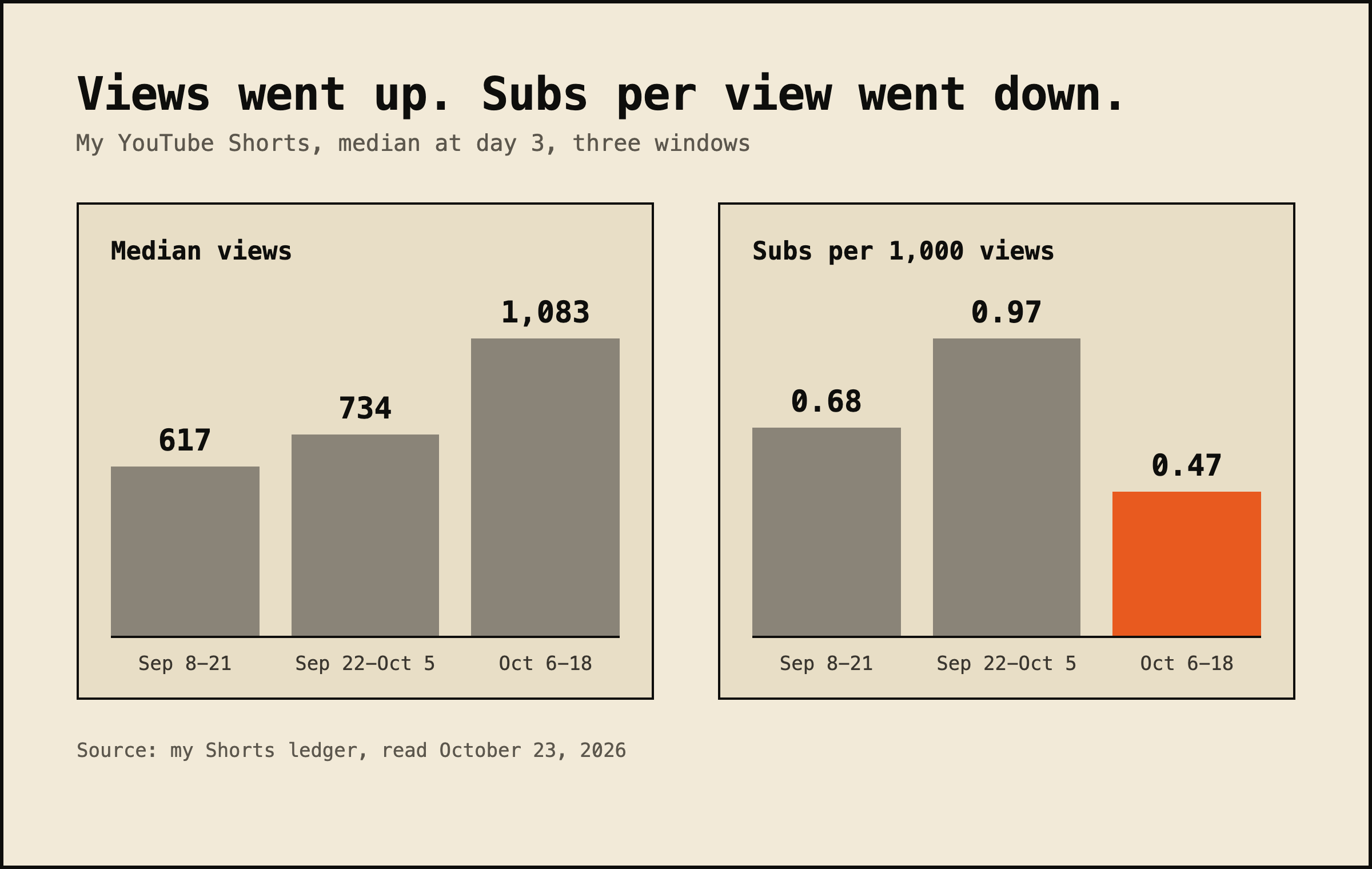 My Shorts, day-3 medians, September 8 to October 18, 2026.
Raw views would have called October a win. Per view, it was my worst window of the three.
Same story on this website. Here are three pages from the four weeks to October 27, with visitors counted by my Umami dashboard:
| Page | Visitors | New subscribers | Visitors per signup |
|---|---|---|---|
| Grok usage limits explained | 1,094 | 1 | 1,094 |
| Claude Opus 5.5 vs Fable | 1,197 | 3 | 399 |
| How to use Claude Projects | 221 | 3 | about 74 |
The Projects page had a fifth of the traffic and tied for signups. Browser blockers can hide some visitors from Umami, so read these as direction, not decimals.
Paste this with your export attached:
Attached: my numbers for the last 4 weeks.
My conversion is [email signups / booked calls / sales].
Use Python to calculate [views or visitors] per conversion
for each [page / post / video]. Show me the code and a table
sorted worst to best. Don't give me a verdict yet.
Applicable for: consultants, coaches and creators with a site, a list or a channel; anyone who owns a weekly numbers update at work.
Step 2: Put your numbers where you and the AI can both read them
Claude: Settings > Capabilities > turn on file creation, then attach your CSV. In ChatGPT, attach the file in any chat.
You don’t need my setup. Pick the option that matches where your numbers already live:
| Option | Cost | What it reads | Watch out for |
|---|---|---|---|
| Google Analytics Ask Advisor | Inside Google Analytics, eligible accounts only | One GA property | Beta, English properties only |
| ChatGPT with a CSV | Varies by plan | Spreadsheets, CSV and JSON you upload | File types and limits vary by plan |
| Claude with a CSV | Free, Pro and Max | CSV, TSV and more, up to 30MB | Check it’s on in Settings |
| Umami dashboard | Self-host for free, or cloud Hobby at $0 | Your site traffic | Cloud Hobby: 1 site, 100K events a month |
Sources: Google’s Ask Advisor page, OpenAI’s and Anthropic’s help pages above, and Umami’s pricing page, read October 29, 2026.
Mine is a self-hosted Umami dashboard plus Ship Lean Studio, an app I built that pulls my YouTube, email and site numbers into one place. AI dives into it. I can dive into it.
The Umami software costs me nothing because I host it myself. The hosting is its own line.
Want the robots that feed it? They run on my Mac mini. You can skip all of that and start with an export.
Step 3: Ask why it’s low, why it’s high, and why it worked
Three questions, in this order. Here’s what I actually type when I dive in:
Why is this low? Why is this high? If something works, especially SEO, why did this work? Let’s double down on this.
That’s the whole prompt, really. The hooks read came from exactly this. On my Shorts, the two best openers named a problem or a myth, and 50% and 53% of viewers stayed past the first swipe. The two worst announced a list: 27% and 35%.
So the test I opened was test #29 from the top of this page: on list and setup shorts, line 1 is the problem or myth, then the list.
The Monday numbers prompt from The Solo Creators asks for “3 plain-English sentences about what changed and one question I should look into.” Good start. My three questions below do that job, with you doing the asking.
Steal this for your weekly read:
Here are my numbers [attached]. Three questions:
1. Why is this low? Take the 2 worst [pages / posts / videos]
   by [your rate] and tell me what they have in common.
2. Why is this high? Same for the 2 best.
3. Why did this work? What do the best ones do that the worst
   don't? Show me the rows you're basing it on.
Then go look at the rows yourself. The answer isn’t always in the numbers. Mine was in the first second of the video.
Step 4: Fix the top of the funnel first, then make the call yourself
Before you accept any plan, ask which step of the path it fixes. AI still gets this wrong on my numbers. Sometimes it can shift the goal.
In October, the long-form test we landed on was about what happens after the click: the title’s promise on screen by 0:40, judged at the 2-minute mark. Meanwhile my own scoreboard flags the click as the weakest step.
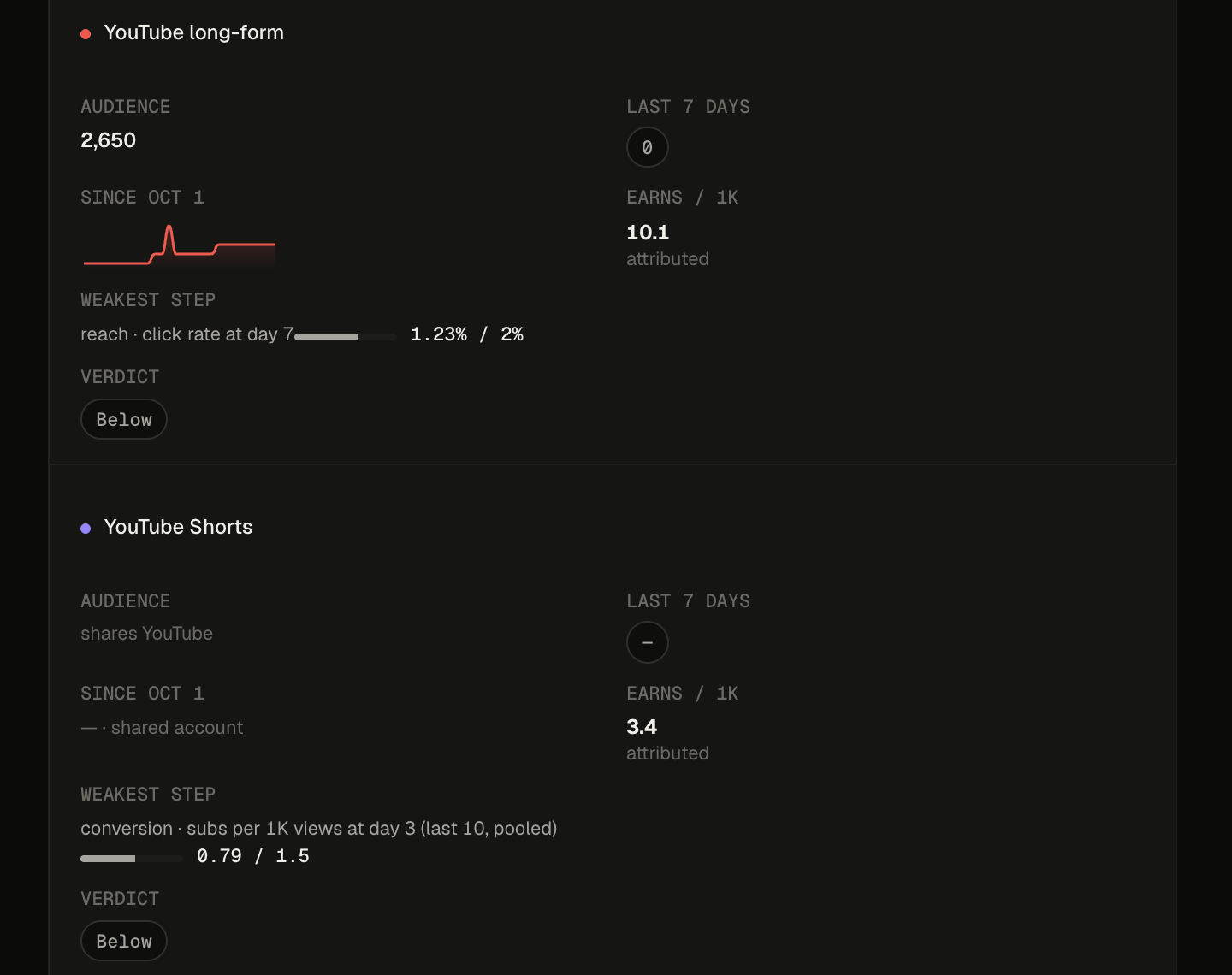 My Studio scoreboard, October 29, 2026. Each channel’s weakest step, as a rate.
If we’re focusing on all this, wouldn’t the click-through rate be the first thing we do? If we get no traffic coming in, if we don’t convert it at the top, why does it matter optimizing everything below it?
Your click-through rate is probably one of the most important metrics you have for long form. People see your thumbnail and your headline, and they need to click, bro. That’s my take. YouTube’s own CTR help page says half of all channels and videos land between 2% and 10%.
Then you write the plan. “This is how we start refining, and we come up with our weekly plan.” It’s not a one-pager. It lives in my dashboard, and the call is mine.
My split now:
- Robots count. Syncs and scripts collect the numbers and do the test math. They never pick.
- AI digs. It finds the worst and best rows and asks why, with me in the chat.
- I decide. One change a week, chosen by me.
Check it worked: one change a week, judged by a rate
Look at what your weekly read produced. Two signs it’s working:
- It ends in one change with a rate attached. “Problem first in line 1, judged by how many people stay past the first swipe” is a plan. Twelve recommendations is the AI making the call again.
- The test gets to finish. No swaps and no resets before its read date. That’s the exact rule my Coach broke 15 times.
If you want the numbers waiting for you before the session, a morning brief can carry the counts. Keep the reading for the session.
The robots count. You make the call.
I thought my hooks were good. Handing AI the verdict didn’t show me otherwise. Sitting with the numbers did. That’s something you wouldn’t see if you just delegate everything.
Where to start depends on where your numbers live:
- On Google Analytics in English: try Ask Advisor, then check its answer against one report.
- Got a CSV: attach it to ChatGPT or Claude and run the step 1 prompt.
- A weekly numbers update at work: run the three questions before you forward anything.
This Friday, pick one conversion, export four weeks, and ask the three questions. More setups like this one live on my Claude at work hub.
FAQ
Can I upload my Google Analytics export to ChatGPT and ask how we did?
Yes. ChatGPT can analyze uploaded .csv, .xls and .xlsx files and writes and runs Python for some data tasks. Claude does the same with CSV and TSV files up to 30MB. Ask for a rate per page, not a verdict, and ask it to show the code so you can check the math.
Is the AI actually doing the math or making it up?
When it runs code, it’s doing real math. ChatGPT and Claude both run Python on uploaded spreadsheets. OpenAI’s own help page says to review the generated code, outputs and assumptions before you rely on the result, so ask it to show the calculation every time.
Does Google Analytics have AI built in now?
Partly. Ask Advisor is in Beta in Google Analytics, for eligible accounts, in properties set to English. Google says its answers rely only on data inside that one property and that it may make mistakes. It can’t see your email list, your sales or your YouTube channel.
Which number should I look at instead of views?
Views per conversion. Pick the one action that matters (an email signup, a booked call, a sale) and divide your views or visitors by it. Views swing week to week, and more views with fewer signups per view is a worse week, not a better one.
Can AI just send me a weekly report?
It can, and I ran one. My system wrote a verdict-first weekly audit, and later a robot picked tests on its own. Between October 1 and 21 it opened 15 tests and got 0 answers. A report is fine for counting. Keep the call yourself.
Where this comes from
The product facts come from Google, OpenAI, Anthropic, Umami and YouTube help pages, read October 29, 2026. The Shorts, test and site numbers are from my own ledgers and my Umami dashboard, and the screenshots are my Studio app on October 29.
The weekly session is how I run my numbers now. I haven’t tested Ask Advisor on my own property, and nothing here is a time-saved number.
Published October 30, 2026. Tool facts checked October 29 against each vendor’s help pages.

Written by
Chris AlarconChris Alarcon isn’t a developer. He shows people who aren’t developers how to build real things with Claude Code: a site, an app, an agent. He runs his one-person operation on these systems and shares every workflow, prompt, and tool combo in public. Start with the free 1-page setup.
The boring setup
It still won't know you tomorrow.
The Setup is one folder. Drop it into a Project, answer three questions, and Claude or ChatGPT writes your memory file and your voice file itself. It stops forgetting you, stops sounding like AI, and runs three real jobs by name. Twenty minutes tonight. No code. $49 · 30-day refund.
See The Setup →Get the free 1-page setup
The boring 1-page setup. No code, no jargon. Get it now, then one short email from me each Tuesday.
