How to Use AI to Follow Up on Emails: Let It Draft, You Press Send (2026)
Chris Alarcon ·
$ you'll have
Follow-ups that go out in hours instead of days, drafted with AI and sent by you.
ok your job, with the steps below
- Cost
- Free with Gmail Nudges and Schedule send; $20 a month for an AI that watches threads and drafts
- Tools
- Gmail · Claude, ChatGPT, Gemini or Grok Bot
Why this setup, and what you need
My Grok Bot caught a follow-up I had dropped. It found the thread from months ago, over a year ago probably: an old conversation with an insurance agent.
If there’s a thread you meant to answer last week, I’m not judging. I forgot a lot.
It didn’t start the thread on its own. It noticed it, looked up the old agent, told me to reach out, we agreed on the messaging and the plan, and it did it.
And then it found other agents, reached out to them. All of them responded.
Some sent me to other people on their team. One of them won, and they’re the ones that was more aggressive with the approach. They move faster.
 My Gmail, October 29, 2026: the quote threads from the chase. Every agent wrote back. Names and addresses blurred.
That’s follow-ups in one story. The faster side wins. On my own, it would have taken me days.
So here’s how to get that speed with Gmail and a $20 AI plan. The AI watches and drafts. You press send. Then the one follow-up I let a robot send by itself, and why 49 of them are still waiting.
Here’s what short looks like. This is that robot’s nudge, copied from its October 29 batch file with the name and links cut out:
Hey [name],

Didn't want this to get buried.

I'd keep source notes beside each draft so the writer can check claims.

[link to the page I made for them]

If it's interesting, grab 15 min here: [my booking link]

If not, all good.
How to use AI to follow up on emails, in three steps:
- Have it tell you when they reply, or when they don’t.
- Let AI draft the follow-up while the thread is still fresh.
- Press send yourself, every time.
What you need (as of October 29, 2026)
- Gmail. Nudges and Schedule send are built in and free, per Google’s Nudges help page and Schedule send page.
- One AI plan, if you want it watching for you. Claude’s scheduled tasks are on Pro and up. ChatGPT’s Gmail-triggered tasks need Plus or higher, per OpenAI’s tasks article.
- A work inbox? Ask IT before you connect an AI to it. On company accounts, an admin often has to switch these connections on first.
- Skip for now: add-ons that promise to “follow up until they reply.” You don’t need a robot writing in your name to stop forgetting.
Step 1: Have it tell you when they reply, or when they don’t
This is the habit I’d set up first if all you have is Gmail and a $20 plan. The follow up habit is you do it yourself, it just lets you know when someone replies to you.
That’s the whole ask I’d give an AI: just monitor the email. Let me know when this person responds. That’s what you gotta do.
Set it up: one watch per person you’re waiting on.
- On Claude Pro: turn on the Gmail connector, then add a scheduled task. It can run hourly or daily, and Anthropic says it runs “even when your computer is asleep.”
- On ChatGPT Plus: create an event-triggered task. OpenAI’s page says “Gmail tasks can respond to a new message or filter by sender or subject,” so you name the person and it pings you when they write.
Paste this into the task:
Watch my Gmail for a reply from [name, email] about [subject].
When they reply, tell me in one line and draft my answer.
If there's no reply by [day], draft a two-sentence follow-up
for me to review. Never send anything.
Applicable for: anyone waiting on a quote, a client, a vendor, a landlord or a recruiter.
No AI plan yet? The free safety net: Gmail > Settings > See all settings > General > Nudges > check the boxes > Save Changes
Google’s page says Nudges let you “see old messages at the top of your inbox with a suggestion to reply or follow up.” It doesn’t say how many days it waits, so treat it as a safety net, not a timer.
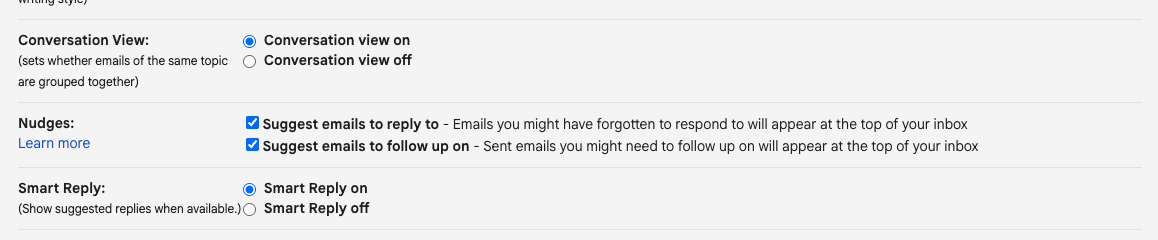 My own Gmail settings, October 29, 2026: both Nudges boxes on.
If your inbox is too noisy for a ping to stand out, use AI to sort your inbox first.
Step 2: Let AI draft the follow-up while the thread is still fresh
The insurance emails went out fast because I never started from a blank email. Grok Bot wrote the first drafts, and we tweaked the email responses together.
Open the thread > copy it > paste it into your AI, or let the Gmail connector read it
Here's an email thread I need to follow up on: [paste thread].
Write a follow-up I can send today. Two or three sentences max.
Name the one thing I'm waiting on. No "just checking in", no
"circling back", no guilt trip. Give me two versions: one warm,
one more direct.
Then tell it what’s off. “Too formal.” “Mention the Thursday deadline.” Two rounds is usually enough.
Here’s what each option can do with a follow-up today:
| Option | Cost | Watches for the reply | Drafts the follow-up | Sends without you? |
|---|---|---|---|---|
| Gmail Nudges | Free | Brings old sent mail back up, no set day count | No | No |
| Gmail Schedule send | Free | No | No, you write it | Sends what you wrote at the time you pick, up to 100 queued |
| Gemini Help me write | Personal accounts in the US, or an eligible Google AI or Workspace plan | No | Yes, and it can pull details from your other emails and Drive | No, you press send |
| Claude (Gmail connector + scheduled task) | Pro, $20 a month, for scheduled tasks | Yes, hourly to weekly | Yes | No. It asks for approval by default |
| ChatGPT (Gmail + tasks) | Plus, $20 a month, for Gmail-triggered tasks | Yes, on a new message from a sender you name | Yes | A send that needs approval pauses the task |
| Grok Bot (Gmail app) | Premium, $30 a month, per xAI’s pricing page | Yes, through routines | Yes | Routine emails wait as a draft until you press Send |
Sources: Google’s Help me write page, Anthropic’s Google Workspace connector page, OpenAI’s tasks article and xAI’s Grok Bot apps page, all read October 29, 2026.
If you’re picking between the two big ones for email, Claude vs ChatGPT for email has the full split.
Step 3: Press send yourself, every time
Nothing goes out in my name until I’ve agreed to it. That’s my rule, hands down. If it’s coming in your name, then you want to make sure you’re literally sending it.
Even when the AI presses the button, you read the email first. Grok Bot sent my insurance emails, but only after we agreed on the messaging.
The tools already lean this way. Anthropic says “Claude asks for your approval before each of these actions,” meaning send, reply and forward. OpenAI says a task that needs approval “pauses until you review it.” xAI says email from a routine “waits as a draft until you press Send.” Leave those gates on.
Write it now, send it at the right time: the arrow next to Send > Schedule send
Draft at 11 p.m., schedule it for 8 a.m. Google lets you hold up to 100 scheduled emails, and canceling one turns it back into a draft.
Applicable for: anyone who answers email late at night and doesn’t want it to look that way.
The one follow-up I let a robot send on its own
There’s one exception, and it’s an experiment. I’m not a fan of spamming, so when I reach out to founders I keep it small: I draft the emails, approve them, send them out.
Two days later, if nobody answered, one last gentle nudge goes out by itself. It’s one or two sentences, low barrier, not intrusive, and it’s the last time I’ll reach out.
When I first described it, I said about 15 founders. My robot’s own log is bigger. It found 71 first emails I sent October 26 to 28 and auto-approved 49 nudges for the morning of October 29. It’s not something that I’m gonna do at scale though.
The rails, straight from the robot’s code on October 29:
- One touch. There is no third email.
- Timing. Due two days after the first email, pushed to Monday over a weekend, sent only 8 to 10 a.m. Eastern on weekdays.
- Short. 45 words max, not counting links. The opening line is 8 words max.
- Banned phrases. Following up, checking in, circling back, bump, touch base, “hope this finds you,” “just wanted to.”
- It stops itself. A reply from the person or anyone at their company, a bounce, or an auto-reply saying they left. A plain out-of-office doesn’t count.
- Slow. At most 10 an hour per account, 5 to 10 minutes apart.
- A kill switch. One empty file named FOLLOWUP_OFF stops everything.
As of October 29, exactly one nudge has gone out, on October 28. The founders who had already written back got skipped, which is the rail doing its job. The October 29 morning run stopped twice on a bug before it sent anything, so those 49 are still waiting.
ExecutiveDre put the founder side plainly on Hacker News: “Most early stage founders put a ton of time into follow-up emails only to get ghosted.” One short last note, and then silence, is my answer to that. A thousand emails is not.
Would I give a beginner this robot? No. Get steps 1 to 3 working first. If you run outreach for your business, the rails above are the minimum I’d want before anything sends without you.
Check it worked: count the replies, not the emails
After the first week, look at three things:
- Did anyone you were waiting on slip by without a ping? Then name that sender in the watch task, or add a second watch.
- Did any draft say “just checking in”? Ask for another version. Your follow-up should name the one thing you need.
- Did your follow-ups go out the same day you got pinged? That’s the speed that won my insurance chase.
The full list of jobs my agents run every day is in Grok Bot use cases.
Be the one who moves faster
That insurance thread sat for months, over a year probably. The agent who won was the one who moved faster. Nobody wins a follow-up by writing the perfect email four days late.
My rule: the AI watches and drafts, and I press send.
Tonight, pick one thread you’ve been sitting on. Paste it in, ask for two sentences, read them, and send it before bed. Then set one watch on the next person you’re waiting on. More setups like this one live on my Claude at work hub.
FAQ
Can AI follow up on emails for me automatically?
It can watch, remind and draft on its own, and the sending should stay with you. Gmail Nudges brings old sent mail back up for free. A Claude scheduled task (Pro and up) or a ChatGPT Gmail-triggered task (Plus and up) can watch a thread and draft the follow-up. Claude asks for your approval before it sends, by default.
How do I write a follow-up email with ChatGPT that doesn’t sound pushy?
Paste the whole thread and ask for two or three sentences that name the one thing you’re waiting on. Ban the stock phrases: just checking in, circling back, bumping this. Ask for a warm version and a direct version, then tell it what’s off and tweak it together before you send.
How long should I wait before following up on an email?
There’s no official number, and Google doesn’t publish one for Gmail Nudges. For something you need, like a quote or a vendor answer, follow up as soon as it’s late: in my insurance chase the faster agent won. For a cold outreach, my robot waits two days, skipping weekends, sends one last short nudge, then stops.
Will an AI send follow-up emails without asking me?
Not by default on the big tools. Claude asks for approval before it sends, replies or forwards. A ChatGPT task pauses when an action needs approval. Grok Bot email from a routine waits as a draft until you press Send. Keep those gates on for anything that goes out in your name.
Does Gmail remind you to follow up on emails?
Yes, with Nudges. In Gmail, open Settings, then See all settings, then the General tab, find Nudges, check the boxes and save. Gmail then shows old messages at the top of your inbox with a suggestion to reply or follow up. Google doesn’t say how many days it waits.
Where this comes from
The tool facts come from Google, Anthropic, OpenAI and xAI help pages, read October 29, 2026. The robot numbers come from its own batch file, ledger and send log that same day.
The insurance chase and the send-it-yourself rule are mine. I’m not showing the insurance emails, I haven’t tested ChatGPT’s Gmail-triggered tasks, and the nudge robot has one send so far, so there’s no reply rate to report.
Published October 30, 2026. Tool facts checked October 29 against each vendor’s help pages.

Written by
Chris AlarconChris Alarcon isn’t a developer. He shows people who aren’t developers how to build real things with Claude Code: a site, an app, an agent. He runs his one-person operation on these systems and shares every workflow, prompt, and tool combo in public. Start with the free 1-page setup.
The boring setup
It still won't know you tomorrow.
The Setup is one folder. Drop it into a Project, answer three questions, and Claude or ChatGPT writes your memory file and your voice file itself. It stops forgetting you, stops sounding like AI, and runs three real jobs by name. Twenty minutes tonight. No code. $49 · 30-day refund.
See The Setup →Get the free 1-page setup
The boring 1-page setup. No code, no jargon. Get it now, then one short email from me each Tuesday.
