Grok Bot Use Cases: The 12 Jobs I Actually Run, and the One I Would Kill First

Grok Bot is for standing jobs, not questions. If a task happens on a schedule, produces something you check later, and does not need files on your laptop, it belongs to a bot. If you would rather just ask and read the answer, use the chat.
Grok change alerts
I'll tell you the next time Grok changes.
One email per change, plus my Tuesday note.

Most lists for this are 35 or 50 hypothetical use cases from launch-week hype. I’ve run mine for a month. Is it perfect? No, of course not. We’re working through the bugs. Here is my actual roster, what each job produces, the one that flopped, and the one I would cancel first.
First, the price thing, because it is wrong everywhere
The most repeated claim about Grok Bot is that it requires a $300 SuperGrok Heavy subscription. Whatever was true at launch, it is not true today, and I can show you the page.
 xAI’s pricing page, captured September 10, 2026. “Grok Bot access” is a listed feature of the $30 SuperGrok tier.
And the feature matrix on the same page has a row worth reading closely:
 Same page, same day. Read the Grok Bot row across all seven columns.
Two things fall out of that row:
- Grok Bot starts at $30, on SuperGrok. Not $300.
- Grok Bot is not listed on Business or Enterprise. The two plans a company would actually buy are the two that do not get the agent product. Grok Build, the coding tool, is on every tier including Free. Grok Bot is not.
If you are evaluating this for a team, that is the fact to check before anything else on this page.
I pay for SuperGrok Plus at $100 myself, for the headroom rather than for access.
The one-line test for whether a job belongs to a bot
Before the list, the filter I use. A job goes to a bot when all three are true:
- It repeats on a schedule you could write down.
- It does not need files on my laptop. The bot lives on its own cloud machine.
- I can check the output later instead of watching it happen.
Fail any one of those and it is not a bot job. That third one is the one people skip, and it is why half the use-case lists on the internet describe things nobody could actually verify.
The three folders
I group everything into growth, publishing, and intelligence. Not because the product asks for folders, but because those are the three things I need to happen without me.
 Inbox Hawk, September 10, 2026: three passes a day, pings me only when needed. My real inbox, blurred.

Chief of Staff, same day: the other bots report to it, and I ask it one question.
One mechanic worth knowing before you build a roster: every bot on your account shares one cloud virtual machine, along with its logins and its files. You authenticate once and the whole team inherits it. Durable work belongs under /workspace, because files elsewhere can disappear during recovery.
That is convenient and it is also the security story. My read of that architecture, and it is a read rather than something xAI documents: your bots are not meaningfully isolated from each other. Whatever one of them can log into, you have effectively granted to the roster. Scope what you connect accordingly.
Folder 1: Growth (the ledger)
These exist so I stop posting blind. They scrape my own analytics roughly three times a day and write to a ledger.
| Bot | What it does |
|---|---|
| Shorts Hawk | Watches short-form performance |
| Substack Hawk | Watches newsletter performance |
| Plan Watch | Tracks changes to AI plans and pricing |
| Bank Pull | Pulls financial numbers on a schedule |
| Comments | Tracks comments across platforms and tells me when someone is talking to me |
| LinkedIn Hawk | Watches LinkedIn performance |
All six scrape on a schedule, roughly three to four times a day, and write what they find into a ledger.
The point of this folder is not the dashboards. It is that the wins and the losses get logged rather than felt. Before this, I was guessing about what worked from memory, which is the worst analytics system ever built.
Folder 2: Publishing
| Bot | What it does |
|---|---|
| YouTube long-form uploader | Takes a finished video and gets it published |
| Substack Notes publisher | Posts notes without me opening the app |
This is the folder that does something I could not do before. Not “did it faster.” Could not do at all, because it happened at a time when I was doing something else.
Folder 3: Intelligence
| Bot | What it does |
|---|---|
| Chief of Staff | Oversees the other bots, surfaces what matters |
| Inbox Hawk | Checks and manages my inbox, starting at 9am, about three times a day |
| News Scout | Scrapes X for anything that drops in my space |
| Distribution Scout | Watches videos I follow and summarizes them my way |
News Scout is the one that changed how I work. Yesterday it told me OpenAI had shipped a new image generation model, which I agreed was a big deal, and we are now looking at integrating it into our YouTube thumbnails. That is a bot changing what I did with my afternoon.
Distribution Scout is the newest one and it has earned its keep fastest. It watches long videos for me and gives me summaries in the format I want, which is not the format any summarizer app gives you.
What is actually good about this, versus a normal automation
I have built the same kinds of jobs before with conventional workflow automation, and the difference is not capability. It is persistence.
A normal automation is a cron job wearing a costume. When it breaks, it tends to break silently, and you find out three weeks later that a thing stopped.
It’s like this agent has a good persistence, not a dumb cron that just fails silently. When it trips, it can pick itself up or escalate.
The way I keep describing it: with a normal workflow, you have to move the thing yourself, and the moment you stop moving it, it dies.
It will occasionally get up and do a boring chore, and sometimes it falls over. Grok Bot plays on its own, and when it falls it can get up, or call one of the others for help.
That is a feel, not a benchmark. But it is the reason I stopped rebuilding these as workflows.
The tradeoff is control. A hand-built workflow is customizable to its exact purpose, which is a real advantage, and also its problem: it becomes a machine assembled from scraps, some good, some generic, none of it fluid. Grok Bot is one system with one heart. More unified, less yours.
The honest part: what is not working
Here is what is not working, from someone who pays for it.
One flopped outright. In week one I built a lead scout and it produced nothing. The product moved a boundary. It did not become magic.
Shorts Hawk is buggy. It is in the roster and it is not reliable yet.
News Scout is a little rough. Not broken, just inconsistent enough that I read its output with suspicion.
If I had to kill one, maybe LinkedIn Hawk. If xAI doubled the price tomorrow, that is the one that goes. It is fun to watch and I could not honestly tell you what it is doing for me.
Writing this page was a decent audit trigger, which is its own lesson: building the plumbing is the easy part, and then you let it run and stop asking whether it earns anything.
Chief of Staff and Inbox Hawk are the ones that stay. Inbox Hawk is not impressive and it has held up. I think Chief of Staff is gonna stay. It is managing everything, which is the job I actually needed.
And the billing risk is real. Each eligible plan includes a weekly Grok Bot allowance, and extra usage is reported to be billed from model and token cost, with no Grok Bot specific spend cap yet, per eesel’s pricing writeup.
A scheduled agent with no ceiling is a category of risk that a fixed subscription does not have. Watch it closely for the first month.
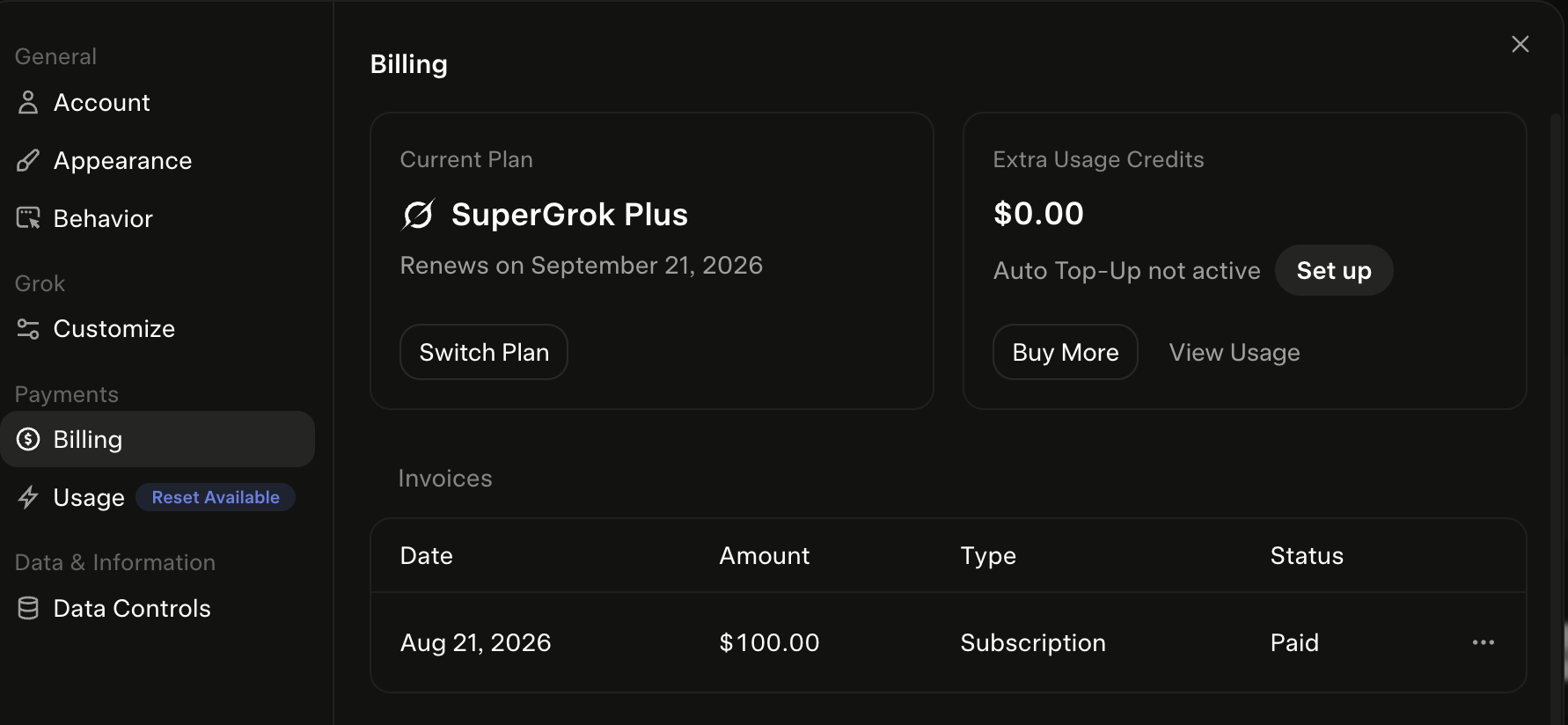 What I actually pay xAI. SuperGrok Plus, for the headroom.
What everyone else runs
The community inventories are genuinely useful for ideas, and I would rather point you at them than pretend I invented the category:
- Matt Van Horn’s 30-day sweep of what people across X, Reddit and YouTube actually use it for.
- Sid Saladi’s 50-use-case inventory, the most-cited list out there.
The categories that recur across the community lists generally, beyond what I run: inbox triage and cleanup, meeting prep, supplier and vendor outreach, dispatch and logistics coordination, and permit or paperwork chasing for trades businesses.
I am deliberately not retelling the individual operator stories that circulate with those lists. Several are compelling and I could not trace them to an original post I could link, so they stay off this page. If you find them, judge them yourself.
How to steal this
If you want one bot by Friday, do this:
- Pick the job you do at the same time every day and resent. Inbox triage, most likely.
- Write the job in three sentences. If you cannot, the bot will not do it well.
- Give it a schedule, not a trigger. Standing jobs beat clever ones.
- Make it write somewhere you will see. A ledger, a doc, a message. Output you never read is a bot that does not exist.
- Audit it in 30 days. Ask what it produced. Kill it if the answer is thin. Mine would not all survive that question, which is the point.
The mistake is not building the wrong bot. It is building twelve and never asking any of them what they did.
Deciding whether the product is for you at all? What is Grok Bot is the week-one field test, Grok Bot vs Claude Cowork is the assistant comparison, Grok Bot vs Claude Code is the one for people who already run an agent, and Grok usage limits explained covers the meters. The equivalent collection on the other side is Claude Cowork use cases. More at Claude Guides.
Published September 10, 2026. Plan tiers from xAI’s pricing page that day; the roster and verdicts are from my own paid account.
Make your limit last
I burned 50% of my weekly Claude limit in one day. On the biggest plan.
These are the 4 fixes I use now so it lasts the whole week: a one-screen model cheat sheet and two rules you paste in. No code. They show up right here, and I'll email you when your plan changes.

Written by
Chris AlarconChris Alarcon shows people who don’t code the boring Claude setup that actually works. He runs his one-person operation on these systems and shares every workflow, prompt, and tool combo in public. Start with the free 1-page setup.
