How to Get an Email When a Price or Plan Changes: 3 Ways, From Free to Zero Effort (2026)
Chris Alarcon ·
$ you'll have
An email whenever a plan you pay for changes its price, its limits, its models or its features.
ok your job, with the steps below
- Cost
- Free with a page watcher or ChatGPT Free; paid AI plans can check hourly
- Tools
- Visualping, Distill or ChangeTower · ChatGPT or Claude scheduled tasks
Why this setup, and what you need
$430 a month. That’s what I pay for AI right now, by my own count.
I pay for Anthropic and OpenAI, both 200 and Grok Bot 30 bucks. I do have also Gemini because my wife has it.
Here’s the number that matters more: my tracker’s changelog has 23 dated entries since July 20, and about half of them never changed a price. A limit moved. A model came or left. A feature switched plans.
If you’re paying for two or three of these and wondering whether you’d even notice, that’s fair. A price alert alone would have missed half of it.
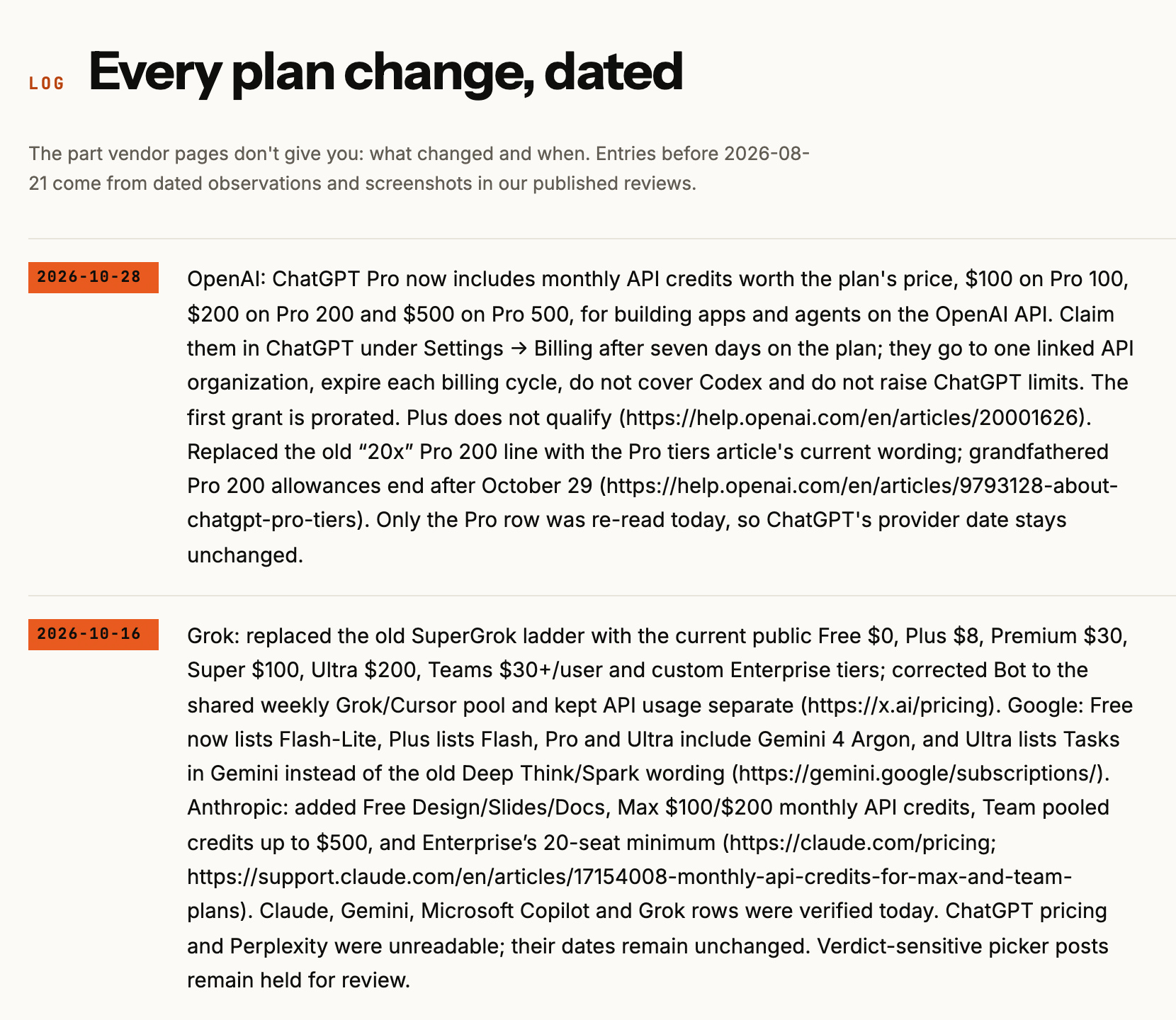 My AI plan tracker’s changelog, October 29, 2026. The top entry changed no price.
How to get an email when a price or plan changes, in three ways and a check:
- Write down only the plans you pay for, with their pricing and limits pages.
- Free: put a page watcher on each of those pages.
- Or have the AI you already pay for check them on a schedule.
- Or get my plan-change email, and know the one catch.
What you need (as of October 29, 2026)
- Your list of paid plans. Two or three is normal. Nobody needs 50 apps watched.
- An email address. Visualping’s free plan needs “no credit card”.
- For the AI route: ChatGPT (Free works, once a day) or a paid Claude plan. Details in step 3.
- A work plan? Watching a public pricing page doesn’t touch company data, so there’s nothing to connect.
- Skip for now: paid monitoring plans and text alerts. A daily email is plenty for a monthly bill.
Step 1: Write down only the plans you pay for
Two links per plan: the pricing page and the page that spells out limits. The limits page is where most changes land.
| Plan you pay for | Pricing page | Limits and fine print |
|---|---|---|
| Claude | claude.com/pricing | Anthropic’s help center articles for your plan |
| ChatGPT | chatgpt.com/pricing | OpenAI’s Pro tiers article and plan help pages |
| Grok | x.ai/pricing | The same page’s compare table |
| Gemini | gemini.google/subscriptions | Google’s plan help pages |
Why not wait for the company to tell you? They do, sometimes, about your own bill. Apple’s subscription price page says that if your price is scheduled to increase, “you’ll be notified before it occurs by email, push notification, and in-app notices.”
That covers a price going up on a plan you have, bought through Apple. It doesn’t cover a limit shrinking, a new tier, or a perk you’d switch for.
dgacmu on Hacker News found that out the hard way: “I went from it feeling unlimited to hitting a 4 day quota in 2 hours of use.” No price changed.
Applicable for: anyone paying for an AI plan, a streaming service or a software seat.
Step 2: Put a free page watcher on each pricing page
Sign up > paste the page URL > pick daily > turn on email alerts. Repeat for each page from step 1.
The free plans, read off each pricing page on October 29, 2026:
| Free watcher | Pages on the free plan | How often it checks | Email alerts |
|---|---|---|---|
| Visualping | 5 pages, 150 checks a month | About once a day per page | Yes, with AI change summaries |
| Distill | 25 monitors, 5 of them in the cloud | Every 6 hours in the cloud | 30 a month |
| ChangeTower | 3 pages | Daily | Yes |
Sources: Visualping, Distill and ChangeTower. pentagrama on Hacker News runs the simplest version: “I use the free plan of https://visualping.io for some software changelogs.”
One trap: Google Alerts is not a page watcher. Google’s help page says it emails you “when new results for a topic show up in Google Search.” It never compares a page to yesterday’s version.
The other trap is noise. My own tripwire on six official pricing pages has thrown 4 false alarms so far:
- Claude’s page added Haiku API caching rates. Not a plan price.
- Claude’s Team plan listed pooled API credits. A business perk.
- Gemini’s page added Enterprise seat prices. Not a consumer plan.
- ChatGPT’s $200 showed up in new cancel text. Same old price.
So when an alert lands, open the page and read the change yourself before you cancel anything.
Step 3: Or have the AI you already pay for check them
ChatGPT: Scheduled > new task > paste the prompt below. Then Settings > Notifications > Email. OpenAI’s scheduled tasks article says “Monitoring tasks check for changes and send a notification when a relevant update occurs,” by push, email or both.
The plan gates, from the same article: 3 active tasks on Free and Go, 5 on Plus, 15 on Pro. Free can run a task no more than once a day. Hourly runs need a paid plan.
Claude: ask for a scheduled task in any chat, then manage it under Scheduled in the left sidebar. Anthropic’s scheduled tasks article says they’re on all paid plans and “run on their cadence even when your computer is asleep.” The deeper setup is in Claude Cowork scheduled tasks.
The prompt I’d paste:
Every morning, read these pages:
[paste your pricing and limits links from step 1]

Compare them to what you saw last time. Only message me if one
of these changed on a plan I pay for: the price, a usage limit,
a model on the plan, or a feature moving between plans.

For each change: quote the old wording and the new wording, and
link the page. Ignore API prices, business seats and layout
changes. If you're not sure it's a real change, say so.
The last line matters. My system has Claude check every tripwire flag before anything gets logged, and that check is what caught all 4 false alarms above.
Applicable for: anyone already paying for ChatGPT or Claude who’d rather not run another app. The same kind of task can also write you a morning brief.
Either route works, with one cost. It’s not hard to do, but you do gotta maintain it. So that’s just something less you gotta do when someone else watches for you. That’s step 4.
Step 4: Or get my email, and know it waits on me
Open my AI plan tracker > the “Email me if it changes” box at the top > your email.
That page lists the big consumer AI plans’ prices and limits, read off the official pages, with the dated changelog you saw at the top of this post.
How the email gets made: every morning at 9:05, a script on my Mac mini looks for new changelog entries. If there’s one, it drafts one email and pings me on Telegram. Then I tap Send.
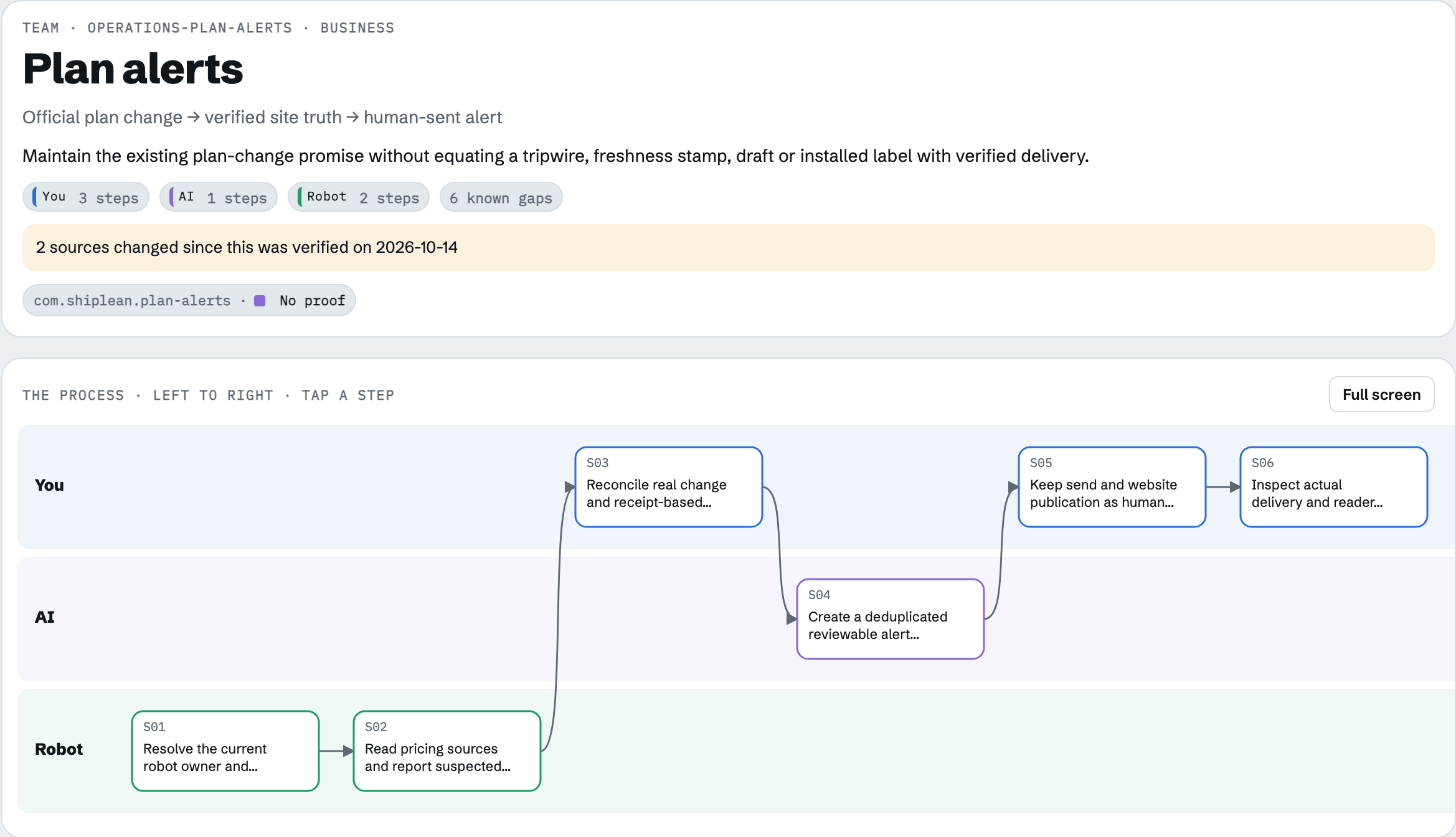 My Under the Hood control room, October 29, 2026. The send step sits in my lane, not the robot’s.
That tap is the catch. As of October 29, my robot has drafted 9 plan-change emails since September 18, and only the first one went out. The other 8 are sitting in my email tools. The three most recent, straight from the run log:
Kit DRAFT 26340081 created to tag 22870839: "ChatGPT Pro 200 reopens to new subscribers, Pro 500 adds Ultrafast" (1 entries). Not sent.
Kit DRAFT 26444149 created to tag 22870839: "Grok now has a $200 Ultra plan tier" (1 entries). Not sent.
Resend DRAFT 6a539fba-f89e-4a75-8a90-a8f7b87ad390 created to segment plan_alerts: "ChatGPT Pro now includes monthly API credits" (1 entries). Not sent.
Three drafts, none sent. Something’s stuck between draft and send. I gotta check it.
So here’s the honest promise: sign up and you get the email when I hit Send. Until I fix that, the changelog on the tracker is the always-current version, and it’s free to check.
My take on DIY versus the email: if you want to do your own, sure, I’m all for it. You want to do both, do that too.
How the rest of my setup runs on that Mac mini is in what runs on my Mac mini.
Check it worked: one test before you trust it
Run one check by hand on day one.
- Watcher: open its dashboard and confirm the first snapshot of each page saved. A blank or “blocked” snapshot means it can’t read that page. Swap in the limits article instead.
- AI task: in the same chat, ask “Run this check now and show me what you’d send.” You want a short “no changes” answer with links, not a page summary.
- Email: find the first alert or confirmation. If it went to spam, mark it not spam now, not after the price moves.
Stay for a reason, not out of loyalty
Back to that $430. An alert doesn’t tell you what to do. It tells you when to look again.
Here’s how I look. If Grok Bot just drops something revolutionary then maybe I go to the $100 plan. Grok Bot isn’t its own plan, by the way: it comes with Grok Premium at $30 a month, and the $100 tier is called Super, per xAI’s pricing page.
And the incentives keep shifting. So now you get API credits on OpenAI. So that might be leverage for me.
The fine print on that one: OpenAI’s API credits article says Pro 200 gets $200 a month for the API, but the credits “do not increase your ChatGPT or signed-in Codex usage limits.” The full breakdown is in ChatGPT Pro API credits.
I think Anthropic is probably gonna stay for a minute.
My rule: never keep just one, even if it’s the free one.
So tonight, write down your two or three plans and put a watcher on each pricing page. More setups like this live on my Claude at work hub.
FAQ
Can I get an email when a ChatGPT or Claude price changes?
Yes, three ways. Put a free page watcher like Visualping on the official pricing page, set a ChatGPT scheduled task to check the page and email you, or sign up for a plan-change email from someone who already tracks it. Watch the limits pages too, because most plan changes move a limit or a model, not the price.
Will the company email me when my subscription price goes up?
Sometimes, and only about your own bill. Apple says App Store subscribers are notified before a scheduled price increase. OpenAI says only affected Pro 200 subscribers got an email about their allowance change. A new tier, a model leaving your plan or a perk on a plan you don’t have won’t reach your inbox.
Can Google Alerts tell me when a web page changes?
No. Google says Alerts emails you when new results for a topic show up in Google Search. It doesn’t compare a pricing page to yesterday’s version. For that you need a page watcher like Visualping, Distill or ChangeTower, or an AI task that reads the page.
Is there a free way to monitor a pricing page for changes?
Yes. As of October 29, 2026, Visualping’s free plan watches 5 pages about once a day, ChangeTower’s free plan watches 3 pages daily, and Distill’s free plan includes 5 cloud monitors checked every 6 hours with 30 email alerts a month. All three send email alerts on the free plan.
Do ChatGPT Pro API credits raise my ChatGPT limits?
No. OpenAI says the monthly API credits on Pro 100, Pro 200 and Pro 500 go to one linked API organization and don’t increase your ChatGPT or signed-in Codex usage. They also don’t cover Codex used through API keys, and unused credits expire at the end of each billing cycle.
Where this comes from
Tool and plan facts come from Visualping, Distill, ChangeTower, Google, Apple, OpenAI, Anthropic and xAI pages, read October 29, 2026. The changelog counts, the false alarms and the unsent drafts come from my own tracker and its run log.
What I pay is my own count on October 29, not read off a billing screen. My wife’s Gemini is Google AI Pro, which lists at $19.99 and which we get through Verizon. I haven’t tested Visualping, Distill or ChangeTower on these pages myself, and nothing here is a time-saved number.
Published October 30, 2026. Plan facts checked October 29, 2026 against each vendor’s own pages.

Written by
Chris AlarconChris Alarcon isn’t a developer. He shows people who aren’t developers how to build real things with Claude Code: a site, an app, an agent. He runs his one-person operation on these systems and shares every workflow, prompt, and tool combo in public. Start with the free 1-page setup.
The boring setup
It still won't know you tomorrow.
The Setup is one folder. Drop it into a Project, answer three questions, and Claude or ChatGPT writes your memory file and your voice file itself. It stops forgetting you, stops sounding like AI, and runs three real jobs by name. Twenty minutes tonight. No code. $49 · 30-day refund.
See The Setup →Get the free 1-page setup
The boring 1-page setup. No code, no jargon. Get it now, then one short email from me each Tuesday.
