
That table checks the Grok 4.6 model, image generation and Grok Build under Free, and dashes video generation, Expert mode and Grok Bot. SuperGrok at $30 is where Grok Bot appears, and that is the line that should actually make you pay.
My rule on Grok pricing: free stops working the day you want something that runs without you.
Published September 10, 2026. Every price and row verified on xAI’s pricing page the same day.
Quick decision
Where xAI actually prints the prices
Nobody screenshots this part, because most people writing about Grok are not paying for it.
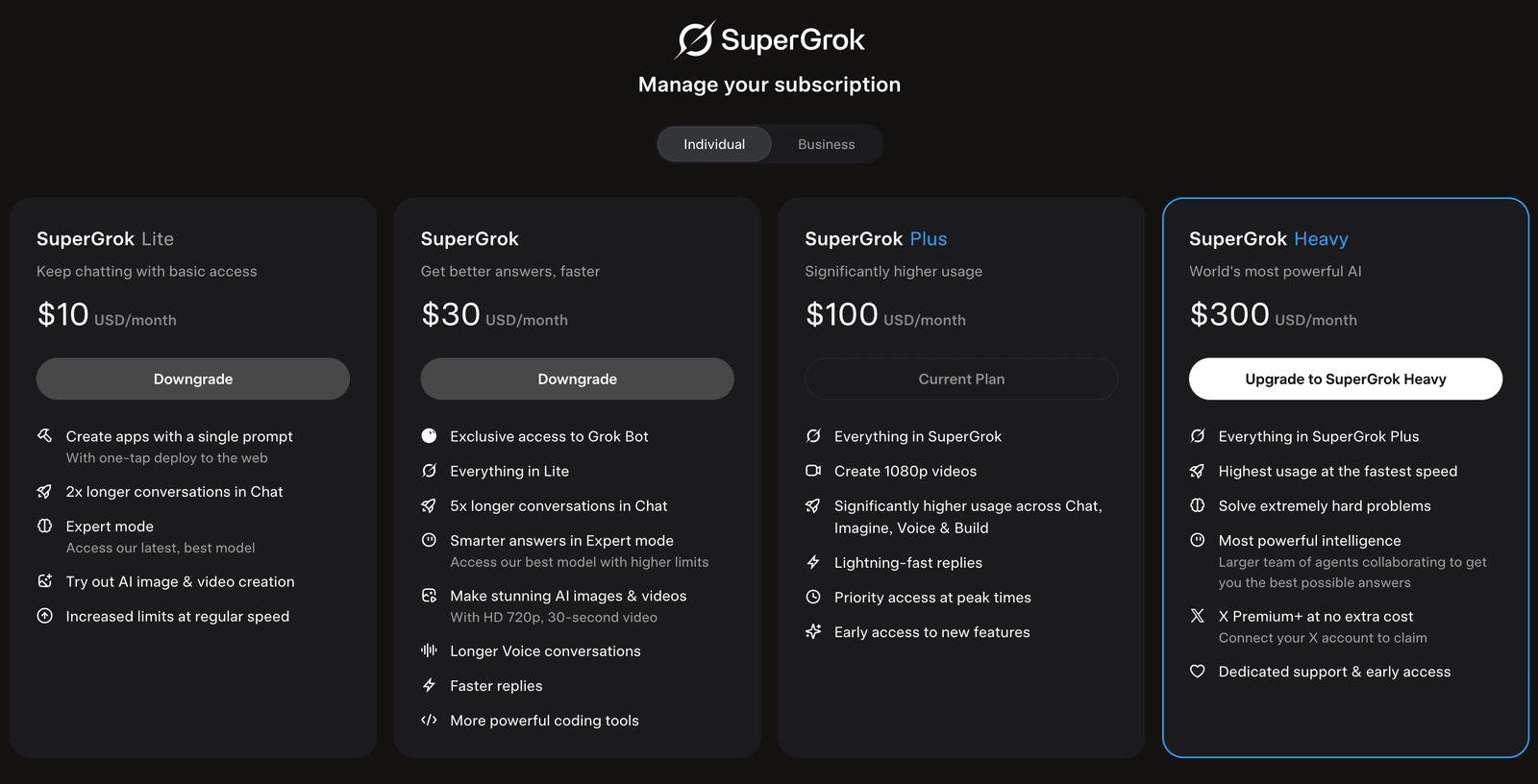 My own SuperGrok subscription screen, captured September 11, 2026. Four priced tiers, including the two that the public pricing page refuses to put a number on. “Current Plan” is my $100.
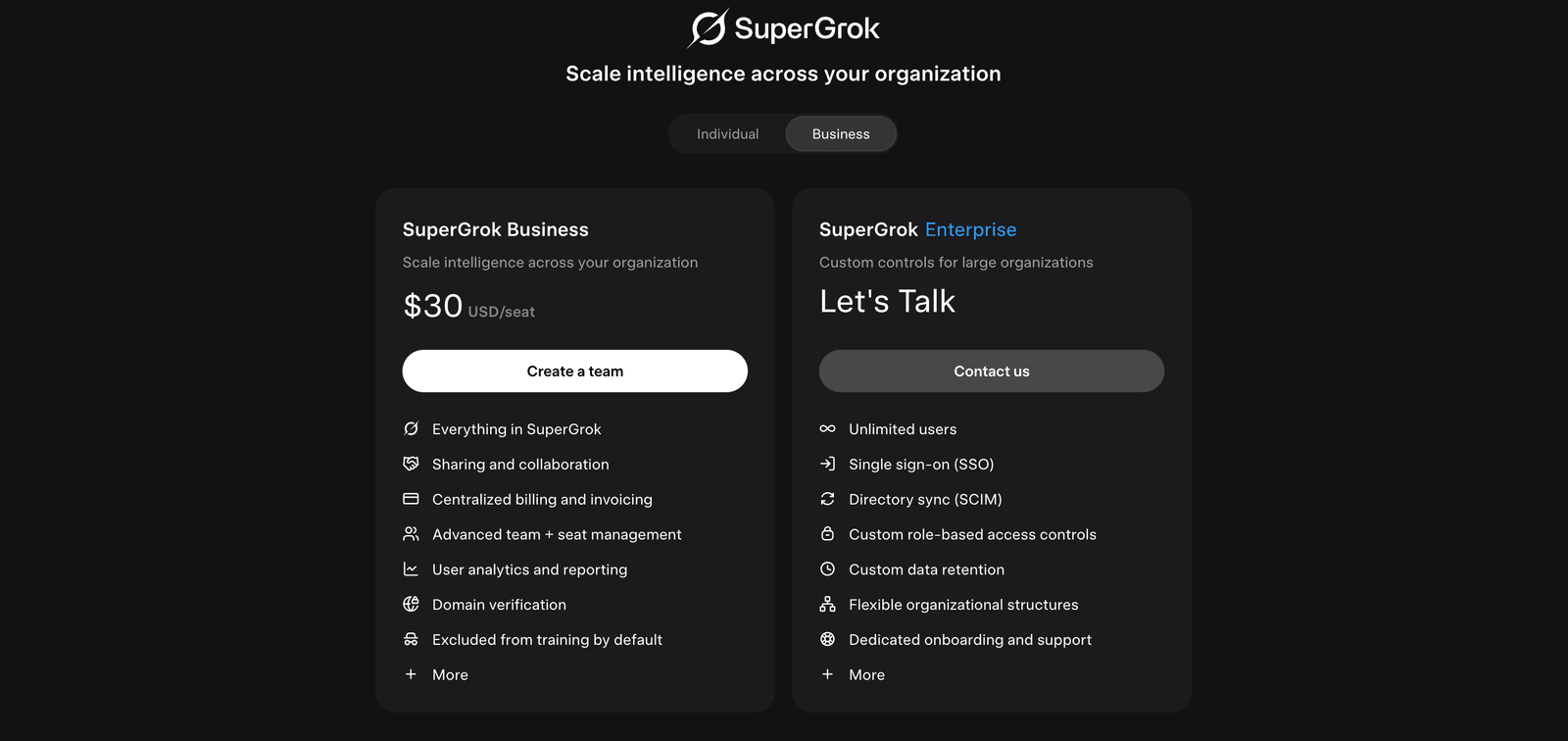 Same screen, Business tab. SuperGrok Business is $30 per seat. Enterprise is the only rung that genuinely has no number.
And here is what a logged-out visitor gets at the same company:
 xAI’s pricing page, captured September 10, 2026. Three numbers. Scroll down and Lite and Heavy appear as columns in the comparison table with buttons and no price; those buttons hand you to grok.com, where the number only prints once you sign in.
| Plan | Price | Where the number is visible |
|---|---|---|
| Free | $0 | Real-time web and X search (limited), voice mode, connectors |
| SuperGrok Lite | $10/mo | Signed-in subscription screen only. Apps from a single prompt, Expert mode, image and video, increased limits at regular speed |
| SuperGrok | $30 | The cheapest published rung with Grok Bot access |
| SuperGrok Plus | $100 | Everything above, plus 1080p video and much higher usage |
| SuperGrok Heavy | $300/mo | Signed-in subscription screen only. Highest usage at the fastest speed, X Premium+ included, dedicated support |
| Business | $30/seat | Signed-in subscription screen, Business tab. Team seats, RBAC, consolidated billing |
| Enterprise | Not published | Contact sales, custom RBAC |
Only Enterprise has no number, and that one is honestly a sales conversation. Everything else is priced. You just cannot see four of the seven prices without an account. That is why every roundup you have read quotes $30 and $100 and stops.
Every free-tier limit number on Google describes a system that died in June
If you search this question you will be told the free tier gives you 10 requests every 2 hours, per AI Toolbox, or 2 prompts every 2 hours, per AI Tool Discovery, or 3 to 5 images a day, per Arsturn.
Those three numbers cannot all be right, and they sit on the same results page.
I am naming them because they are not scams, they are just stale. They are all describing message counting, which xAI retired in June 2026.
The most honest competitor on this question is DataStudios, which structures the comparison properly. Even there, check the limit numbers against the date.
What replaced it: paid plans get one weekly compute pool spent across any Grok product, where different products drain it at different rates. Per xAI’s FAQ, the free tier is not on that pool at all. Free keeps its own limits on Chat and Voice, and those reset on their own schedule.
xAI publishes no per-tier number for either system. I wrote the full mechanics up in how Grok’s usage limits actually work, and it is the page to read before you buy anything.
The free plan can build you a working website
Nobody has caught up to this yet.
Since August 19, 2026, Grok Build is on every plan. You describe a site or an app in the chat window, it builds a working version live, and there is a Publish button at the end that puts it on a link you can send someone. On the $0 plan.
So the free tier will build and publish a business’s landing page, and will not make you a five-second video.
If that seems backwards, it is. But it is real. What Grok Build actually is has my own session and the finished page it produced.
What free actually gets you, row by row
 Read the Free column straight down. September 10, 2026.
| Row | Free | What it means for you |
|---|---|---|
| Grok 4.6 | Yes | Same headline model as the paid tiers |
| Image generation (Imagine) | Yes | Stills are in |
| Video generation | No | This is the first real wall |
| Grok Build | Yes | Websites and apps, published to a link |
| Grok Bot | No | Standing jobs need $30 |
| Real-time web + X search | Limited | The good part, rationed |
| Expert | No | No longer-thinking mode |
I had this wrong until I read the row: free is not stuck on an older model. xAI’s table checks Grok 4.6 across every column including Free. What free is missing is Expert mode, video, the bot, and headroom, not the model itself.
The really good free feature is real-time web and X search. It is rationed, and it is still the reason to keep a free Grok account open even if you pay somebody else for everything else. Grok vs ChatGPT is where that comparison lives.
What the $30 buys, and the buried line is Grok Bot
The SuperGrok card lists the Grok 4.6 model, connectors, higher rate limits across all features, Expert, SOC 2 compliance, and image and video generation.
And one more: Grok Bot access.
That is the line that changes the math, because Grok Bot is not a better chat window. It runs standing jobs on its own cloud machine on a schedule, and it is metered separately from your chat pool.
You are not paying $30 for a chatbot. You are paying it for a chatbot plus something employee-shaped.
If you have not met it, start with what Grok Bot is, then the 12 jobs I run.
I pay $100, and I did not buy it for the chat
 My actual billing screen, captured August 28, 2026. SuperGrok Plus, $100 a month.
Nobody else writing about this ladder is showing you an invoice, so here is mine and the reasoning behind it.
Did I over-buy? I do not think so, but not for the reason you would guess. I did not buy $100 for a better chat window.
I bought it for Grok Bot, and the bot pool is a different meter from the chat meter. The bot meter is the one that moves in my account. The chat and Build meter barely does.
I am deliberately not putting percentages on that. I could not get a clean capture of the usage pane while writing this, and this site does not print numbers it cannot show you. When I can screenshot the meter, it goes on the page.
What it means without the numbers: if I used Grok the way most people use Grok, I would be wasting most of what I pay for.
I also did not add this on top of everything. I funded it by downgrading one of the $200 coding subscriptions I was already paying for, which is the same trade I described in ChatGPT Pro vs SuperGrok Plus.
That was a bet on Grok Bot specifically, and two weekends in it is looking like a good bet. It is still early to tell.
So if you work like me, start at $30. Give it one simple job and watch what it does to your usage. If you outgrow it quickly, then upgrade. Studying a tool and using a tool are two different things, and $30 buys you the second one.
The full $100 argument is its own page: is Grok worth paying for.
One trigger per rung
Not a feature grid. The specific moment each rung becomes the right one.
| Rung | What puts you on it |
|---|---|
| Free, $0 | Questions, news and real-time search, plus building a page you can publish |
| SuperGrok Lite, $10 | It sits between Free and $30, and adds video, Expert mode and single-prompt apps |
| SuperGrok, $30 | You want Grok Bot, or you outgrow the usage fast |
| SuperGrok Plus, $100 | You are running bots daily and babysitting a meter is costing you more than $70 |
| SuperGrok Heavy, $300 | You want the swarm-of-agents mode, the highest usage and the fastest speed |
The free-to-$30 trigger is the one that matters.
If you want a simple chat box for random questions, free is good enough. Take advantage of it. You might already pay for X and have some Grok usage bundled there already.
The moment free stops working is when you want to build something serious. A repeatable workflow. An automation. A thing that runs on a schedule. That is a different way of using the tool, and it starts at $30.
Two gotchas that cost people money
X Premium is not SuperGrok. Two subscriptions, two billing relationships. Paying X does not get you Grok Bot, Build headroom or the weekly pool. People double-subscribe by accident and then wonder why the features they read about are not there.
Check the price on the day you buy. These plans changed twice in six weeks, and I got caught too: this page had Lite and Heavy logged as unpriced until September 11, when I looked again and both had a number.
Check xAI’s pricing page yourself, and I keep a dated changelog of these moves on my AI plan tracker.
Where this fits
If you are choosing between Grok and something you already pay for, that is Grok vs Claude or Grok vs ChatGPT. If the image question brought you here, Grok Imagine’s free line is more interesting than it looks. If it was the app builder, Grok Build.
Everything I run day to day is on my Claude guides hub.
How I checked this: every price, row and gap comes from x.ai’s pricing page read and screenshotted on September 10, 2026, plus xAI’s own FAQ for the usage mechanics. The $100 account is mine and the billing screen is real. I have not used the free tier recently, so the free-tier description is xAI’s published table rather than my own testing, and I have flagged the one row that corrected me. Last reviewed September 2026.
Frequently asked questions
Is Grok free?
Yes, and it is a standing $0 plan rather than a trial. Per xAI's comparison table on September 10, 2026, the free column is checked for the Grok 4.6 model, image generation, Grok Build and connectors, with real-time web and X search marked Limited. It is dashed for video generation, Expert mode and Grok Bot.
Is there a Grok free trial?
There is no trial because there is nothing to expire. The free tier is a standing plan on xAI's pricing page. If you are searching for a trial you are probably looking for the paid features. SuperGrok Lite sits between Free and SuperGrok at $10 a month, and the mainstream paid tier is SuperGrok at $30 a month.
Is SuperGrok worth $30 a month?
The $30 tier is where Grok Bot appears, and that is the real reason to pay rather than the chat improvements. If you only want a better chat window, free plus your existing subscriptions is probably enough. If you want something that runs standing jobs on a schedule, $30 is the entry.
What is the difference between SuperGrok and SuperGrok Plus?
SuperGrok at $30 gets you the feature set. SuperGrok Plus at $100 gets you headroom: significantly higher usage across Chat, Imagine, Voice and Build, 1080p video, faster replies, priority at peak times and early access. It is a usage decision, not a features decision.
What do SuperGrok Lite and SuperGrok Heavy cost?
SuperGrok Lite is $10 a month and SuperGrok Heavy is $300 a month. xAI shows these prices only on the signed-in subscription screen at grok.com (Settings → Manage your subscription). The public pricing page at x.ai/pricing lists Lite and Heavy as columns in its comparison table with no number attached; the “Get Lite” and “Get Heavy” buttons hand you off to grok.com, and the price appears after you sign in. Screenshot on this page, captured September 11, 2026. So the common claim that xAI never prices them is half right: it does not price them anywhere logged out.
Do I need X Premium too?
No, and this is where people accidentally pay twice. X Premium and SuperGrok are separate subscriptions. If your goal is Grok's own products like Grok Bot, Build and Imagine, the ladder that matters is xAI's.
What are Grok's free tier limits?
xAI publishes no number. Paid plans share one weekly compute pool, and per xAI's FAQ the free tier keeps its own separate limits on Chat and Voice that reset on their own schedule. The specific figures circulating online mostly date from the message-counting system xAI retired in June 2026, so treat any of them as an estimate.
Prices change quietly. I'll email you when Grok changes.
One email per change, plus my Tuesday note. Unsubscribe anytime.