How Many Grok Bots Can You Have? No Bot Cap, but One Shared Weekly Meter (2026)

there’s no published cap on how many Grok Bots you can have. xAI’s docs set no number for any plan. What runs out is usage: every Bot on your account draws from one shared weekly pool, so the pool runs out long before your bot count does.
Grok change alerts
Hitting Grok limits? Get the 4 fixes I use to make a plan last the week.
Free, in your inbox in a minute. Plus one email when your plan changes, and my Tuesday note.

I run seven, on Ultra. Here’s my meter this week, with one day to go before it resets:
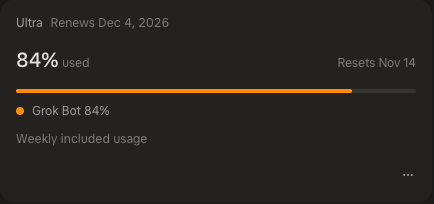 My Grok usage card, November 13, 2026.
I have not hit the cap, and I’ve been forcefully hitting it on purpose. So it’s been, it seems, really efficient.
There’s no bot limit in xAI’s docs, only advice to keep the roster small
I checked xAI’s Grok Bot pages on November 13, 2026: the FAQ, the bots guide and the X Subscription page. None of them gives a maximum number of Bots for any plan.
The closest thing to a rule is one line in the bots guide: “Ask before creating several Bots if you want to keep the roster small.” That’s about your Bots creating Bots for you, not a ceiling.
How many Grok Bots you can have on each plan
| Plan | Price | Grok Bot? | Bot count limit | Weekly usage vs Plus |
|---|---|---|---|---|
| Free | $0 | No | n/a | n/a |
| Plus | $8/month | No | n/a | 1x |
| Premium | $30/month | Yes | None published | 4x |
| Super | $100/month | Yes | None published | 15x |
| Ultra | $200/month | Yes | None published | 50x |
Prices and usage multiples come from xAI’s plans page, checked November 13, 2026. First-month promos (Premium $15, Super $50, Ultra $100) aren’t in the table.
Older accounts still on SuperGrok, SuperGrok Plus, SuperGrok Heavy or X Premium+ can link Grok Bot too, per the FAQ. SuperGrok Lite can’t.
So the plan doesn’t change how many Bots you can make. It changes how much work they can do together before the week runs out.
I run seven, and each one has one job
One for X, one for finance, one for health, one for revenue, one for scouting things on X, one that manages a YouTube channel, and a chief of staff over the rest.
That’s down from the dozen or so I ran in the first months, which I wrote up in my Grok Bot use cases. A smaller roster is easier to keep honest.
Here’s what seven Bots look like in tokens this month:
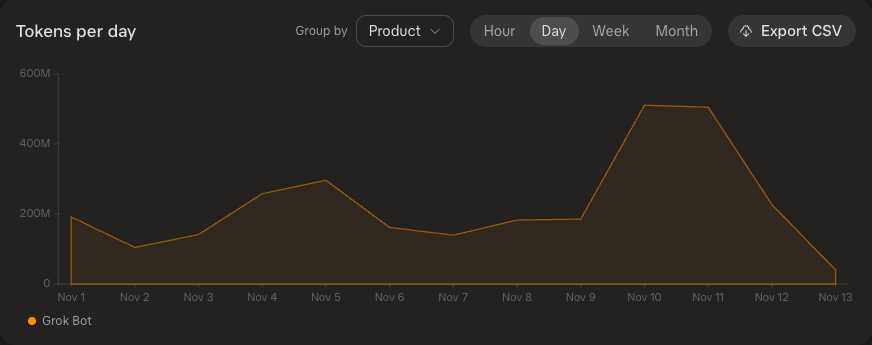 My Grok Bot tokens per day, November 1 to 13, 2026.
The spike on November 10 and 11 is me pushing it on purpose. The week still didn’t run dry.
xAI says it shipped Grok Bot 1.0 on November 11, and the launch post says Bots got “more efficient, reducing the resources required to complete tasks.” My meter is one account and one week, so I’d read it as a good sign, not proof.
All your Bots share one weekly meter and one computer
This decides how many Bots make sense for you.
- One pool. On The X Subscription, xAI says “Grok Bot draws from the same weekly usage pool as Cursor and the Grok apps.” Seven Bots don’t get seven meters.
- One place to check it. Usage at grok.com/dashboard, the card above. Accounts still billed through Cursor see it on the Cursor dashboard instead.
- One cloud computer. Every Bot on your account shares it, files and browser sessions included.
- One primary Bot. It’s your main contact and coordinates the others, per the bots guide.
The full mechanics of the weekly pool, resets and credits live in Grok usage limits explained.
What to do when you need more than your plan gives you
You have three moves, and only one costs money.
- Wait for the reset. Mine resets weekly; the card shows the date.
- Add prepaid credit. xAI uses it for overage once included usage is gone. Set a ceiling on auto top-up at grok.com/dashboard/billing so it can’t run away.
- Stop and hand the work to something else.
Number 3 is mine. When I need more, I stop. I got Dots, ChatGPT’s always-on agents, so the overflow goes there instead of into a bigger Grok bill.
The other cheap move is cutting a Bot that isn’t earning its share of the meter. If two Bots do overlapping jobs, merge them before you upgrade.
How many Grok Bots you should run
If you’re on Premium at $30, start with one primary Bot and one job Bot. Add a third only after a full week where the meter stayed under about half.
If you’re on Super or Ultra and you hit the meter, look at the roster before the plan. Seven focused Bots on one pool is working fine for me.
Is the plan itself worth it? That’s a separate question, and I answer it with my own bill in is Grok worth paying for. If Grok Bot is new to you, start with what Grok Bot is.
Common questions
How many Grok Bots can you have?
xAI doesn’t publish a maximum number of Bots per account or plan, as of November 13, 2026. Its docs only suggest keeping the roster small. Usage is the real limit, because every Bot draws from the same weekly pool.
How many Grok Bots can I have on the $30 plan?
xAI publishes no bot count for Premium or any other plan. The plan sets the size of the shared pool: Premium is rated at 4x Plus, Super 15x and Ultra 50x. Plus at $8 and Free don’t include Grok Bot.
Do Grok Bots share one usage limit?
Yes. On The X Subscription, xAI says Grok Bot uses the same weekly pool as Cursor and the Grok apps. You see one meter under Usage at grok.com/dashboard, not one per Bot.
What happens when Grok Bot hits its usage limit?
Work stops until the weekly reset unless you have prepaid credit, which covers overage. Cap auto top-ups at grok.com/dashboard/billing. Or stop and move the overflow to another agent, which is what I do.
Do all my Grok Bots share one computer?
Yes. xAI says every Bot on an account shares one cloud computer, with the same files and browser sessions. It makes handoffs easy and is a good reason to keep the roster small.
Where this comes from
Plans, prices and pool rules come from xAI’s plans page and Grok Bot docs, checked November 13, 2026. The two screens are my own Grok dashboard, captured the same day. The roster and the “I stop and use Dots” rule are mine.
I haven’t tried running more than about a dozen Bots, so I can’t tell you where things break past that.
Published November 13, 2026. Last reviewed November 13, 2026 against xAI’s docs.
Make your limit last
I burned 50% of my weekly Claude limit in one day. On the biggest plan.
These are the 4 fixes I use now so it lasts the whole week: a one-screen model cheat sheet and two rules you paste in. No code. They show up right here, and I'll email you when your plan changes.

Written by
Chris AlarconChris Alarcon shows people who don’t code the boring Claude setup that actually works. He runs his one-person operation on these systems and shares every workflow, prompt, and tool combo in public. Start with the free 1-page setup.
