In this article
- 1 Two of the 5 best Claude skills are downloads, and you build the other three
- 2 The four built-ins are already on, so don’t count them as picks
- 3 Design is already in every chat, so skip hunting for a design skill
- 4 1. Karpathy’s autoresearch loop makes your other skills better, and I copied it instead of installing it
- 5 2. Tesseract turns information into motion graphics you actually watch
- 6 The 3 best Claude skills to build yourself come from your own back-and-forth
- 7 What I’d skip: packs, developer lists, and tiny one-step skills
- 8 A skill earns its spot only if you still use it
- 9 What changed since my July list
- 10 Copy the idea, then make it yours
- 11 Common questions
- 12 Where this comes from
If it was as easy as installing a skill and growing a business and you become a millionaire, everybody would be doing it. It’s not that easy, man.
That’s my whole reaction to the “500 free Claude skills” posts.
Maybe you saved one of those lists anyway. Or you landed on a GitHub page with 100 skills on it and closed the tab feeling behind.
Me too. I’m having a hard time sometimes keeping up with the features, man.
If GitHub is new to you: it’s just a website where coders and developers share code and resources for free. People give away business skills there, and some of it is cool. I just think it should be an inspiration versus downloading and hoping that it’s gonna do magic for you.
Out of everything I’ve downloaded, two survived my test (do I still use it?): my copy of Andrej Karpathy’s autoresearch loop, which makes my other skills better, and Tesseract, which turns information into motion graphics.
The other three on this page are skills you build yourself: an inbox skill, a weekly prioritizer and a news digest.
Here’s the Skills menu in my Claude app today, flaws included.
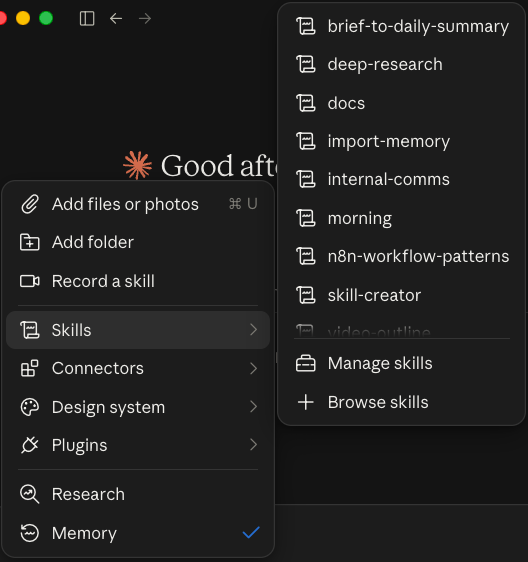 My Claude app’s Skills menu, October 2, 2026.
That n8n skill has been on since January. And neither of my two keepers shows up in that menu, because they live in Claude Code, where most of my skills run.
Published October 2, 2026. Skill, plugin and plan facts checked against Anthropic’s help center and the GitHub pages linked below that same day.
Two of the 5 best Claude skills are downloads, and you build the other three
| # | Skill | What it does for you | Where it comes from | The catch |
|---|---|---|---|---|
| 1 | A skill-improvement loop (my copy of Karpathy’s autoresearch) | Runs a skill, grades the result, keeps the better version, repeats | A free GitHub project I copied and rewrote as my own skill | Karpathy’s version needs an NVIDIA graphics card. You copy the idea, you don’t install it |
| 2 | Tesseract, by Mirage | Turns information into motion graphics and edited video | Public download on GitHub | Needs Claude Code or Codex on your computer, not a chat toggle |
| 3 | An inbox skill | Sorts your email so only the things you have to do stay | You build it | Needs the Gmail connector. Keep sending on approval |
| 4 | A weekly prioritizer | Reads your Trello or Notion tasks and picks the week’s top few | You build it | Needs that app’s connector |
| 5 | A news digest | A short read of the sources you actually care about | You build it | You’ll tweak the sources for a while |
My rule for the order: a skill I still use beats one that sounds powerful.
If you haven’t turned skills on yet, the switches are in how to use Claude Skills. This page is about which ones are worth it.
New to Claude altogether? Start at the Claude guides.
The four built-ins are already on, so don’t count them as picks
Anthropic’s Use skills in Claude page lists four built-in skills: Excel, Word, PowerPoint and PDF. They’re on once code execution is on, on every plan, Free included.
Back in July I made a Short calling PowerPoint, Excel, Word, PDF and Canvas Design the five to install. I’d change that now.
These are all generic. I think Claude is smart enough to just know what to use. Ask for a deck and it reaches for the PowerPoint skill on its own.
If I had to name one to care about, probably PDF.
Design is already in every chat, so skip hunting for a design skill
Claude Design stopped being a separate thing on September 16. Anthropic’s release notes say you can now ask for a design, deck or document in any conversation, on every plan including Free.
There’s also a separate Design add-on from Anthropic in the skills directory. It’s a bundle: 7 skills and 9 connectors for design critique, UX writing and accessibility checks. It’s not on my account.
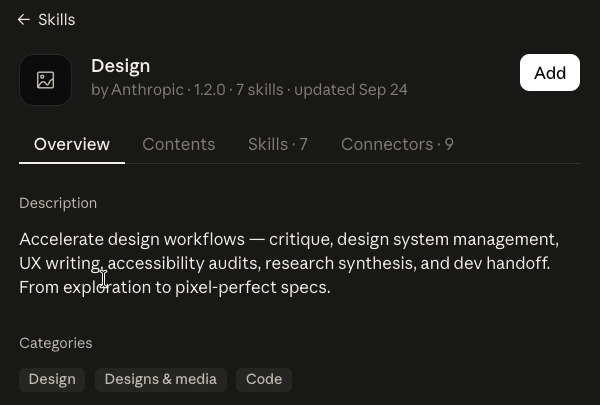 Anthropic’s Design bundle in my skills directory, October 2, 2026.
A bundle like that is what Anthropic calls a plugin, and its plugins help page lists those on paid plans only. Unless you do design critique for a living, the built-in Claude Design covers you.
1. Karpathy’s autoresearch loop makes your other skills better, and I copied it instead of installing it
Best for: anyone with one skill they use every week that’s almost right.
The mess: you build a skill, it gets you 70% there, and you tweak it by hand for weeks.
Andrej Karpathy, the AI researcher, put autoresearch on GitHub in March 2026. The idea: an AI agent changes the code, runs a 5-minute experiment, checks if the result improved, keeps it or throws it out, and repeats overnight.
His version trains a small AI model and needs an NVIDIA graphics card. That’s not the part I wanted.
I didn’t even download it. I just copied it. Meaning I took it and I modified it for me.
Think of it like a smarter way to make a skill loop and just get better instead of painfully doing it for months.
My copy is a skill called refine, in my skills folder since June. It runs the skill I’m fixing, has a separate agent grade the output, changes one thing, and keeps the best version.
You don’t need my files to get the same thing. Steal this:
Here is my [name] skill and three outputs from it I didn't like.
Grade each output against what I actually want, out of 10.
Change one thing in the skill, run it again on the same inputs,
and keep whichever version scores higher. Show me the scores.
The catch: it only works on a skill you already use. A loop can’t fix a job you haven’t figured out yet.
2. Tesseract turns information into motion graphics you actually watch
Best for: people who make videos, and anyone who reads a wall of text and retains none of it.
Tesseract comes from a company called Mirage. It went up on GitHub on September 16, 2026, and today it carries four skills: Edit Video, Motion Graphics, Editor and Design.
It’s the one that intrigues me the most right now. I’m working with it a lot for motion graphics as I put out video.
You don’t have to make videos to get something out of it. It’s just one way to render information, to get Claude to give you back information in a way you digest better.
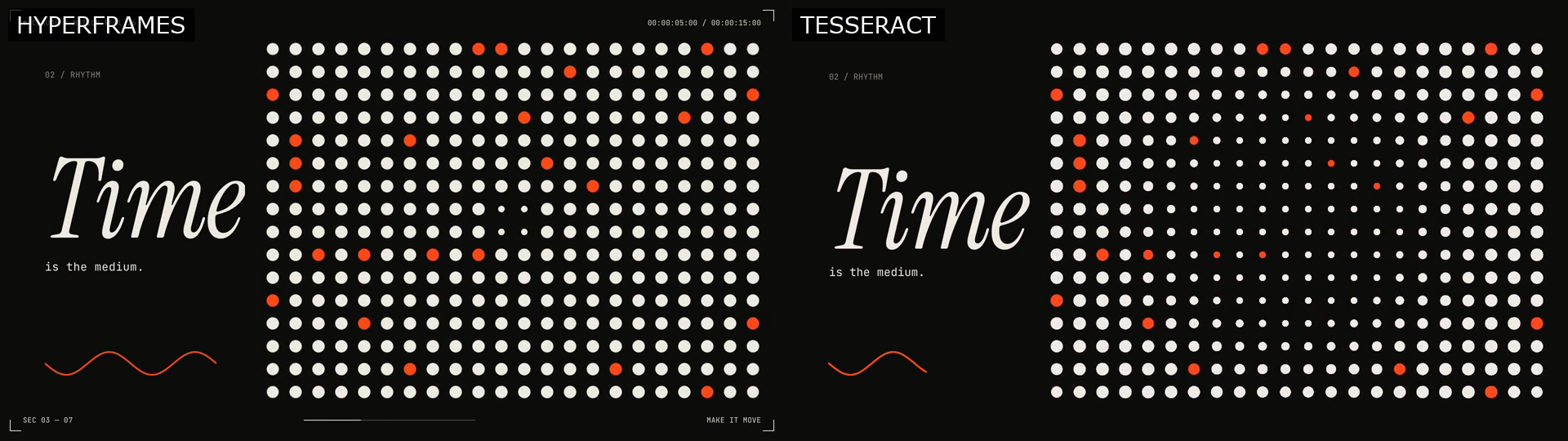 My HyperFrames vs Tesseract test render, September 25, 2026.
That frame is from a side-by-side I ran: the same motion graphic in HyperFrames, HeyGen’s free, open-source tool that turns a web page into video, and in Tesseract. HyperFrames is the cheap way to get video out of Claude. Tesseract is another one I downloaded, and it’s hard to replicate.
The catch, and it’s a real one for a non-coder: Tesseract’s own page says your agent “needs file and command access.” That means Claude Code or Codex running on your computer, not a toggle in the chat. If that’s new, start with how to use Claude Code.
As of October 2, its Claude Code plugin is listed as “coming soon.”
The 3 best Claude skills to build yourself come from your own back-and-forth
The best skills come from your riffs, when you’re going back and forth with Claude about your own work. A stranger on GitHub doesn’t know your inbox or your clients.
You don’t have to write one from scratch. Anthropic’s skill-creator is in the example skills (it’s in my menu above), so describe the job and let it draft the folder.
On a Mac with Pro, Max or Team, Record a skill in Cowork’s + menu lets you do the task once on screen instead (Anthropic’s guide; not on Free).
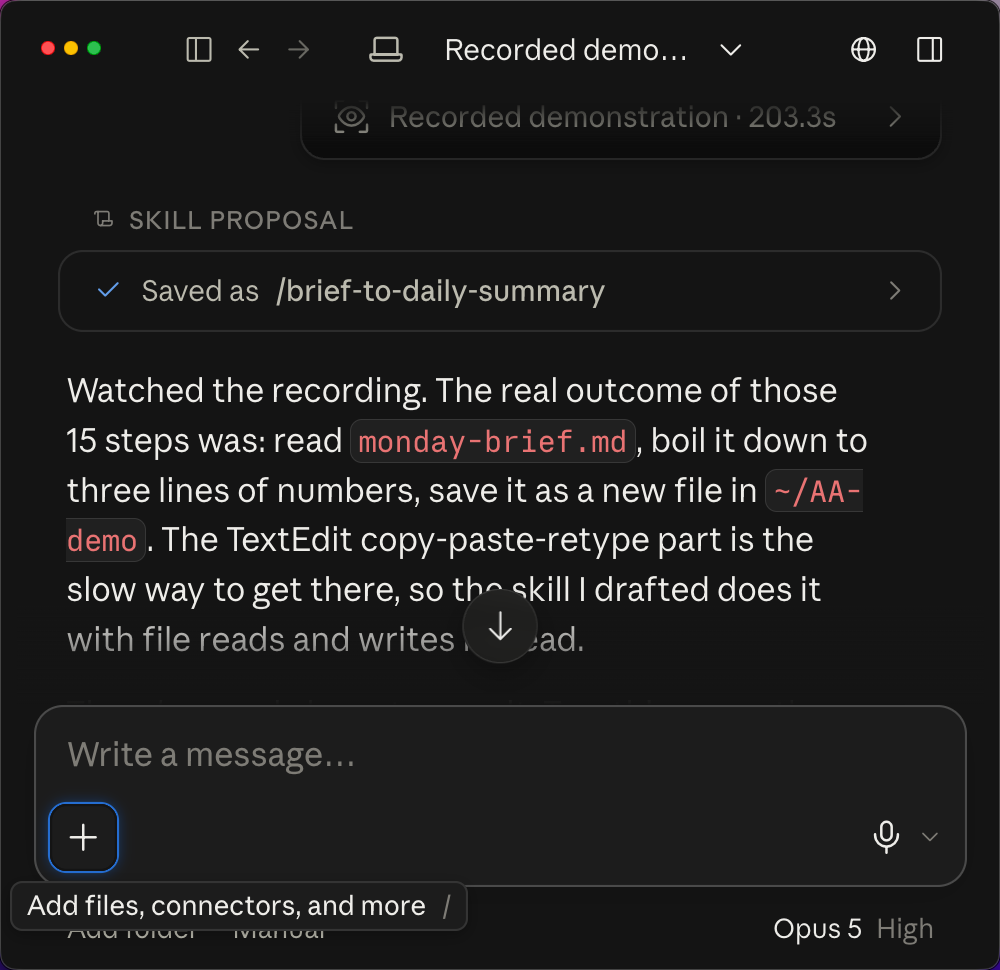 A Record a skill proposal on my Mac, from a September 2026 test run.
It’s something that you won’t nail perfect in the first time, but you can just get the ball rolling. So don’t get lost in trying to optimize it too much. My take: these should take you a few minutes to start, then you tweak them over time.
3. An inbox skill keeps only the email you have to act on
Best for: anyone whose inbox is mostly receipts and notices.
The mess: 300 emails, five that need you. The fix is a skill that asks one question of every message: do I have to do something about this?
My own inbox skill runs on that question across two Gmail accounts. It files receipts and machine notices, and it never sends or deletes anything on its own.
Starting point: Anthropic’s Small Business plugin has an inbox-manager skill you can read and borrow from. The catch: it needs the Gmail connector, and sending should stay on ask-first. Which connector to turn on first is in the best Claude connectors.
4. A weekly prioritizer reads Trello or Notion and picks your week
Best for: people with a task list that keeps growing.
It queries your Trello or Notion, then prioritizes your tasks for the week. You tell it what matters this quarter, and it hands back the three or four things to do first.
Starting points: Anthropic’s productivity plugin has a task-management skill, and the “morning” example skill renders a morning brief. The catch: it only knows what’s in the app it reads, so it needs that app’s connector.
5. A news digest reads the sources you’d never get to
Best for: anyone who subscribes to more newsletters than they open.
You tell it which blogs and newsletters to read, what you care about, and how short you want it. It hands back the few items worth your time.
The catch: the first version will pull the wrong stuff. That’s normal. You go back and forth, cut a source, add one, and it gets closer every week.
What I’d skip: packs, developer lists, and tiny one-step skills
| Skip | Why | Do this instead |
|---|---|---|
| 100+ skill packs and “free skill library” downloads | Built for someone else’s workflow | Pick one chore and build for it |
| Business skills from GitHub, installed as-is | Inspiration, not magic. Even Anthropic’s example repo says “demonstration and educational purposes only” | Read it, copy the idea, make it yours |
| Developer skills (frontend-design, mcp-builder, webapp-testing) | They fill most “best skills” lists, and they’re for coders | Ignore them unless you write code |
| Tiny one-step skills | Ten tiny skills fight each other | One skill per job, with the steps inside it |
I’m not the only one saying this. Kyle Redelinghuys at ksred.com, writing for developers, sums up a reviewer who went through 200+ skills, and it’s harsher than mine: “most publicly available skills don’t just fail to help, they actively hurt, adding tokens, adding latency and injecting constraints that narrow the output.”
And the author of welcomedeveloper.com’s list lands where I do: “The point isn’t to install everything. It’s to start with what matches the work you actually do and let the gaps tell you what to add next.”
On the one-step skills, I learned that one the hard way. The story of how my list got too long is in how to use Claude Skills.
A skill earns its spot only if you still use it
My test is one question: do I still use it?
That’s why only two downloads made this page. Everything else I tried either got folded into a skill of my own or switched off.
To clean yours up: Customize > Skills, then switch off anything you haven’t touched lately. Skills from the directory are view-only, so if you want to change one, download a copy, edit it and upload it as your own.
What changed since my July list
- July 2: my Short picked PowerPoint, Excel, Word, PDF and Canvas Design. Canvas Design is still in Anthropic’s GitHub examples, but it isn’t on my account and I wouldn’t send you looking for it.
- September 16: Claude Design moved into every conversation, Free included.
- September 24: Anthropic updated its Design bundle (version 1.2.0) in the skills directory.
- September 25: Anthropic opened a developer portal for submitting plugins to the Claude directory, so expect the directory to keep growing.
Updated October 2, 2026.
Copy the idea, then make it yours
If installing a skill made you a millionaire, everybody would be doing it. The two skills I kept prove the point: one I copied and rewrote, the other I picked because it does a job I already had.
My rule: download for inspiration, keep only what you still use, and build the rest from your own back-and-forth.
So pick one chore from this page and get the ball rolling today. If you live in the chat app, start with the inbox. If you make video and already work in Claude Code, try Tesseract.
When you want the bigger case for building your own, it’s in Claude Skills for non coders.
Common questions
Are Claude skills free?
Yes. Anthropic lists Skills on Free, Pro, Max, Team and Enterprise as of October 2026, as long as code execution is on. Plugins, the bundles of skills plus connectors, are paid plans only. What else the $0 plan covers is in Claude’s free plan.
What is the difference between a Claude skill and a plugin?
A skill is one folder of instructions Claude loads for a job, like making a PDF. A plugin bundles several skills with connectors for one kind of work. Anthropic’s Design plugin carries 7 skills and 9 connectors. Skills work on Free; plugins need a paid plan.
Where do I find a list of Claude skills and examples?
In the app: the + button in the message box, then Skills, then Browse skills, which opens the Discover tab. Anthropic’s own example skills sit in its skills repo on GitHub, next to big community lists. Treat those as ideas to copy, and install only from sources you trust.
Are the free Claude skill lists on GitHub safe?
Some are, and nobody checks most of them. A skill can run code, so Anthropic says to install only from trusted sources and check what a skill depends on. Its own example repo says it’s for demonstration and educational purposes only.
How many Claude skills should I have turned on?
Fewer than you think. The four built-ins are already there and Claude picks them itself. Past that, keep what you still use and switch the rest off in Customize > Skills.
Where this comes from
The plan, plugin and directory facts come from Anthropic’s help center, its GitHub repos and my own Claude app, checked October 2, 2026.
The two keepers, the Tesseract test and both app screenshots are mine. I haven’t tried every skill in the directory, and Tesseract and my refine loop run in Claude Code, not the chat app.
This post is part of Claude Guides, the hub with every plan decision, task comparison, and setup guide for using Claude without code.

Written by
Chris AlarconChris Alarcon shows people who don’t code the boring Claude setup that actually works. He runs his one-person operation on these systems and shares every workflow, prompt, and tool combo in public. Start with the 15 prompts he uses every day.
The boring setup
It still won't know you tomorrow.
The Setup is one folder. Drop it into a Project, answer three questions, and Claude or ChatGPT writes your memory file and your voice file itself. It stops forgetting you, stops sounding like AI, and runs three real jobs by name. Twenty minutes tonight. No code. $39, 30-day refund.
See The Setup →The 15 AI prompts I actually use every day
I tested hundreds and kept the 15 that survived. You get them right away, then one short email from me every Tuesday.