How to Use Claude Skills: Start With the 4 Built-In Ones Before You Install Anything (2026)


I had 60. That’s the worst part. I would create them too granular.
Sixty Claude skills. My main skills folder is down to 26 as of September 25, 2026, and I probably gotta delete a few.
So if you went into Settings looking for a Skills button and it wasn’t there, you’re ahead of where I was. A commenter on one of my TikToks asked it word for word: “But where in settings”. Or you found it, turned something on, and now you can’t tell if it did anything.
Both are two switches and one test away from fixed. And you don’t need to install a single skill to start, because four of them already ship with Claude.
Here to build your own in Claude Code? Typically when we build a skill, we start off with a clear purpose and we do it manually, and once it works I’m like, let’s make this into a skill. The five build steps are further down.
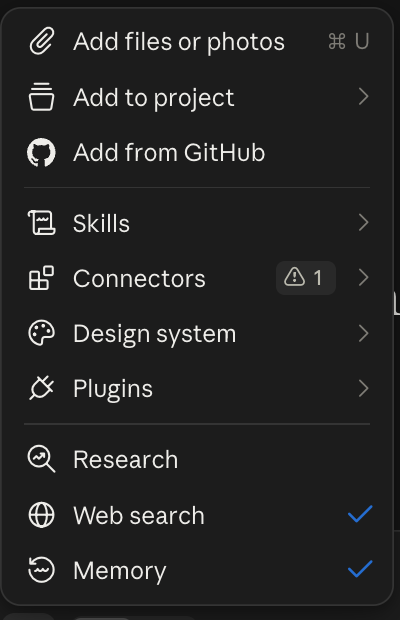 The Skills menu inside my Claude composer, September 18, 2026.
That menu is where you end up. Here is how to get there on your account.
What you need (as of September 25, 2026)
- Any Claude plan. Anthropic’s Use skills in Claude page lists Free, Pro, Max, Team and Enterprise.
- Code execution switched on. Skills hide without it. That’s step one below.
- Claude on the web or the desktop app. The switches are in the same place on both.
- On a work account: skills can run code and reach other services. Before you upload one from outside, ask IT what’s allowed. On Enterprise, an owner turns skills on for everyone.
- Skip for now: skill packs, “500 free skills” downloads, and building your own. You’ll get there.
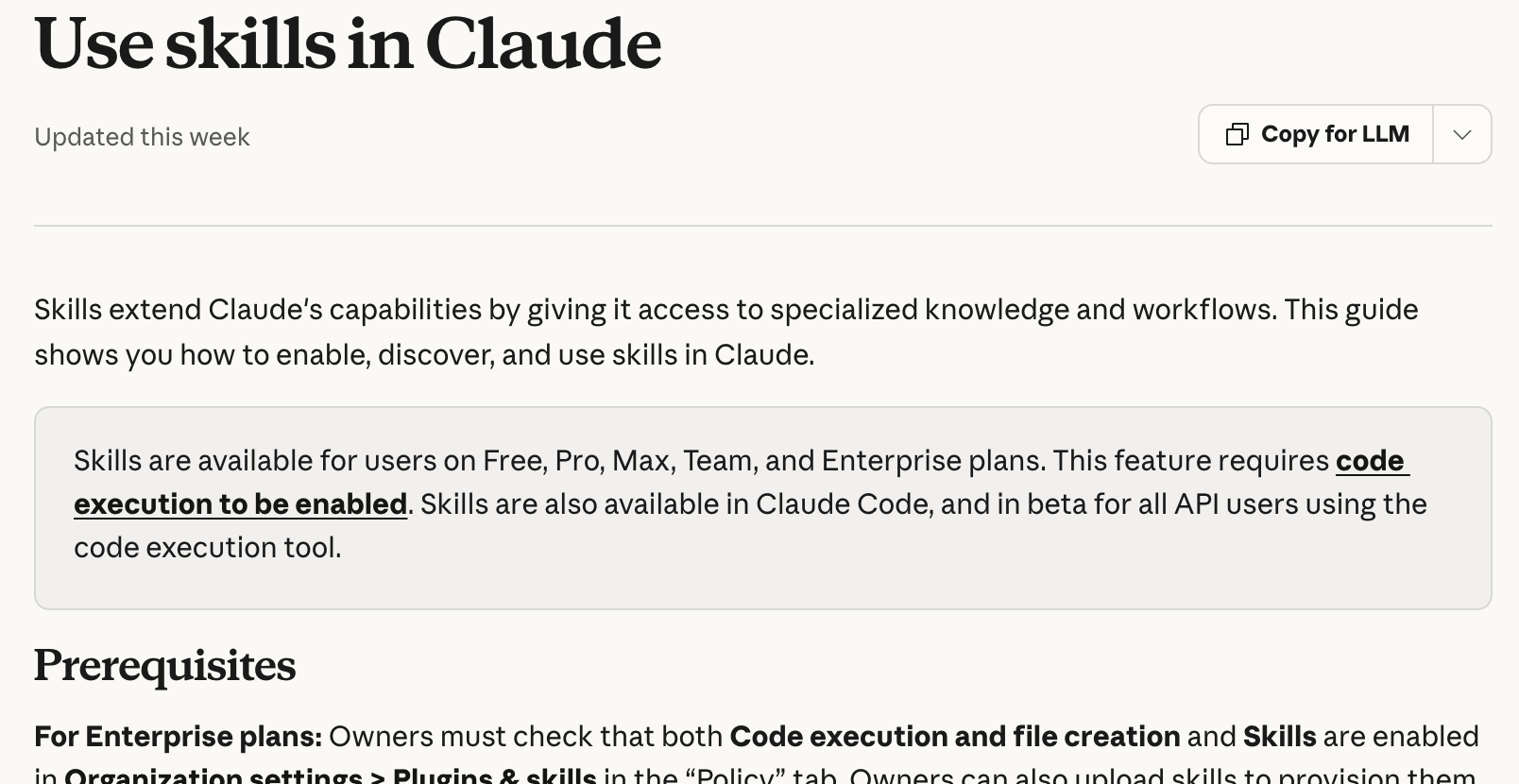 Anthropic’s skills help page, captured September 25, 2026.
Step 1: Turn on code execution first, because Skills stays hidden without it
Settings > Capabilities > Code execution and file creation, switch it on.
That one toggle is the gate. Anthropic’s troubleshooting list puts it first for both “I can’t see Skills” and “my skill is greyed out”.
On a work plan, the path is different:
- Team: skills are on by default at the organization level, so you usually go straight to step two.
- Enterprise: an owner has to enable both code execution and Skills in Organization settings > Plugins & skills, on the Policy tab. If it’s off, that’s IT’s switch, not yours.
Two things that look like bugs and aren’t. Since the September 16 update folded Cowork into every chat, your old Cowork skills carried over. If your message box still shows “Chat” and “Cowork” as two options, your account just hasn’t moved to the new layout yet.
And incognito chats can’t create files or run code, so don’t expect a file skill to fire there. That last part is my read of Anthropic’s merge notes, not a line they wrote.
Step 2: Find your skills in Customize > Skills, not in Settings
Left sidebar > Customize > Skills.
This is where people get stuck. Since February, Anthropic groups skills, plugins and connectors under Customize, and that’s where the list and the on/off toggles live now.
You’ll see your skills in sections: Personal, Shared with you, and Organization on a work plan. The four built-ins are already in there.
You can also reach them mid-chat: the + button in the message box has a Skills submenu. That’s the menu in the screenshot at the top of this page.
Step 3: Ask for a real file and let the 4 built-ins fire on their own
Anthropic’s help page lists four built-in skills: Excel, Word, PowerPoint and PDF. With code execution on, you don’t call them by name. Ask for the file, and Claude picks the skill.
Give it 15 minutes with something from your actual week. Paste your notes from the last meeting and send this:
Turn these meeting notes into a 5-slide PowerPoint deck for my team.
One slide per decision, a last slide with owners and due dates.
Keep every slide under 30 words.
You should get a .pptx file back, not a wall of text in the chat. Swap the ask and the same thing happens with a spreadsheet (“turn this list into an Excel tracker with a status column”), a Word doc or a PDF.
If Claude answers in chat instead of handing you a file, name the skill once: “Use the PowerPoint skill for this.” That’s the override, not the normal way.
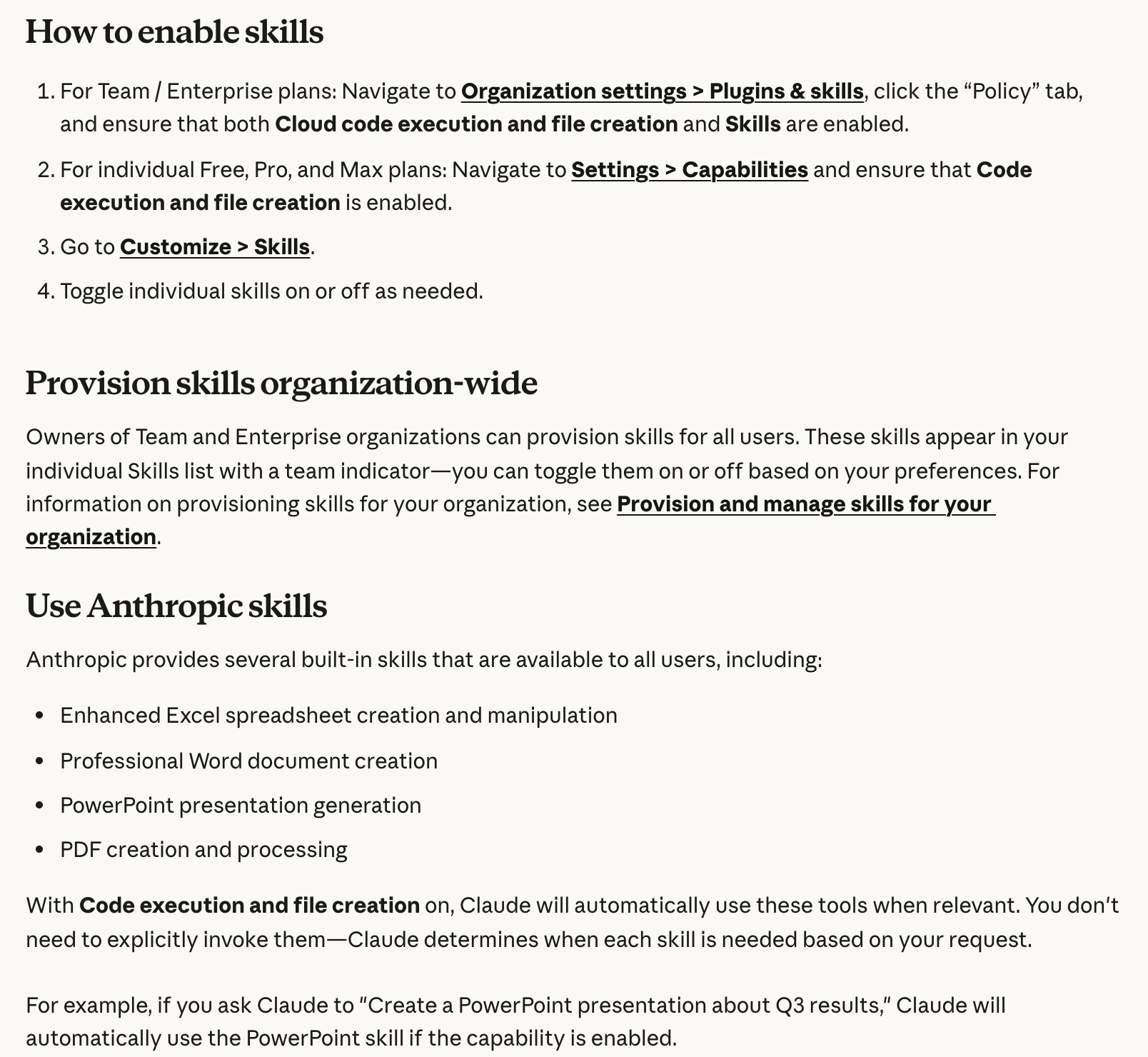 Anthropic’s enable steps and the four built-ins, September 25, 2026.
Applicable for: ops leads, HR, project managers, teachers, anyone who turns notes into decks and trackers.
Step 4: Check it fired by asking Claude straight out
A skill that didn’t load looks like a normal answer. That’s the trap.
Here is how I tell. First, the output quality. You know what good looks like for your own work, and a skipped skill gives you the generic version.
In Claude Code it literally says it’s using the skill when it gets invoked. In the Claude app, Anthropic’s advice is to review Claude’s thinking and look for the skill loading.
Second, I just ask.
If I see the output, I’m like damn it looks bad. Did you use the skill? And it’ll tell you why it didn’t.
Did you use my [skill name] skill for this? If not, why not,
and what should I change so you use it next time?
Usually the fix it points to is the skill’s description.
Carrie Loranger, who teaches creators this in her Claude Skills guide, puts it bluntly: “If you do not see a confirmation that the skill loaded, the skill is not running and you are getting a generic Claude response. This is the single most common mistake new users make.”
When it doesn’t fire, the fix is usually one of these:
| What you see | What's going on | Fix |
|---|---|---|
| No Skills section anywhere | Code execution is off, or an Enterprise owner hasn't enabled skills | Step one above, or ask your admin |
| A shared skill is greyed out | Shares arrive switched off | Toggle it on in Customize > Skills after you read it |
| Skill is on, Claude ignores it | The description doesn't match how you ask | Name it once in the prompt, then rewrite the description in your words |
| Upload fails | ZIP too big, folder name doesn't match the skill name, or no SKILL.md inside | Rename the folder to match, check SKILL.md is there, zip again |
| You can't edit a directory skill | Directory skills are view-only | Download a copy, edit it, upload it as your own |
Step 5: Install one skill on purpose, and read it before you switch it on
Once the built-ins work, you can add more. There are three ways a skill reaches you:
- The directory. Customize > Skills > + > Browse skills, then Install. These arrive switched on and view-only.
- A ZIP file. Customize > Skills > + > Create skill > Upload a skill. A skill is just a folder with a SKILL.md inside, zipped.
- A teammate’s share on Team or Enterprise. It shows up under Shared with you, greyed out until you enable it, and it updates when they update it.
Anthropic’s own line: only install skills from trusted sources, and review a colleague’s skill before you enable it.
My take on the rest. As a beginner, you shouldn’t be looking for skills. You’re asking the wrong questions.
“What are the best skills to install?” means you don’t know your own workflow yet. If it was that easy, you’d plug a chip into your AI and it would write your posts for you.
And no one’s gonna give away a really high quality skill for free. They’ll give you a starting point. A lot of people on GitHub have released decent ones.
We took a framework Andrej Karpathy shared (his LLM wiki pattern, a way to keep notes Claude can search) and molded it to our own, instead of installing it whole, because some of it wasn’t relevant to us.
I rarely download skills to be honest. The latest one that was actually worth it was the video and motion skills from Tesseract (my video tool), for motion graphics in my long-form and Shorts.
I’d already tried building my own skill for that job, and it was decent. We’re keeping the brain of mine and replacing the motion tool it ran on.
Step 6: Keep the list short, and build your own only after you’ve done it by hand
Here’s where my 60 came from.
I’ll create a skill for YouTube descriptions. I’ll create a skill for YouTube headline. I’ll create a skill for a thumbnail. Now I just have one skill for long form and it has all that embedded in it.
That’s why understanding the architecture of a skill matters. A skill is a folder. The SKILL.md is like the table of contents: the main instructions, pointing to other files in that folder (scripts, reference notes).
That’s how one skill handles a complex job instead of ten tiny ones fighting each other.
My rule is still the same one: do the thing by hand two or three times first. You’re gonna have to do the process manually and test it and refine it once or twice and then you’re gonna build the skill. Otherwise, you’re gonna build something and you’re at risk that you’re never gonna use it again.
When you get there, don’t write it from scratch. Anthropic has a skill builder, skill-creator, in the example skills. Use that and call it a day.
What made the architecture click for me was Anthropic’s free Introduction to agent skills course. It’s six modules taught in Claude Code, and the folder layout is the same one the app uses.
If you’re on Pro, Max or Team and use Claude on a Mac, there’s also Record a skill in the + menu: you do the task once on screen and Claude drafts the skill from the recording.
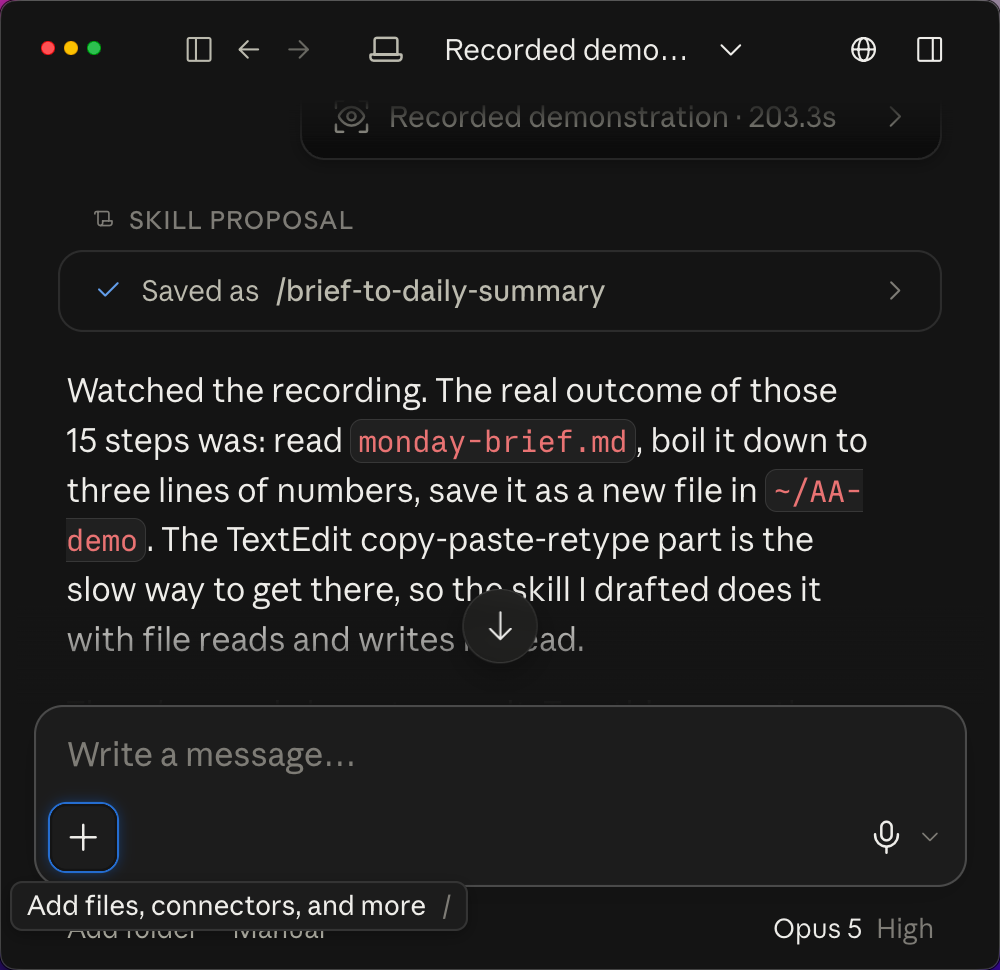 A Record a skill proposal on my Mac, from a September 2026 test run.
Where to go from here depends on your plan. On Free, Pro or Max, stay on the built-ins until you’ve asked for a few real files. On Team or Enterprise, check your Skills list before you install anything, because owners can provision skills for everyone.
The full case for when a skill is worth building, and when it’s the wrong tool, is in Claude Skills for non coders. For the rest of the Claude setup around it, start at Claude Guides.
Cleanup matters too, and I’m not preaching from a clean list: my Claude app still has an n8n skill switched on from January. Customize > Skills is where you switch one off or delete it.
When I clean up, I don’t just delete. I fold the tiny ones together, because a single skill with the proper architecture can not only fit more and be more complex but be better quality.
How to build a skill in Claude Code, step by step
Most of my skills live in Claude Code, so this is the order I actually build them in. The folder rules come from Anthropic’s skills docs, checked October 23, 2026. The order is mine.
Step 1: Pick one clear purpose and do the job by hand first
Open Claude Code, do the job start to finish, and correct it in the chat as you go.
That’s my by-hand rule in Claude Code form: one clear purpose, done manually, in a normal session. The corrections you make are what the skill keeps.
Anthropic’s docs give the same signal from the other side: make a skill “when you keep pasting the same instructions, checklist, or multi-step procedure into chat.”
Step 2: When the session works, tell Claude to make it a skill
This was a good session. Based on everything we've done, make this a skill.That’s the sentence. My example is tweets: this was a good session, now based on everything we’ve done, make this a skill.
Anthropic’s skill-creator instructions expect exactly this. When you say “turn this into a skill”, it pulls the steps and your corrections from the chat history first.
Alma (my ChatGPT agent), the newest skill in my folder (October 12), went even simpler. I just told Claude we’re gonna build this and it does it.
Alma is my ChatGPT dot, OpenAI’s always-on agent. The skill is how Claude Code and Codex hand her a job. Is it a skill? It uses a SKILL.md, sure.
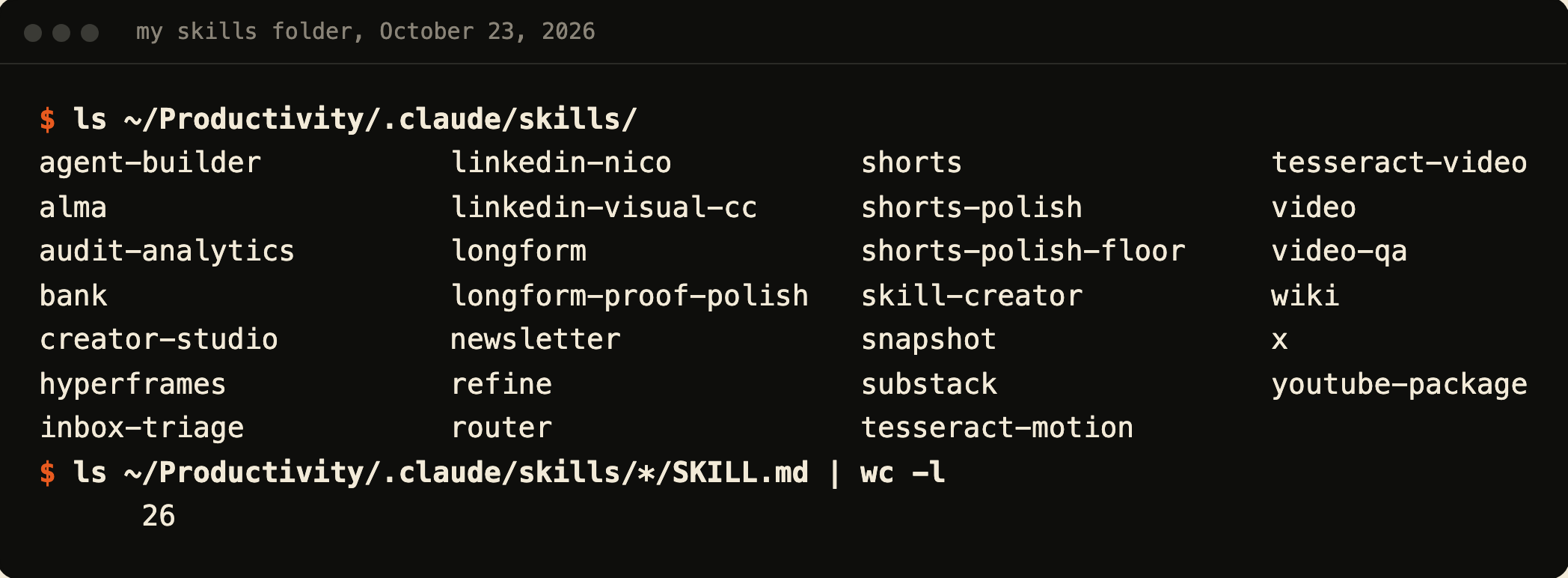 My skills folder, October 23, 2026.
Step 3: Let the skill builder write it, and read the plan before you approve
Let Claude run the skill builder, then read the folder plan it shows you before you say yes.
Claude takes it from there. It uses the skill-builder skill to build it, then I review it, I approve the plan, and then it becomes a maintaining thing over time.
My skill builder is a copy of Anthropic’s skill-creator. Since June 16 it has a gate: before it writes a SKILL.md, it has to say the folder shape (the SKILL.md, any reference files, any scripts) and wait for my nod. That nod is the plan I approve.
If you don’t have a skill builder yet, this installs Anthropic’s as a Claude Code plugin:
/plugin install skill-creator@claude-plugins-officialWhere the folder lands decides where the skill works:
- Personal:
~/.claude/skills/<name>/SKILL.mdworks in every project on your machine, but not in Cowork or cloud sessions. - Project:
.claude/skills/<name>/SKILL.mdworks in that one project folder. - Same name in both: the personal one wins.
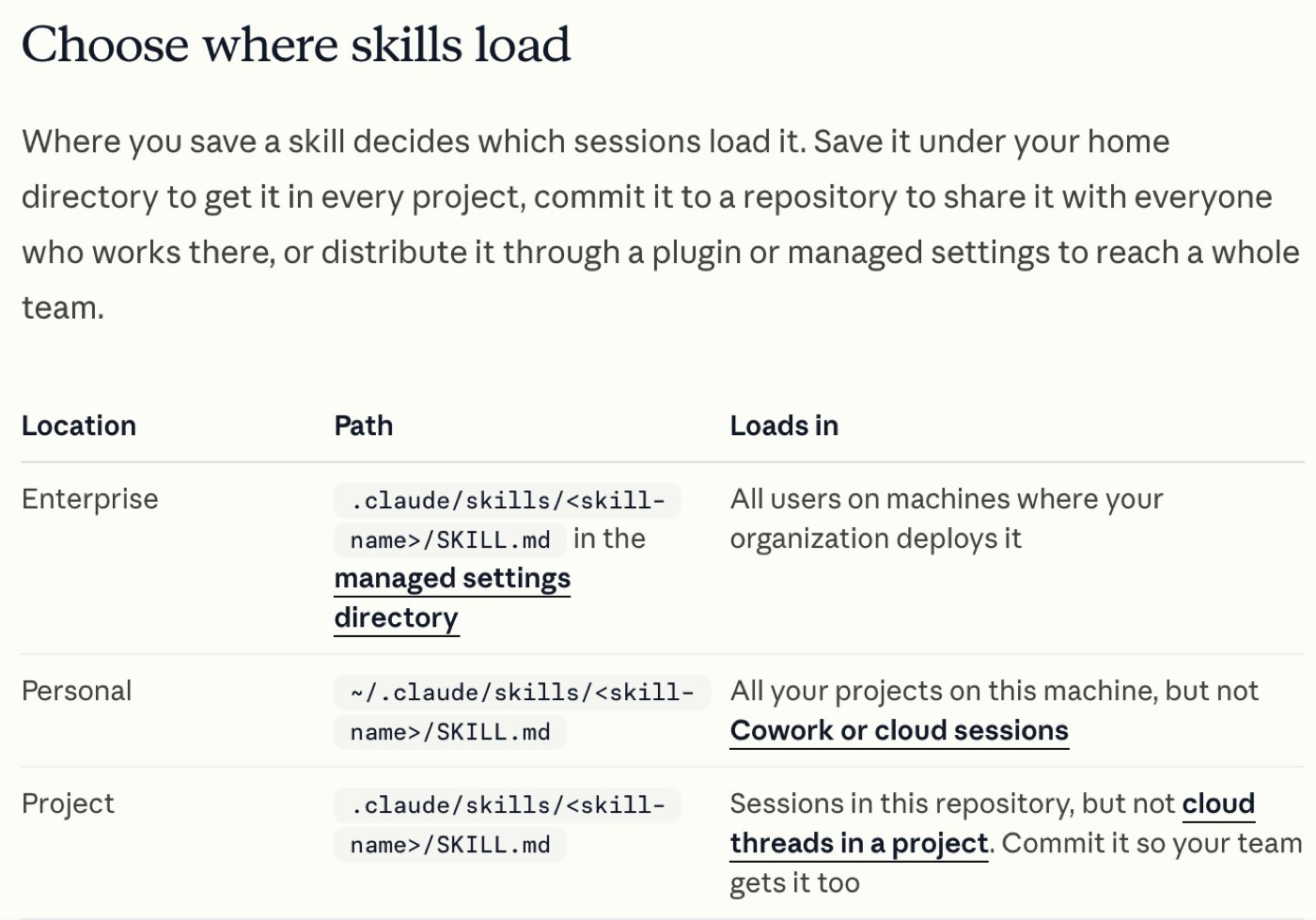 Anthropic’s Claude Code skills docs, October 23, 2026.
The part of the plan I read closest is the description, because Claude uses it to decide when to fire the skill. In Claude Code only description is recommended, and name defaults to the folder name.
My rule for it: it has to be clear, concise. I don’t think I’ve written one in a while. We just have the skill builder and it does it for me.
Since October 13 my skill builder has its own rule for that (it’s in the change history in step 5): 500 characters or less, saying what the skill does, when to use it and what it’s not for. Here’s the top of alma’s, trimmed:
---
name: alma
description: Delegate a task to Alma (Chris's ChatGPT Dot) and get her
  answer back, from Claude Code or Codex. [...] Use whenever Chris says
  ask Alma, hand this to Alma, delegate to Alma, check with Alma, ping
  Alma, have Alma do it [...]
---
Alma’s runs 573 characters, because it was written the day before the builder got that rule. Claude Code itself cuts a description off at 1,536 characters, so put the main use case first.
Step 4: Run it with /name, then ask normally and watch it fire
/your-skill-nameTyping the slash and the folder name runs the skill on purpose. Then ask for the job the way you normally would, without the slash. If the answer comes back generic, the skill may not have loaded. Check that the folder name and description match what you asked for.
If it doesn’t fire, Anthropic’s checklist starts with the description: does it hold the words you’d naturally say? You can also ask Claude “What skills are available?” to see if it loaded at all.
Edits to a skill load in the same session, no restart. The one exception: if Claude made a skills folder that didn’t exist when the session started, run /reload-skills. And if the output still looks generic, ask Claude straight out whether it used the skill.
Step 5: Keep maintaining it, and fold before you add
/skill-doctorMaintaining means the skill keeps changing after it ships. My skill builder is the proof: it changed on October 12, 13 and 19 this month alone.
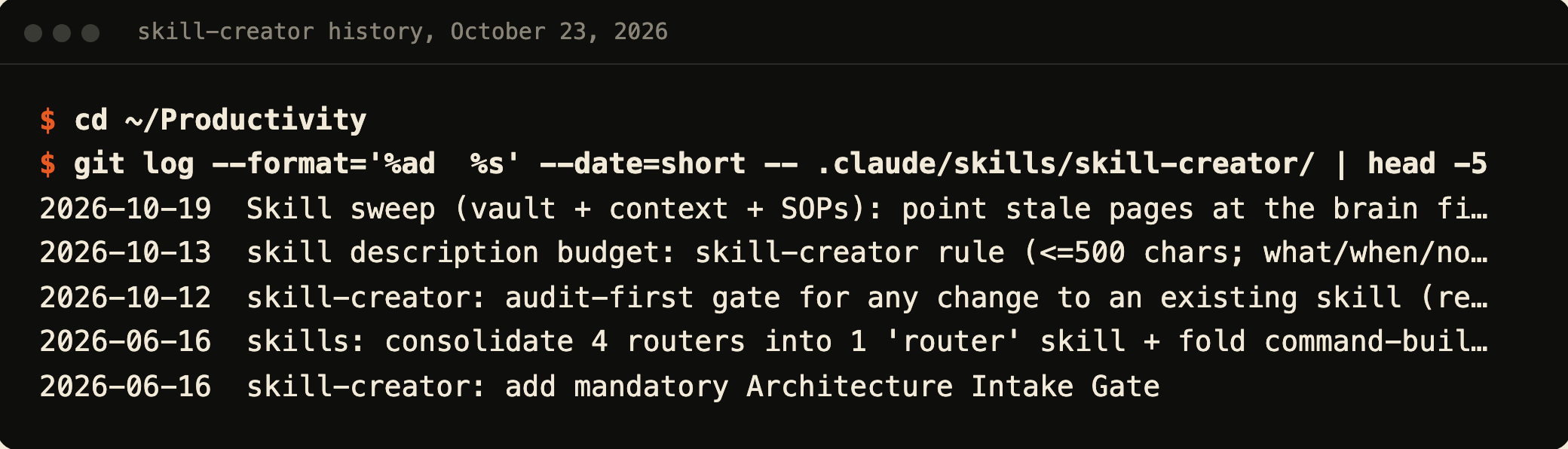 My skill-creator’s change history, October 23, 2026.
The first June 16 line is my fold rule in real life. Four separate router skills became one router skill (four similar skills merged into one), and a separate command builder moved inside skill-creator. That one change deleted 1,483 lines and added 251.

My own cut, on camera: I Killed 17 Claude Code Skills (Keep These 8) (15 min).
/skill-doctor shows what each skill costs and how often it gets used, so you can see which ones to fold or switch off. Anthropic lists it from Claude Code version 2.1.252.
Not every repeat job should be a skill, though. Here’s where each kind of instruction goes in Claude Code:
| Put it in | Use it for | When it loads |
|---|---|---|
| CLAUDE.md | A fact or rule every session needs | Every session |
| A skill | A procedure you repeat | The description always, the body only when used |
| A subagent | A big side job you want done in its own context | When Claude hands the job off |
You get to skip the 60
I had 60. Today it’s still 26, with alma in and one old polish skill out.
My rule hasn’t moved: do it by hand until it works, then say make this a skill.
So ask Claude for one real file this week, watch a built-in fire, and build your first skill only after you’ve done that job by hand.
Common questions
Are Claude Skills free?
Yes. Anthropic lists Skills on Free, Pro, Max, Team and Enterprise as of September 2026, as long as code execution and file creation is on. Older pages, including a Short I made in July, say you need a paid plan, but the current help center says otherwise. For what else the $0 plan covers, see Claude’s free plan.
Why can’t I find Skills in my Claude settings?
Because it moved. Turn on Code execution and file creation in Settings > Capabilities, then open Customize in the left sidebar and click Skills. On Enterprise, an owner has to enable skills first under Organization settings > Plugins & skills.
Where did my Cowork skills go after the September update?
They carried over into the merged Claude, per Anthropic’s September 16, 2026 release notes. If you still see Chat and Cowork as separate options, your account hasn’t moved yet. The full map of what moved is in Claude Cowork is now Claude, and the new workflow is in how to use Claude Cowork.
Do skills I turn on in the Claude app show up in Claude Code?
Yes, one way. From version 2.1.273, Claude Code downloads your claude.ai skills into ~/.claude/skills/synced/ when you sign in with that account, and it never uploads. So a skill you build in Claude Code stays on your machine. If Claude Code is next for you, start with how to use Claude Code.
How do I build a skill in Claude Code?
Do the job by hand in a normal Claude Code session until it works, then tell Claude to make it a skill. It writes a folder with a SKILL.md, at ~/.claude/skills/<name>/ for every project or .claude/skills/<name>/ for one. Read the description before you approve it, then run /skill-name to check it fires.
Where this comes from
The app click paths come from Anthropic’s help center, checked September 25, 2026. The Claude Code steps come from Anthropic’s skills docs, checked October 23, 2026.
The build order, the 60-to-26 story and the “did you use the skill?” check are mine, and so are the folder and its history. I haven’t tested every skill in the directory.
Published September 25, 2026. Updated October 23, 2026 with the Claude Code build steps, checked against Anthropic’s docs.
This post is part of Claude Guides, the hub with every plan decision, task comparison, and setup guide for using Claude without code.

Written by
Chris AlarconChris Alarcon isn’t a developer. He shows people who aren’t developers how to build real things with Claude Code: a site, an app, an agent. He runs his one-person operation on these systems and shares every workflow, prompt, and tool combo in public. Start with the free 1-page setup.
The boring setup
It still won't know you tomorrow.
The Setup is one folder. Drop it into a Project, answer three questions, and Claude or ChatGPT writes your memory file and your voice file itself. It stops forgetting you, stops sounding like AI, and runs three real jobs by name. Twenty minutes tonight. No code. $49 · 30-day refund.
See The Setup →Get the free 1-page setup
The boring 1-page setup. No code, no jargon. Get it now, then one short email from me each Tuesday.
