How to Use Claude Code Projects: I Ran 12 Claudes From One Chat (No Code)


“When I had more than five I’d constantly get confused, paste the wrong stuff to the wrong window.”
Five windows stacked up, each one renamed so I wouldn’t forget what it was doing.
On November 3, I ran 12 studies of my YouTube channel at once, all started from one chat. Once they had reported, one more thread read all 12 and handed me a single page.
I’m not a developer and if you can type a message you can do this.
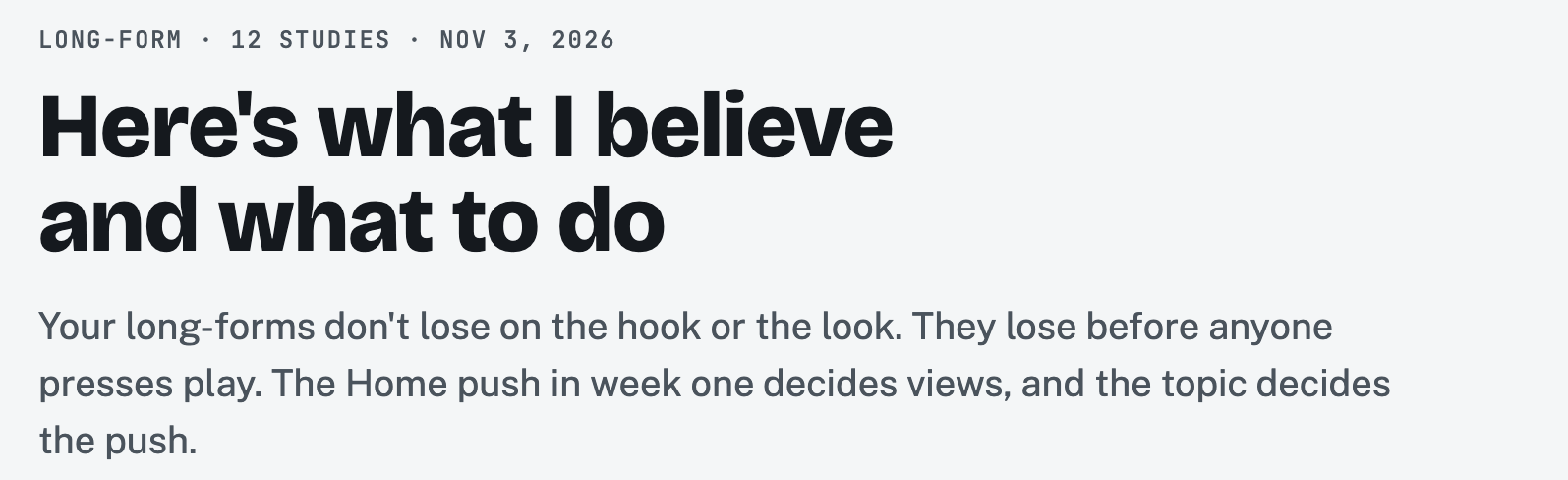 The one page that came back from my 12 studies, November 3, 2026.
People online are calling this “Claude 2.0.” It isn’t a new model. The real name is Projects, and it lives inside Claude Code.
What you need (as of November 8, 2026)
- A Pro, Max or Ultra plan. Anthropic’s Projects docs say it’s a public beta “rolling out gradually.” Team and Enterprise don’t have it yet, and neither does Free.
- The Claude desktop app, updated, or claude.ai/code in a browser. Look for Projects in the left sidebar, or under More.
- No GitHub and no code. The docs say it plainly: “A project doesn’t need a repository at all.”
- Not the Projects you already know. The ones in regular chat are a place to keep your files and instructions. Same name, different thing.
- On a work computer? Cloud threads work on the files you upload, so ask before you put company files in one.
New to the Code tab? Start with how to use Claude Code and come back.
Make one project per kind of work, not one per task
Projects > New project. If the button says Get started instead, select it. Anthropic’s docs say you first upgrade or archive the existing claude.ai projects it lists.
I have one called Content, one called Team Desk for other production work and my own setup, and one called Apps. If something breaks in an app, I go there. I don’t start a brand new chat and explain everything again.
Give each project short standing rules in Project settings > Memory > Project instructions. Every new thread gets them. The limit is 16,000 characters, and you don’t need anywhere near that.
Check your Thread effort before you send anything
Right-click the project in the sidebar, then Settings > General.
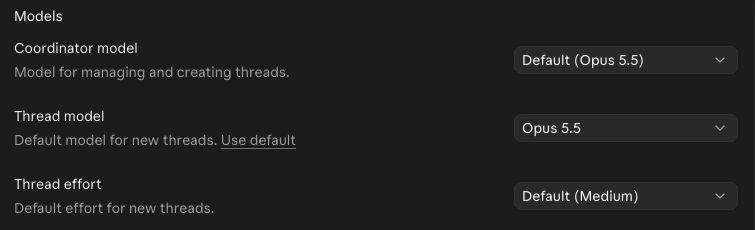 My Content project’s model settings, November 8, 2026.
Anthropic’s docs say “A new project runs every thread on Opus at high effort, which draws on your plan fastest.” My screen says Default (Medium).
So don’t take my word or the docs’ word. Open yours and read it. On a $20 plan, this is the first setting to look at.
I just leave it on medium, and here’s when I move off medium. For complex stuff you can use high, and you can always toggle it on your own once the thread is spawned.
Dump the whole mess into one chat and tell it to open threads
The first job I’d hand it is your chaos. Just tell it everything, then tell it to open the threads it needs.
Steal this:
Here's everything on my plate this week: [dump it all, messy is fine].

Open the threads you need, one job per thread. When they're done, open one more thread that reads all of them and gives me one page: what you found and what I should do next.
The chat on the left is the boss. Each thread on the right is a separate session with its own job.
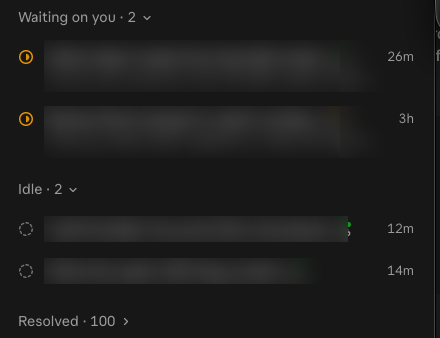 The thread list in my Content project, titles blurred, November 8, 2026.
Applicable for: anyone running a shop, a service or a side business with more open loops than tabs.
Close threads when they’re done, because you will lose track
I don’t like how I still lose track of some threads. It’s the quirk of the whole thing: you can open a lot of them.
Click the check mark to resolve a thread and it drops out of your active list. If you closed it too early, uncheck it and it comes back. You can also just tell the boss chat: “Thanks for the research, please close all the threads.”
The boss chat is pretty good and it handles a lot, so I like that part. Keeping the list tidy is still on you.
Run a thread on your own computer only when it needs your files
Threads run in the cloud by default. You can tell which is which: a thread on your machine shows a computer icon.
Ask for a local thread when the job needs something only your computer has. Anthropic’s catch: it “Runs only while that computer is awake with Remote Control turned on.” I keep a Mac mini running all day for exactly this.
Here’s where it still bugs me. I sometimes get annoyed when it spawns a cloud session so I gotta be very specific about where each job runs. First turn on Settings > Code > Use this computer from your phone and claude.ai and add the folder. Then say “run this on my computer” in the message.
Cloud threads don’t have the skills installed only on your computer. Anthropic’s fix is to enable them on your claude.ai account. We wrote a small script so mine work in the cloud anyway, and I got there by asking Claude:
How can I read my skills in the cloud?You’ll know it worked when you get one page instead of twelve
Open the last thread. It should read like one answer, with the threads’ work inside it. If you’re still jumping between reports, tell the boss chat to pull them together.
Then open Project settings > Usage and see what it cost.
 Usage for my Content project, November 8, 2026.
Look at Coordinator: 0%. The boss chat barely registers. The threads are where your plan goes.
Anthropic warns that a project “uses your limits faster than a single session does, and on a Pro plan in particular you should expect to reach your limit sooner on days you run one.” Have I watched that happen on my own meter? No, I haven’t seen it in my limits faster. I do feel like it does.
Keep that in context, because I’m on Ultra at $200 a month and I think we’re pretty optimized at this point. I keep a usage status pinned so I can see it, and at the end of the week I ask Claude what we’re doing that’s inefficient.
I’m not going back to five windows
I definitely am never gonna use the VS Code app again. I think this is the way to do it, the Claude app. So I definitely migrated here.
I can reach it from my phone. I can hold more in my head without feeling overwhelmed, because I’m talking to one chat instead of babysitting five.
If what you came here for was examples of what you can build, here’s what I built with Claude Code, and my Claude Code tips cover the spending rails. The rest of what Claude does on a normal workday is in my Claude guides.
My rule: one chat runs it, a few do the work, and you get one page.
So open Projects, read that effort setting, and hand it your mess.
Where this comes from
The plan, beta and limit facts come from Anthropic’s Projects docs and its September 17 announcement, checked November 8, 2026. The screenshots are my own account that same day, and the 12 studies ran November 3.
I have not tested how fast it empties a $20 plan.
Published November 8, 2026. Last reviewed November 8, 2026 against Anthropic’s docs.

Written by
Chris AlarconChris Alarcon shows people who don’t code the boring Claude setup that actually works. He runs his one-person operation on these systems and shares every workflow, prompt, and tool combo in public. Start with the free 1-page setup.
The boring setup
It still won't know you tomorrow.
The Setup is one folder. Drop it into a Project, answer three questions, and Claude or ChatGPT writes your memory file and your voice file itself. It stops forgetting you, stops sounding like AI, and runs three real jobs by name. Twenty minutes tonight. No code. $49 · 30-day refund.
See The Setup →Get the free 1-page setup
The boring 1-page setup. No code, no jargon. Get it now, then one short email from me each Tuesday.
