Anthropic gave me $200 of Claude API credits in October, and it was gone in about a week. I burned 200 on some stupid cron jobs running in the Mac Mini, but it wasn’t worth it. Just testing different use cases.
 My Claude API spend strip, October 29, 2026.
Now OpenAI is handing ChatGPT Pro the same thing. Free money from OpenAI. Trap, bill, or toy?
Starting today, eligible ChatGPT Pro and Business subscribers can claim up to $500 per month in API credits to build apps and agents.
OpenAI Developers (@OpenAIDevs), October 28, 2026
My answer for anyone on Pro who has never opened the API: “Yes, claim that dude. That’s free money right there.”
Then set one cap before you build anything, and only spend it on a job your subscription can’t do. With Claude, my own script’s cap never saw most of the spend.
What you need (as of October 29, 2026)
- A paid ChatGPT Pro or Business plan that’s at least 7 days old. Plus doesn’t qualify, and neither do free trials, Enterprise or Edu.
- One login for both sides. The ChatGPT account that owns the plan, and an OpenAI API Platform account on the same email.
- No card and no API setup. OpenAI says new users can link their Personal API Organization without finishing API onboarding.
- Using a work account? The credits land in whatever API organization you pick, so don’t link a company org without asking whoever owns it.
Skip for now: the Business seat math, unless you own the workspace.
Prices are from OpenAI’s Pro tiers article. The credit amounts are from OpenAI’s API credits help article. The first grant is prorated for what’s left of your billing period. After that it renews on its own, and unused credits expire at the end of each cycle.
OpenAI also says “the benefit may change or be removed in the future.”
I’m on Pro 200 myself.
Step 1: Claim it in ChatGPT under Settings, then Billing
Click path: ChatGPT on the web, Settings, then Billing, then the API credits benefit. Pick the API organization, check the amount, and confirm.
You can also do it from the other side: platform.openai.com, your organization, Billing, then pick your subscription.
I linked mine the night it launched. It did show up. So I’m ready to use that sh*t.
Three things trip people up, and they’re all on this list:
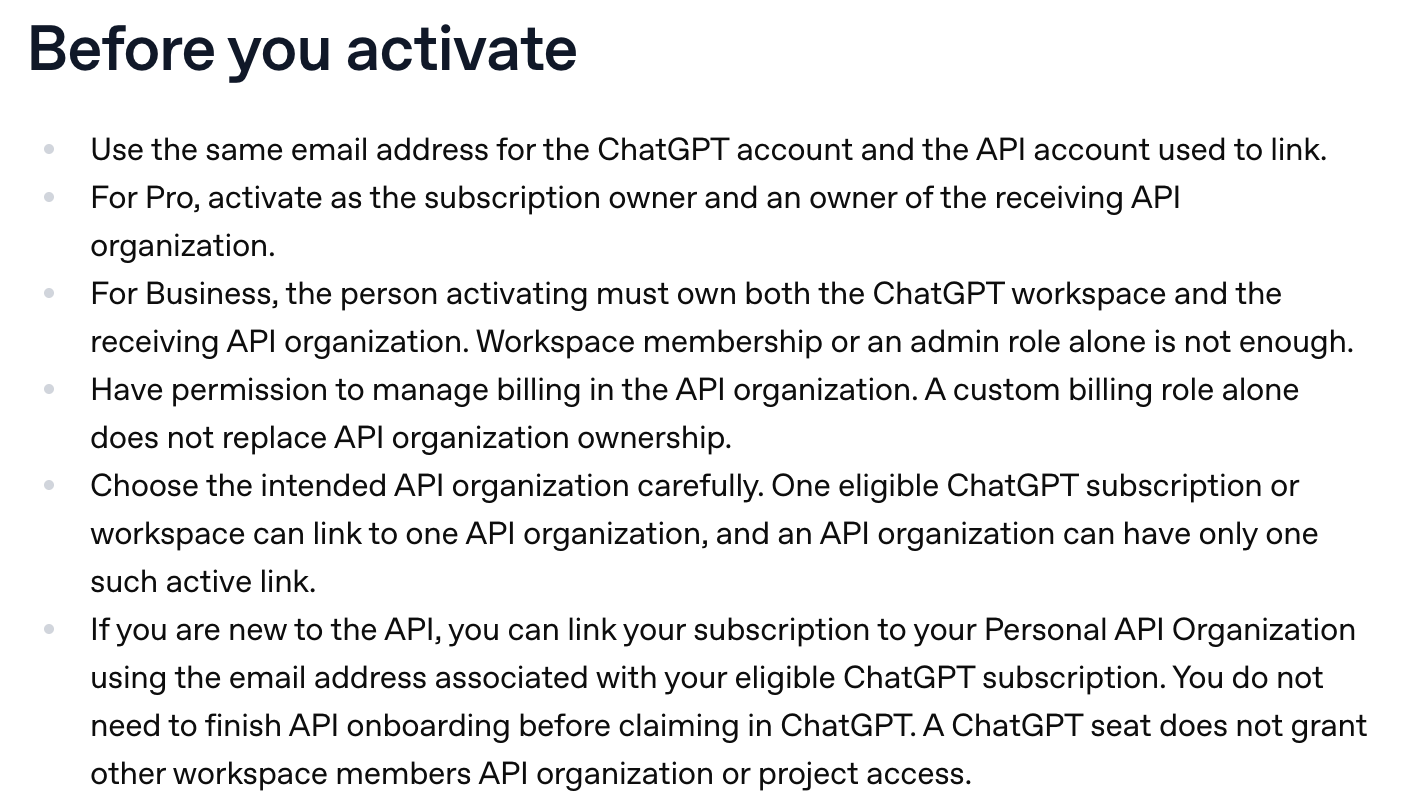 OpenAI’s activation rules, help center, October 29, 2026.
- Different emails. If your ChatGPT login and your API login aren’t the same address, the link fails.
- Not the owner. Being a member or an admin of the API organization isn’t enough.
- The one-org lock. One subscription links to one API organization. Changing it later means contacting Support.
Not seeing the benefit at all? You’re not alone. u/XelaSiM on r/OpenAI on launch night: “Not seeing it in GPT or the OpenAI Platform per the article.” OpenAI says availability “depends on the enabled cohort and country.”
Step 2: Check the grant landed in the API organization, not in ChatGPT
Click path: platform.openai.com, select the organization you linked, Billing, then Credit grants.
You should see a grant with an amount and an expiry date. OpenAI says “linking and credit issuance are separate results.” If the grant is still missing, its help article says to contact Support with your organization ID and the time you linked.
Don’t look for it in the ChatGPT app. Its Usage & billing pane has its own credits, and they’re a different balance:
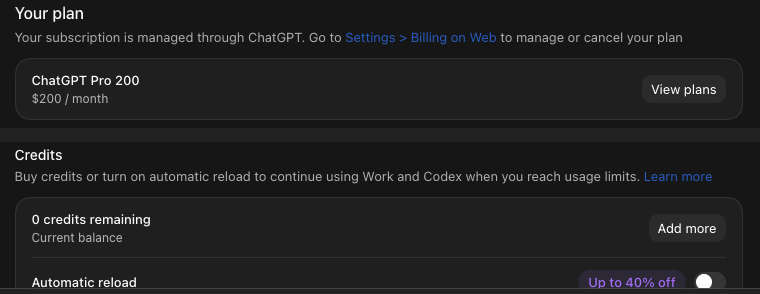 My ChatGPT Usage & billing pane on Pro 200, October 29, 2026.
Those “0 credits” are for Work and Codex once you pass your plan limit. The API grant never shows up there.
The quickest real test is the Playground on platform.openai.com. It draws on the same API balance, so one short prompt proves the money is live:
Reply with one sentence: what model are you, and what's today's date?Step 3: Set a hard spend limit before you build anything
Out of the box, the grant just stops when it’s empty. If you haven’t bought credits, OpenAI says requests “fail with HTTP 429 and error code credit_balance_exhausted.” No card, no surprise bill.
That changes the day you buy API credits or turn on Auto Recharge. So before you build, set a ceiling:
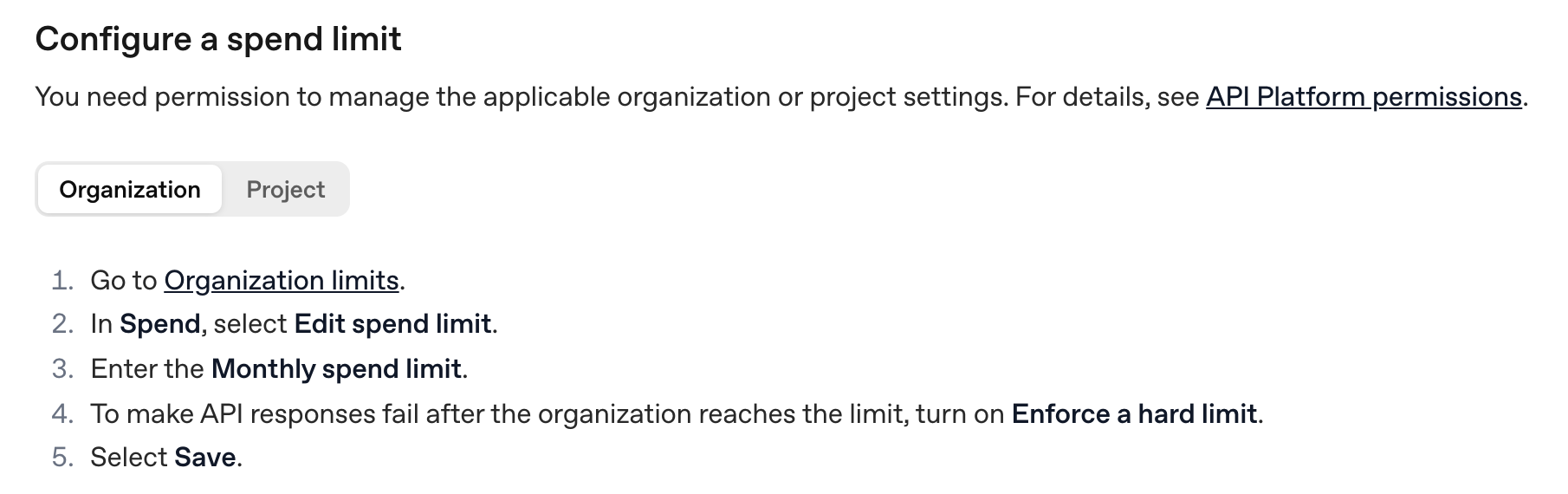 OpenAI’s spend limit steps, developer docs, October 29, 2026.
Click path: platform.openai.com, Organization limits, Spend, Edit spend limit. Enter a monthly number at or under your grant and turn on Enforce a hard limit.
OpenAI’s spend limits guide warns enforcement “is not instantaneous,” so leave a little room. And money isn’t the only ceiling. OpenAI’s help article: “A credit balance does not remove request-rate, token-rate, model, organization or project limits.”
My Claude credits taught me this one. My credit router had a soft cap under the $200 grant, but my own log only caught $77.55 of October’s spend.
The hard stop was auto-reload off in Anthropic’s Console. October still reads $203.04, so $3.04 past the grant.
A cap you set in the dashboard doesn’t care what your scripts remember to log.
Step 4: Point it at one job your subscription can’t do
On October 15 I shut the Claude credits off. The reason in my log: “subscription first; API only for a case a sub cannot do.”
The math is why. My rough estimate: “You’d be paying out of pocket five to ten X more and it’s harder to control the spending” if you ran your normal subscription work through the API. “So your subscription is definitely giving you way more bang for your buck.”
So what can’t a subscription do? Serve anyone but you. Your plan runs under your login. API credits can sit behind a website, a server, or a client’s tool.
Here’s where I’m pointing mine. I haven’t built either one on OpenAI credits yet.
- An interactive lead magnet on my site. Visitors can’t use my subscription, so this is the real sub-can’t-do job. “I throttle the API, a limit. So it’s only $25 for example on that specific webpage or the whole website.” That keeps bots from draining it.
- My price checker, maybe. It tracks AI plan prices, and it runs on my subscription, on my Mac mini, right now. I’m thinking of moving it: “Maybe we just keep it on the API dirt cheap and it checks every day or once a week and it just refreshes it for me.” It might cost me a dollar or two.
For the lead magnet I’d just put a cheap model on it, like GPT-6.1 Terra. OpenAI’s model page lists it at $1 per million input tokens and $5 per million output.
Click path for that $25 cap: platform.openai.com, the project’s Settings, Limits, Spend, Edit spend limit. Enter $25, turn on Enforce a hard limit, and Save. A project limit only stops that one project, so the rest of your grant keeps working.
Two jobs this money can’t do: Codex and your ChatGPT limits. OpenAI’s article says the benefit “does not cover Codex usage through API keys” and doesn’t raise “your ChatGPT or signed-in Codex usage limits.” If Codex is why you’re on Pro, Codex pricing is the page for that.
If you’re still picking a tier, ChatGPT Pro $100 vs $200 vs $500 breaks down each bucket, and my AI-at-work hub has the rest of the plan pages.
The Claude version works the same way
Anthropic shipped this first. Its release notes announced Max API credits on October 7: $100 a month on Max 5x and $200 on Max 20x, with the same shape. No Claude Code, no rollover, a separate org you link. u/purposive-saunter in the same Reddit thread: “Anthropic just did this a week or two ago so not surprised OpenAI is following suite.”
I covered the Claude side in Claude pricing. The background jobs that ate my Claude credits run on my always-on Mac mini.
Claim it tonight, and let the cap do the worrying
I burned Claude’s credits on tests that weren’t worth it. This time the cap goes on before the first job.
And don’t sit on it. Who knows how long that’s gonna last.
My rule: “Think of it as a cherry on top. There’s just extra stuff you can run, you can run on the cloud, you can run anywhere.”
Claim it, set the hard limit, then point it at one job your subscription can’t do.
FAQ
Do ChatGPT Pro plans include API credits?
Yes, since October 28, 2026. Pro $100, $200 and $500 include $100, $200 or $500 a month in OpenAI API credits, claimed under Settings, then Billing, once your paid plan is at least 7 days old. The first grant is prorated, unused credits don’t roll over, and Plus doesn’t qualify.
Can I use ChatGPT Pro API credits in Codex?
No. OpenAI says the benefit does not cover Codex usage through API keys and does not raise your ChatGPT or signed-in Codex limits. The credits pay for API calls in the one API organization you link, including the Playground.
Will I be charged when the API credits run out?
Not unless you add money yourself. With nothing left, requests fail with HTTP 429 and the code credit_balance_exhausted. You only pay if you buy API credits or turn on Auto Recharge.
Does using the API credits decrease my ChatGPT usage?
No. The grant sits in a separate API organization, and OpenAI keeps ChatGPT and API billing separate. u/Aperturebanana asked it word for word on Reddit: “Does using that credit decrease your usage?”
Do ChatGPT Business plans get API credits too?
Yes. Business gets $20 per paid Standard seat and $100 per paid Premium seat, pooled and capped at $500 a month. The person claiming must own both the workspace and the receiving API organization.
Where this comes from
The amounts, rules and click paths are OpenAI’s, from its help article, changelog and docs, read on October 29, 2026. The $203.04 and the $77.55 come from my own Claude spend dashboard and credit log. I’ve linked my OpenAI credits, but I haven’t built anything on them yet, so the two jobs above are plans, not results.
This post is part of Claude Guides, the hub for using AI without code.
Published October 29, 2026. Plan amounts and rules checked against OpenAI’s own pages that day, linked inline.
Frequently asked questions
Do ChatGPT Pro plans include API credits?
Yes, since October 28, 2026. Pro $100, $200 and $500 include $100, $200 or $500 a month in OpenAI API credits, claimed under Settings, then Billing, once your paid plan is at least 7 days old. The first grant is prorated, unused credits don't roll over, and Plus, free trials, Enterprise and Edu don't qualify.
Can I use ChatGPT Pro API credits in Codex?
No. OpenAI's help article says the benefit does not cover Codex usage through API keys and does not raise your ChatGPT or signed-in Codex limits. The credits pay for API calls in the one API organization you link, including the Responses API, Agents, Realtime, Images and the Playground.
Will I be charged when the API credits run out?
Not unless you add money yourself. With no purchased credits left, OpenAI says requests fail with HTTP 429 and the error code credit_balance_exhausted. You only pay if you buy API credits or turn on Auto Recharge, and you don't need a payment method to use the grant.
Does using the API credits decrease my ChatGPT usage?
No. The grant sits in a separate API organization, and OpenAI keeps ChatGPT and API billing separate. API calls draw on the API balance, and OpenAI says the credits don't increase your ChatGPT or signed-in Codex allowance either.
Do ChatGPT Business plans get API credits too?
Yes. Business workspaces get $20 per paid Standard seat and $100 per paid Premium seat, pooled and capped at $500 a month, or $6,000 a year on annual billing. The person claiming must own both the ChatGPT workspace and the receiving API organization.
Prices change quietly. I'll email you when ChatGPT changes.
One email per change, plus my Tuesday note. Unsubscribe anytime.