Claude Code Tips for People Who Don't Code: How I Run It One Year In


$2,465.25. That was my Google bill in June, and $2,444.86 of it was one Places API line, from an automation I’d left looping.
It was just something that was just burning day and night. And the worst part is it didn’t make me money. It didn’t give me clarity.
I’ve run Claude Code for one year now, and I don’t code. Here are the six things I’d hand someone like me, starting with the one that cost me.
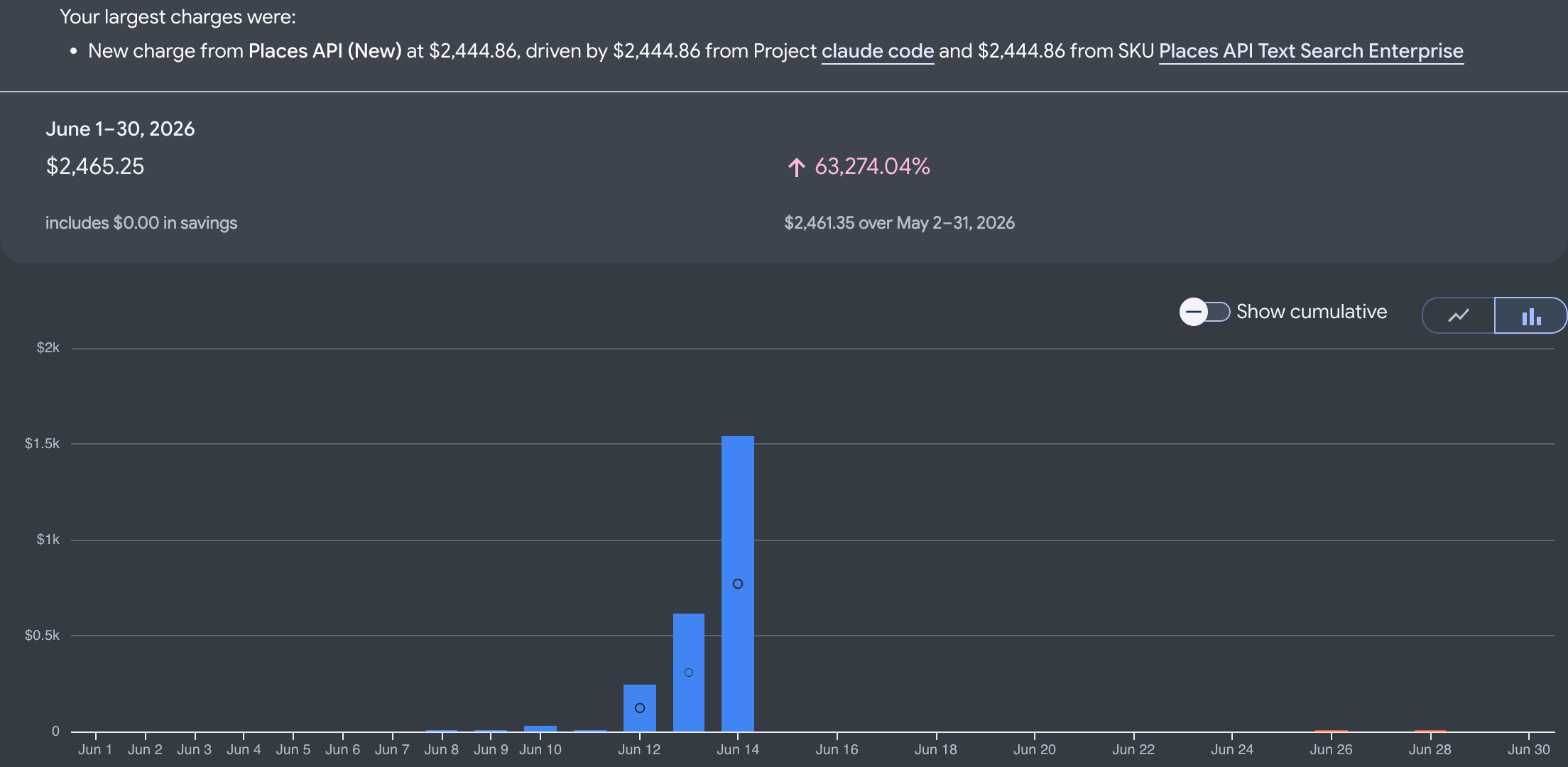 My Google Cloud billing report for June 2026.
| Tip | Do this |
|---|---|
| 1. Spending rails | Put a hard limit on anything metered, before it runs |
| 2. Written rules | Write one down after something burns you |
| 3. Fewer skills | Build one only for what you repeat |
| 4. Threads | One chat runs it, one job per thread |
| 5. Routing | Let Claude pick the model and hand off grunt work |
| 6. Boundaries | Don’t rebuild what already works |
Tip 1: Put a hard spending limit on anything metered before it runs
The one thing I tell them is to create guardrails of spending. Especially when you use an API.
Otherwise you can go crazy and you’re gonna get a surprise like I did.
Here’s what happened. An automation was hitting Google’s Places API over and over, looking up businesses across dozens of cities. My notes from that week put it at roughly 70,000 calls, and you can see the spike on June 12, 13 and 14. Nobody hacked me. I just didn’t fully understand what I’d left running.
We just disabled it and we got our credit back. I think I still paid a couple hundred bucks, but it was nothing close to the twenty five hundred.
Your plan’s normal limits won’t do this to you. Claude Code is included on paid plans and shares those limits. The danger is the separate paid key you hand it, for maps, data, images, email or Claude’s own API.
Know which kind of Google limit you actually have:
- A budget alert only tells you. Google’s budgets page says alerts-only budgets trigger email notifications, and that they “don’t trigger a spend cap.”
- Spend cap budgets stop the service, but only on Google’s eligible list. As of November 8, 2026, that’s the Gemini API, Agent Platform, Cloud Run and Cloud Run functions. Places isn’t on it.
- A lower daily quota is the hard limit for Places. Google’s Maps cost guide says “To put a hard cap on usage of an API, lower its per-day quota.” Open the Quotas page in the Cloud console, select the API, and edit the quota.
Tip 2: Write the rule down after it burns you
After the bill, I wrote this into my rules file: “Before running anything metered at volume, CONFIRM the per-call price and state the math.” Then a hard stop on anything that could pass about $20 or 1,000 metered calls.
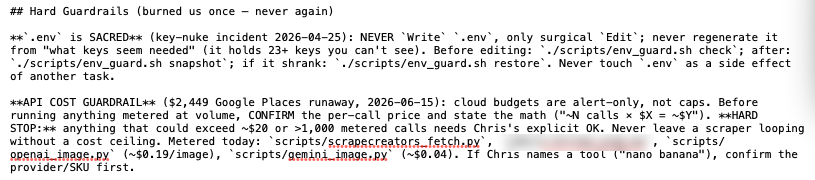 The rule I wrote after that bill, in my CLAUDE.md, November 8, 2026.
The figure and “alert-only” line in that note are what I had at the time. The bill up top is Google’s own report, and Tip 1 has its current limits.
That file is 116 lines long, and both rules under Hard Guardrails came from something that already went wrong.
Tip 3: Build a skill only for what you repeat
I had like 60 skills, which sounds cool, but it’s not.
You don’t need that many skills, man. I think it becomes a nightmare to maintain. Sixty is too granular.
Now my test is simple: I build a skill once I repeat something. Creating content, writing emails, blogs, client issues.
One skill can hold a lot. My long-form video skill handles complex steps like thumbnails inside one single skill, and Claude hasn’t forgotten them on me. The reason is how it’s set up. We use the SKILL.md as like the table of contents, and the heavy stuff lives in folders next to it.
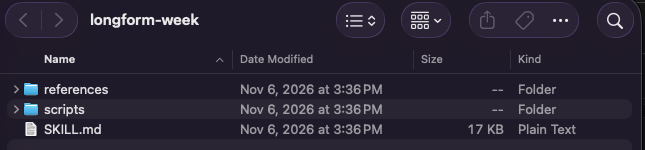 One of my skills: a table of contents and two folders, November 8, 2026.
That SKILL.md is 109 lines. Start with how to use Claude Skills if you haven’t made one yet.
Tip 4: Use threads instead of a pile of windows
If you open like five windows, it’s easy to lose track, and you start pasting into the wrong one. I did that plenty.
Threads is the answer for this. I still lose track of some threads, but I do think the orchestrator is pretty good.
Projects > New project. The orchestrator is one chat that acts as the boss and opens a thread for each job. Here’s how to use Claude Code Projects, including the one setting to check first.
Tip 5: Let Claude do the routing, and give it helpers
I let Claude do the routing, with model and effort level. I use Opus 5.5 on medium as the manager, and it hands work to bigger or smaller models depending on the job. Here’s why I run it on medium. Check yours in Project settings > General > Thread effort.
You can also bring in outside help. If you pay for ChatGPT, send the grunt work to Codex and have it challenge you on builds. I wrote up how I use Codex and Claude Code together.
And you don’t need the terminal for any of this. The Code tab in the desktop app does the job.
Tip 6: Know what not to build
Not everything needs to be solved.
I built a personal finance app I’m not using. I’m not gonna build another Notion. I just use a free one. That’s good enough for me. The apps I actually kept all came from an old problem of mine.
If you want the wider map, Claude guides has the rest.
Set those rails from the start and you’ll be good
That bill didn’t make me a dollar. It got me one rule.
My rule: let’s set those rails from the start and you’ll be good.
Open whatever paid account you’ve connected and set the limit today.
Where this comes from
The Google and plan facts come from Google’s billing and Maps docs and Claude’s pricing page, checked November 8, 2026. The bill is my own Google Cloud billing report, the call count comes from my notes that week, and the other screenshots are my own files from November 8.
I haven’t tested Google’s spend caps, since Places isn’t eligible.
Published November 8, 2026. Last reviewed November 8, 2026 against Google’s and Anthropic’s pages.

Written by
Chris AlarconChris Alarcon shows people who don’t code the boring Claude setup that actually works. He runs his one-person operation on these systems and shares every workflow, prompt, and tool combo in public. Start with the free 1-page setup.
The boring setup
It still won't know you tomorrow.
The Setup is one folder. Drop it into a Project, answer three questions, and Claude or ChatGPT writes your memory file and your voice file itself. It stops forgetting you, stops sounding like AI, and runs three real jobs by name. Twenty minutes tonight. No code. $49 · 30-day refund.
See The Setup →Get the free 1-page setup
The boring 1-page setup. No code, no jargon. Get it now, then one short email from me each Tuesday.
